
LocateAnything for Strands


This project turns NVIDIA's LocateAnything-3B visual-grounding model into reusable tools for Strands Agents and Strands Robots. It lets an agent or robot receive a natural-language request such as “find the blue cup,” locate the described object in a live camera image, and return its bounding box, center, and position in the scene. Robot perception and control layers can then use that structured result to search for a target, turn a robot-mounted camera toward it, or guide the next navigation and manipulation action.
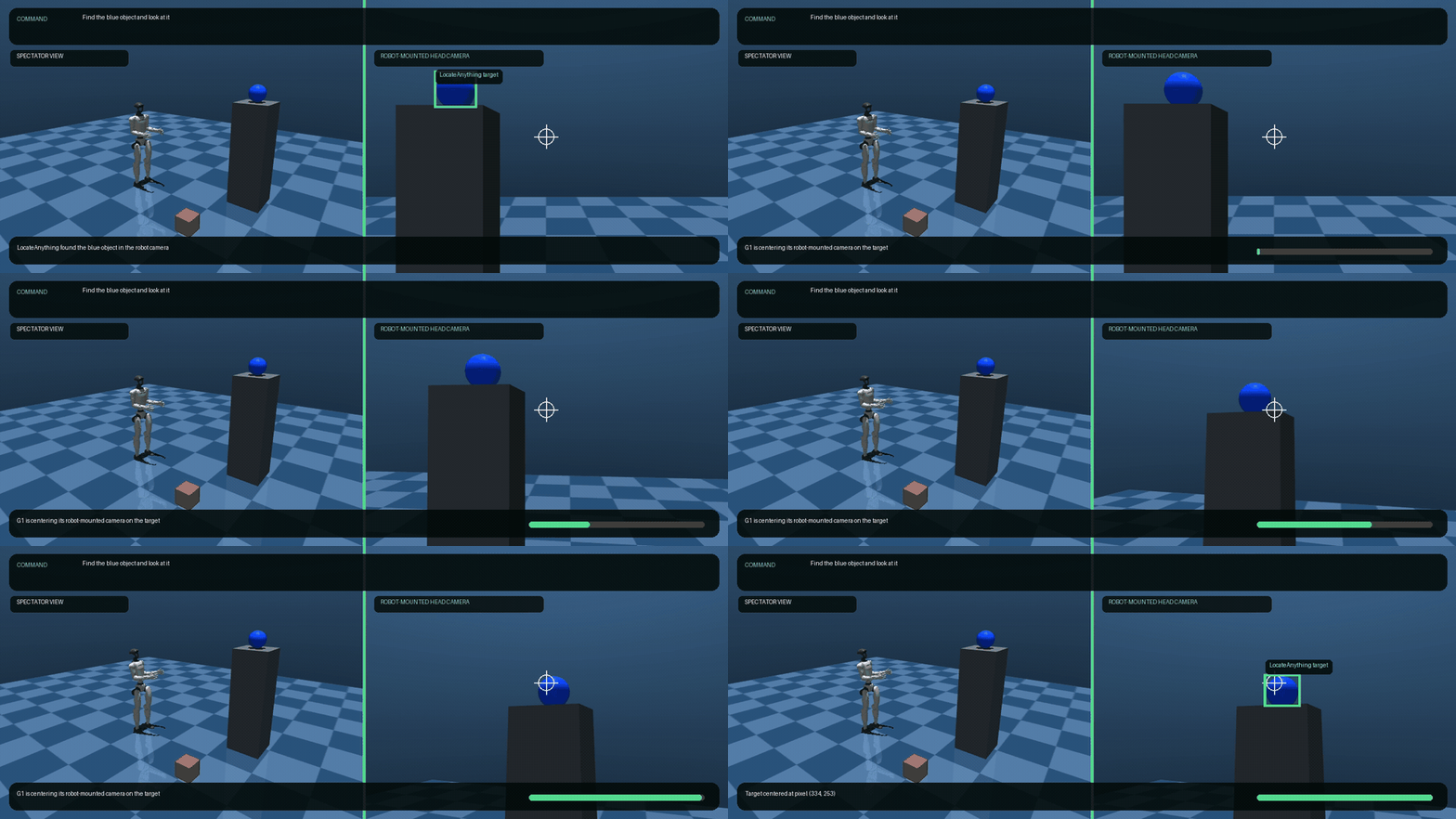
Natural-language target grounding and robot-camera centering in a Unitree G1 simulation.
The repository includes:
- Python tools for Strands Agents
- A chat-style browser camera demo
- A CLI that works without an agent
- A tested bridge for Strands Robots MuJoCo renders, including SO-100 and Unitree G1 examples
- A local-tool adapter for tiny.technology
Demo videos
- Live Mac-camera grounding: find a blue pencil
- SO-101 wrist-camera target selection and centering
- Unitree G1 robot-camera target selection and centering
The live-camera video shows the local UI processing a Mac camera frame. The robot videos use cameras mounted on simulated robot bodies; their spectator views are display-only and are never passed to LocateAnything.
What problem does it solve?
Robot and agent frameworks can already decide what to do, call tools, control hardware, and coordinate workflows. They still need a reliable way to answer:
Where is the thing the user described?
LocateAnything is a visual grounding model. It receives an image and a textual description such as:
the red cup
the book being held by the person
the search button
the text "Total Amount"
the object next to the laptop
The model returns structured spatial coordinates. This project converts those coordinates into pixels, calculates the target center and image region, draws an annotated result, and exposes the workflow as reusable tools.
Architecture
flowchart LR
    A["User command<br/>Find the book I am holding"] --> B["Strands or Tiny agent"]
    B --> C["LocateAnything tool"]
    D["Mac camera<br/>Robot camera<br/>Simulation render<br/>Image file"] --> C
    C --> E["NVIDIA LocateAnything"]
    E --> F["Boxes or points"]
    F --> G["Pixel coordinates<br/>Target center<br/>Image region"]
    G --> H["Agent decision<br/>Robot policy<br/>UI annotation"]
The localizer deliberately does not control robot motion. Navigation, depth, collision avoidance, grasp planning, and motor commands remain the responsibility of the robot or policy layer.
Features
- Natural-language visual grounding
- Open-vocabulary target descriptions
- Multi-category object detection
- Referring-expression grounding
- Point-based localization
- GUI element grounding
- Visible-text grounding
- Built-in and USB camera capture
- Existing image-file input
- Normalized and pixel coordinate output
- Target-center and coarse image-region output
- Annotated result images
- Lazy model loading
- Apple Silicon inference through MLX
- Strands
@toolintegration - Strands Robots simulation render bridge
- SO-100, SO-101, and Unitree G1 simulation examples
- Tiny local-agent adapter
- Local-only FastAPI service
Supported tasks
| Task | Input example | Expected output |
|---|---|---|
ground |
the book being held by the person |
One or more matching boxes |
detect |
person, book, cup |
Boxes for the requested categories |
point |
the phone on the table |
A target point |
gui |
the button used to save the document |
A GUI-region box |
text |
Total Amount |
The box containing the referenced text |
LocateAnything works best when the target is visually meaningful and specific.
For example, the book with a forest on its cover can be more reliable than
the green book when the cover is mostly dark.
Current implementation
The default backend uses the community Apple Silicon conversion:
mlx-community/LocateAnything-3B-4bit
The Apple Silicon extra uses the released mlx-vlm package with
LocateAnything support.
This backend makes an 8 GB M2 Mac suitable for a single-frame demonstration, but it is not equivalent to NVIDIA's official CUDA deployment:
- The weights are quantized to 4-bit.
- The web demo reduces the inference image to 384 pixels.
- The web demo limits output to 32 tokens.
- Small, distant, or visually ambiguous targets may be missed.
- Dense multi-object output may be truncated.
- NVIDIA's official H100/A100 performance numbers do not apply.
What this project is not
This project is not:
- A continuous 30 FPS tracker
- A video object-tracking system
- A scene captioner that automatically names everything
- A depth-estimation model
- A 3D pose estimator
- A navigation stack
- A grasp planner
- A robot motor controller
It analyzes one image at a time. A robot must capture new frames and call the tool again as it moves.
Requirements
The currently tested local configuration requires:
- An Apple Silicon Mac
- Python 3.10, 3.11, 3.12, or 3.13
- Approximately 5 GB of free disk space
- Internet access for the initial model download
- Camera permission for the terminal or application running Python
The optional Strands Robots integration requires Python 3.12 or newer. The core camera and image tools remain compatible with Python 3.10–3.13.
Recommended for an 8 GB Mac:
- Close memory-intensive applications before the first model load.
- Use 640×480 camera capture.
- Use a 384-pixel maximum inference dimension.
- Use a 32-token output limit for small demonstrations.
- Avoid running a second local language model at the same time.
Quick start
Create an isolated environment and install the Apple Silicon backend:
python3 -m venv .venv
source .venv/bin/activate
python -m pip install --upgrade pip
pip install "strands-locate-anything[apple-silicon]"
The model is downloaded from Hugging Face on the first inference. Model weights are stored in the user's Hugging Face cache and are not copied into this repository.
To run the repository examples or contribute changes, clone the source and install it in editable mode:
git clone https://github.com/hashtagemy/strands-locate-anything.git
cd strands-locate-anything
pip install -e ".[apple-silicon,dev]"
Camera permissions on macOS
On first use, macOS should ask for camera permission. If it does not, open:
System Settings → Privacy & Security → Camera
Enable access for the application that launches Python, such as Terminal, iTerm, Codex, or the browser used by the web demo.
If the process was already running when permission was granted, stop it and start it again.
Browser camera demo
Start the local UI:
cd strands-locate-anything
source .venv/bin/activate
locate-anything-ui
Open http://127.0.0.1:7860 if the browser does not open automatically.
The browser displays a live preview and accepts conversational commands such
as Find the book I am holding. A frame is sent to the local Python process
only when Send is pressed. Inference and generated artifacts stay on the
Mac.
Stop the service with Control-C.
Good demonstration queries
the person wearing glasses
the glasses worn by the person
the book being held by the person
the book with a forest on its cover
the phone in my right hand
the object next to the laptop
Natural-language commands such as Find this book can work directly.
An agent can also normalize longer or multilingual requests into a concise
visual target description before calling the tool.
Command-line demo
Capture one frame and locate a target:
locate-anything-camera --query "the red cup"
Low-memory profile:
locate-anything-camera \
  --query "the red cup" \
  --width 640 \
  --height 480 \
  --max-image-dimension 384 \
  --max-tokens 32
Task examples:
locate-anything-camera \
  --query "person, laptop" \
  --task detect

locate-anything-camera \
  --query "the search button" \
  --task gui

locate-anything-camera \
  --query "the object on the left" \
  --task point

locate-anything-camera \
  --query "Total Amount" \
  --task text
Generated images are written to artifacts/.
Direct Python usage
Camera input
from strands_locate_anything import LocateAnythingService

service = LocateAnythingService()
result = service.locate_camera(
    query="the book being held by the person",
    task="ground",
)

print(result["detections"])
print(result["annotated_image"])
Existing image
from strands_locate_anything import LocateAnythingService

service = LocateAnythingService()
result = service.locate_image(
    image_path="/absolute/path/to/image.jpg",
    query="the red cup next to the laptop",
    task="ground",
)

if result["not_found"]:
    print("Target not found")
else:
    print(result["detections"])
Strands Agents integration
The package exports two Strands tools:
| Tool | Purpose |
|---|---|
locate_with_camera |
Capture a camera frame and locate a target |
locate_image |
Locate a target in an existing local image |
Example:
from strands import Agent
from strands_locate_anything import locate_with_camera

agent = Agent(
    tools=[locate_with_camera],
    system_prompt=(
        "You are a visual grounding agent. When the user asks you to find a "
        "visible target, preserve its attributes and spatial relationships, "
        "normalize the target into a concise visual description, and call "
        "locate_with_camera. Never claim success when not_found is true."
    ),
)

response = agent(
    "Look through the camera and find the book I am holding."
)
print(response)
The Strands agent requires a configured model provider. The visual grounding model and the agent's reasoning model are separate:
- The agent understands the user's intent and selects a tool.
- LocateAnything processes the image and returns spatial coordinates.
Strands Robots integration
This repository includes a perception bridge for
Strands Robots. It calls the
simulation's sandboxed render(output_path=...) method, passes the saved frame
to LocateAnything, and returns the same structured result used by the camera
and image tools.
Use Python 3.12 or newer when creating the project environment, then install
the camera, MLX, and robot dependencies into the same .venv:
python3.13 -m venv .venv
source .venv/bin/activate
pip install "strands-locate-anything[apple-silicon,robots]"
Python 3.12 can be used instead of 3.13. An environment created with Python 3.10 or 3.11 can run the core camera tools but cannot install the current Strands Robots integration.
The robots extra uses the released strands-robots package from PyPI.
Hardware-free MuJoCo demo
The example supports both an SO-100 arm and a Unitree G1 humanoid. It adds a
red cube, blue sphere, green cylinder, and a camera before grounding the
requested object. mode="sim" is explicit and mesh=False prevents
peer-network startup:
python examples/strands_robots_sim.py \
  --robot so100 \
  --query "the blue sphere"

python examples/strands_robots_sim.py \
  --robot unitree_g1 \
  --query "the green cylinder"
Equivalent Python:
from strands_robots import Robot
from strands_locate_anything import locate_simulation_view

robot = Robot("unitree_g1", mode="sim", mesh=False)
# See examples/strands_robots_sim.py for the object and camera setup.
result = locate_simulation_view(
    robot,
    query="the green cylinder",
    camera_name="locate_demo",
)

print(result["detections"])
print(result["annotated_image"])
The bridge performs perception only. It does not move the simulation or the robot.
On the documented M2/8 GB Mac, both simulations were manually rendered at
640×480. LocateAnything correctly grounded the blue sphere in the SO-100
scene and the green cylinder in the Unitree G1 scene using the 384-pixel,
32-token inference profile.
Robot-camera control and MP4 recording
The Unitree G1 and SO-101 video examples go beyond the perception-only bridge. They capture the target from a camera physically mounted on the simulated robot, use LocateAnything's box center as visual-servo error, move the robot camera toward the target, re-localize from that camera, and record the result as a browser-compatible H.264 MP4.
Unitree G1 head-camera example:
python examples/unitree_g1_head_camera_video.py \
  --instruction "Find the blue object and look at it" \
  --open
SO-101 wrist-camera example:
python examples/so101_wrist_camera_video.py \
  --instruction "Find the blue object and look at it" \
  --open
The default outputs are:
artifacts/unitree-g1-head-camera-blue-object.mp4
artifacts/so101-wrist-camera-blue-object.mp4
Each video is a split screen: the left side is a display-only spectator camera, while the right side is the robot-mounted perception camera. Only the right side is passed to LocateAnything. The target begins away from the robot-camera center and ends at its reticle. A JSON file beside each video records the initial/final detections and the commanded joints.
The current bundled G1 asset has no separate neck joints. The virtual head
camera is mounted at head height on torso_link, and waist_yaw_joint plus
waist_pitch_joint move its gaze. A robot model with articulated neck joints
can use the same pixel-error controller with those joints instead.
The SO-101 camera is attached directly to so101/gripper, the mount point
advertised by Strands Robots. Its base-yaw and wrist-pitch joints center the
target. The wrist-roll joint establishes an upright physical camera mount;
the camera frame is not digitally rotated. A blue sphere, red cube, green
cylinder, and yellow cylinder rest directly on the floor in front of the arm.
Their vertical positions use half their physical height or diameter, so none
of the objects float or intersect the ground.
The SO-101 demo was run end to end with the default Apple Silicon model. The
model selected the blue object from the four-object scene. The first
robot-camera detection centered the target at pixel (212, 224) and the
post-motion detection centered it at (317, 239) in a 640×480 frame.
The resulting five-second video is H.264, 1280×480, and 24 fps.
The standalone example recognizes the deterministic
Find <target> and turn toward it command form so it can run without a second
language model. In an agent application, a Strands reasoning model can
interpret broader natural language and call the grounding and robot-control
tools separately.
This example localizes before and after the motion. Continuous localization during every control step, collision-aware navigation, grasping, and real-hardware control remain separate robotics layers.
Real robot cameras
Strands Robots owns hardware discovery, device drivers, camera configuration,
and motion. Follow its
hardware documentation
for the selected robot. Configure real hardware with an explicit
mode="real"; never rely on an inferred mode for a physical system.
The stable integration boundary is a saved RGB frame:
from strands_locate_anything import LocateAnythingService

service = LocateAnythingService()
result = service.locate_image(
    image_path="/absolute/path/from/robot/front-camera.jpg",
    query="the red cup beside the plate",
    task="ground",
)
The exact capture call varies by robot and camera driver, so this project does
not duplicate or override the Strands Robots hardware layer. Once the robot
has written a JPEG, PNG, or WebP frame, locate_image is hardware-agnostic.
tiny.technology integration
The repository includes a Tiny local-tool adapter:
integrations/tiny/locate-anything.mjs
The adapter connects Tiny's conversational agent to the local camera service. It runs on the user's device so camera frames and inference remain local.
Install the Tiny adapter
Keep the LocateAnything service running:
locate-anything-ui
In another terminal:
mkdir -p ~/.tiny/tools
cp integrations/tiny/locate-anything.mjs ~/.tiny/tools/
Tiny local tools require Tiny's local-agent mode. The zero-configuration server proxy does not load tools from the device.
For an 8 GB Mac, a BYO cloud reasoning model avoids running a second local model beside LocateAnything:
export TINY_MODEL_PROVIDER=openai
export TINY_MODEL_API_KEY="your-provider-key"
npx tiny-tech
Tiny also supports other providers. Never place provider keys in this repository or in the adapter source.
Reload local tools inside Tiny:
use_tools reload
Example chat requests:
Find this book.
Locate the object I am holding.
Point to the phone on the table.
The adapter calls:
POST http://127.0.0.1:7860/api/camera/locate
Use LOCATE_ANYTHING_URL to select a different local port or service URL.
Local adapter versus Tiny Marketplace
The included adapter is a local Tiny tool. It is not a Tiny Marketplace listing.
Tiny Marketplace forged tools execute in a server-side sandbox and cannot
access a user's Mac camera, local files, or 127.0.0.1. A future marketplace
version would require a public HTTPS inference service that accepts uploaded
images. That hosted service is not part of this repository.
Local HTTP API
The web service binds to 127.0.0.1 by default.
Health
curl http://127.0.0.1:7860/api/health
Example response:
{
  "status": "ok",
  "model_loaded": false,
  "model": "mlx-community/LocateAnything-3B-4bit"
}
Capture and locate
This endpoint captures a frame through the server-side camera:
curl -X POST http://127.0.0.1:7860/api/camera/locate \
  -H "Content-Type: application/json" \
  -d '{
    "query": "the book being held by the person",
    "task": "ground"
  }'
Upload and locate
curl -X POST http://127.0.0.1:7860/api/detect \
  -F "image=@/absolute/path/to/image.jpg;type=image/jpeg" \
  -F "query=the red cup" \
  -F "task=ground"
Supported upload types are JPEG, PNG, and WebP. The current upload limit is 6 MB.
Output schema
Example box result:
{
  "query": "the red cup",
  "task": "ground",
  "model": "mlx-community/LocateAnything-3B-4bit",
  "image_size": [1280, 720],
  "detections": [
    {
      "label": "the red cup",
      "box_normalized": [100, 200, 500, 800],
      "box_pixels": [128, 144, 640, 576],
      "center_normalized": [300, 500],
      "center_pixels": [384, 360],
      "image_region": {
        "horizontal": "left",
        "vertical": "middle"
      }
    }
  ],
  "points": [],
  "not_found": false,
  "annotated_image": "/absolute/path/to/image-located.jpg",
  "raw_output": "<ref>the red cup</ref><box><100><200><500><800></box>"
}
Coordinates in box_normalized and center_normalized use LocateAnything's
0–1000 coordinate space. Pixel values are calculated from the original image
dimensions.
image_region is coarse visual metadata:
- Horizontal:
left,center, orright - Vertical:
top,middle, orbottom
It is not a robot motion command.
LocateAnything does not provide a calibrated confidence value in the current structured output. This project does not invent one.
Runtime configuration
LocateAnythingConfig controls the local backend:
| Field | Default | Description |
|---|---|---|
model_id |
mlx-community/LocateAnything-3B-4bit |
Hugging Face model |
output_dir |
artifacts |
Captures and annotations |
max_tokens |
64 |
Maximum generated output |
max_image_dimension |
512 |
Longest inference-image edge |
mlx_cache_limit_mb |
128 |
MLX cache limit |
temperature |
0.0 |
Generation temperature |
generation_mode |
slow |
slow, fast, or hybrid |
The browser UI intentionally overrides max_tokens to 32 and
max_image_dimension to 384 for the tested 8 GB Mac demo.
Fast and hybrid generation modes are experimental in the community MLX path.
Use slow when stability matters more than throughput.
Troubleshooting
Camera could not be opened
Grant camera permission to the terminal or application launching Python:
System Settings → Privacy & Security → Camera
Restart the process after changing permissions.
The model returns not_found
Try a description based on:
- The object's relationship to a person or another object
- Visible text on the object
- Position in the image
- Shape or distinctive visual content
For example:
the book being held by the person
the book with a forest on its cover
the Tao Te Ching book
Avoid relaxing a safety-critical query automatically. If the user asks for a specific object, finding a generic object of the same category is not proof that it is the requested one.
The Mac becomes slow
- Close large applications.
- Use the 384-pixel/32-token profile.
- Avoid loading another local LLM.
- Run one inference at a time.
- Restart the service if memory pressure remains high.
First inference is slow
The first request downloads and loads the model. Later requests reuse the model while the process remains running.
The result box covers a large region
Descriptions such as the person wearing glasses refer to the person, so the
model may box the whole person. To target the glasses, use:
the glasses worn by the person
Privacy and security
- The default service listens only on
127.0.0.1. - Images are processed locally with the default MLX backend.
- Camera frames and annotated images are saved under
artifacts/. - Artifacts are not deleted automatically.
artifacts/is excluded from Git by default.- Review captured images before sharing logs, archives, or bug reports.
- Do not expose the unauthenticated local API to a network.
- Do not commit API keys, access tokens, or Hugging Face credentials.
Project structure
strands-locate-anything/
├── src/strands_locate_anything/
│   ├── backend.py          # Lazy MLX inference backend
│   ├── camera.py           # Capture, resize, and annotation
│   ├── parsing.py          # Structured coordinate parser
│   ├── prompts.py          # LocateAnything task templates
│   ├── robotics.py         # Strands Robots simulation render bridge
│   ├── service.py          # High-level localization service
│   ├── tools.py            # Strands @tool definitions
│   ├── webapp.py           # Local FastAPI service
│   └── web/                # Browser demo assets
├── integrations/
│   └── tiny/
│       └── locate-anything.mjs
├── examples/
│   ├── so101_wrist_camera_video.py
│   ├── strands_agent.py
│   ├── strands_robots_sim.py
│   └── unitree_g1_head_camera_video.py
├── tests/
├── .github/                # CI and contribution templates
├── docs/media/             # README GIF and demo videos
├── CHANGELOG.md
├── CODE_OF_CONDUCT.md
├── CONTRIBUTING.md
├── MODEL_TERMS.md
├── NOTICE
├── SECURITY.md
├── THIRD_PARTY_NOTICES.md
├── LICENSE
└── pyproject.toml
Development
Install development dependencies:
pip install -e ".[apple-silicon,dev]"
Run the unit tests:
PYTHONPATH=src python -m unittest discover -s tests -v
The unit suite validates prompt construction, structured-output parsing, generation-mode forwarding, web uploads, validation errors, the Tiny camera endpoint, and the Strands Robots bridge without downloading or loading model weights.
Run static checks:
python -m compileall -q src tests examples
ruff check src tests examples
Real-camera and model tests are intentionally separate because they require camera permission, several gigabytes of model data, and Apple Silicon.
The separate CI integration job installs the pinned Strands Robots version and renders both SO-100 and Unitree G1 in MuJoCo without model inference or physical hardware.
Project status and roadmap
Version 0.1.0 is an alpha community preview. The local camera workflow, image
workflow, structured parser, web endpoints, Tiny adapter contract, and Strands
Robots render bridge have unit coverage. The default model has also been
manually exercised on the documented M2/8 GB configuration.
Still planned:
- Clean-machine installation testing on additional Apple Silicon devices
- Hardware-verified camera adapters contributed by robot owners
- Closed-loop simulation examples that re-localize continuously during motion
- A PyPI release, after the GitHub source release is stable
- A hosted inference architecture only if a Tiny Marketplace listing is needed
License
The original integration code and documentation in this repository are licensed under the Apache License 2.0. The corresponding attribution is in NOTICE.
The LocateAnything model weights are not included in this repository. They are downloaded separately by the default backend and governed by NVIDIA's non-commercial model license. The default MLX model is a quantized derivative of NVIDIA LocateAnything; conversion does not replace the upstream terms.
Apache License 2.0 permits commercial use of this project's original code, but it does not and cannot grant commercial rights to NVIDIA's model weights. Accordingly, a commercial deployment cannot use the default model backend without separate NVIDIA authorization. A differently licensed compatible model backend may be integrated with the Apache-licensed code.
Review the current upstream terms before downloading, redistributing, hosting, or using the model in a product:
- Model terms and license boundary
- NVIDIA LocateAnything-3B model card
- NVIDIA Eagle repository
- Third-party notices
Acknowledgements
Important notices
1 maintainer

Metadata
1 maintainer
Release files for strands-locate-anything 0.1.0
For a detailed explanation of source distributions (sdists) and built distributions (wheels), please see the package formats documentation.
Source distribution (sdist)
| File | Size | Uploaded | Provenance | Actions |
|---|---|---|---|---|
| strands_locate_anything-0.1.0.tar.gz | 60.1 kB | With provenance | Details for strands_locate_anything-0.1.0.tar.gz |
Built distribution (wheel)
| File | Interpreter | ABI | Platform | Actions Reset |
|---|---|---|---|---|
| strands_locate_anything-0.1.0-py3-none-any.whl | Python 3 | none | any | Details for strands_locate_anything-0.1.0-py3-none-any.whl |
Total release size: 96.7 kB
Release files / strands_locate_anything-0.1.0.tar.gz
| Download URL | strands_locate_anything-0.1.0.tar.gz |
|---|---|
| Size | 60.1 kB |
| Tags | Source |
|
SHA-256 checksum How to use checksums |
f7186dcd7735ddb0b76b1a1b63744bff88f6b8138c5a021698d79e03b4cdf867
|
|
BLAKE2b-256 checksum How to use checksums |
641e7f2ea53f8f6908c42d23d6034252b44f9c2d33e29abe5568823dee736528
|
| Upload date | |
|
Uploaded using Trusted Publishing? What is trusted publishing? |
Yes |
| Uploaded via |
twine/7.0.0 CPython/3.13.14
|
Provenance
Provenance describes where a file came from. On PyPI, provenance is shared via attestations, which provide a verifiable record of the build or publishing details. View details, limitations and caveats.


PyPI Publish Attestation
PyPI verified that this artifact, at this checksum, originated from the publisher listed below.
Signed by GitHub Actions, verified by PyPI on Jul 30, 2026.
Transparency logRelease files / strands_locate_anything-0.1.0-py3-none-any.whl
| Download URL | strands_locate_anything-0.1.0-py3-none-any.whl |
|---|---|
| Size | 36.7 kB |
| Tags | Python 3 |
|
SHA-256 checksum How to use checksums |
82567ca591795ca42a29355e2e81feb8fb9c7989ce8f4080d55eb0691ee8356d
|
|
BLAKE2b-256 checksum How to use checksums |
f928f369cbe07de8cf423f54d0026465e6afed672ed83fa90ac3eda3f2dd4b00
|
| Upload date | |
|
Uploaded using Trusted Publishing? What is trusted publishing? |
Yes |
| Uploaded via |
twine/7.0.0 CPython/3.13.14
|
Provenance
Provenance describes where a file came from. On PyPI, provenance is shared via attestations, which provide a verifiable record of the build or publishing details. View details, limitations and caveats.
PyPI Publish Attestation
PyPI verified that this artifact, at this checksum, originated from the publisher listed below.
Signed by GitHub Actions, verified by PyPI on Jul 30, 2026.
Transparency logSecurity for strands-locate-anything 0.1.0
Provenance
Provenance describes where a file came from. On PyPI, provenance is shared via attestations, which provide a verifiable record of the build or publishing details. View details, limitations and caveats.
Full provenance
All 2 files in this release have been uploaded with provenance metadata.
Attestation for strands_locate_anything-0.1.0.tar.gz
PyPI Publish Attestation
PyPI verified that this artifact, at this checksum, originated from the publisher listed below.
Signed by GitHub Actions, verified by PyPI on Jul 30, 2026.
Transparency logA note on package security
PyPI is a repository for distributing packages, not a service for auditing them. While third-party security researchers and our staff do their best to detect and remove malicious packages, PyPI cannot guarantee the quality, security or suitability of any given package.
To learn more about protecting yourself from malicious actors, visit our package security documentation.













