






Read Latest Documentation - Browse GitHub Code Repository
streamdeck_ui A Linux compatible UI for the Elgato Stream Deck.
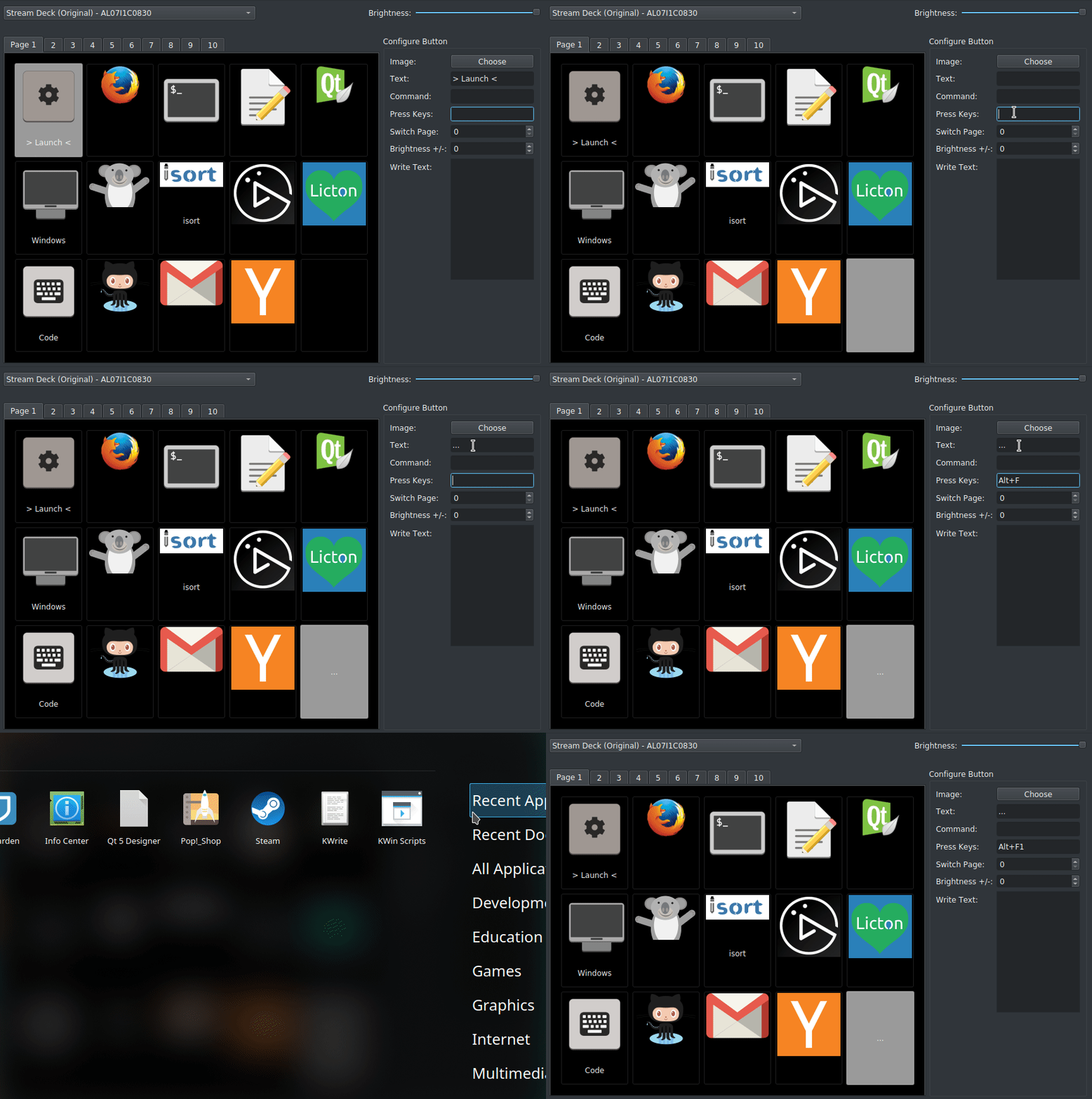
Key Features
- Linux Compatible: Enables usage of all Stream Deck devices on Linux without needing to code.
- Multi-device: Enables connecting and configuring multiple Stream Deck devices on one computer.
- Brightness Control: Supports controlling the brightness from both the configuration UI and buttons on the device itself.
- Configurable Button Display: Icons + Text, Icon Only, and Text Only configurable per button on the Stream Deck.
- Multi-Action Support: Run commands, write text and press hotkey combinations at the press of a single button on your Stream Deck.
- Button Pages: streamdeck_ui supports multiple pages of buttons and dynamically setting up buttons to switch between those pages.
- Auto Reconnect: Automatically and gracefully reconnects, in the case the device is unplugged and replugged in.
- Import/Export: Supports saving and restoring Stream Deck configuration.
Communication with the Streamdeck is powered by the Python Elgato Stream Deck Library.
Linux Quick Start
To use streamdeck_ui on Linux, you will need first to install some pre-requisite system libraries and give your user access to the Stream Deck devices.
Here is a simple script for doing that on Ubuntu:
#!/bin/bash -xe

sudo apt install libhidapi-hidraw0 libudev-dev libusb-1.0-0-dev

sudo usermod -a -G plugdev `whoami`

sudo tee /etc/udev/rules.d/99-streamdeck.rules << EOF
SUBSYSTEM=="usb", ATTRS{idVendor}=="0fd9", ATTRS{idProduct}=="0060", MODE:="666", GROUP="plugdev"
SUBSYSTEM=="usb", ATTRS{idVendor}=="0fd9", ATTRS{idProduct}=="0063", MODE:="666", GROUP="plugdev"
SUBSYSTEM=="usb", ATTRS{idVendor}=="0fd9", ATTRS{idProduct}=="006c", MODE:="666", GROUP="plugdev"
SUBSYSTEM=="usb", ATTRS{idVendor}=="0fd9", ATTRS{idProduct}=="006d", MODE:="666", GROUP="plugdev"
EOF

sudo udevadm control --reload-rules

echo "Unplug and replug in device for the new udev rules to take effect"
As mentioned in the echo in the last line, make sure you unplug and replug your device before continuing. Once complete, you should be able to install streamdeck_ui:
sudo pip3 install streamdeck_ui
You can then launch streamdeck to start configuring your device.
streamdeck
It's recommended that you include streamdeck in your windowing environment's list of applications to auto-start.
Generic Quick Start
On other Operating Systems, or if you already have the required libraries and permissions, you should be able to install and run streamdeck_ui:
pip3 install streamdeck_ui --user
streamdeck
2 maintainers


Metadata
2 maintainers
Release files for streamdeck-ui 1.0.2
For a detailed explanation of source distributions (sdists) and built distributions (wheels), please see the package formats documentation.
Source distribution (sdist)
| File | Size | Uploaded | Provenance | Actions |
|---|---|---|---|---|
| streamdeck_ui-1.0.2.tar.gz | 1.2 MB | Without provenance | Details for streamdeck_ui-1.0.2.tar.gz |
Built distribution (wheel)
| File | Interpreter | ABI | Platform | Actions Reset |
|---|---|---|---|---|
| streamdeck_ui-1.0.2-py3-none-any.whl | Python 3 | none | any | Details for streamdeck_ui-1.0.2-py3-none-any.whl |
Total release size: 2.3 MB
Release files / streamdeck_ui-1.0.2.tar.gz
| Download URL | streamdeck_ui-1.0.2.tar.gz |
|---|---|
| Size | 1.2 MB |
| Tags | Source |
|
SHA-256 checksum How to use checksums |
90e4c7ea21f238a8d205281e446eb778457b0b92adb39a911c8542270e18dde1
|
|
BLAKE2b-256 checksum How to use checksums |
25676012374e6412914b31932a939834b4e99e4bfb92e4bacff8a0f734990974
|
| Upload date | |
|
Uploaded using Trusted Publishing? What is trusted publishing? |
No |
| Uploaded via |
poetry/0.12.17 CPython/3.7.3 Linux/5.3.0-20-generic
|
Release files / streamdeck_ui-1.0.2-py3-none-any.whl
| Download URL | streamdeck_ui-1.0.2-py3-none-any.whl |
|---|---|
| Size | 1.2 MB |
| Tags | Python 3 |
|
SHA-256 checksum How to use checksums |
669bb68b8fa031e4bb6a59e33fc931476364b9a60b07a6910b09447de04da7e3
|
|
BLAKE2b-256 checksum How to use checksums |
984dfe60feaa7b0d5c7afac6da68cfb8b4fd5f48a10e3f9824e3764e7301a5a4
|
| Upload date | |
|
Uploaded using Trusted Publishing? What is trusted publishing? |
No |
| Uploaded via |
poetry/0.12.17 CPython/3.7.3 Linux/5.3.0-20-generic
|
Security for streamdeck-ui 1.0.2
Provenance
Provenance describes where a file came from. On PyPI, provenance is shared via attestations, which provide a verifiable record of the build or publishing details. View details, limitations and caveats.
No provenance found
None of the files in this release were uploaded with provenance metadata.
A note on package security
PyPI is a repository for distributing packages, not a service for auditing them. While third-party security researchers and our staff do their best to detect and remove malicious packages, PyPI cannot guarantee the quality, security or suitability of any given package.
To learn more about protecting yourself from malicious actors, visit our package security documentation.














