
Welcome to Data Validator!

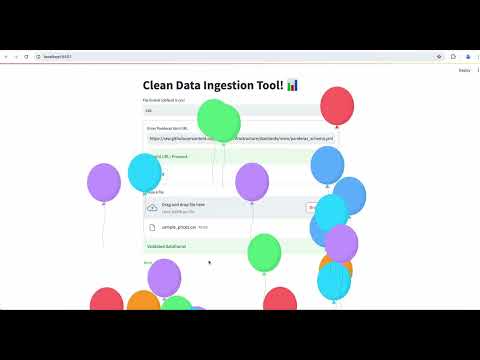
Data Validator is your go-to tool for clean data ingestion and validation, seamlessly integrating Streamlit and Panderas to make your data processing tasks a breeze.
Features
- Easy Data Ingestion: Select your file format (CSV or JSON) and provide a URL to a Panderas schema.
- Streamlined Validation: With just a few clicks, submit your selections and validate your data effortlessly.
streamlit-pandera
Installation instructions
pip install streamlit-pandera
Usage instructions
import streamlit as st

from  import run_validate_file


def validate():
    standards = {
        "store_schema": ("https://raw.githubusercontent.com/resilientinfrastructure/standards/main/panderas_schema.yml")
    }
    st.set_page_config(
        page_title="Data Validator Home",
        page_icon="📊",
    )
    validated_df = run_validate_file(standards=standards)
    # TODO: DO SOMETHING ELSE WITH VALIDATED_DF
Instructions
Step 1: Select File Format
Choose the file format you want to ingest. Whether it's CSV or JSON, streamlit-pandera has got you covered.
Step 2: Provide Panderas Schema URL
Enter the URL to the Panderas schema you want to use for validation. Don't worry, we support various schema sources to suit your needs.
Step 3: Submit and Validate
Hit that submit button and let streamlit-pandera work its magic! Your data will be validated against the specified schema in no time.
Run Tests
To ensure everything is functioning smoothly, run the tests using the following commands:
poetry install
poetry run playwright install
poetry run pytest e2e
Run the App
Ready to see streamlit-pandera in action? Simply run the following command:
poetry run streamlit run streamlit_pandera/Home.py
Contributions
We welcome contributions from the community! If you have any ideas, bug fixes, or enhancements, feel free to submit a pull request.
Feedback
We'd love to hear your feedback! Whether you have suggestions for improvement or just want to share your experience using streamlit-pandera, don't hesitate to reach out.
Happy data ingesting with streamlit-pandera!
Feel free to customize it further to better suit your project's tone and style!
1 maintainer

Metadata
1 maintainer
Release files for streamlit_pandera 0.0.2
For a detailed explanation of source distributions (sdists) and built distributions (wheels), please see the package formats documentation.
Source distribution (sdist)
| File | Size | Uploaded | |
|---|---|---|---|
| streamlit_pandera-0.0.2.tar.gz | 4.3 kB | Details |
Built distribution (wheel)
| File | Interpreter | ABI | Platform | Reset |
|---|---|---|---|---|
| streamlit_pandera-0.0.2-py3-none-any.whl | Python 3 | none | any | Details |
Total release size: 9.5 kB
Release files / streamlit_pandera-0.0.2.tar.gz
| Download URL | streamlit_pandera-0.0.2.tar.gz |
|---|---|
| Size | 4.3 kB |
| Tags | Source |
|
SHA-256 checksum How to use checksums |
2cb4785f6b2a3d943d86eee331ccd90d2bd4e77a8f18ac9fb2f08de2ddf85551
|
|
BLAKE2b-256 checksum How to use checksums |
c3ac769799a81216e1afc2b303b805fc50c21fb5aaa62a5c90954299759614de
|
| Upload date | |
|
Uploaded using Trusted Publishing? What is trusted publishing? |
No |
| Uploaded via |
poetry/1.8.3 CPython/3.10.14 Linux/6.5.0-1021-azure
|
Release files / streamlit_pandera-0.0.2-py3-none-any.whl
| Download URL | streamlit_pandera-0.0.2-py3-none-any.whl |
|---|---|
| Size | 5.2 kB |
| Tags | Python 3 |
|
SHA-256 checksum How to use checksums |
5b8b4fb6218cf2a4c6194c043118e266348da7c290703f6b7e4e756f00283953
|
|
BLAKE2b-256 checksum How to use checksums |
aac9c9a8c773489020db3fd8dfe4610321b77dc5b4e0741073e07f34f37a52a7
|
| Upload date | |
|
Uploaded using Trusted Publishing? What is trusted publishing? |
No |
| Uploaded via |
poetry/1.8.3 CPython/3.10.14 Linux/6.5.0-1021-azure
|














