
What is Streamsync?




Streamsync is an open-source framework for creating data apps. Build user interfaces using a visual editor; write the backend code in Python.
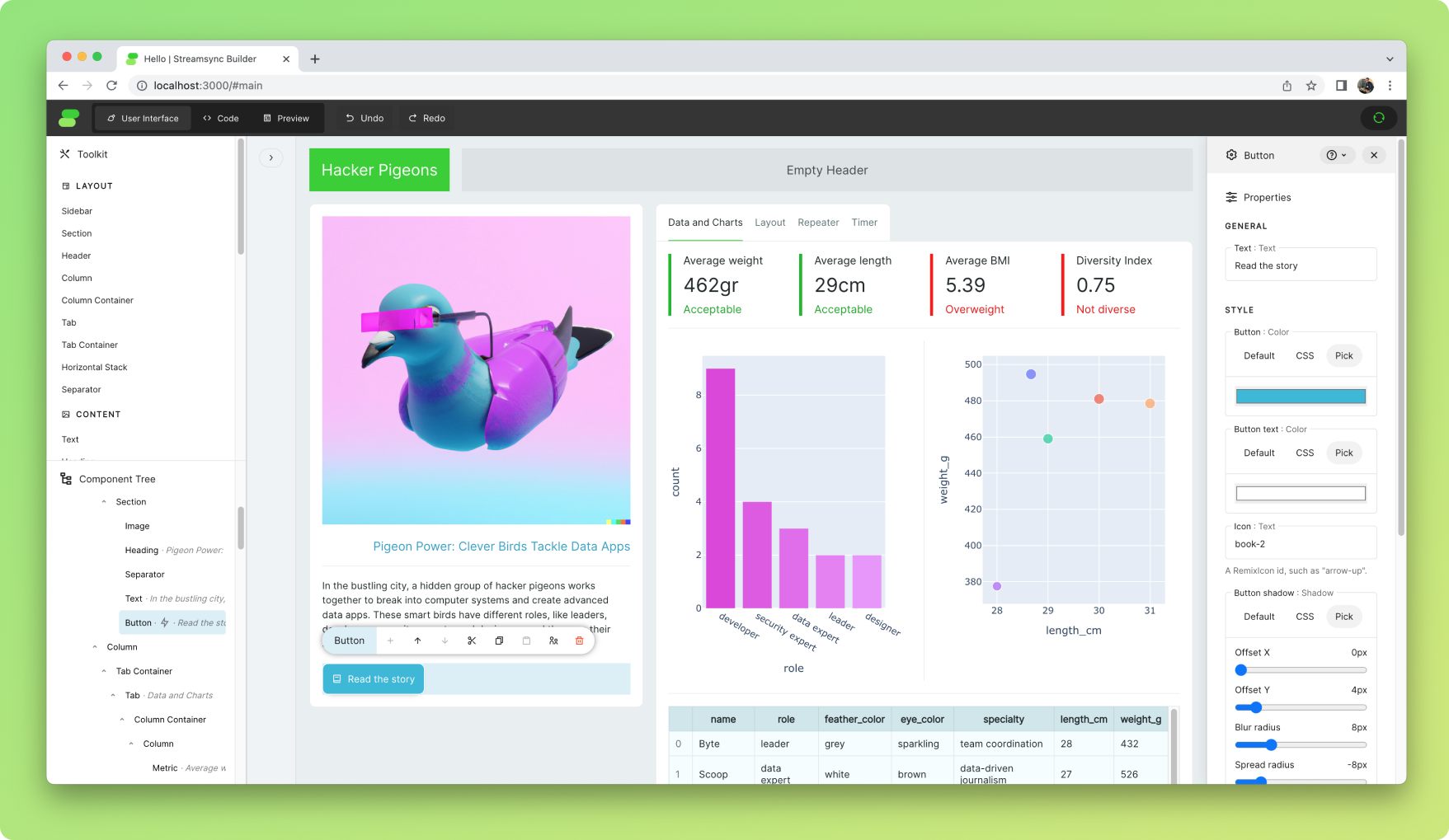
- Live demo of an app. Source code.
- 1 minute introduction video on YouTube
It's an alternative to Plotly Dash, Streamlit and Gradio. Its focused on the creation of web applications for data analytics and machine learning.
It aims to be as simple as Streamlit, but faster, more flexible and with a cleaner, easily-testable syntax. It provides separation of concerns between UI and business logic, enabling more complex applications.
Highlights
Reactive and state-driven
Streamsync is fully state-driven and provides separation of concerns between user interface and business logic.
import streamsync as ss

def handle_increment(state):
    state["counter"] += 1

ss.init_state({
    "counter": 0
})
The user interface is a template, which is defined visually. The template contains reactive references to state, e.g. @{counter}, and references to event handlers, e.g. when Button is clicked, trigger handle_increment.
Flexible
- Elements are highly customisable with no CSS required, allowing for shadows, button icons, background colours, etc.
- HTML elements with custom CSS can be included using the HTML Element component. They can serve as containers for built-in components.
Fast
- Event handling adds minimal overhead to your Python code (~1-2ms*).
- Streaming (WebSockets) is used to synchronise frontend and backend states.
- The script only runs once.
- Non-blocking by default. Events are handled asynchronously in a thread pool running in a dedicated process.
*End-to-end figure, including DOM mutation. Tested locally on a Macbook Air M2. Measurement methodology.
Developer-friendly
- It's all contained in a standard Python package, just one
pip installaway. - User interfaces are saved as JSON, so they can be version controlled together with the rest of the application.
- Use your local code editor and get instant refreshes when you save your code. Alternatively, use the provided web-based editor.
- You edit the UI while your app is running. No hitting "Preview" and seeing something completely different to what you expected.
Installation and Quickstart
Getting started with Streamsync is easy. It works on Linux, Mac and Windows.
pip install "streamsync[ds]"
streamsync hello
- The first command will install Streamsync using
pipand include the optional data science dependencies. - The second command will create a demo application in the subfolder "hello" and start Streamsync Builder, the framework's visual editor, which will be accessible via a local URL.
The following commands can be used to create, launch Streamsync Builder and run an application.
streamsync create my_app
streamsync edit my_app
streamsync run my_app
Documentation
Documentation is available online at streamsync.cloud.
License
This project is licensed under the Apache 2.0 License.
3 maintainers


Metadata
3 maintainers
Release files for streamsync 0.5.0
For a detailed explanation of source distributions (sdists) and built distributions (wheels), please see the package formats documentation.
Source distribution (sdist)
| File | Size | Uploaded | Provenance | Actions |
|---|---|---|---|---|
| streamsync-0.5.0.tar.gz | 7.6 MB | Without provenance | Details for streamsync-0.5.0.tar.gz |
Built distribution (wheel)
| File | Interpreter | ABI | Platform | Actions Reset |
|---|---|---|---|---|
| streamsync-0.5.0-py3-none-any.whl | Python 3 | none | any | Details for streamsync-0.5.0-py3-none-any.whl |
Total release size: 15.2 MB
Release files / streamsync-0.5.0.tar.gz
| Download URL | streamsync-0.5.0.tar.gz |
|---|---|
| Size | 7.6 MB |
| Tags | Source |
|
SHA-256 checksum How to use checksums |
e820228ab7934a2c805ac2287970e664e76ee1b8d24a70bb3603455d929a0ddb
|
|
BLAKE2b-256 checksum How to use checksums |
f70ca17ee26fbd601b24d4fb2015c3bfe82f44d29b17cb45c4780562054150ab
|
| Upload date | |
|
Uploaded using Trusted Publishing? What is trusted publishing? |
No |
| Uploaded via |
poetry/1.8.2 CPython/3.10.12 Linux/6.5.0-1018-azure
|
Release files / streamsync-0.5.0-py3-none-any.whl
| Download URL | streamsync-0.5.0-py3-none-any.whl |
|---|---|
| Size | 7.6 MB |
| Tags | Python 3 |
|
SHA-256 checksum How to use checksums |
50531cfb3109a66b3757577a33319303055634074ec67502961484419901d76e
|
|
BLAKE2b-256 checksum How to use checksums |
4a620696d2a22034218e77875dc2fa3d4bf7a4414942a709fccc57cda489f383
|
| Upload date | |
|
Uploaded using Trusted Publishing? What is trusted publishing? |
No |
| Uploaded via |
poetry/1.8.2 CPython/3.10.12 Linux/6.5.0-1018-azure
|
Security for streamsync 0.5.0
Provenance
Provenance describes where a file came from. On PyPI, provenance is shared via attestations, which provide a verifiable record of the build or publishing details. View details, limitations and caveats.
No provenance found
None of the files in this release were uploaded with provenance metadata.
A note on package security
PyPI is a repository for distributing packages, not a service for auditing them. While third-party security researchers and our staff do their best to detect and remove malicious packages, PyPI cannot guarantee the quality, security or suitability of any given package.
To learn more about protecting yourself from malicious actors, visit our package security documentation.














