
A library for styling pandas DataFrames in Jupyter Notebooks

Project description
style_table.py


style_table is a Python package designed to provide an easy way to style pandas DataFrames in Jupyter Notebooks. It supports custom styling for headers, cell backgrounds, and gradients, with additional options for formatting and display.
Key Features
- Customizable table styles: Set the width, row height, borders, and more.
- Apply gradients: Use colormaps to add color gradients to columns.
- Flexible options: Hide the index, reverse color maps, and adjust other table properties.
- Centered display: Automatically centers the table output in Jupyter Notebooks.
Installation
You can install this package directly from PyPI:
pip install style_table
Parameters
- data: The DataFrame or dictionary to style.
- caption: A title or subtitle for the table.
- column_cmap: A dictionary where keys are column names and values are colormaps.
- width: Width of each column (default is "100px").
- border: Border style for cells (default is "1px solid black").
- header_background: Background color for the table header (default is "lightblue").
- row_height: Row height (default is "15px").
- hide_index: Whether to hide the DataFrame index (default is False).
- reverse_cmap: Reverse the colormap (default is False).
- font_size: Font size for the table content (default is "14px").
- font_family: Font family for the table content (default is "Arial").
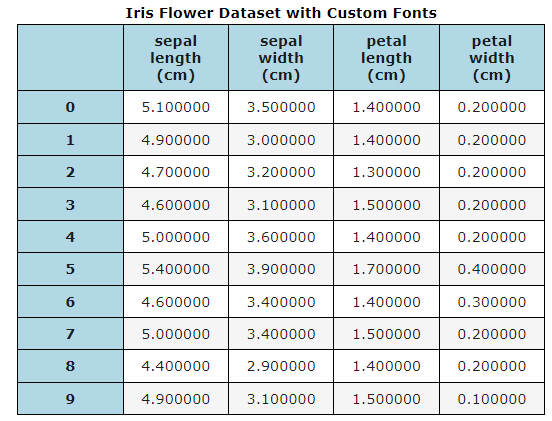
1. Basic Styling with Custom Fonts
This example demonstrates how to load the Iris dataset and apply basic styling with custom font size and font family.
import style_table
import pandas as pd
from sklearn.datasets import load_iris

# Load the Iris dataset
iris = load_iris()
df = pd.DataFrame(data=iris.data, columns=iris.feature_names)

# Apply styling with custom font size and font family
style_table(df.head(10), caption="Iris Flower Dataset with Custom Fonts", font_size="16px", font_family="Verdana")
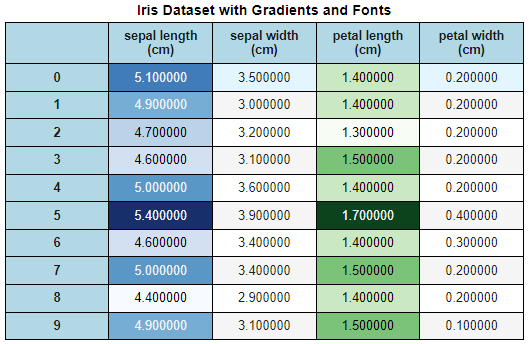
2. Styling with Column Gradients and Custom Fonts
In this example, we apply color gradients to the sepal length and petal length columns, along with customized fonts.
import style_table
import pandas as pd
from sklearn.datasets import load_iris

# Load the Iris dataset
iris = load_iris()
df = pd.DataFrame(data=iris.data, columns=iris.feature_names)

# Apply a gradient and custom font
style_table(df.head(10), caption="Iris Dataset with Gradients and Fonts", column_cmap={
    "sepal length (cm)": "Blues",
    "petal length (cm)": "Greens"
}, font_size="14px", font_family="Helvetica")
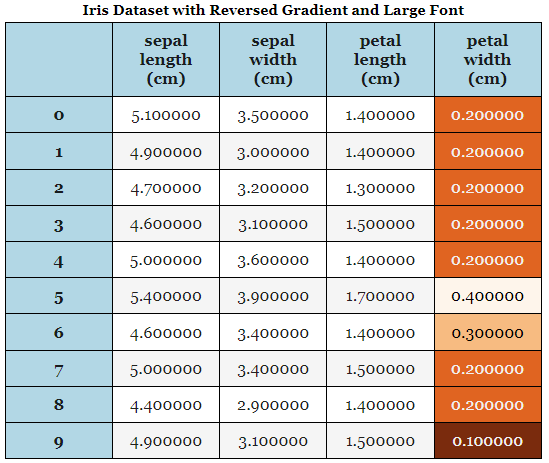
3. Reversed Gradients with Large Font
This example demonstrates how to reverse a colormap for the petal width column while using a larger font size.
import style_table
import pandas as pd
from sklearn.datasets import load_iris

# Load the Iris dataset
iris = load_iris()
df = pd.DataFrame(data=iris.data, columns=iris.feature_names)

# Apply reversed gradient to 'petal width' and set larger font size
style_table(df.head(10), caption="Iris Dataset with Reversed Gradient and Large Font", column_cmap={
    "petal width (cm)": "Oranges"
}, reverse_cmap=True, font_size="18px", font_family="Georgia")
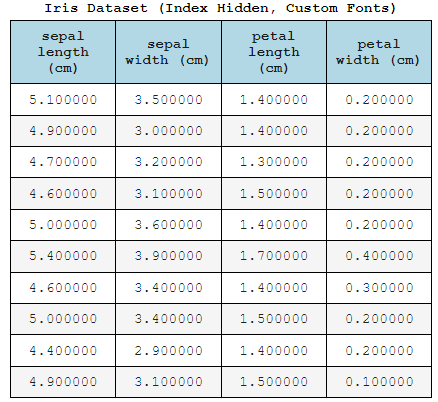
4. Hiding the Index with Custom Fonts
In this example, we hide the DataFrame index, use a larger font size, and apply a custom font family.
import style_table
import pandas as pd
from sklearn.datasets import load_iris

# Load the Iris dataset
iris = load_iris()
df = pd.DataFrame(data=iris.data, columns=iris.feature_names)

# Hide the index and use custom fonts
style_table(df.head(10), caption="Iris Dataset (Index Hidden, Custom Fonts)", hide_index=True, font_size="16px", font_family="Courier New")
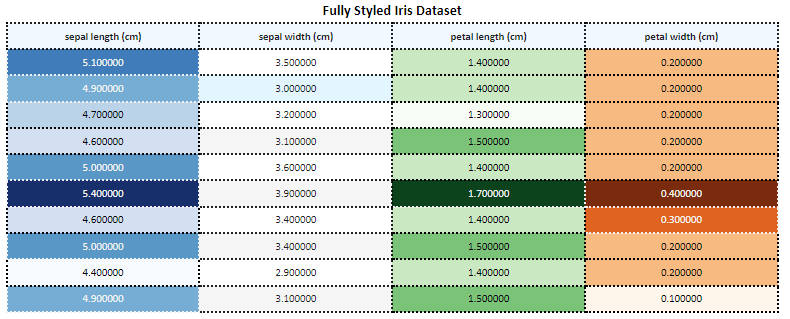
5. Combining All Features: Gradients, Hidden Index, and Fonts
In this final example, we apply gradients, hide the index, and customize both the font size and family for a fully styled table.
import style_table
import pandas as pd
from sklearn.datasets import load_iris

# Load the Iris dataset
iris = load_iris()
df = pd.DataFrame(data=iris.data, columns=iris.feature_names)

# Apply all customizations: gradients, hidden index, and fonts
style_table(df.head(10), caption="Fully Styled Iris Dataset", column_cmap={
    "sepal length (cm)": "Blues",
    "petal length (cm)": "Greens",
    "petal width (cm)": "Oranges"
}, width="200px", border="3px dotted",hide_index=True, header_background="aliceblue", font_size="12px", font_family="Calibri")
🛠️ Customization Options
- column_cmap: Apply colormaps (e.g., "Blues", "Greens") to specific columns.
- reverse_cmap: Set True to reverse colormap gradients.
- width: Adjust column width (default is "100px").
- border: Customize cell borders (default is "1px solid black").
- header_background: Customize the header background color (default is "lightblue").
- row_height: Set the height of rows (default is "15px").
- hide_index: Set True to hide the index.
- font_size: Customize the font size for table content (default is "14px").
- font_family: Customize the font family for table content (default is "Arial").
🤝 Contributing
Contributions are welcome! If you'd like to contribute, please fork the repository and create a pull request.
Release history Release notifications | RSS feed

Download files
Download the file for your platform. If you're not sure which to choose, learn more about installing packages.
Source Distribution
Built Distribution
Filter files by name, interpreter, ABI, and platform.
If you're not sure about the file name format, learn more about wheel file names.
Copy a direct link to the current filters
File details
Details for the file style_table-0.1.1.tar.gz.
File metadata
- Download URL: style_table-0.1.1.tar.gz
- Upload date:
- Size: 5.2 kB
- Tags: Source
- Uploaded using Trusted Publishing? No
- Uploaded via: twine/5.1.1 CPython/3.10.7
File hashes
| Algorithm | Hash digest | |
|---|---|---|
| SHA256 |
8671039b89afd86f1ef7dbbc1dcf094ada3ba098885ad620a4408fe799393836
|
|
| MD5 |
986dc64d587a93986c2f255732bd5fe6
|
|
| BLAKE2b-256 |
8dd5fc3859749461c382ce124be807e3cd0ebd20902b96a156cb6aafe6d3f160
|
File details
Details for the file style_table-0.1.1-py3-none-any.whl.
File metadata
- Download URL: style_table-0.1.1-py3-none-any.whl
- Upload date:
- Size: 5.7 kB
- Tags: Python 3
- Uploaded using Trusted Publishing? No
- Uploaded via: twine/5.1.1 CPython/3.10.7
File hashes
| Algorithm | Hash digest | |
|---|---|---|
| SHA256 |
e8e8610b76630255e41a4e3e1d2e19acff5e32a32a17d71e89adfa7962b6259b
|
|
| MD5 |
ac6c20984faffd3123054a09370de85b
|
|
| BLAKE2b-256 |
6f0f1eddb19188387e4b2502041624022dc64365a3966b60e04a51bbb3839e8c
|






