
subtidal


A command line utility for batch downloading subtitles for all movies organized in a central media folder.
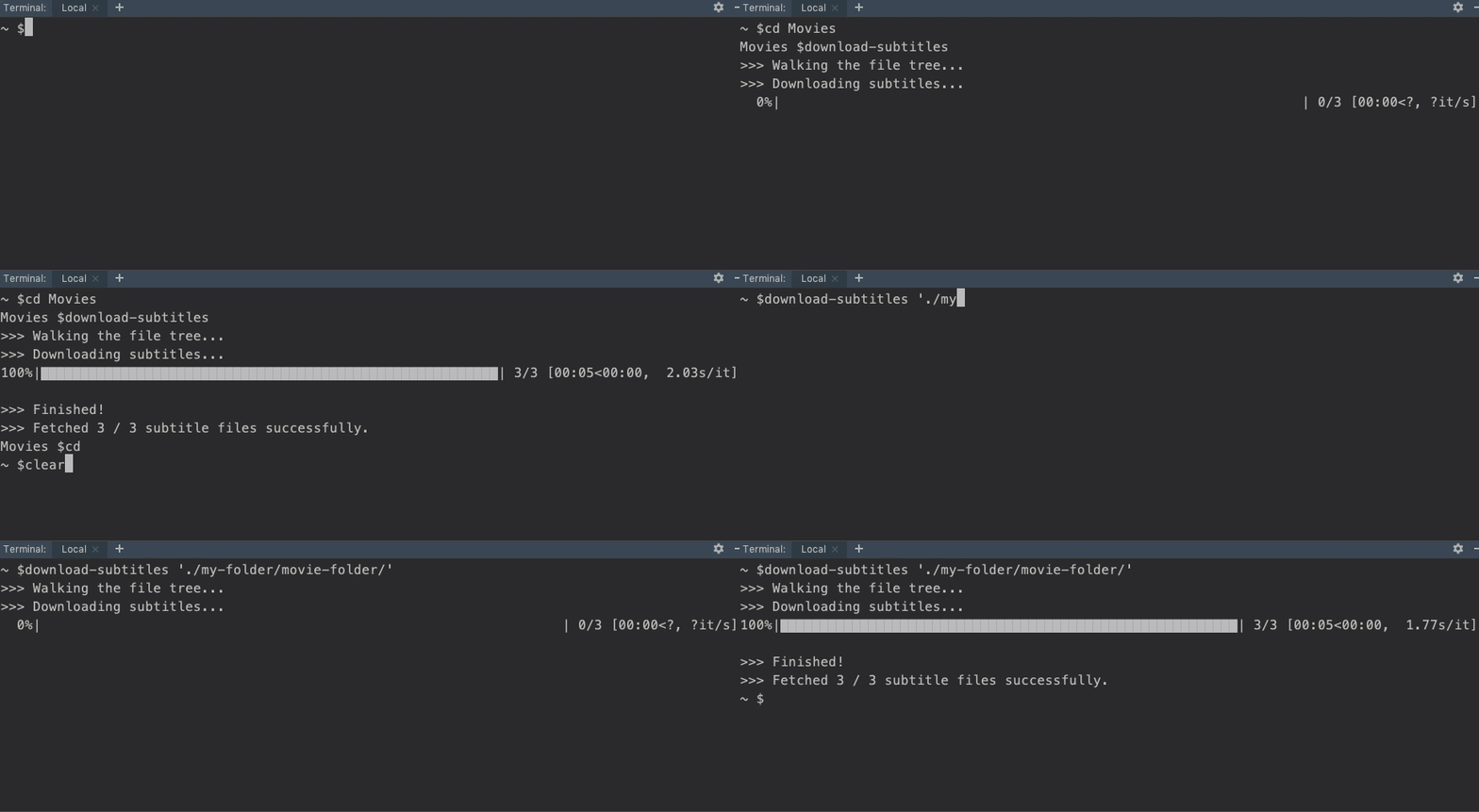
Walks the file tree, visiting subfolders and downloading subtitles for each movie if they do not already exist.
Changes subtitle names so that they are automatically recognized by Roku Media Player, VLC, and others.
Makes quick work of central media folders and entire hard drives alike. Ideally, your central media folder will be organized as a repository of folders, with one movie or TV show each, but subtidal will still work if they're not quite that tidy.
Installation
Use the package manager pip to install subtidal. From the command line:
pip install subtidal
Quickstart
Option 1: From the command line
cd /path/to/Your-Movie-Folder
download-subtitles
or, call download-subtitles and specify the path directly:
download-subtitles /path/to/your-movie-folder
Option 2: From Python
from subtidal.download import download

download("./path/to/Your Movie Folder")

# you can also add optional parameters
download(directory="./path/to/Your Movie Folder", verbose=True)
Motivation
I hope this project is of use to you. I got frustrated (or rather, was very mildly inconvenienced) because some of the movies I downloaded online didn't come included with subtitles, and I often found myself having to pause the movie I was watching to manually download them from sites like opensubtitles.org](https://opensubtitles.org).
Furthermore, even when subtitles were included with a movie, if the filename differed at all from the name of the movie, they weren't recognized by the Roku Media Player, so I set about to rectify that.
I have a huge, network-attached-storage media folder that acts as the central repository for all of the movies I download online, and I wanted to create a package that could download missing subtitles for every movie in it in one fell swoop.
I imagined that as I downloaded new movies and TV shows into this central repository, I'd be able to run the package periodically via a cron job on my Raspberry Pi, so I'd never have to suffer the loathsome indignity of watching a show without having subtitles available ever again. This package is my attempt to make that vision a reality (or to make some fun out of laziness, depending on how you look at it), and in so doing, make a package available to the public on PyPI, which I had never done before.
Additional function & parameter info in the docstring
def download_subtitles(directory, verbose=False):
    """
    Takes in a directory path, walks through the file tree, and downloads subtitles for any video files found.
    Renames the subtitle file to match the video's name (in order to make it compatible with Roku Media Player.)

    :param (str) directory: Directory where video files or folders are located.
    :param (str) language : [optional] Desired language for subtitles, expressed as a 3-letter ISO-639-3 code. Visit https://bit.ly/29fjNpm for a list of language codes.
    :param (str) country : [optional] Country code (needed in addition to language code for certain languages).
    :param (bool) verbose : [optional] Prints more output to the console.

    Examples:
    1. download_subtitles('./Users/Laura/Movies')
    2. download_subtitles(directory='./Users/Tim/TV Shows', verbose=True)
    """
Contributing
Pull requests are welcome!
License
1 maintainer

Metadata
1 maintainer
Release files for subtidal 1.1.0
For a detailed explanation of source distributions (sdists) and built distributions (wheels), please see the package formats documentation.
Source distribution (sdist)
| File | Size | Uploaded | Provenance | Actions |
|---|---|---|---|---|
| subtidal-1.1.0.tar.gz | 4.7 kB | Without provenance | Details for subtidal-1.1.0.tar.gz |
Built distribution (wheel)
| File | Interpreter | ABI | Platform | Actions Reset |
|---|---|---|---|---|
| subtidal-1.1.0-py3-none-any.whl | Python 3 | none | any | Details for subtidal-1.1.0-py3-none-any.whl |
Total release size: 11.2 kB
Release files / subtidal-1.1.0.tar.gz
| Download URL | subtidal-1.1.0.tar.gz |
|---|---|
| Size | 4.7 kB |
| Tags | Source |
|
SHA-256 checksum How to use checksums |
54a2237afd4fe78b0c3c203c09caac59a1ec2a74a82f562ebc190fa407564bac
|
|
BLAKE2b-256 checksum How to use checksums |
7b0412723048472ba0c3e1e45332202e887f5edea6ac433a47fbcea4a3ce2246
|
| Upload date | |
|
Uploaded using Trusted Publishing? What is trusted publishing? |
No |
| Uploaded via |
twine/1.13.0 pkginfo/1.4.2 requests/2.21.0 setuptools/40.4.3 requests-toolbelt/0.9.1 tqdm/4.31.1 CPython/3.6.7
|
Release files / subtidal-1.1.0-py3-none-any.whl
| Download URL | subtidal-1.1.0-py3-none-any.whl |
|---|---|
| Size | 6.5 kB |
| Tags | Python 3 |
|
SHA-256 checksum How to use checksums |
205a0e8c67b529cfbf4180aa9f1f45dda07bec47bcd2d101bca6d736a2f5f25d
|
|
BLAKE2b-256 checksum How to use checksums |
eba266b99f8ef5250c0d9ee9636f8c48dfd58d5e4e9449c1eecf622aa8f0d6cd
|
| Upload date | |
|
Uploaded using Trusted Publishing? What is trusted publishing? |
No |
| Uploaded via |
twine/1.13.0 pkginfo/1.4.2 requests/2.21.0 setuptools/40.4.3 requests-toolbelt/0.9.1 tqdm/4.31.1 CPython/3.6.7
|
Security for subtidal 1.1.0
Provenance
Provenance describes where a file came from. On PyPI, provenance is shared via attestations, which provide a verifiable record of the build or publishing details. View details, limitations and caveats.
No provenance found
None of the files in this release were uploaded with provenance metadata.
A note on package security
PyPI is a repository for distributing packages, not a service for auditing them. While third-party security researchers and our staff do their best to detect and remove malicious packages, PyPI cannot guarantee the quality, security or suitability of any given package.
To learn more about protecting yourself from malicious actors, visit our package security documentation.














