
SurfaceDefects Python Package
A simple but powerful Python package capable of
detecting poresin concrete, steel and similar surafaces, or thefabrication errorsfor that matter.- determining the
areaof each pore. - calculating
equivalent diameterof each pore. Equivalent diameter is the diameter of a circle whose area equals that of a pore. More on it later... - calculating
surface porosityi.e., the ratio of area covered by pores to the total area. - plotting
circlesover pores once theequivalent diametersare determined. - assigning length
scaleto image.
It works on the spirit of Computer Vision and segmentation. The Python package SurfaceDefects classifies surfaces based on the difference in their pixel values. It can also generally be used for detecting contours in 2D images of any type provided they are suitable for the intended purpose.
Better images lead to better results!
The concept will develop as we go down the documentation.
1. Install SurfaceDefects
~ pip install SurfaceDefects
2. Import into the project alongwith matplotlib.pyplot
import SurfaceDefects as sdf
import matplotlib.pyplot as plt
3. Load image using LoadImage() function
img = sdf.LoadImage(path, gray=Fasle)
path: is the complete path to your image
gray: whether to load the image as a grayscale image, default is False
Tip: Load
imgas it is and anotherimg_grayas a graysacle image. You will need both of them later.
4. Make a black replica of img (not compulsory)
black = sdf.PseudoImage(img)
5. Detect pores/defects using ClassifySurface() function
thresh = sdf.ClassifySurface(img_gray, threshold, invert_color=True)
plt.imshow(thresh, cmap='gray')
thresh: the resultant image is better known as thresholded image hence thresh
img_gray: the original grayscale image
threshold: verily the most important parameter, threshold is what that controls the detection of pores/defects. Ranges between 0 (black) and 255 (white).
invert_color: swaps colors i.e., black to white. Default is True
plt's
cmap='gray'for a grayscale image.

6. Find boundary of pores/defects using FindContours() function
Contours are lines joining points of same instensity.
Those points in this case are located along the boundaries of pores.
contours, _ = sdf.FindContours(classified_img)
contours: an array
_: the hierarchy and can be ignored in this particular case.
classified_img = thresh, the thresholded image.
7. SignificatContours()
Some of the contours found by FindContours() might be insignificant in that their areas might be zero. SignificatContours() will automatically discard contours whose areas are zero.
sig_contours, _ = sdf.SignificantContours(classified_img)
sig_contours: an array
_: the hierarchy and can be ignored in this particular case.
classified_img = thresh, the thresholded image.
8. Define a scale using DefineScale() function
scale_factor = sdf.Scale(height, width)
scale_factor: a ratio of scale, or better known as a Referesentative Factor
height, width: height and width of real object/surface in units of length
9. Calculate area of pores using ContourArea()
pore_area = sdf.ContourArea(classified_img, sum=False, scale_factor=1)
If sum=True, total pore area will be calculated; otherwise a list.
scale_factor: a ratio of scale, or better known as a Referesentative Factor. Default value is $1$ which means no conversion from units of pixel to units of length.
10. EquivalentDiameter() calculates diameter of a circle whose area equals that of a pore
equ_dia = sdf.EquivalentDiameter(contours, scale_factor=1)
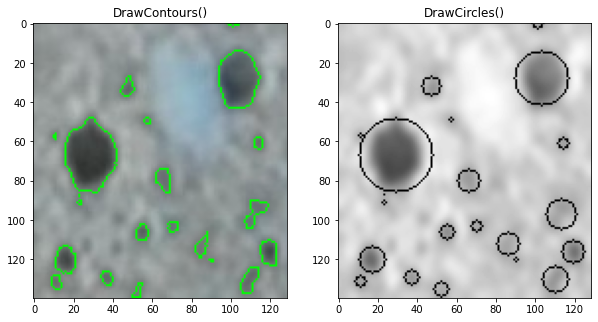
11. DrawContours() draws boundaries of each pore
contour_img = sdf.DrawContours(img,contours, index=-1, color = (0,255,0), thickness=1)
#display
plt.imshow(contour_img)
img: original or black img
contours: array from DrawContours() or SignificantContours()
index: which contour boundary to plot? $-1$ means all. Similarly $2, 3, 4$ for number $3$rd, $4$th, $5$th respectively, and so on.
color: color of boundary line, default is green.
thickness: thickness of boundary line, default is 1.
12. DrawCircles() draws circle aroud the boundary of equivalent diameter
circle_img = sdf.DrawCircles(img, contours, color=(0,255,0), thickness=1)
plt.imshow(circle_img)
Refer to point number $11$ for parameters/arguments.
13. Denoise() smoothens/denoises the original image
#applies GaussianBlur filter of opencv-python

denoised_img = sdf.Denoise(img, kernel=(3,3), channels=0)
kernel: default ($3,3$)
channels: $3$ for an RGB/BGR image and $0$ for a grayscale image
14. SurfacePorosity() calculates the ratio in percentage of area covered by pores to the total area
porosity = sdf.SurfacePorosity(img, contour_area)
contour_area: a float or an integer
Acknowledgement | Dependencies
opencv-pythonnumpy
1 maintainer

Metadata
1 maintainer
Release files for SurfaceDefects 0.1.0
For a detailed explanation of source distributions (sdists) and built distributions (wheels), please see the package formats documentation.
Source distribution (sdist)
| File | Size | Uploaded | |
|---|---|---|---|
| SurfaceDefects-0.1.0.tar.gz | 5.8 kB | Details |
Built distribution (wheel)
| File | Interpreter | ABI | Platform | Reset |
|---|---|---|---|---|
| SurfaceDefects-0.1.0-py3-none-any.whl | Python 3 | none | any | Details |
Total release size: 11.6 kB
Release files / SurfaceDefects-0.1.0.tar.gz
| Download URL | SurfaceDefects-0.1.0.tar.gz |
|---|---|
| Size | 5.8 kB |
| Tags | Source |
|
SHA-256 checksum How to use checksums |
db876b62a29d6b7416fe00377d649adb38f9d2b998a9f0f3be159592d0d0829d
|
|
BLAKE2b-256 checksum How to use checksums |
55ed194b6ab1e931cd26c9db23dba0e7a894ce9f15bc6fd96ae253c2cde4aa8a
|
| Upload date | |
|
Uploaded using Trusted Publishing? What is trusted publishing? |
No |
| Uploaded via |
twine/4.0.2 CPython/3.8.8
|
Release files / SurfaceDefects-0.1.0-py3-none-any.whl
| Download URL | SurfaceDefects-0.1.0-py3-none-any.whl |
|---|---|
| Size | 5.9 kB |
| Tags | Python 3 |
|
SHA-256 checksum How to use checksums |
057fce5f6211ebbc388ff157b5fb1247853adc4901eb3673843d35da4637a149
|
|
BLAKE2b-256 checksum How to use checksums |
60816b1253c68fdb12a722055e50f0f9a0dfbf18733c8beff5e45b7163efb7b1
|
| Upload date | |
|
Uploaded using Trusted Publishing? What is trusted publishing? |
No |
| Uploaded via |
twine/4.0.2 CPython/3.8.8
|














