

by Güney Kıymaç






Installation
pip install SymbolicDSGE
pip install "SymbolicDSGE[fred]"  # FRED API utilities
pip install "SymbolicDSGE[sr]"    # Symbolic Regression Deps
pip install "SymbolicDSGE[ui]"    # Web based GUI
Useful Links
Overview
SymbolicDSGE is a Python DSGE engine with a JIT compiled backend for linear and linearized DSGE models, supporting symbolic manipulation features for in-place model modification.
It also provides measurement-equation augmentation tools, including symbolic regression for complete or restricted free-form function discovery and OLS, Ridge, Lasso, and Elastic Net for structured linear coefficient estimation.
The library supports a wide set of features beyond augmentation:
- DSGE model specification, symbolic manipulation, and linearization
- Bayesian and maximum-likelihood estimation
- Simulation and impulse-response-function utilities
- Gaussian and extended Kalman filtering
- Automatic data retrieval from FRED
- Custom shock distributions via SciPy or user-defined samplers
- Monte Carlo pipelines for comparing models or model-generated samples, including:
- Statistical tests
- Regression setups
- Output transformations
- Filtering
- Data generation
Web-UI
SymbolicDSGE ships a [ui] dependency with the goal of making DSGE basic experiments accessible to non-programmers.
While model estimation is currently not implemented, given a configuration file GUI users can:
- Adjust parameters
- Solve
- Simulate
- Create and run Monte Carlo experiments
- Apply data transformations to outputs
- Produce figures
- Access raw output data
There are two intended ways to access the GUI:
# Option 1: Serve the GUI from the command line
#           This launhes an empty GUI and the configuration should be done through the Builder tab.
sdsge-ui
# Option 2: Serve the GUI with a pre-loaded SolvedModel object

# Read a config and solve the model as usual
from SymbolicDSGE import ModelParser, DSGESolver

model, kalman = ModelParser(...).get_all()
solver = DSGESolver(model, kalman)
compiled = solver.compile(...)
sol = solver.solve(compiled, ...)

# Serve the GUI with the solved model pre-loaded in the reference slot
sol.serve(open_browser=True)
The UI does not support all capabilities of the library; however it can significantly aid the demonstration of findings to a non-technical audience by allowing them to interact with a given model. The UI is in active development and supporting all built-in features is a long-term goal.
Read the Docs
Alongside API references and implementation conventions, the documentation includes guides covering model setup, estimation, simulation, and filtering.
The documentation is kept up to date and aims to clarify conventions, workflows, and implementation choices throughout SymbolicDSGE.
Suggestions for improving or extending the documentation are welcome as issues.
AI Parsability
The documentation is a static Material MkDocs site, so web-enabled AI tools should be able to search, parse, and summarize it reliably.
Minimal Example
from SymbolicDSGE import ModelParser
from SymbolicDSGE import DSGESolver
from numpy import float64, array

# Read the YAML config (Equations, Measurements, Parameters, Optional Filter Spec)
parsed = ModelParser("<path-to-config>.yaml").get_all()
model, kalman = parsed

# Compile the model
solver = DSGESolver(model, kalman)
compiled = solver.compile(
    variable_order=None,
    params_order=None,
    n_state=3,
    n_exog=2,
    linearize=False,
)
print("Equations with symbols removed: \n", "\n".join(map(str, compiled.objective_eqs)), "\n")
print("Equations as passed to the solver: \n", compiled.equations)
>>> Equations with symbols removed:
 -beta*fwd_Pi + cur_Pi - cur_x*kappa - cur_z
-cur_g + cur_x - fwd_x + tau_inv*(cur_r - fwd_Pi)
-cur_r*rho_r - e_R + fwd_r + (rho_r - 1)*(fwd_Pi*psi_pi + fwd_x*psi_x)
-cur_g*rho_g - e_g + fwd_g
-cur_z*rho_z - e_z + fwd_z


Equations as passed to the solver:
 <function DSGESolver.compile.<locals>.equations at 0x0000012D16AB5B20>
# Solve the compiled model
sol = solver.solve(
    compiled,
    parameters=None,
    steady_state=array([0.0, 0.0, 0.0, 0.0, 0.0], dtype=float64),
)
print("Is stable: ", sol.policy.stab == 0)
print("Eigenvalues: ", sol.policy.eig)
>>> Is stable:  True
Eigenvalues:  [0.27920118+0.j 0.83000003+0.j 0.84999992+0.j 2.56517116+0.j 1.18470582+0.j]
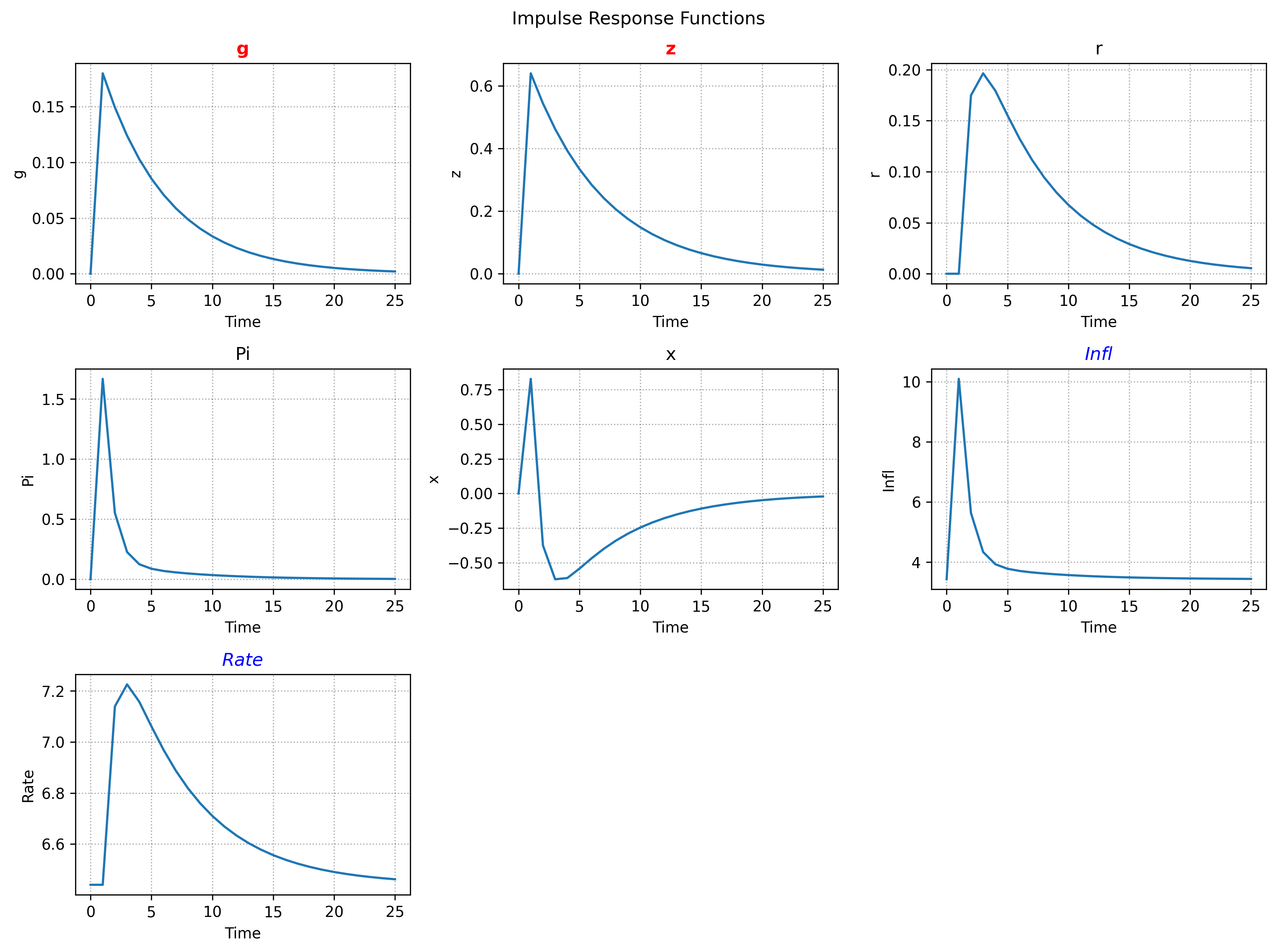
# Plot IRFs (single or multi shock)
sol.transition_plot(
    T=25,
    shocks=["g", "z"],
    scale=1.0,
    observables=True,
)
1 maintainer

Metadata
1 maintainer
Release files for SymbolicDSGE 1.4.1
For a detailed explanation of source distributions (sdists) and built distributions (wheels), please see the package formats documentation.
Source distribution (sdist)
| File | Size | Uploaded | Provenance | Actions |
|---|---|---|---|---|
| symbolicdsge-1.4.1.tar.gz | 2.3 MB | Without provenance | Details for symbolicdsge-1.4.1.tar.gz |
Built distribution (wheel)
| File | Interpreter | ABI | Platform | Actions Reset |
|---|---|---|---|---|
| symbolicdsge-1.4.1-py3-none-any.whl | Python 3 | none | any | Details for symbolicdsge-1.4.1-py3-none-any.whl |
Total release size: 4.8 MB
Release files / symbolicdsge-1.4.1.tar.gz
| Download URL | symbolicdsge-1.4.1.tar.gz |
|---|---|
| Size | 2.3 MB |
| Tags | Source |
|
SHA-256 checksum How to use checksums |
4089c116005e74a814675dce8d189ed124427df2731ebfc6e5de658b544b884a
|
|
BLAKE2b-256 checksum How to use checksums |
306141df53cece17b57d124aac73e9ce1e9601d111c7914313696abfbe43e90b
|
| Upload date | |
|
Uploaded using Trusted Publishing? What is trusted publishing? |
Yes |
| Uploaded via |
uv/0.11.20 {"installer":{"name":"uv","version":"0.11.20","subcommand":["publish"]},"python":null,"implementation":{"name":null,"version":null},"distro":{"name":"Ubuntu","version":"24.04","id":"noble","libc":null},"system":{"name":null,"release":null},"cpu":null,"openssl_version":null,"setuptools_version":null,"rustc_version":null,"ci":true}
|
Release files / symbolicdsge-1.4.1-py3-none-any.whl
| Download URL | symbolicdsge-1.4.1-py3-none-any.whl |
|---|---|
| Size | 2.4 MB |
| Tags | Python 3 |
|
SHA-256 checksum How to use checksums |
65f525f9cd9ab010a7b2e891ba791b1ecf1703ce92d01ee52d94ea22ccbff337
|
|
BLAKE2b-256 checksum How to use checksums |
778a0ac21ba718448cc55b894e6faaf828fcd90c14587737297c18a003358796
|
| Upload date | |
|
Uploaded using Trusted Publishing? What is trusted publishing? |
Yes |
| Uploaded via |
uv/0.11.20 {"installer":{"name":"uv","version":"0.11.20","subcommand":["publish"]},"python":null,"implementation":{"name":null,"version":null},"distro":{"name":"Ubuntu","version":"24.04","id":"noble","libc":null},"system":{"name":null,"release":null},"cpu":null,"openssl_version":null,"setuptools_version":null,"rustc_version":null,"ci":true}
|
Security for SymbolicDSGE 1.4.1
Provenance
Provenance describes where a file came from. On PyPI, provenance is shared via attestations, which provide a verifiable record of the build or publishing details. View details, limitations and caveats.
No provenance found
None of the files in this release were uploaded with provenance metadata.
A note on package security
PyPI is a repository for distributing packages, not a service for auditing them. While third-party security researchers and our staff do their best to detect and remove malicious packages, PyPI cannot guarantee the quality, security or suitability of any given package.
To learn more about protecting yourself from malicious actors, visit our package security documentation.














