
TabularQual converter
Convert between spreadsheets (XLSX, CSV) and SBML-qual for logical models (Boolean and multi-valued).
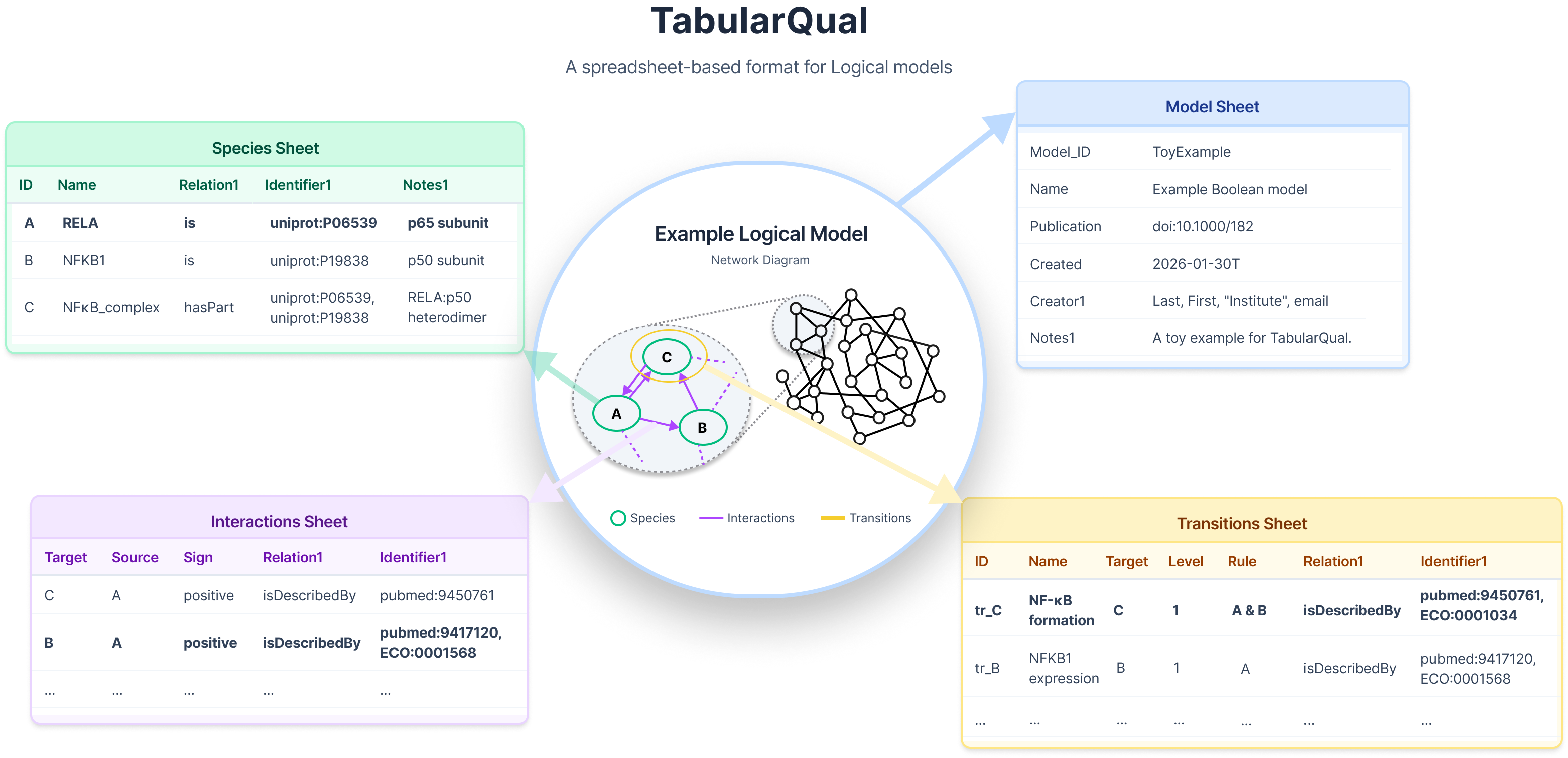
Note: the format is specified here.
Install
pip install tabularqual
Or install from source:
git clone https://github.com/sys-bio/TabularQual.git
cd TabularQual
python3.11 -m venv .venv
source .venv/bin/activate
python -m pip install --upgrade pip
python -m pip install -e .
Python 3.11 or newer is required. For the optional FastAPI server, install
.[api]; for release development, install .[test,release,api].
Usage
TabularQual can be used as a web app, a Python package, or via the command line (CLI).
Web App
No installation required — open in your browser:
For large networks the Streamlit cloud may hit resource limits. Run locally instead:
streamlit run app.py
Python API
from tabularqual import convert_spreadsheet_to_sbml, convert_sbml_to_spreadsheet

# Spreadsheet to SBML  (accepts XLSX file, CSV folder, or CSV prefix)
stats = convert_spreadsheet_to_sbml("Model.xlsx", "Model.sbml")

# SBML to Spreadsheet (XLSX)
stats = convert_sbml_to_spreadsheet("Model.sbml", "Model.xlsx")

# SBML to CSV files
stats = convert_sbml_to_spreadsheet("Model.sbml", "Model", output_csv=True)
Both functions return a stats dict:
{
    "species":                 int,
    "transitions":             int,
    "interactions":            int,
    "warnings":                list[str],   # all messages produced
    "validation_errors":       list[str],   # annotation identifier issues
    "total_validation_errors": int,
    "created_files":           list[str],   # output file paths
}
See python_api_example.py for a working example covering multi-valued models and other options.
CLI
Spreadsheet → SBML
# XLSX input (output defaults to same name with .sbml extension)
to-sbml examples/ToyExample.xlsx

# CSV directory
to-sbml examples/ToyExample_csv/

# CSV prefix (looks for Model_Species.csv, Model_Transitions.csv, etc.)
to-sbml Model
SBML → Spreadsheet
# XLSX output (default)
to-table examples/ToyExample.sbml

# CSV output (creates ToyExample_Species.csv, ToyExample_Transitions.csv, etc.)
to-table examples/ToyExample.sbml --csv
Options
to-sbml INPUT [OUTPUT]
| Option | Description |
|---|---|
--inter-anno |
Include annotations from the Interactions sheet in SBML |
--trans-anno |
Include annotations from the Transitions sheet in SBML |
--use-name |
Rules/targets use species Names instead of IDs (see below) |
--no-validate |
Skip annotation identifier validation |
to-table INPUT [OUTPUT]
| Option | Description |
|---|---|
--csv |
Write CSV files instead of a single XLSX workbook |
--colon-format |
Use colon notation in rules (A:2 instead of A >= 2) |
--use-name |
Write species Names in rules/targets instead of IDs |
--template PATH |
Custom template file for README/Appendix sheets (XLSX only) |
--no-validate |
Skip annotation identifier validation |
Spreadsheet Format
The spreadsheet consists of up to four sheets. Sheet names and column headers must match exactly (case-sensitive).
| Sheet | Required | Required columns |
|---|---|---|
| Model | No | — |
| Species | Yes | Species_ID or Name |
| Transitions | Yes | Target, Rule |
| Interactions | No | Target, Source |
Additional sheets (e.g. README, Appendix) and columns are silently ignored.
See the specification, the template spreadsheet and examples for details.
Transition Rules Syntax
The Rule column accepts Boolean and comparison expressions; spaces are ignored during parsing. See the transition-rule syntax guide for full details including operator precedence and multi-valued model conventions.
| Symbol | Meaning | Example |
|---|---|---|
& |
AND | A & B |
| |
OR | A | B |
! |
NOT | !A |
^ |
XOR | A ^ B |
() |
Grouping | (A & B) | C |
A:2 |
A ≥ 2 (threshold) | multi-valued only |
!A:2 |
A < 2 | multi-valued only |
>= <= > < = == != |
Comparison operators | A >= 2 |
TRUE / FALSE |
Fixed active / inactive | constant rule |
2 |
Fixed at level 2 | constant rule (multi-valued) |
"name" |
Name with spaces or special characters | "p53 protein" & B |
Examples
A & B                      # Both A and B active (level ≥ 1)
A | (D & !C)               # A active, or D active and C inactive
A ^ B                      # Exactly one of A or B active (XOR)
A:2 | B < 1                # A at level 2+, or B inactive
!CI:2 & !Cro:3             # CI below level 2 AND Cro below level 3
(A & B) | (!C & D != 1)    # Complex grouped expression
FALSE                      # Target always inactive
Multi-valued models: each result level gets its own row in the Transitions sheet with a different Level value. Rows with the same Target are merged into one SBML Transition with multiple function terms.
When importing SBML-qual, the tool follows spec §5.1: symbolic threshold
<ci>references in MathML are replaced with theirthresholdLevelvalues, and Boolean simplification is applied (e.g.A >= 1→A,A < 1→!A).
Species Names in Rules
By default, Target and Rule columns reference species by ID (Species_ID). Passing --use-name (CLI) or checking "Rules use species Names" (web app / use_name=True in Python) switches to Name-based references.
Names with spaces or special characters must be enclosed in double quotes in rules:
"p53 protein" & MDM2
"NF-κB complex" | IKK
Duplicate names are automatically disambiguated with numeric suffixes. Given:
| Species_ID | Name |
|---|---|
| GeneA | Kinase |
| GeneB | Kinase |
The first occurrence keeps the original name; subsequent ones get _1, _2, ...:
Kinase & Kinase_1 # refers to GeneA and GeneB respectively
Fallback: if any species lack a Name when --use-name is active, a warning is issued and IDs are used instead.
Validation
SId Format
Model_ID, Species_ID, Transitions_ID, and Compartment must conform to SBML SId rules:
- Start with a letter or underscore
- Contain only letters, digits, and underscores
- No spaces, slashes, or other special characters
Invalid IDs are cleaned automatically: special characters → _, leading digit → prepend _, duplicates → append _1, _2, ... A warning is shown for each correction.
Example: PI3K/AKT-pathway → PI3K_AKT_pathway
Controlled vocabulary
| Field | Valid values |
|---|---|
Species Type |
Input, Internal, Output |
Interaction Sign |
positive, negative, dual, unknown |
Relation (Species) |
is, hasVersion, isVersionOf, isDescribedBy, hasPart, isPartOf, hasProperty, isPropertyOf, encodes, isEncodedBy, isHomologTo, occursIn, hasTaxon |
Relation (Transitions / Interactions) |
same list as above; defaults to isDescribedBy |
All values are accepted case-insensitively and normalised to their canonical form.
Annotation identifiers
Compact identifiers (prefix:accession, e.g. uniprot:P19838) are resolved to https://identifiers.org/ URLs in SBML. Optionally validate that identifiers actually exist through sbmlutils:
Common ChEBI variants such as chebi:35305 are normalized to the canonical
CHEBI:35305 form before validation.
pip install sbmlutils>=0.9.6
# then run without --no-validate (the default)
Examples
| File | Description |
|---|---|
examples/ToyExample.xlsx |
Small Boolean model |
examples/ToyExample_multivalue.xlsx |
Multi-valued variant of the toy model |
examples/Faure2006/Faure2006.xlsx |
Fauré 2006 mammalian cell-cycle (Boolean) |
examples/ThieffryThomas1995/ThieffryThomas1995_multivalue.xlsx |
Thieffry & Thomas 1995 λ phage (multi-valued) |
1 maintainer

Metadata
1 maintainer
Release files for tabularqual 0.1.6
For a detailed explanation of source distributions (sdists) and built distributions (wheels), please see the package formats documentation.
Source distribution (sdist)
| File | Size | Uploaded | Provenance | Actions |
|---|---|---|---|---|
| tabularqual-0.1.6.tar.gz | 103.6 kB | Without provenance | Details for tabularqual-0.1.6.tar.gz |
Built distribution (wheel)
| File | Interpreter | ABI | Platform | Actions Reset |
|---|---|---|---|---|
| tabularqual-0.1.6-py3-none-any.whl | Python 3 | none | any | Details for tabularqual-0.1.6-py3-none-any.whl |
Total release size: 206.4 kB
Release files / tabularqual-0.1.6.tar.gz
| Download URL | tabularqual-0.1.6.tar.gz |
|---|---|
| Size | 103.6 kB |
| Tags | Source |
|
SHA-256 checksum How to use checksums |
b15d0b5cfc15ab45165c8991ec324bcd8c320b2cc1ea1495930eefd38d1fb004
|
|
BLAKE2b-256 checksum How to use checksums |
a5a4330051c1a446425479e87783ed0ad577fe87892e68572da1c871c91db914
|
| Upload date | |
|
Uploaded using Trusted Publishing? What is trusted publishing? |
No |
| Uploaded via |
twine/6.2.0 CPython/3.11.14
|
Release files / tabularqual-0.1.6-py3-none-any.whl
| Download URL | tabularqual-0.1.6-py3-none-any.whl |
|---|---|
| Size | 102.8 kB |
| Tags | Python 3 |
|
SHA-256 checksum How to use checksums |
ae810f681c9a9a0e6e6f21be035faeeaca336cb9ce638776218069edd1164048
|
|
BLAKE2b-256 checksum How to use checksums |
a93649a5e5d6477880f2f060a130aef97ac024e9384bfe1f7e7cdbcfbcc9e369
|
| Upload date | |
|
Uploaded using Trusted Publishing? What is trusted publishing? |
No |
| Uploaded via |
twine/6.2.0 CPython/3.11.14
|
Security for tabularqual 0.1.6
Provenance
Provenance describes where a file came from. On PyPI, provenance is shared via attestations, which provide a verifiable record of the build or publishing details. View details, limitations and caveats.
No provenance found
None of the files in this release were uploaded with provenance metadata.
A note on package security
PyPI is a repository for distributing packages, not a service for auditing them. While third-party security researchers and our staff do their best to detect and remove malicious packages, PyPI cannot guarantee the quality, security or suitability of any given package.
To learn more about protecting yourself from malicious actors, visit our package security documentation.














