
TaskPlot - Plot your tasks
TaskPlot is a Python module and command line tool based on in it that may be used to plot progress in multiple tasks in a single graph.
Requirements
This package should be used with Python 3.4 or any later version of Python interpreter.
On a Windows system, the following packages must be installed for Python 3.4 from <http://www.lfd.uci.edu/~gohlke/pythonlibs/>: numpy, dateutil, pyparsing, six and matplotlib.
On a Linux system, the python3-matplotlib package and the packages it depends on must be installed. On a Debian system, the following command may be used to install the required packages and execute the script:
aptitude install python3-matplotlib
This package uses the Matplotlib library to plot graphs.
Installation
You can install this package using pip3 using the following command:
pip3 install taskplot
You can install this package from source distribution. To do so, download the latest .tar.gz file from <https://pypi.python.org/pypi/taskplot>, extract it, then open command prompt or shell, and change your current directory to the directory where you extracted the source distribution, and then execute the following command:
python3 setup.py install
Note that on a Windows system, you may have to replace python3 with the path to your Python 3 interpreter.
Getting started
There are three ways to feed data to TaskPlot and let it plot graphs.
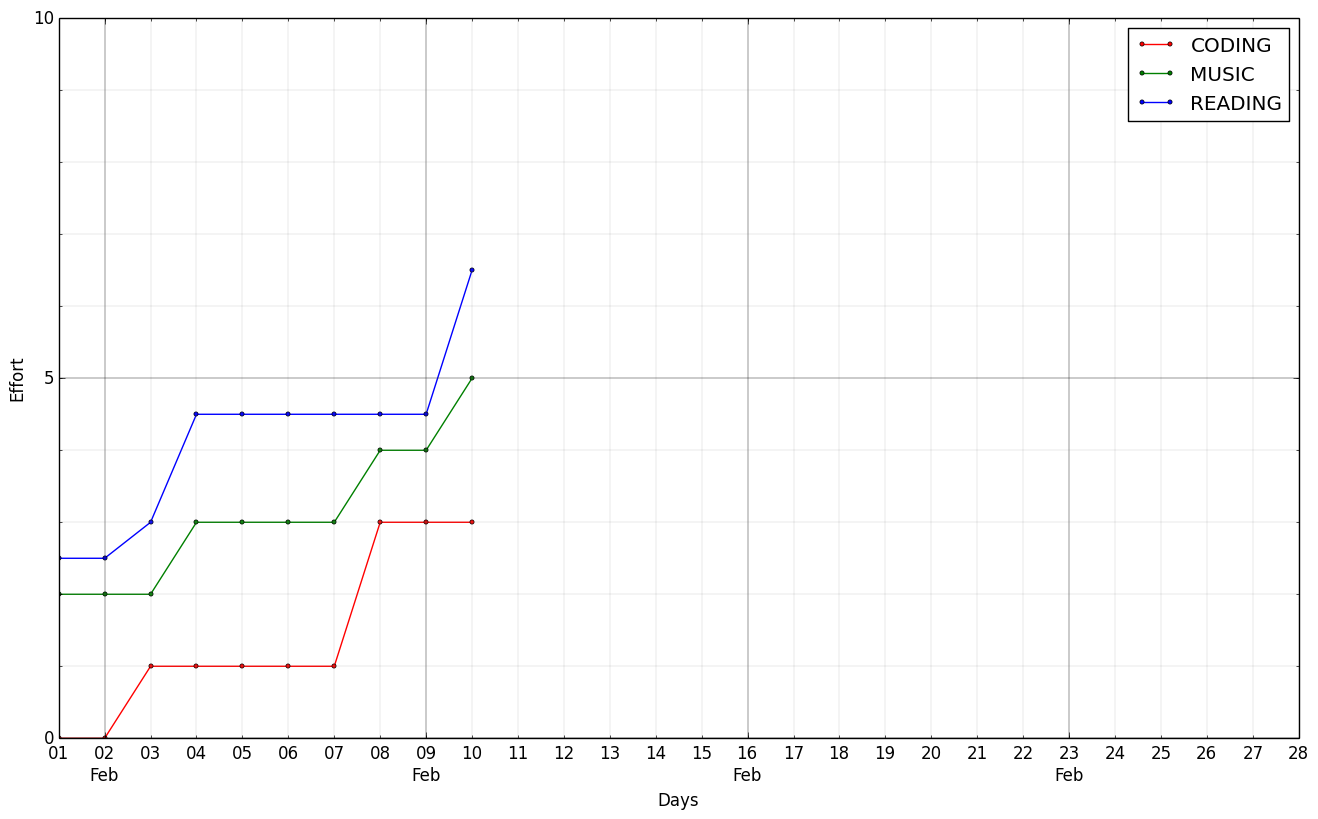
Using a task directory containing task files: Let us assume your current directory contains the following files and contents:
-- 2014-02-01.txt --
READING: [xx] [xx]
MUSIC: [xx] [xx]
READING: [x]

-- 2014-02-03.txt --
READING: [x]
CODING: [xx]

-- 2014-02-04.txt --
READING: [xx] [x]
MUSIC: [xx]

-- 2014-02-08.txt --
MUSIC: [xx]
CODING: [xx] [xx]

-- 2014-02-10.txt --
READING: [xx]
MUSIC: [xx]
READING: [xx]
Execute the following command in the current directory:
taskplot
The above command will plot a graph from those files and save it in a file called taskplot.png
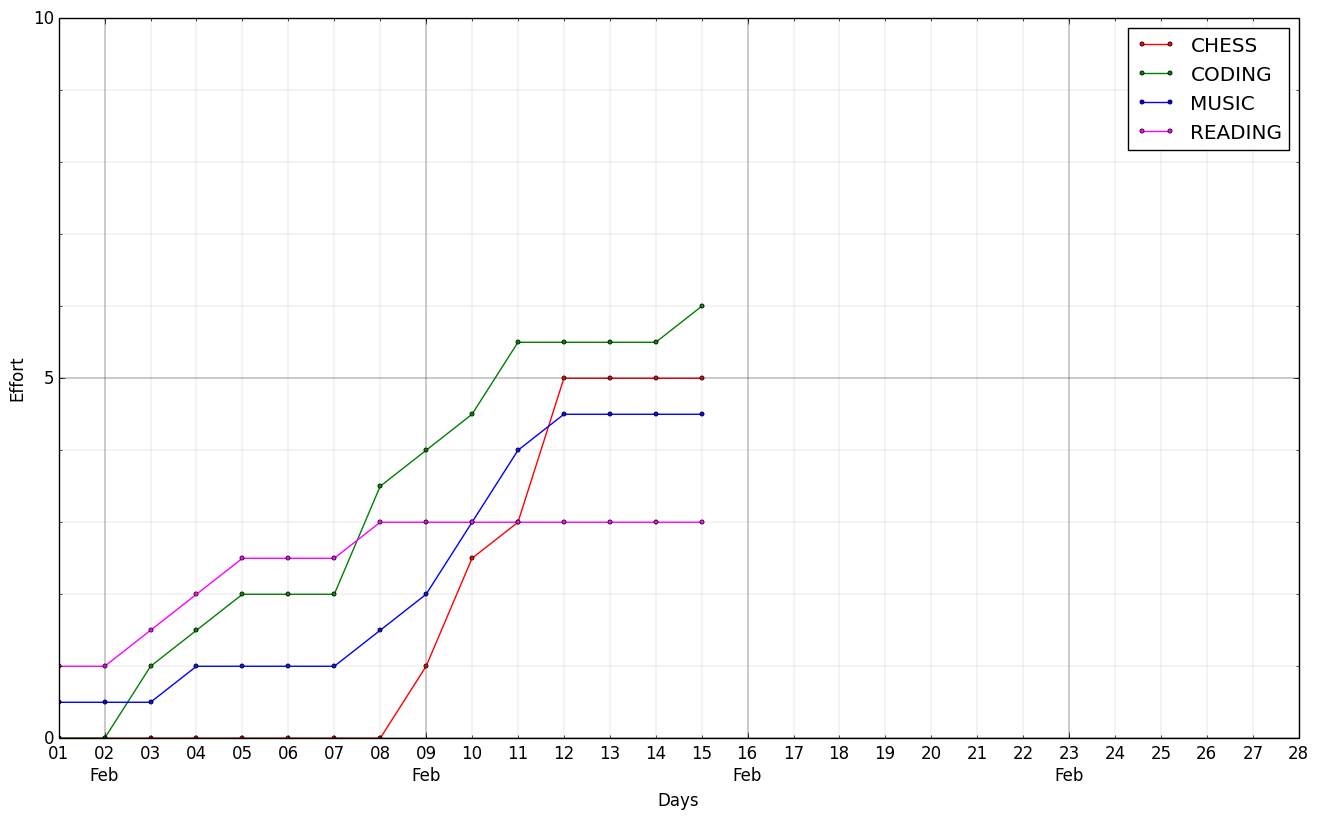
Using a task list file: Let us assume your current directory contains a file called tasklist.txt with the following content:
DATE        READING  MUSIC     CODING
2014-02-01  1.0      0.5       0.0
2014-02-03  0.5      0.0       1.0
2014-02-04  0.5      0.5       0.5
2014-02-05  0.5      0.0       0.5
2014-02-08  0.5      0.5       1.5

DATE        CHESS    MUSIC     CODING
2014-02-09  1.0      0.5       0.5
2014-02-10  1.5      1.0       0.5
2014-02-11  0.5      1.0       1.0
2014-02-12  2.0      0.5       0.0
2014-02-15  0.0      0.0       0.5
Execute the following command in the current directory:
taskplot tasklist.txt
The above command will plot a graph from the data in the file and save it in a file called taskplot.png
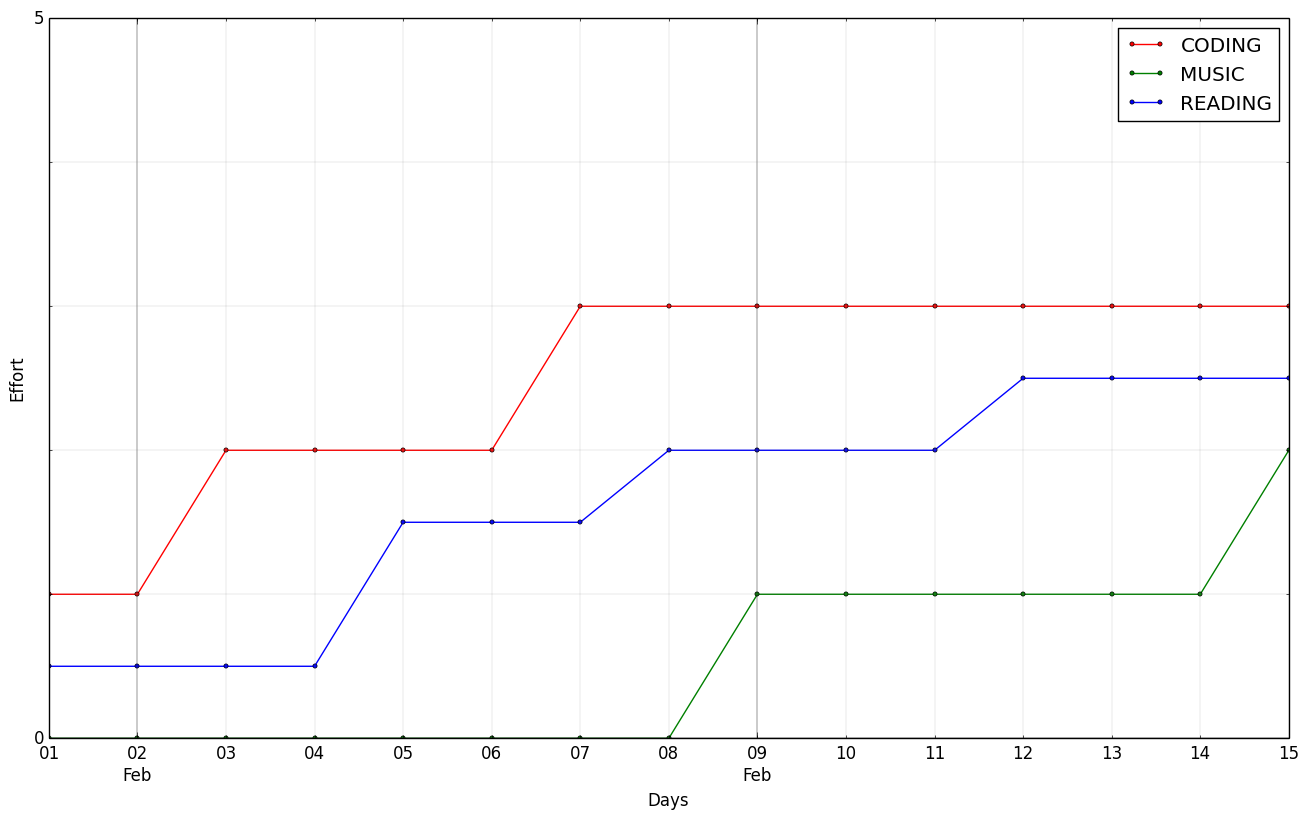
Using your own program: Here is an example program:
import taskplot
import datetime

taskplot = taskplot.TaskPlot()
taskplot.add_effort('READING', datetime.datetime(2014, 2, 1), 0.5)
taskplot.add_effort('READING', datetime.datetime(2014, 2, 5), 1.0)
taskplot.add_effort('READING', datetime.datetime(2014, 2, 8), 0.5)
taskplot.add_effort('READING', datetime.datetime(2014, 2, 12), 0.5)
taskplot.add_effort('CODING', datetime.datetime(2014, 2, 1), 1.0)
taskplot.add_effort('CODING', datetime.datetime(2014, 2, 3), 1.0)
taskplot.add_effort('CODING', datetime.datetime(2014, 2, 7), 1.0)
taskplot.add_effort('MUSIC', datetime.datetime(2014, 2, 9), 1.0)
taskplot.add_effort('MUSIC', datetime.datetime(2014, 2, 15), 1.0)
taskplot.print_summary()
taskplot.plot_graph()
taskplot.save_graph('taskplot.png')
Executing this program using Python 3 interpreter will plot a graph and generate the following graph.
Support
To report any bugs, or ask any question, please visit <https://github.com/susam/taskplot/issues>.
Resources
Here is a list of useful links about this project.
License
This is free software. You are permitted to redistribute and use it in source and binary forms, with or without modification, under the terms of the Simplified BSD License. See the LICENSE.rst file for the complete license.
This software is provided WITHOUT ANY WARRANTY; without even the implied warranty of MERCHANTABILITY or FITNESS FOR A PARTICULAR PURPOSE. See the LICENSE.rst file for the complete disclaimer.
1 maintainer

Metadata
1 maintainer
Release files for taskplot 0.1.2
For a detailed explanation of source distributions (sdists) and built distributions (wheels), please see the package formats documentation.
Source distribution (sdist)
| File | Size | Uploaded | Provenance | |
|---|---|---|---|---|
| taskplot-0.1.2.tar.gz | 13.8 kB | Without provenance | Details |
Release files / taskplot-0.1.2.tar.gz
| Download URL | taskplot-0.1.2.tar.gz |
|---|---|
| Size | 13.8 kB |
| Tags | Source |
|
SHA-256 checksum How to use checksums |
7706d96846f7bbbf11714eb3a6a5bf021168fc1f207d35b18ca4878f29777e7c
|
|
BLAKE2b-256 checksum How to use checksums |
b77ef1fc93068750da44199f8a5d4aaff8fd79cfbab83e5724ee485463ecab78
|
| Upload date | |
|
Uploaded using Trusted Publishing? What is trusted publishing? |
No |
Security for taskplot 0.1.2
Provenance
Provenance describes where a file came from. On PyPI, provenance is shared via attestations, which provide a verifiable record of the build or publishing details. View details, limitations and caveats.
No provenance found
None of the files in this release were uploaded with provenance metadata.
A note on package security
PyPI is a repository for distributing packages, not a service for auditing them. While third-party security researchers and our staff do their best to detect and remove malicious packages, PyPI cannot guarantee the quality, security or suitability of any given package.














