
TL;DR
Uses data from taskwarrior and timewarrior to indicate which task should be done next considering both its urgency and the time already spent on it. Its logic is inspired on the Linux CFS scheduler.
Installation
Dependencies
The following dependencies are not python dependencies and must be installed through your system's package manager
Install with pip
It is possible to install via pip by:
pip install taskwarrior-scheduler
How to use it
- Run
nextto know on what task you should focus next - Log the task you are doing to timewarrior (preferably via a taskwarrior hook)
- When you feel you are not performing as you should, or when you feel reached an important milestone, or when the task is too dull to be handled, hit
nextand check if there is another task you could focus on. - Stop the time tracking whenever you stop working
Hints
- Do not change tasks when you feel you are being productive, even if the task you are working on isn't the most urgent;
- Learn to do "partial breaks" by [filtering tasks] (https://taskwarrior.org/docs/filter/) (yes, I am talking about the
-workduring office hours). The script will know how to balance back when you stop this partial break; - Define clear criteria for when you should be working on tasks and when you should be taking breaks or partial breaks;
- Learn to distinguish between the times when you need a little push to get things done, when you need a partial break, when you need a full break and when you need to sleep.
How does it work
Introduction
Taskwarrior is meant to be used to organize tasks according to their urgencies, so that the user can dedicate always to complete the most urgent task. However, sometimes the most urgent task is too complex and takes a lot of time and effort to be completed.
The best practices state that, in this case, a complex task should be broken into smaller units of work, so that the user has the opportunity to plan ahead. This is a sensible advice, but users are humans. And humans are not always in the best state of mind to realize they are getting stuck in a task that should be better planned, specially if they are too focused on getting it done as soon as possible.
My story in that matter started by the second half of 2024, when I had to get my master thesis done in (what seemed to me was) a very short time. I was stuck in a chapter and no matter the strategy, I was simply stuck. I tried breaking into smaller tasks but it didn't work because I got stuck into every related task, no regardless how small it was. Pomodoro timer just got me more anxious when I realized I couldn't perform as well as I thought I should in that time. And taking a break just to take my head out of things was the worst of it all, because I simply wouldn't get back to work. The worst part of it all was that I didn't have the time to fully dedicate to my thesis, I had other tasks too, including several projects at my job, which I was deliberately delaying in order to get my thesis done --- after all, my Thesis had the greatest urgency in taskwarrior. I was a mess.
I felt like a (old?) Windows, frequently freezing while executing a demanding thread. And ironically it was the spark I needed to create a method (which comes down to this script) to organize my time so I wouldn't to get stuck in a time-consuming task as well as not neglecting important tasks. The rationale is:
- All tasks must have a fraction of your time that must be related to its urgency. More urgent times must have a greater share.
- The task to be done next must be the one whose time spent fraction is the most distance from the ideal fraction, calculated considering its urgency
As a result, the most urgent tasks will have the greatest shares of the time, but there will be a rotation of tasks to less urgent tasks.
Ideal time calculation
The timeshare for a task with urgency u in a set Us of tasks is given by:

Where 
This equation has two important properties:
- The timeshare will only be affected by the difference of urgency not by the absolute value of this urgency
- When a task is removed from the set (if it was done or filtered out), its timeshare will be proportionately taken by the other tasks, according to their urgencies.
Next task selection
The next task will be chosen according to the expression:

Where t is the time already spent on which task. In a nutshell, this expressions selects the task whose time spent fraction is the most distance from the ideal fraction.
Tag/project correction coefficient
Time spent on completed or filtered out tasks are considered by the
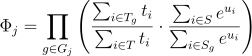
Where Gj are the tags of task j (including the project), Sg is the set of pending tasks tagged with g, S is the set of all pending tags, Tg is the set of tasks with tagged with g with any time spent and T is the set of all tags with any tipe spent.
This coefficient is intended to balance the daily time spent on a tag according to the share remaining tasks should take.
Edge cases
There are two edge cases: the one where a long task has the greatest urgency and remaining tasks can be sorted out in a short time and the other where a task has a urgency that doesn't allow task commutation
Long task problem
If a long task has the greatest urgency and all the other tasks can be readily done, the greatest task will be started. On the first commutation event, this long task will have 100% of the executed time, so the second task will be selected. When this second task is marked as done, the long task would go back having 100% of executed time so it will be skipped again.
In order to overcome this issue, whenever the greatest urgency task has 100%, it will remain on this task except if the last recorded time is bigger than a configured value (typically 25min).
High urgency task problem
In the event of a task with an urgency much greater than the rest, the next command would never indicate any commutation (except when there is a long task problem). When this happens, the next command will suggest a commutation to the task with the second greatest difference between time spent fraction and the ideal fraction if the time spent on the task is grater than a maximum time (typically 25min).
1 maintainer

Metadata
1 maintainer
Release files for taskwarrior_scheduler 0.1.2
For a detailed explanation of source distributions (sdists) and built distributions (wheels), please see the package formats documentation.
Source distribution (sdist)
| File | Size | Uploaded | |
|---|---|---|---|
| taskwarrior_scheduler-0.1.2.tar.gz | 19.2 kB | Details |
Built distribution (wheel)
| File | Interpreter | ABI | Platform | Reset |
|---|---|---|---|---|
| taskwarrior_scheduler-0.1.2-py3-none-any.whl | Python 3 | none | any | Details |
Total release size: 41.2 kB
Release files / taskwarrior_scheduler-0.1.2.tar.gz
| Download URL | taskwarrior_scheduler-0.1.2.tar.gz |
|---|---|
| Size | 19.2 kB |
| Tags | Source |
|
SHA-256 checksum How to use checksums |
3e4e5c8b587959e379d89b2a4391b71e6fd21b3efb883d51ebda4c0f0a8c5623
|
|
BLAKE2b-256 checksum How to use checksums |
d6e63b966163f742451d53ddbdfa359643b75d79f94bc7d6e79708d6a947f535
|
| Upload date | |
|
Uploaded using Trusted Publishing? What is trusted publishing? |
No |
| Uploaded via |
poetry/2.3.2 CPython/3.13.12 Linux/6.14.0-1017-azure
|
Release files / taskwarrior_scheduler-0.1.2-py3-none-any.whl
| Download URL | taskwarrior_scheduler-0.1.2-py3-none-any.whl |
|---|---|
| Size | 22.0 kB |
| Tags | Python 3 |
|
SHA-256 checksum How to use checksums |
f0908abeb350cedce4c7e33ac5e83849481bcdd8aaa9b212200a793240338583
|
|
BLAKE2b-256 checksum How to use checksums |
14dd77d02079f752b22752fef13561520af572cf032e5868e5ab83eb46f2943d
|
| Upload date | |
|
Uploaded using Trusted Publishing? What is trusted publishing? |
No |
| Uploaded via |
poetry/2.3.2 CPython/3.13.12 Linux/6.14.0-1017-azure
|














