






🚩 Table of contents
👀 What is tattler?
If you are building an online service, you’ll need to notify your users. Sign up, password reset and the like.
Tattler helps you send beautiful branded notifications easily, via email and SMS.
It’s perfect for python and django with its easy API:
from auth.models import User
from tattler.client.tattler_py import send_notification

myusr = User.object.get(pk=123)
send_notification('mywebapp', 'account_upgraded', 'foo@bar.com', {'user': myusr})
… but it’s easy to use with any other application via its HTTP API too:
curl -X POST 'http://127.0.0.1:11503/notification/mywebapp/account_upgraded/?user=foo@bar.com'Your designers control templates with a simple directory structure:
templates_base/
└── mywebapp/
   └── password_changed/      <- your event, one of many
      ├── email/
      │  ├── subject.txt
      │  ├── body.mjml        <- in MJML format, see https://www.mjml.io
      │  ├── body.txt         <- text fallback
      │  └── priority.txt
      └── sms/
         └── body.txt
Tattler helps you with these basics:
Templates: Load and expand powerful templates for event password_changed for email, SMS etc.
MIME: Assemble a great-looking email which displays perfectly on all clients and satisfies spam filters (with MJML).
Delivery: Send everything via SMTP and/or SMS.
and here’s some more advanced features:
Dev mode: Let your applications trigger notifications to the real user, while tattler only delivers to your debug address.
Django: Easily pass whole Django models to your templates without manual serialization.
CI/CD: let tattler verify in your CI/CD that your code supplies all the data you require to your templates.
Addressbook: Fetch the user’s email address and mobile number from your DB (with trivial-to-write plug-ins).
Template data: Fetch variables for your templates natively (with trivial-to-write plug-ins) instead of assembling long context dictionaries.
Tattler is designed with simplicity in mind. It strives for trivial deployment so you can focus on your communication, brand and customer journey.
If your system sends notifications from multiple different softwares – say a web application, a billing daemon, and a cron job which monitors inventory – then tattler multiples your simplification gains 🚀
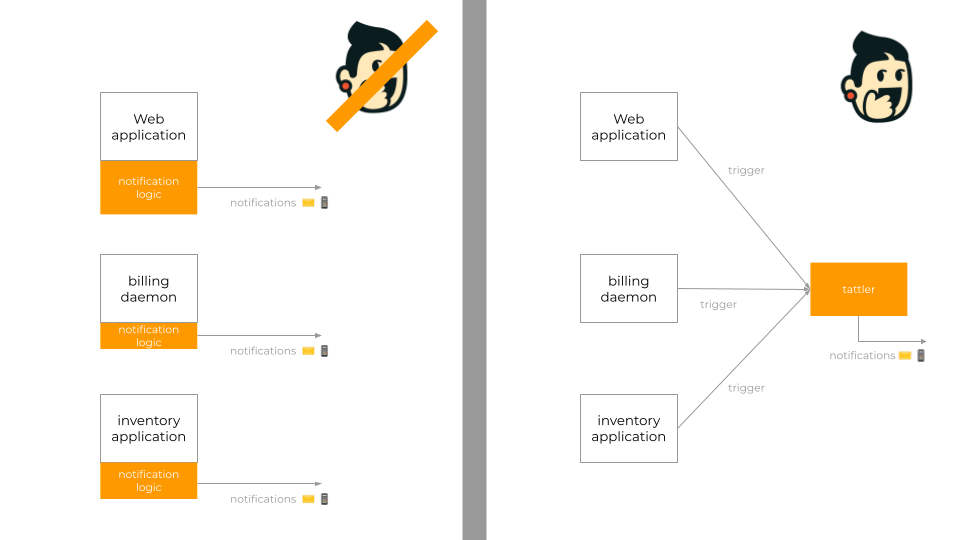
😵💫 Don’t beat around the bush!
Tattler is:
a server
written in python
for UNIX systems
that exposes a REST interface
which your applications contact
to request delivery of notifications to users.
🤩 Examples
Here’s a little gallery of notifications sent via tattler to email and SMS:
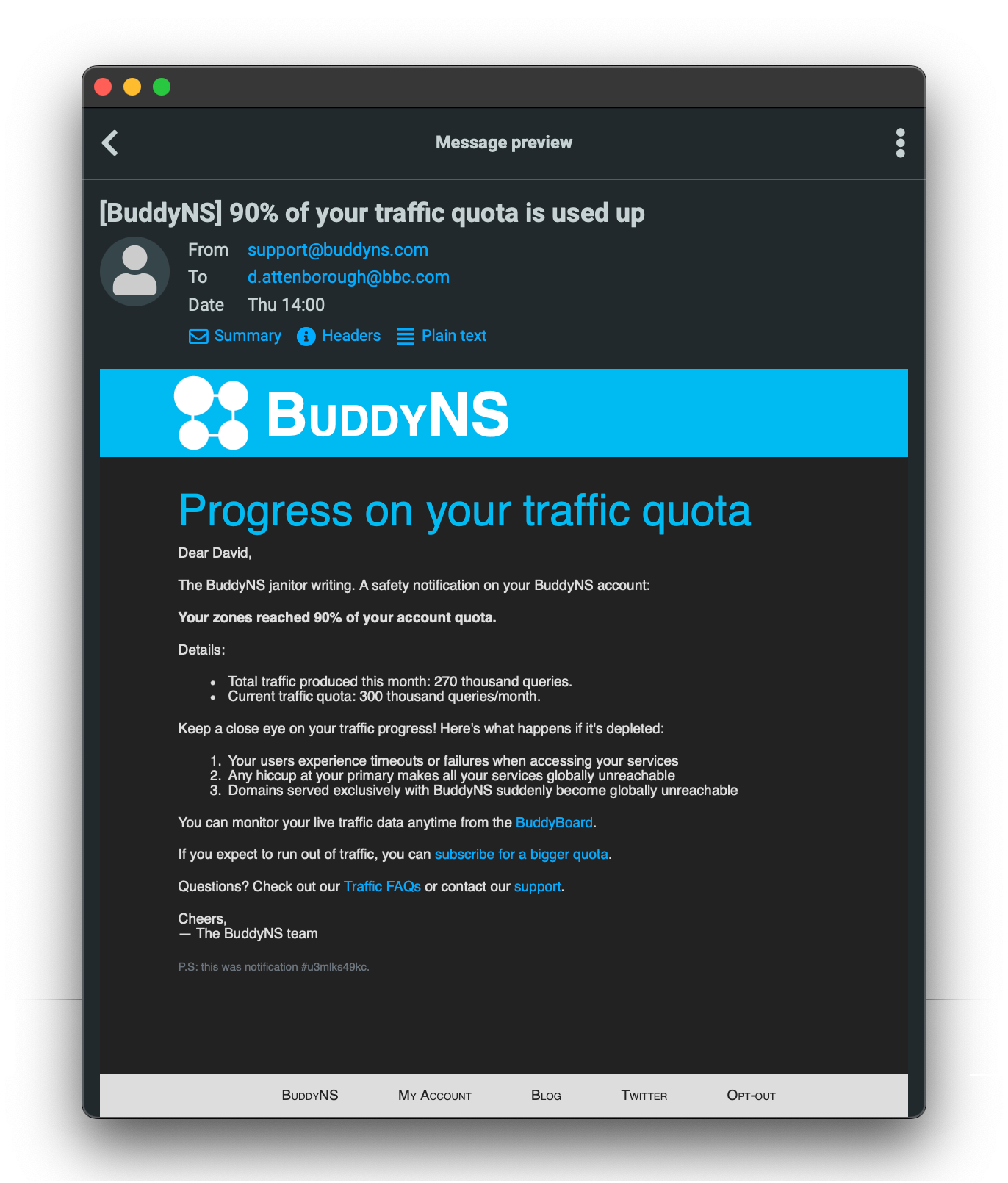
Fig 1. Example notification as HTML email. |
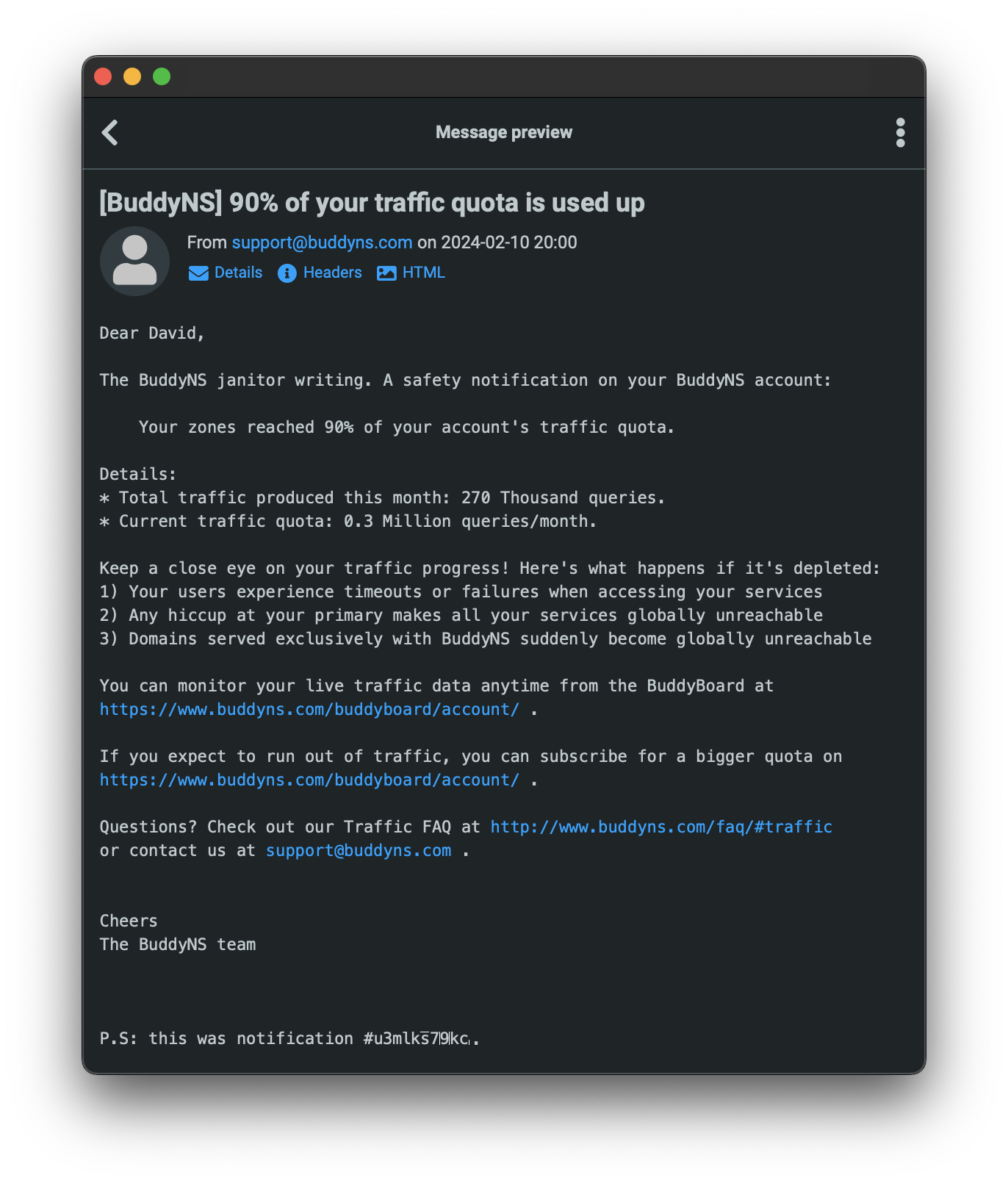
Fig 2. Its corresponding plain text version. |
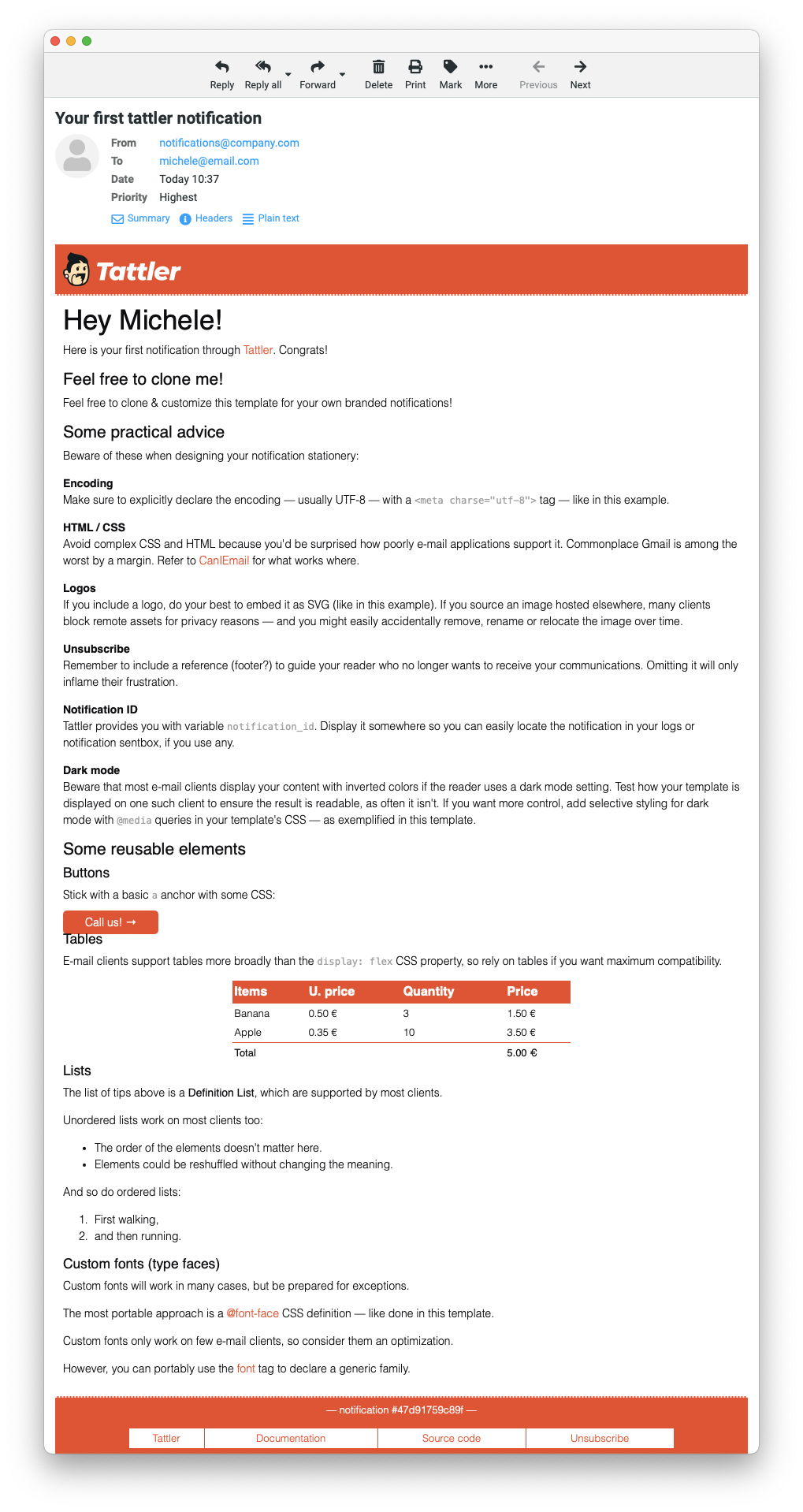
Fig 3. Tattler’s demo notification with reusable code samples. |
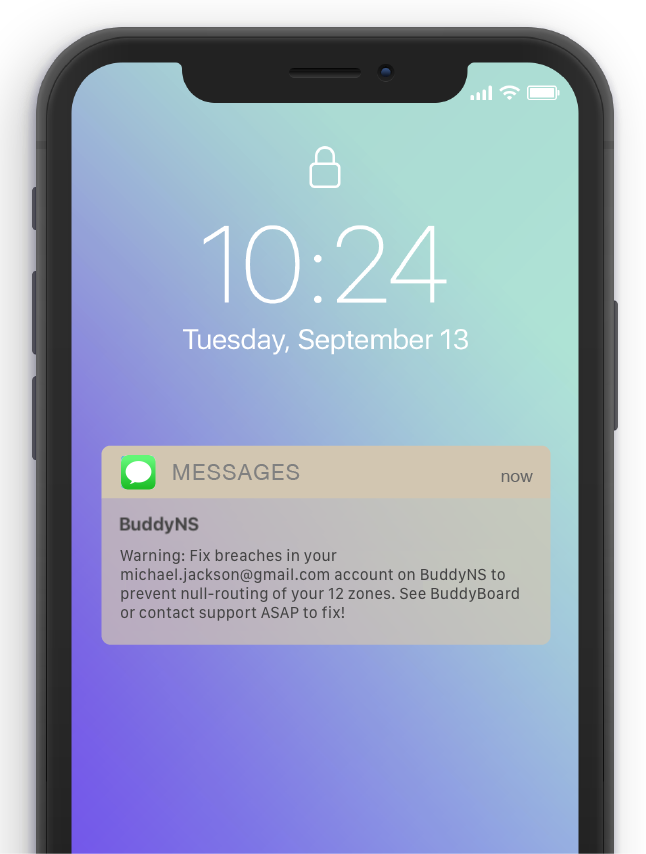
Fig 4. A SMS notification. |
🚀 Quick start
Install tattler:
# create and load a virtualenv to install into
mkdir ~/tattler_quickstart
python3 -m venv ~/tattler_quickstart/venv
. ~/tattler_quickstart/venv/bin/activate

# install tattler into it
pip install tattler
Run tattler server:
export TATTLER_MASTER_MODE=production

# if you need to customize your SMTP settings
export TATTLER_SMTP_ADDRESS="127.0.0.1:25"
export TATTLER_SMTP_AUTH="username:password" # you will learn secure configuration later
export TATTLER_SMTP_TLS=yes

# run tattler server on default 127.0.0.1:11503
tattler_server
Trigger a demo notification via HTTP:
# in a new terminal:

# replace ``your@email.com`` with your actual email address
curl -X POST 'http://127.0.0.1:11503/notification/demoscope/demoevent/?mode=production&user=your@email.com'
… or via command-line utility:
# load the same virtual environment where you installed tattler server
. ~/tattler_quickstart/venv/bin/activate

# replace ``your@email.com`` with your actual email address
tattler_notify -s '127.0.0.1:11503' -m production your@email.com demoscope demoevent
… or via tattler’s python SDK:
from tattler.client.tattler_py import send_notification

# replace ``your@email.com`` with your actual email address
send_notification('demoscope', 'demoevent', 'your@email.com', mode='production', srv_addr='127.0.0.1', srv_port=11503)
Done!
Want more? Proceed to the complete quickstart in tattler’s documentation for plug-ins, deployment and more.
📋 Templates
Tattler uses the powerful Jinja as default template engine:
Dear {{ user_firstname }}!

Thank you for your order #{{ order.number }} with {{ order.products|length }} products:

{% for product in order.products %}
- {{ product.name }}
{% endfor %}

{% if user_account_type == 'premium' %}
As a premium customer, your order will be at your doorstep tomorrow!
{% else %}
Delivery is expected by {{ delivery_date }}.
{% endif %}

{# a comment #}
Used to a different template engine already? Tattler also supports customizing this, too.
Tattler also allows you to share common style among all your notifications with base templates. Put your style, header, footer and any common text into the base template – so your event templates only need to define the content specific to them.
📸 Live previews
Perfect your communication in no time by getting high-fidelity, real-time previews while you edit your templates.
Tattler includes tattler_livepreview, which monitors your template files, and fires a preview notification as soon as they change.
What’s cool about this:
You get the real output directly in your email program, where your users will. No misleading shortcuts with browsers!
You get variables expanded too, giving you faithful previews of your filters, loops, conditionals etc.
You do continual testing of template expansion before go-live, because tattler_livepreview runs through the very logic used by tattler_server.
💙 Help us be better
Here’s how you can help:
⭐️ star our repository if you like tattler. That’s our go-to place whenever we feel sad! 😁
Post about tattler online.
And if you’re a developer:
Report any issue in our code or docs. We take those seriously.
Package tattler for your distribution. Else Ubuntu, Debian, CentOS and FreeBSD will serve the most people.
Implement a client for tattler in another language.
See our contributing guidelines for details.
🎖️ License
Tattler is open-source software (BSD 3-clause license).
📈 Enterprise users
Tattler is enterprise-friendly. Enterprise users avail of a subscription which provides a bugfixing warranty, extra features, and patronage for the continuity of the project.
📌 Links
1 maintainer

Metadata
1 maintainer
Release files for tattler 3.4.0
For a detailed explanation of source distributions (sdists) and built distributions (wheels), please see the package formats documentation.
Source distribution (sdist)
| File | Size | Uploaded | Provenance | |
|---|---|---|---|---|
| tattler-3.4.0.tar.gz | 104.0 kB | Without provenance | Details |
Built distribution (wheel)
| File | Interpreter | ABI | Platform | Reset |
|---|---|---|---|---|
| tattler-3.4.0-py3-none-any.whl | Python 3 | none | any | Details |
Total release size: 231.1 kB
Release files / tattler-3.4.0.tar.gz
| Download URL | tattler-3.4.0.tar.gz |
|---|---|
| Size | 104.0 kB |
| Tags | Source |
|
SHA-256 checksum How to use checksums |
c0ea495e17f69c5b5e627e733e6d01d84f940defd43f850b6883df231714fb6f
|
|
BLAKE2b-256 checksum How to use checksums |
37a1e56b01ee0afafc5886b96dc9ef543171165203a6cfc46a3324710052b79c
|
| Upload date | |
|
Uploaded using Trusted Publishing? What is trusted publishing? |
No |
| Uploaded via |
twine/6.2.0 CPython/3.14.5
|
Release files / tattler-3.4.0-py3-none-any.whl
| Download URL | tattler-3.4.0-py3-none-any.whl |
|---|---|
| Size | 127.0 kB |
| Tags | Python 3 |
|
SHA-256 checksum How to use checksums |
f7d23f3851de0c615557bf38b059a8f8c4334cdb43b6b0b65977aaf740e6a1de
|
|
BLAKE2b-256 checksum How to use checksums |
ae9d920b97a26c05e7585c0497342a94df019b701d0338ca827fed1bd60eae40
|
| Upload date | |
|
Uploaded using Trusted Publishing? What is trusted publishing? |
No |
| Uploaded via |
twine/6.2.0 CPython/3.14.5
|
Security for tattler 3.4.0
Provenance
Provenance describes where a file came from. On PyPI, provenance is shared via attestations, which provide a verifiable record of the build or publishing details. View details, limitations and caveats.
No provenance found
None of the files in this release were uploaded with provenance metadata.
A note on package security
PyPI is a repository for distributing packages, not a service for auditing them. While third-party security researchers and our staff do their best to detect and remove malicious packages, PyPI cannot guarantee the quality, security or suitability of any given package.














