




Generate templated documents within Django in any format supported by LibreOffice: texts, spreadsheets, presentations etc.
Free software: MIT license
Documentation: https://templated-docs.readthedocs.io.
Requirements
Python 2.7 or 3.4+
Django >= 1.8
A recent LibreOffice version (>=4.3.0) supporting LibreOfficeKit API.
Example usage
Create a sample.odt document (make sure it’s in OpenDocument format) and put it in your Django templates folder. It should look something like this:
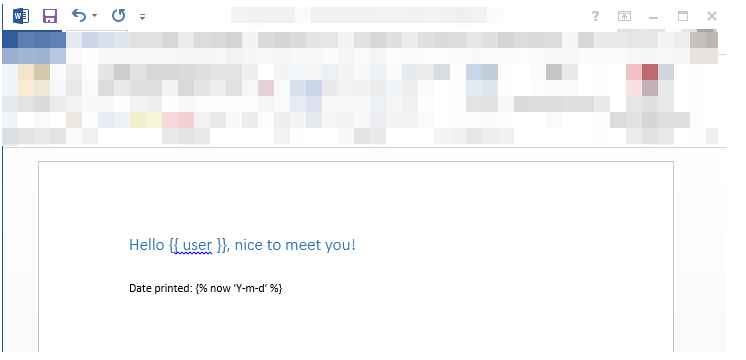
Then write a view to generate documents from this template:
from templated_docs import fill_template
from templated_docs.http import FileResponse

def get_document(request):
    """
    A view to get a document filled with context variables.
    """
    context = {'user': request.user}  # Just an example

    filename = fill_template('sample.odt', context, output_format='pdf')
    visible_filename = 'greeting.pdf'

    return FileResponse(filename, visible_filename)
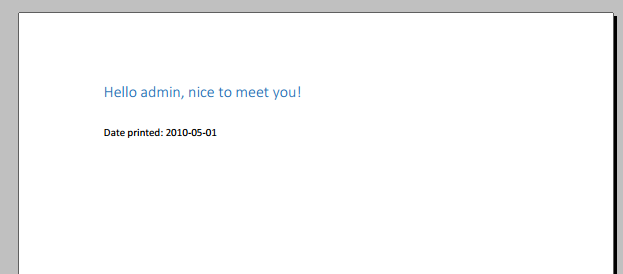
Navigate to the url your view is connected to, and you’ll see a rendered and converted document:
For more examples, see the examples/ subfolder in the repository. More detailed documentation is available on https://templated-docs.readthedocs.io.
Credits
Templated-docs was written by Alex Morozov.
As the repository is left idle for 2 years, Sian Lerk Lau has forked and resume the task of updating the module.
This package was created with Cookiecutter and the audreyr/cookiecutter-pypackage project template.


Release files for templateddocs 0.3.4
For a detailed explanation of source distributions (sdists) and built distributions (wheels), please see the package formats documentation.
Source distribution (sdist)
| File | Size | Uploaded | |
|---|---|---|---|
| templateddocs-0.3.4.tar.gz | 48.4 kB | Details |
Release files / templateddocs-0.3.4.tar.gz
| Download URL | templateddocs-0.3.4.tar.gz |
|---|---|
| Size | 48.4 kB |
| Tags | Source |
|
SHA-256 checksum How to use checksums |
15d5ea7e397a0acd08a59a022e9656c4aeb64135ca51d2afaa8c6261c67ed20b
|
|
BLAKE2b-256 checksum How to use checksums |
ab2497c989d71465cbf2d3dda953e60e5f561c4b8bb5c0303ff672aab83f74bc
|
| Upload date | |
|
Uploaded using Trusted Publishing? What is trusted publishing? |
No |
| Uploaded via |
Python-urllib/3.7
|














