
termfits
A FITS image viewer that runs in your terminal, built for quick looks at radio images over SSH: no X forwarding, no VNC, no copying files back to your laptop.
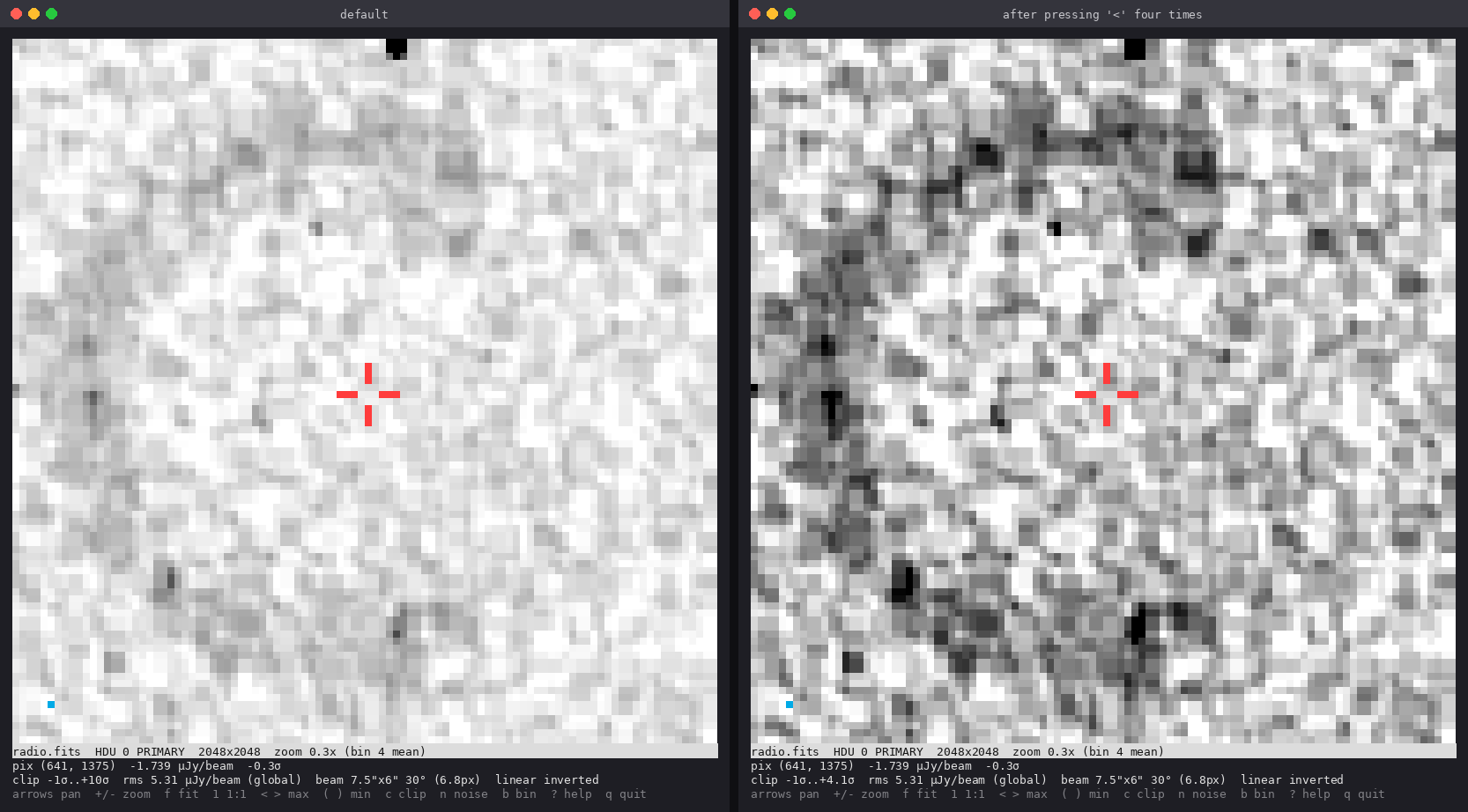
It draws the image with Unicode half-block characters in 24-bit colour. Each character cell holds two pixels, so a 100 x 100 character window shows a 100 x 200 grid of roughly square pixels. You can zoom, pan, step through cube planes and switch extensions, and the status bar reports the pixel value, its significance in sigma, the position in RA/Dec, the noise and the beam.
Install
pip install termfits
This installs a termfits command. termfits needs Python 3.9+, numpy and astropy, and
a terminal with truecolour support: most current terminals have it, including iTerm2,
GNOME Terminal, Konsole, kitty, WezTerm, Alacritty, Windows Terminal (via WSL) and tmux
with set -g default-terminal "tmux-256color" and set -as terminal-features ",*:RGB".
It runs on Linux and macOS, or under WSL on Windows.
Use
termfits image.fits
termfits cube.fits --plane 120 --cmap inferno
termfits image.fits --sigma-hi 4           # tighter limits for faint emission
termfits image.fits --width 100 --height 50  # square-ish view for a square image
Make your terminal at least 100 columns by 104 rows for the default view (100 x 100
plus a 4-line status bar), or set --width / --height to fit. Terminal characters are
about twice as tall as they are wide, so --height set to half of --width gives a
square viewing area.
Press ? in the viewer for the key list.
| Keys | Action |
|---|---|
arrows or h j k l |
pan by 10% of the view |
Shift+arrows or H J K L |
pan by half the view |
+ / - |
zoom in / out |
f / 1 / r |
fit image / 1:1 / reset |
< > |
lower / raise the upper display limit (sigma) |
( ) |
lower / raise the lower display limit (sigma) |
c |
cycle clip mode: sigma, 99.5, 99, 98, 95 %, min/max |
n / N |
measure the noise in the current view / back to the whole image |
b |
zoomed-out binning: block mean / block max |
m / M |
next / previous colour map |
s |
cycle stretch: linear, sqrt, log, asinh |
e / x |
toggle beam ellipse / crosshair |
[ ] |
previous / next plane (channel, Stokes) |
Tab |
next image extension |
q or Esc |
quit |
termfits image.fits --snapshot prints one frame to stdout and exits, which is handy
for logs or notebooks.
Radio defaults
- Display limits from the noise. The rms is estimated as 1.4826 x the median
absolute deviation, which bright sources barely affect. The default range is -1 to
+10 sigma about the median. Press
nto re-measure the noise from the region in view when it varies across the field (e.g. towards the primary-beam edge). - Values in sigma. The status bar shows the pixel under the crosshair in BUNIT (scaled to Jy, mJy or µJy so the rms reads sensibly) and in sigma.
- Beam. BMAJ/BMIN/BPA from the header are shown in arcsec and pixels, and the beam is drawn in the lower-left corner once it is large enough to see.
- Blanked pixels (NaNs, e.g. outside a primary-beam cut) are drawn in a muted purple so they are not mistaken for zero.
Zoomed out: what you can and can't trust
When the image is larger than the view, blocks of pixels are combined into one screen pixel; none are skipped.
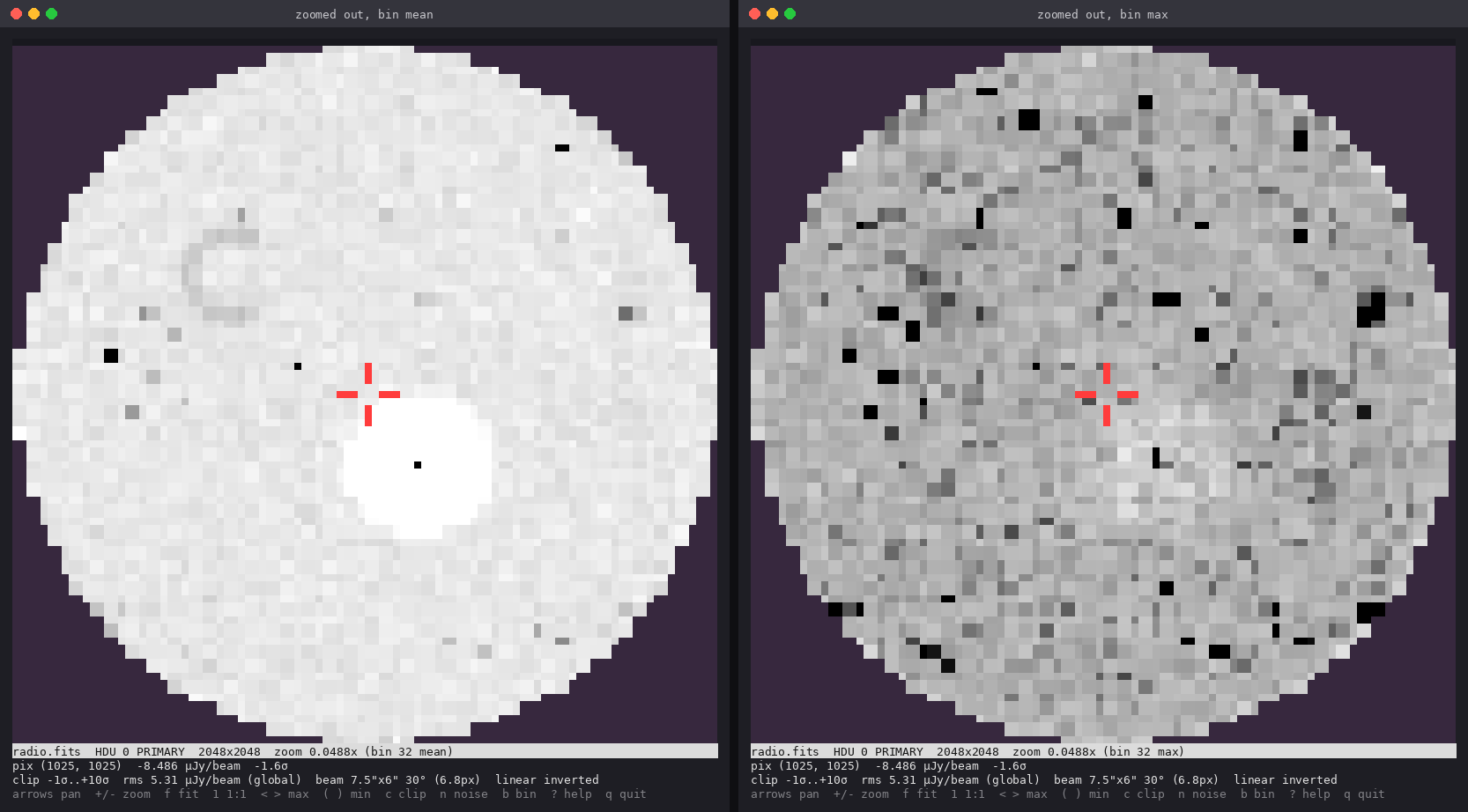
- Block mean (default) lowers the noise, so faint extended emission stands out, but faint compact sources are diluted and can vanish.
- Block max (
b) keeps every compact source visible, but it also lifts the background: the maximum of many noise pixels sits around +3 sigma, so noise peaks look like sources.
Use either for finding candidates, then press 1 to inspect them at full resolution.
For decisions about marginal detections, use a full-resolution viewer such as CARTA
or DS9.
Colour maps
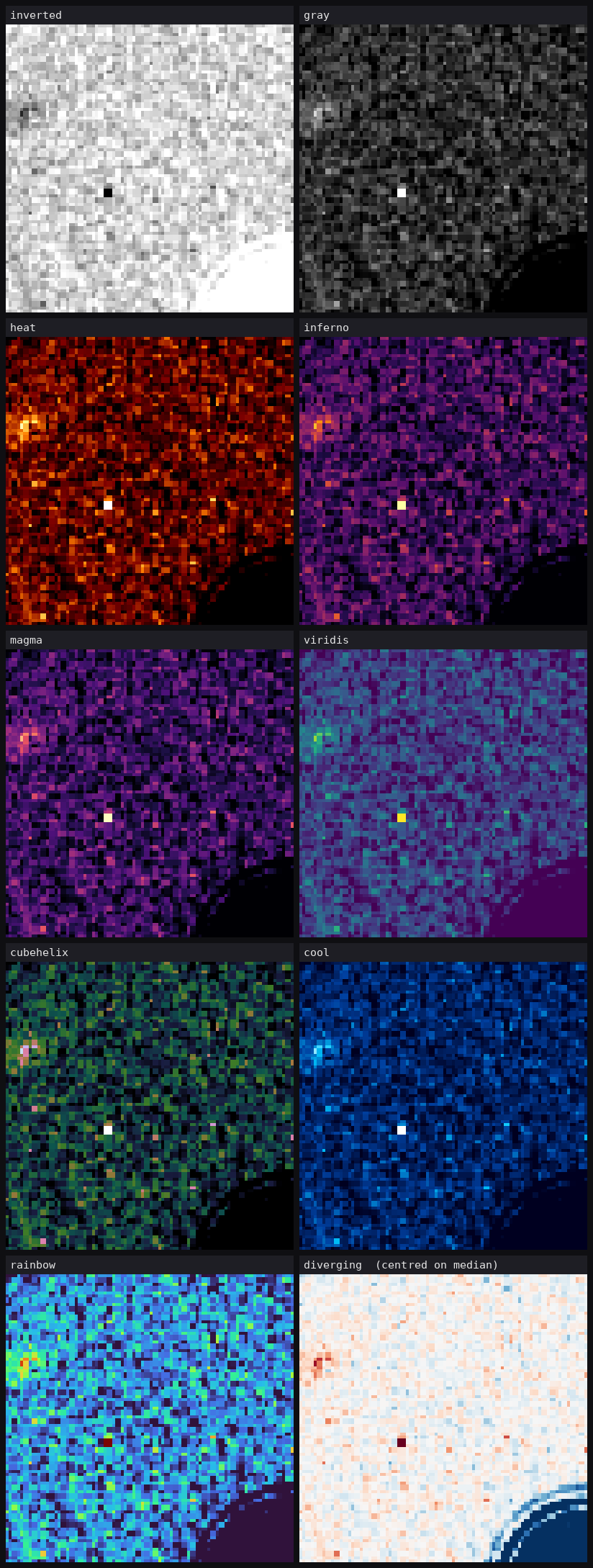
inverted (default) and gray; heat (DS9-style); inferno, magma, viridis and
cubehelix, which are perceptually uniform and the best colour choices for faint
features; cool; rainbow (turbo-like, good for bright high-dynamic-range regions,
but it creates false contours in noise); and diverging, which is centred on the
median so negative sidelobes show blue and positive emission red.
Truecolour gives the full range; --256 is a fallback for terminals without it, and
colour maps get coarse there (6 levels per channel).
Data support
- 2-D images, and cubes of any dimension: extra axes (FREQ, STOKES, ...) are
flattened into planes stepped with
[and]. - Multi-extension files: every image HDU is reachable with
Tab. - RA/Dec readout from the celestial WCS via astropy.
- Large images: one plane is loaded into memory as float32 (about 400 MB for 10k x 10k). The first zoom-out builds the binned copies, which takes a few seconds; after that it is quick.
- If astropy is missing, a built-in reader handles plain uncompressed images, without WCS.
Not yet supported: per-channel beams stored in a CASA BEAMS table (the header beam is
used), and tile-compressed images without astropy.
Development
git clone https://github.com/ianheywood/termfits
cd termfits
pip install -e ".[test]"
pytest
The screenshots in docs/images were rendered from termfits' own output, using
synthetic data.
Licence
MIT. See LICENSE.
1 maintainer

Metadata
1 maintainer
Release files for termfits 0.1.0
For a detailed explanation of source distributions (sdists) and built distributions (wheels), please see the package formats documentation.
Source distribution (sdist)
| File | Size | Uploaded | |
|---|---|---|---|
| termfits-0.1.0.tar.gz | 21.4 kB | Details |
Built distribution (wheel)
| File | Interpreter | ABI | Platform | Reset |
|---|---|---|---|---|
| termfits-0.1.0-py3-none-any.whl | Python 3 | none | any | Details |
Total release size: 37.6 kB
Release files / termfits-0.1.0.tar.gz
| Download URL | termfits-0.1.0.tar.gz |
|---|---|
| Size | 21.4 kB |
| Tags | Source |
|
SHA-256 checksum How to use checksums |
2727be899cf356adfeb7c7df367675b625439df76b713139cff6039b1ce92dc2
|
|
BLAKE2b-256 checksum How to use checksums |
c4b488efb274ac6c272a99399cd779726eb73f6a8787cb71ac5a41132b6f32ee
|
| Upload date | |
|
Uploaded using Trusted Publishing? What is trusted publishing? |
Yes |
| Uploaded via |
twine/7.0.0 CPython/3.13.14
|
Provenance
Provenance describes where a file came from. On PyPI, provenance is shared via attestations, which provide a verifiable record of the build or publishing details. View details, limitations and caveats.


PyPI Publish Attestation
PyPI verified that this artifact, at this checksum, originated from the publisher listed below.
Signed by GitHub Actions, verified by PyPI on Oct 13, 2026.
Transparency logRelease files / termfits-0.1.0-py3-none-any.whl
| Download URL | termfits-0.1.0-py3-none-any.whl |
|---|---|
| Size | 16.2 kB |
| Tags | Python 3 |
|
SHA-256 checksum How to use checksums |
7dbada126a158f64c8022bd55b06b6b4d95e0033a49b5570ad29d5d8057ac3f4
|
|
BLAKE2b-256 checksum How to use checksums |
3f51da1151b3f8f34733cd640aa0ea261c517db700fe3c57ed9c6d9081539fbe
|
| Upload date | |
|
Uploaded using Trusted Publishing? What is trusted publishing? |
Yes |
| Uploaded via |
twine/7.0.0 CPython/3.13.14
|
Provenance
Provenance describes where a file came from. On PyPI, provenance is shared via attestations, which provide a verifiable record of the build or publishing details. View details, limitations and caveats.
PyPI Publish Attestation
PyPI verified that this artifact, at this checksum, originated from the publisher listed below.
Signed by GitHub Actions, verified by PyPI on Oct 13, 2026.
Transparency log












