






Welcome to terminalGPT, the terminal-based ChatGPT personal assistant app! With terminalGPT, you can easily interact with the OpenAI GPT-3.5 and GPT-4 language models.
Whether you need help with a quick question or want to explore a complex topic, TerminalGPT is here to assist you. Simply enter your query and TerminalGPT will provide you with the best answer possible based on its extensive knowledge base.
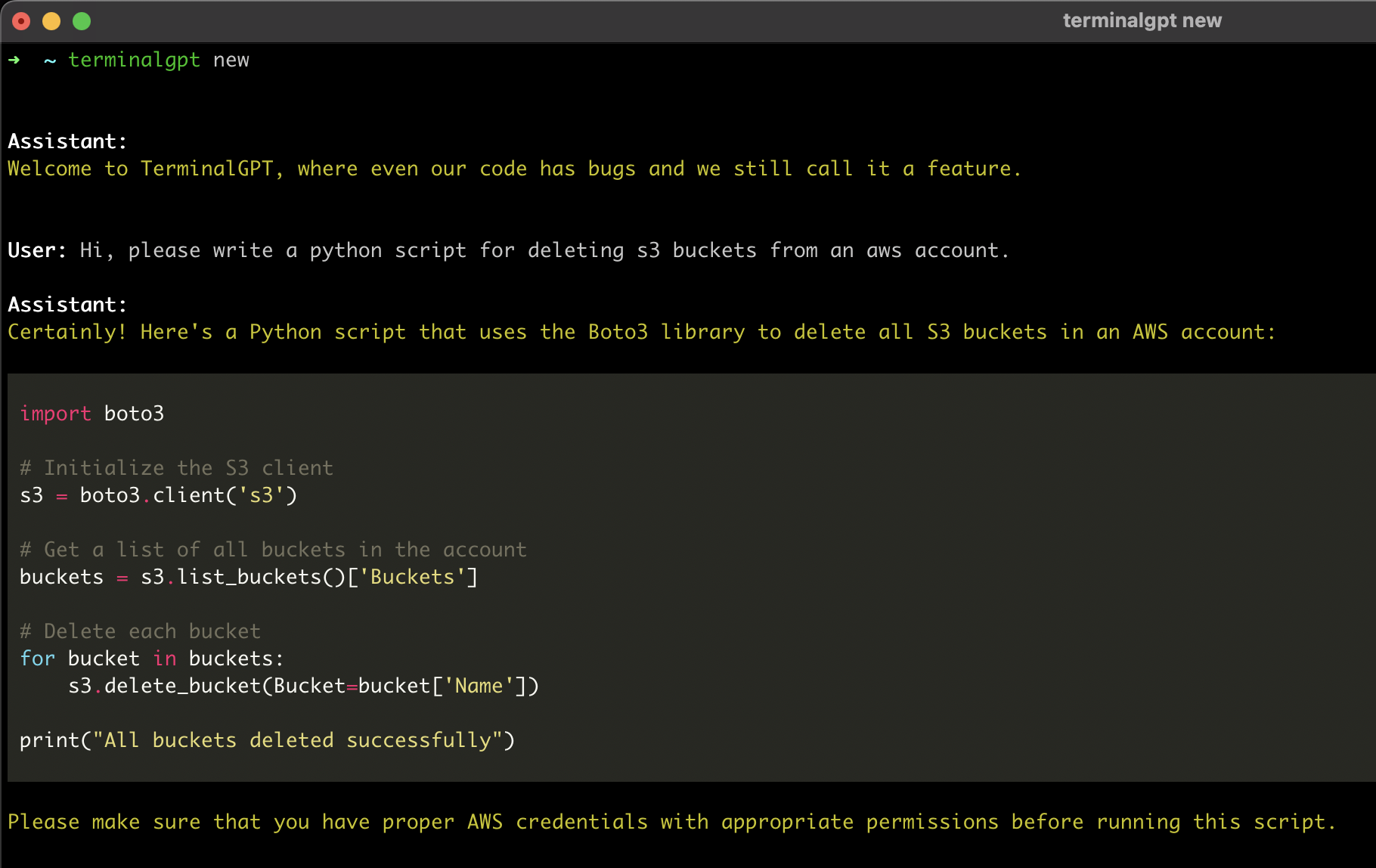
Why?
Some advantages of using TerminalGPT over the chatGPT browser-based app:
- It doesn't disconnect like the browser-based app, so you can leave it running in a terminal session on the side without losing context.
- It's highly available and can be used whenever you need it.
- It's faster with replies than the browser-based app.
- You can use TerminalGPT with your IDE terminal, which means you won't have to constantly switch between your browser and your IDE when you have questions.
- TerminalGPT's answers are tailored to your machine's operating system, distribution, and chip-set architecture
- Doesn't use your conversation data for training the model (unlike the browser-based app).
- Your conversations are stored locally on your machine, so only you can access them.
Pre-requisites
- Python 3.6 or higher
- An OpenAI Account and API key.
- Sign up at https://beta.openai.com/signup using email or Google/Microsoft account.
- Go to https://beta.openai.com/account/api-keys or click on "View API keys" in the menu to get your API key.
Installation
- Install the latest TerminalGPT with pip install.
pip install terminalgpt -U --user
or
pip3 install terminalgpt -U --user
- Now you have
terminalgptcommand available in your terminal. Run the following install command to configure the app.
terminalgpt install
-
Enter your OpenAI API key when prompted and press enter.
-
Choose one of the models below as the default model. it can be overridden with the
-m --modelflag later. -
Choose a printing style ('markdown' is recommended and suggested by default)
That's it! You're ready to use TerminalGPT!
You can now start a new conversation with terminalgpt new or load a previous conversation with terminalgpt load. Also you can reinstall with terminalgpt install or delete previous conversations with terminalgpt delete.
Usage
TL;DR
Usage: terminalgpt [OPTIONS] COMMAND [ARGS]...

  *~ TerminalGPT - Your Personal Terminal Assistant ~*

Options:
  --version                       Show the version and exit.
  -m, --model [gpt-3.5-turbo|gpt-3.5-turbo-16k|gpt-4|gpt-4-32k|gpt-4-1106-preview]
                                  Choose a model to use.
  -s, --style [markdown|plain]    Output style.
  -t, --token-limit INTEGER       Set the token limit. this will override the
                                  default token limit for the chosen model.
  --help                          Show this message and exit.

Commands:
  delete    Choose a previous conversation to delete.
  install   Installing the OpenAI API key and setup some default settings.
  load      Choose a previous conversation to load.
  new       Start a new conversation.
  one-shot  One shot question answer.
New
Start a new conversation:
terminalgpt new
One-Shot
One shot question to get a fast answer in the terminal.
terminalgpt one-shot "What is the meaning of life?"
Load
Load previous conversations:
terminalgpt load
Delete
Delete previous conversations:
terminalgpt delete
1 maintainer

Release files for TerminalGPT-main 0.2
For a detailed explanation of source distributions (sdists) and built distributions (wheels), please see the package formats documentation.
Source distribution (sdist)
| File | Size | Uploaded | |
|---|---|---|---|
| TerminalGPT-main-0.2.tar.gz | 14.7 kB | Details |
Built distribution (wheel)
| File | Interpreter | ABI | Platform | Reset |
|---|---|---|---|---|
| TerminalGPT_main-0.2-py3-none-any.whl | Python 3 | none | any | Details |
Total release size: 31.3 kB
Release files / TerminalGPT-main-0.2.tar.gz
| Download URL | TerminalGPT-main-0.2.tar.gz |
|---|---|
| Size | 14.7 kB |
| Tags | Source |
|
SHA-256 checksum How to use checksums |
bf3d5e95f189edb3d77ad61bdac8732e3459f774feadf08e418cbaf818742dc6
|
|
BLAKE2b-256 checksum How to use checksums |
abbb8205c9fb81e29cce581330bf02c4fedf0a1da57a72b6fe1f5672aed61c24
|
| Upload date | |
|
Uploaded using Trusted Publishing? What is trusted publishing? |
No |
| Uploaded via |
twine/5.0.0 CPython/3.10.0
|
Release files / TerminalGPT_main-0.2-py3-none-any.whl
| Download URL | TerminalGPT_main-0.2-py3-none-any.whl |
|---|---|
| Size | 16.6 kB |
| Tags | Python 3 |
|
SHA-256 checksum How to use checksums |
23c06d32e22887c87b61eb3ae81ec85b7a14cac69fa8eb8bb47645c8521779b9
|
|
BLAKE2b-256 checksum How to use checksums |
3409cbab896e68cc83c46d10ac62cc0763f1a7148723b6cde644af35ec13abe1
|
| Upload date | |
|
Uploaded using Trusted Publishing? What is trusted publishing? |
No |
| Uploaded via |
twine/5.0.0 CPython/3.10.0
|













