
⌨️ Terminal Key Monitor 📟
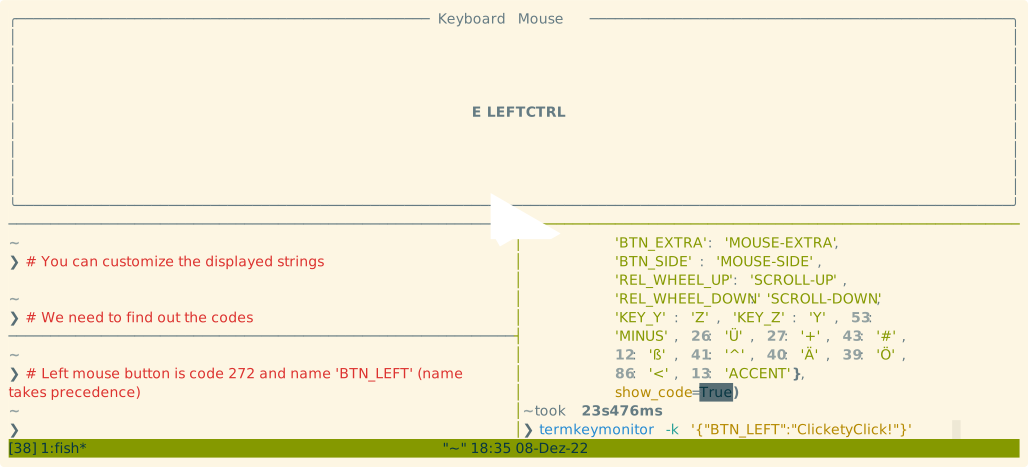
Show pressed keys in the terminal. Useful e.g. when recording asciinema screencasts.
termkeymonitor connects directly to a local input device using evdev.
📥 Installation
# from PyPI
pip install termkeymonitor
# directly from GitLab
pip install git+https://gitlab.com/nobodyinperson/termkeymonitor.git
❓ Usage
# use any of the below commands to invoke
termkeymonitor
python -m termkeymonitor
python3 -m termkeymonitor
🎥 Screencast
⚠️ Caveats
- no Windows and MacOS support (Apparently
evdevonly works on Linux... 😔, might need to use some other backend likepynputin the future) - needs a local keyboard connected so doesn't work as expected on remote machines (e.g. via SSH)
- Make sure you have permissions to access the
/dev/input/event*files (this normally means you need to add yourself to theinputgroup)
1 maintainer

Metadata
1 maintainer
Release files for termkeymonitor 1.4.5
For a detailed explanation of source distributions (sdists) and built distributions (wheels), please see the package formats documentation.
Source distribution (sdist)
| File | Size | Uploaded | Provenance | |
|---|---|---|---|---|
| termkeymonitor-1.4.5.tar.gz | 6.3 kB | Without provenance | Details |
Release files / termkeymonitor-1.4.5.tar.gz
| Download URL | termkeymonitor-1.4.5.tar.gz |
|---|---|
| Size | 6.3 kB |
| Tags | Source |
|
SHA-256 checksum How to use checksums |
b8db174890adb5d5036e5f2ca4cb3b1c74782803d7e776e7230dea89977f054f
|
|
BLAKE2b-256 checksum How to use checksums |
05e30a331f642ce7d5f0b3929ddb2744072c1f5ca43b781654b7ac80fec65a83
|
| Upload date | |
|
Uploaded using Trusted Publishing? What is trusted publishing? |
No |
| Uploaded via |
twine/4.0.2 CPython/3.11.1
|
Security for termkeymonitor 1.4.5
Provenance
Provenance describes where a file came from. On PyPI, provenance is shared via attestations, which provide a verifiable record of the build or publishing details. View details, limitations and caveats.
No provenance found
None of the files in this release were uploaded with provenance metadata.
A note on package security
PyPI is a repository for distributing packages, not a service for auditing them. While third-party security researchers and our staff do their best to detect and remove malicious packages, PyPI cannot guarantee the quality, security or suitability of any given package.














