
This release is a pre-release and may not be stable for production use.








Test Junkie 

Installation
From your favorite terminal:
pip install test-junkie or python -m pip install test-junkie
Basic Usage
Save code bellow into a Python file. Lets say C:\Development\TestJunkie\demo.py.
from test_junkie.decorators import Suite, beforeTest, afterTest, test, beforeClass, afterClass


@Suite()
class ExampleTestSuite:

    @beforeClass()
    def before_class(self):
        print("Hi, I'm before class")

    @beforeTest()
    def before_test(self):
        print("Hi, I'm before test")

    @afterTest()
    def after_test(self):
        print("Hi, I'm after test")

    @afterClass()
    def after_class(self):
        print("Hi, I'm after class")

    @test()
    def something_to_test1(self):
        print("Hi, I'm test #1")

    @test()
    def something_to_test2(self):
        print("Hi, I'm test #2")

    @test()
    def something_to_test3(self):
        print("Hi, I'm test #3")


# and to run this marvel programmatically, all you need to do . . .
if "__main__" == __name__:
    from test_junkie.runner import Runner
    runner = Runner([ExampleTestSuite])
    runner.run()
    # OR use Test Junkie's CLI: `tj run -s C:\Development\TestJunkie\demo.py`
CLI
Starting from version 0.6a6 there is now full CLI
support and the above test suite can also be executed with tj run -s C:\Development\TestJunkie\demo.py
For more examples, see CLI documentation.
Output Example
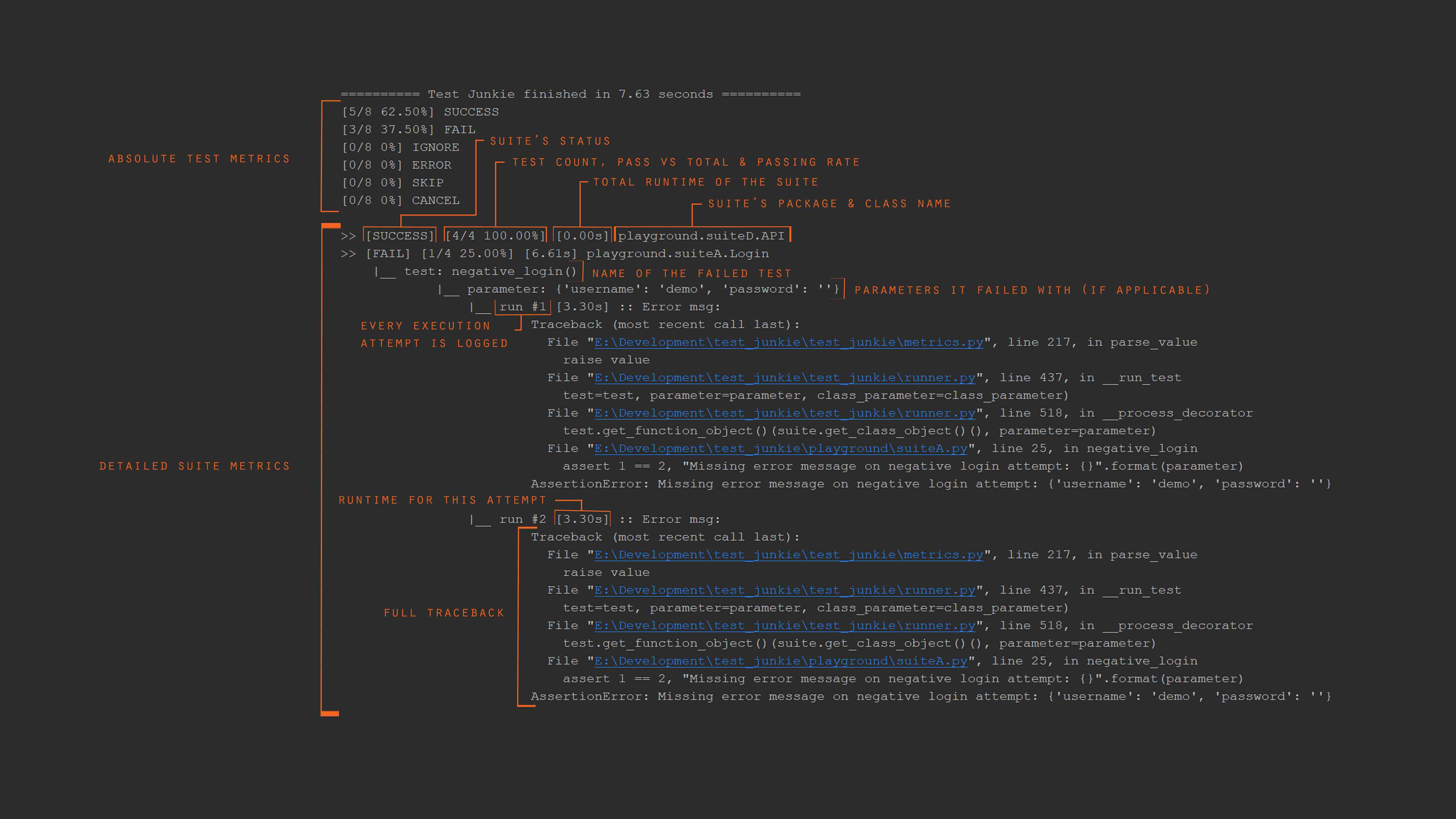
Full documentation is available on test-junkie.com
Please report any bugs you find.
Our Sponsors

become our sponsor
1 maintainer

Metadata
1 maintainer
Release files for test-junkie 0.8a8
For a detailed explanation of source distributions (sdists) and built distributions (wheels), please see the package formats documentation.
Source distribution (sdist)
| File | Size | Uploaded | Provenance | |
|---|---|---|---|---|
| test_junkie-0.8a8.tar.gz | 71.5 kB | Without provenance | Details |
Built distribution (wheel)
| File | Interpreter | ABI | Platform | Reset |
|---|---|---|---|---|
| test_junkie-0.8a8-py3-none-any.whl | Python 3 | none | any | Details |
Total release size: 171.0 kB
Release files / test_junkie-0.8a8.tar.gz
| Download URL | test_junkie-0.8a8.tar.gz |
|---|---|
| Size | 71.5 kB |
| Tags | Source |
|
SHA-256 checksum How to use checksums |
a814fc7b487b598730b156db02049cf11451bd5681730936734ef299ec51b1ab
|
|
BLAKE2b-256 checksum How to use checksums |
1941c660b550ec8d83f4000f931b92c4d9c28ac2574cd4f798b2a1d1e6cf8f3f
|
| Upload date | |
|
Uploaded using Trusted Publishing? What is trusted publishing? |
No |
| Uploaded via |
twine/4.0.2 CPython/3.9.13
|
Release files / test_junkie-0.8a8-py3-none-any.whl
| Download URL | test_junkie-0.8a8-py3-none-any.whl |
|---|---|
| Size | 99.5 kB |
| Tags | Python 3 |
|
SHA-256 checksum How to use checksums |
e5bdbbe211c52e764c5404b9a48f8fba5c43dec2abcfb88033fbe8cbc2f39126
|
|
BLAKE2b-256 checksum How to use checksums |
b4e8e7da8401dd95d3cc1ee4d06a0d65d507f5176504f715bc500fd8186c29e1
|
| Upload date | |
|
Uploaded using Trusted Publishing? What is trusted publishing? |
No |
| Uploaded via |
twine/4.0.2 CPython/3.9.13
|
Security for test-junkie 0.8a8
Provenance
Provenance describes where a file came from. On PyPI, provenance is shared via attestations, which provide a verifiable record of the build or publishing details. View details, limitations and caveats.
No provenance found
None of the files in this release were uploaded with provenance metadata.
A note on package security
PyPI is a repository for distributing packages, not a service for auditing them. While third-party security researchers and our staff do their best to detect and remove malicious packages, PyPI cannot guarantee the quality, security or suitability of any given package.














