
Calculating the 95% confidence interval for the trend of Tide Gauge data

Project description
Last updated: 2-1-2023, by Guoquan (Bob) Wang.
Feel free to contact me by: bob.g.wang@gmail.com
Main function
Calculating the mean seal-level (MSL) rate and its 95% confidence interval.
Please read the main routine "Main_cal_TG_Rate_95CI.py" for calling the Python module "TG_Rate_95CI.py" in your Python programs. The detailed methodology for calculating the 95%CI is adressed in:
Wang, G. (2023). A methodoly for calculating the 95% confidence interval of the mean sea-level rate derived from tide gauge data, submitted xxx (02/01/2023)
You may install the module on your computer by:
pip install TG-Rate-95CI
Please visit the PyPi site:
https://pypi.org/project/TG-Rate-95CI
The source code (TG_Rate_95CI.py) and an sample Main program (Main_cal_TG_Rate_95CI.py) are archived at my Github site:
   https://github.com/bob-Github-2020/TG_Rate_95CI

   Main_cal_TG_Rate_95CI.py
Required Python Modules
You may need to install several Python standard modules on your computer if you have not installed them before. Those modules are: pandas, numpy, matplotlib, statsmodels, statistics, math, datetime, and Pyts (Must be the LATEST Pyts). Do this by:
pip install module-name
For installing the LATEST pyts module for using the SSA module, please carefully read the following website.
https://pyts.readthedocs.io/en/latest/install.html
You should get the LATEST version of pyts by cloning the Github repository:
   git clone https://github.com/johannfaouzi/pyts.git
   cd pyts
   pip install .
It may take a while installing the LATEST pyts on your Windows system
First, install "git" on your Windows computer, https://git-scm.com/downloads
Second, Use the git Bash window, run the following commands:
      git clone https://github.com/johannfaouzi/pyts.git
      cd pyts
      pip install .
Test the module (Visit my GitHub site)
Copy Main_cal_TG_Rate_95CI.py, TG_Rate_95CI.py, and the sample PSMSL data (e.g., 828.rlrdata) to your working directory. Run the following command in a Linux terminal:
./Main_cal_TG_Rate_95CI.py
or run (in a Windows CMD terminal):
python3 Main_cal_TG_Rate_95CI.py
Important notices
The PSMSL dataset *.rlrdata is organized as the following, the unit of MSL is mm.
   1957.7083;  6990; 0;000
   1957.7917;  6975; 0;000
   .......
   1965.1250;-99999;00;000
   1965.2083;-99999;00;000
   1965.2917;-99999;00;000
PSMSL fills the data gap as -99999. These gap lines need to be removed before inputting the data into Main_cal_TG_Rate_95CI.py and TG_Rate_95CI.py. Only the first two columns are used. You may use the follwing Bash command to remove gap lines:
sed -e '/-99999/d' -i 828.rlrdata
I wrote a Bash script, "do_PSMSL_Pre_Process.sh", for doing the pre-process, removing gap lines, excluding datasets shorter than 20 years or with gaps over half of the year range. Visit my GitHub site to get the script.
For NOAA data users
The Main program "Main_cal_TG_Rate_95CI.py" is designed for reading PSMSL data. NOAA data is organized in a slight different way (e.g., 9457292_meantrend.txt). The unit of MSL is in meters.
Year   Month    Monthly_MSL
1949   9        -0.622
1949   10       -0.663
1949   11       -0.568
1949   12       -0.804
If you are working on NOAA data, please use the following Python program for calling the module, TG_Rate_95CI.py:
 #! /usr/bin/python3
 ## for reading NOAA MSL data and calling "TG_Rate_95CI.py"
 import os
 import pandas as pd
 from TG_Rate_95CI import cal_95CI

 directory = './'
   for fin in os.listdir(directory):
       if fin.endswith("meantrend.txt"):
          print(fin)
          ns=len(fin)
          TG = fin[0:7]    # station name, e.g., 8771450
          ts_noaa = []
          ts_noaa = pd.read_csv (fin, header=0, delim_whitespace=True)
          year = ts_noaa.iloc[:,0]    # year
          mm = ts_noaa.iloc[:,1]
          msl = ts_noaa.iloc[:,2]     # Monthly_MSL

          ts = msl*1000              # m to mm
          dy = year + (mm-0.5)/12

          # For processing a bunch datasets, may set pltshow='off'
          result=cal_95CI(dy, ts, TG, output='on', pltshow='on')
          b=round(result[0],2)           # Trend
          b_95CI=round(result[1],2)      # 95%CI

          #os.remove (fin)
        else:
          pass
I wish a good luck for Windows-Python users!
Example outputs
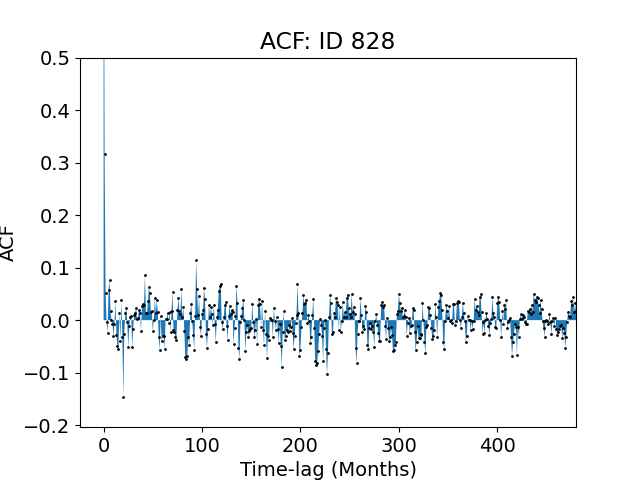
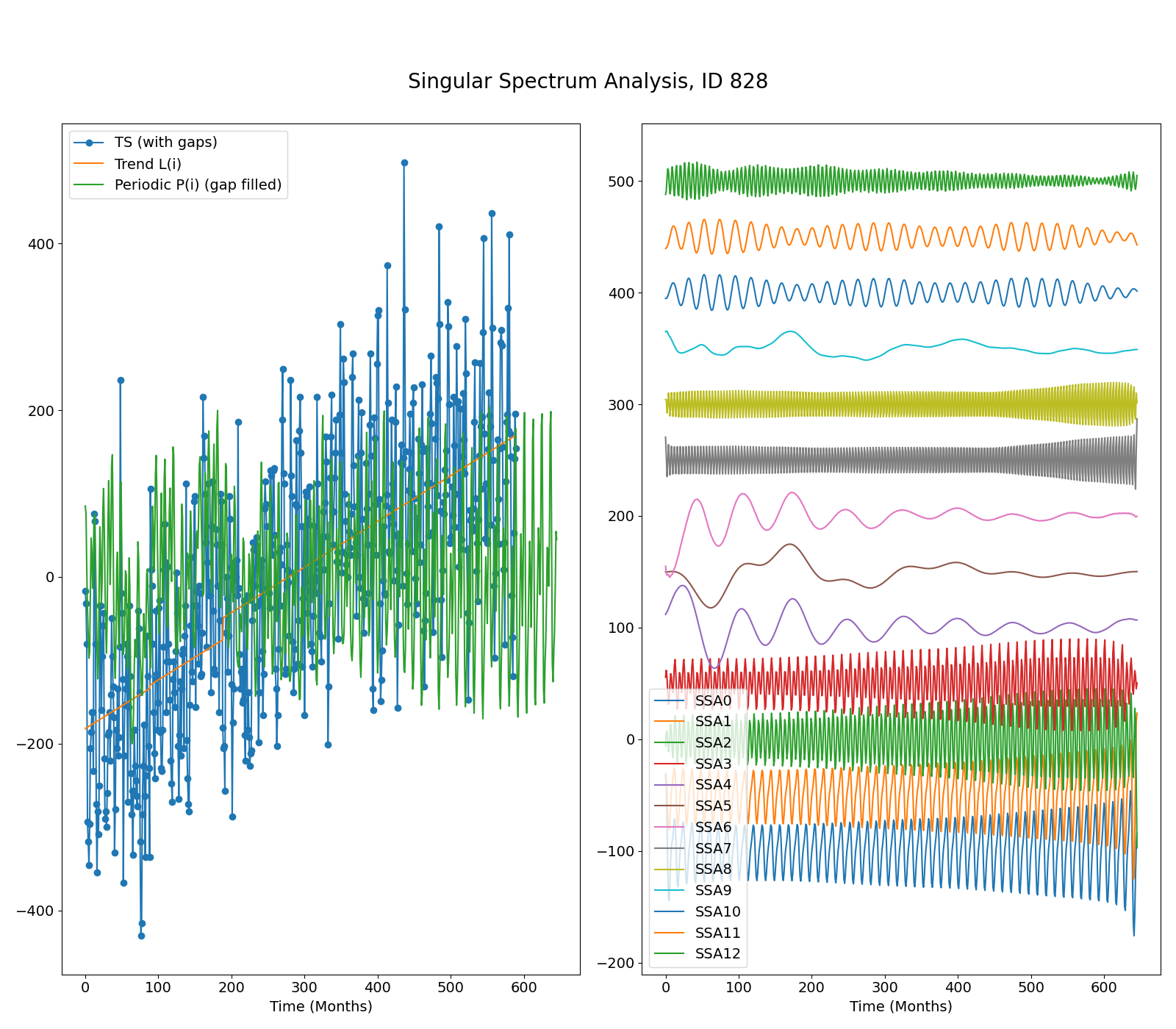
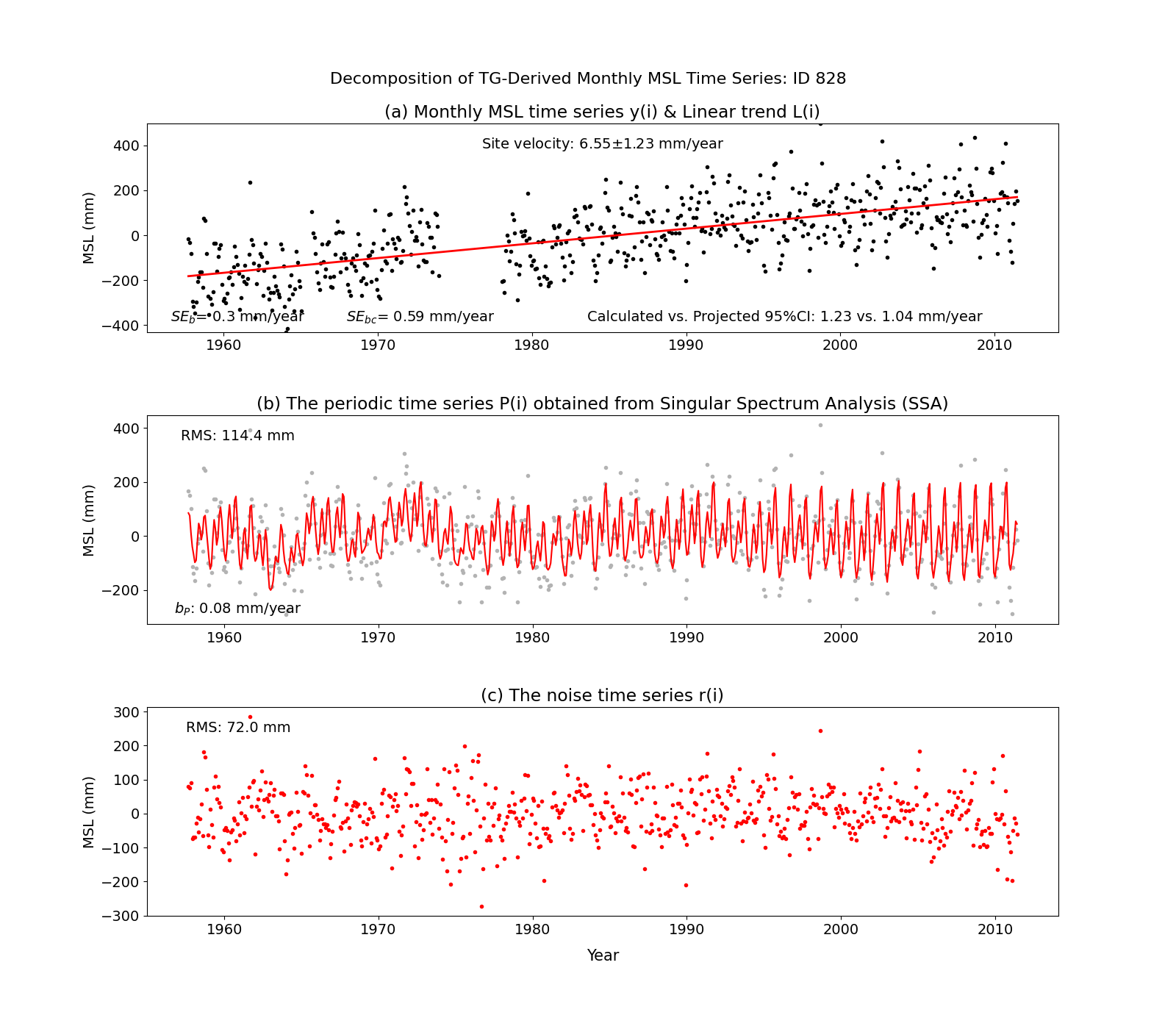
Some example figures for the Galveston Pleasure Pier TG (PSMSL ID: 828) output from the Python Module:
Release history Release notifications | RSS feed

Download files
Download the file for your platform. If you're not sure which to choose, learn more about installing packages.
Source Distribution
Built Distribution
Filter files by name, interpreter, ABI, and platform.
If you're not sure about the file name format, learn more about wheel file names.
Copy a direct link to the current filters
File details
Details for the file TG-Rate-95CI-1.0.0.tar.gz.
File metadata
- Download URL: TG-Rate-95CI-1.0.0.tar.gz
- Upload date:
- Size: 9.4 kB
- Tags: Source
- Uploaded using Trusted Publishing? No
- Uploaded via: twine/4.0.2 CPython/3.8.10
File hashes
| Algorithm | Hash digest | |
|---|---|---|
| SHA256 |
5c27892925ed52136d314b20458c14023a0142107a52c284147d98c15266a4f9
|
|
| MD5 |
18ae21c5bbddbe0d1ded62640a4e66e4
|
|
| BLAKE2b-256 |
50ced38df5676d64c956d4dfa52c987e1cc803bd4c75aa5d8e4ffd8bd084cae8
|
File details
Details for the file TG_Rate_95CI-1.0.0-py3-none-any.whl.
File metadata
- Download URL: TG_Rate_95CI-1.0.0-py3-none-any.whl
- Upload date:
- Size: 10.8 kB
- Tags: Python 3
- Uploaded using Trusted Publishing? No
- Uploaded via: twine/4.0.2 CPython/3.8.10
File hashes
| Algorithm | Hash digest | |
|---|---|---|
| SHA256 |
b980b213b00a149a1943f51cf930720a267fbb2a2c3d6ed52dacdf43b6027e0a
|
|
| MD5 |
2c37cf817dddc954e6ee903c523cdb19
|
|
| BLAKE2b-256 |
9307debcfdd0db20c39f39bccaef1b440c01093796646dc05abfbd1abc097df9
|






