
The Wild Tool. (Summary and Docs)
Downtool is an open sources project developed mainly in python. Currently (November 2022) it is under development, therefore, you may encounter options that are not there or that are buggier than GTA the trilogy when it came out.
Summary
TheWildTool is a tool developed with the main objective of saving time when working with audio datasets. Either to prepare them (segmentation of your raw audio and more), to get them (get content from the internet like YouTube and more) or to train a model with them (train a model with your dataset created with the above and more).
As already said, TheWildTool covers all these sections to have your space much tidier and cleaner. Only a few libraries are sometimes necessary.
TheMovieTool makes use of FFMPEG, therefore, for scalability, our repository and package already comes with it. We will update it as we update the tools.
Classes Summary
-
ProccessAudio: It processes the audio to obtain different types of information in order to train a model.
-
GenerateDataSet: Generate extraid datasets of key sites!
-
VideoExtract: Process your videos into audio.
Installation
- Using pypi:
pip install TheWildTool
or clonning repository (no recommended)
git clone https://github.com/ElHaban3ro/TheWildTool
and installing the dependencies
py -m pip install -r TheWildTool/requirements.txt
TheWildTool Origin
Comming Soon...
Documents
ProccessAudio:
Processes the audios and operates with them.
ProccessAudio | <type: class>
Import:
from TheWildTool.WorkData import ProccessAudio
audiop =  ProdcessAudio()
Methods:
-
add_to_queue
Add your audios to the list, and then work with them.
ProccessAudio.add_to_queue(route_files: list)
- route_files: list of audio file paths. (.mp3)
-
queue_to_array
Transforms the tail array into numpy arrays. If you do not process the audios with this method you will not be able to see to them.
ProccessAudio.queue_to_array()
-
listen
Show audio in a notebook.
ProccessAudio.listen(index: int)
- index: Index of element belonging to extract_queue.
-
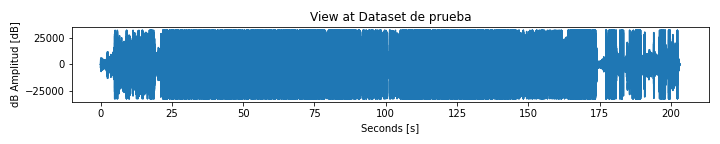
see
It generates a graph that represents the decibels of your audio over time.
ProccessAudio.see(index: int, grid = False, save = False, image_size = (20, 10), **kwargs)
-
index: Index of element belonging to extract_queue.
-
grid (bool, optional): Activate or deactivate the grid of your chart. Defaults to False.
-
save (bool, optional): Save the graph in its save_route. Defaults to False.
-
image_size (tuple, optional): Image size (it is not presented in pixels. It is useful to download this if you don't have a good graphic). Defaults to (20, 10).
-
**kwargs (optional).
-
-
segment
Cut a long audio into small segments that you use to train a model or whatever else you decide.
ProccessAudio.segment(index:int, segment_file:str)
-
index (int): Index of your element in the queue.
-
segment_file (str): Path of the segmentation file for that mp3 file in the list.
To do the segmentation we make use of a file with a certain syntax to standardize the segmentation. Here is how the file would look like
myVideo.aseg[DATASET NAME][list, of, persons, that, is, in, the, audio][time_type: h:m:s, m:s, s][Video Name] # Comment with "#" ! Eminem # "!" Instance of speaker. - 00:00:25 > 00:01:03 # Segment time to speaker.a example? oki:
[TheWildProject Dataset][Jordi, Nacho, Other][h:m:s][TWP Clavero] ! Jordi - 00:00:13 > 00:01:27 ! Nacho - 00:01:30 > 02:23:56 # (hace el podcast!! 😱 xd) -
VideoExtract:
Extract audio from video files.
VideoExtract | <type: class>
Import:
from TheWildTool.WorkData import VideoExtract
videos =  VideoExtract()
Methods:
-
add_to_queue
Add your audios to the list, and then work with them.
ProccessAudio.add_to_queue(route_files: list)
- route_files: list of audio file paths. (.mp3)
-
to_audio
Extract the audio from the video.
ProccessAudio.to_audio(remove_original = True, audio_bitrate = '10k')
-
remove_original:(boolm optional) After conversion, delete the video.
-
audio_bitrate (str, optional): String of the amount of bitrate your audio has. The string should be something like "50k", "777k" or "5k", but keep in mind that more Bitrate represents more weight in the file (but more quality).
-
GenerateDataset
Generates datasets based on multimedia content from the Internet.
GenerateDataset | <type: class>
Import:
from TheWildTool.WorkData import GenerateDataset
dataset =  GenerateDataset()
Methods:
-
youtube
Generate a dataset (obviously not prepared) based on a youtube playlist.
GenerateDataset.youtube(playlist: str, delete_original = True, video_mode = False)
-
playlist (str): Playlist URL.
-
delete_original (bool, optional): If video mode is false, the video file are removed.
-
video_mode (bool, optional): It will generate a video dataset. It maximizes the "medium" video quality, where it is not so low, but enough to train a model (maybe even very high). 3 hours of video usually weighs 150mb's.
-
-----> More Examples Here <----- Google Colab
¿Some error? Contact me



1 maintainer

Metadata
1 maintainer
Release files for TheWildTool 1.5.7
For a detailed explanation of source distributions (sdists) and built distributions (wheels), please see the package formats documentation.
Source distribution (sdist)
| File | Size | Uploaded | |
|---|---|---|---|
| TheWildTool-1.5.7.tar.gz | 11.4 kB | Details |
Built distribution (wheel)
| File | Interpreter | ABI | Platform | Reset |
|---|---|---|---|---|
| TheWildTool-1.5.7-py3-none-any.whl | Python 3 | none | any | Details |
Total release size: 21.9 kB
Release files / TheWildTool-1.5.7.tar.gz
| Download URL | TheWildTool-1.5.7.tar.gz |
|---|---|
| Size | 11.4 kB |
| Tags | Source |
|
SHA-256 checksum How to use checksums |
3ad697f8f0411e58b68c946385d7be4c867119a73fc87d2cc3aad0a220602495
|
|
BLAKE2b-256 checksum How to use checksums |
79d69e4470b4a3bd135d2b3fce549c8e8402e8e5d3f6bdddde78e5801871c9ee
|
| Upload date | |
|
Uploaded using Trusted Publishing? What is trusted publishing? |
No |
| Uploaded via |
twine/4.0.1 CPython/3.10.8
|
Release files / TheWildTool-1.5.7-py3-none-any.whl
| Download URL | TheWildTool-1.5.7-py3-none-any.whl |
|---|---|
| Size | 10.5 kB |
| Tags | Python 3 |
|
SHA-256 checksum How to use checksums |
e870f6ea1588f2095260cbf641c64f36d8490772aee1493a9c27251b6c0251b7
|
|
BLAKE2b-256 checksum How to use checksums |
c5095d49ed6f59835e63d9cef60ff9ca66898f2c96887d74c730252af8209493
|
| Upload date | |
|
Uploaded using Trusted Publishing? What is trusted publishing? |
No |
| Uploaded via |
twine/4.0.1 CPython/3.10.8
|














