
A modular and open-source AI toolkit for time-series processing, aimed at fault detection and classification in oil well operation


Project description




 3W Toolkit
- About
- Architecture Overview
- 3W Dataset
- Installation & Setup
- Jupyter Notebooks & Examples
- Contributing
📘 About
The evolution of machine learning has been catalyzed by the rapid advancement in data acquisition systems, scalable storage, high-performance processing, and increasingly efficient model training through matrix-centric hardware (e.g., GPUs). These advances have enabled the deployment of highly parameterized AI models in real-world applications such as health care, finance, and industrial operations.
In the oil & gas sector, the widespread availability of low-cost sensors has driven a paradigm shift from reactive maintenance to condition-based monitoring (CBM), where faults are detected and classified during ongoing operation. This approach minimizes downtime and improves operational safety. The synergy between AI and big data analysis has thus enabled the development of generalizable classifiers that require minimal domain knowledge and can be effectively adapted to a wide range of operational scenarios.
In this context, we present 3WToolkit+, a modular and open-source AI toolkit for time-series processing, aimed at fault detection and classification in oil well operation. Building upon the experience with the original 3WToolkit system and leveraging the Petrobras 3W Dataset, 3WToolkit introduces enhanced functionalities, such as advanced data imputation, deep feature extraction, synthetic data augmentation, and high-performance computing capabilities for model training.


The development of the 3WToolkit+ is the result of a collaborative partnership between Petrobras, with a focus on the CENPES research center, and the COPPE/Universidade Federal do Rio de Janeiro (UFRJ). This joint effort brings together complementary strengths: COPPE/UFRJ contributes decades of proven expertise in signal processing and machine learning model development, while CENPES offers access to highly specialized technical knowledge and real-world operational challenges in the oil and gas sector. This synergy ensures that 3WToolkit+ is both scientifically rigorous and practically relevant, addressing complex scenarios with robust and scalable AI-based solutions for time-series analysis and fault detection in oil well operations.
🧩 Architecture Overview
The following image illustrates the high-level architecture of the 3W Toolkit, designed to support the full pipeline of machine learning applications using the 3W dataset. From raw data ingestion to model evaluation and delivery to end users.
The schema below illustrates the main classes of the toolkit.
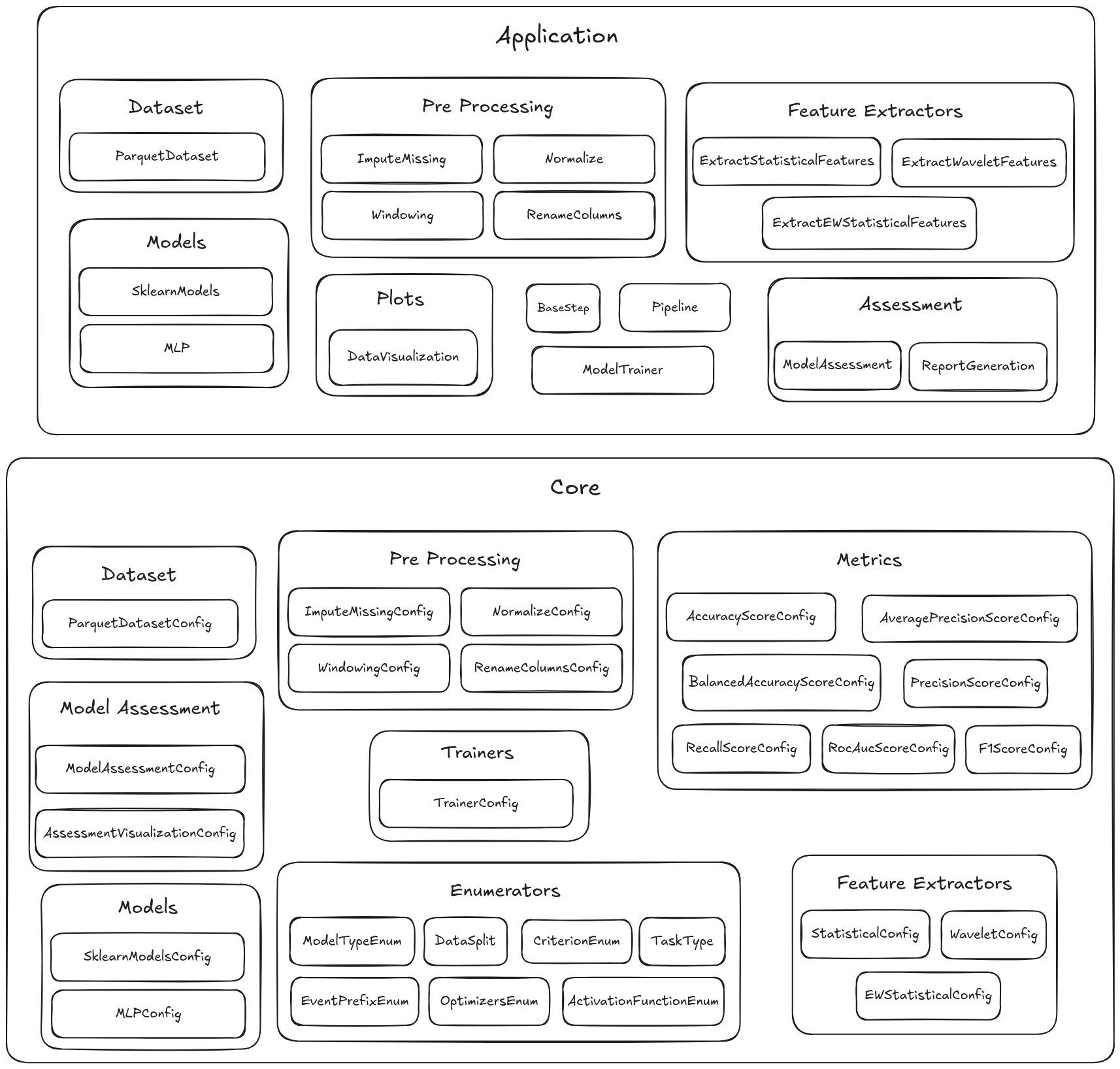
To better understand how the system is organized, we can divide all classes into two main abstraction layers: Application and Core.
-
The
Corelayer contains all configuration (Config) classes. These classes define the parameters required by each functional module. In other words, they describe how each component should behave, specifying its inputs and parameters. -
The
Applicationlayer contains the operational classes, which implement the actual logic for interacting with datasets, preprocessing tools, feature extraction, models, evaluation, visualization, and pipelines. These are the classes that you will uses in workflows.
📊 3W Dataset
The 3W dataset serves as a reference dataset for this project and is hosted on Figshare. However, the toolkit is not limited to the 3W dataset and can be adapted for other datasets as well.
Further details on the 3W dataset’s structure, preprocessing, and usage are available in the 3W_DATASET_STRUCTURE.md file.
⚙️ Installation & Setup
It is possible to perform the installation in different ways.
1. Fork or clone the repository
Option A: Fork
- Go to https://github.com/petrobras/3W
- Click “Fork” in the top-right corner to create a copy under your GitHub account.
- Clone your forked repository:
git clone git@github.com:<your-username>/3W.git
Option B: Clone
git clone git@github.com:petrobras/3W.git
2. Install the package
Option A: Using pip
pip install -e .
Option B: Using uv
uv venv .venv
source venv/bin/activate
uv pip install -e .
Option C: Using conda
conda env create -f environment.yml
conda activate 3W
🪐 Jupyter Notebooks & Examples
A curated set of ready-to-use jupyter notebooks that demonstrate how to use the toolkit to common fault detection tasks using the 3W dataset. These examples accelerate onboarding and reproducibility.
The set of notebooks can be found in the notebooks folder
🤝 Contributing
We welcome contributions to help us improve and expand the functionality of the 3W toolkit. To ensure a smooth collaboration process, please follow our contrubuting guidelines here.


Download files
Download the file for your platform. If you're not sure which to choose, learn more about installing packages.
Source Distribution
Built Distribution
Filter files by name, interpreter, ABI, and platform.
If you're not sure about the file name format, learn more about wheel file names.
Copy a direct link to the current filters
File details
Details for the file threewtoolkit-3.2.1.tar.gz.
File metadata
- Download URL: threewtoolkit-3.2.1.tar.gz
- Upload date:
- Size: 98.3 kB
- Tags: Source
- Uploaded using Trusted Publishing? No
- Uploaded via: twine/6.1.0 CPython/3.13.12
File hashes
| Algorithm | Hash digest | |
|---|---|---|
| SHA256 |
7f1d6a417376524c7911ab8bcf3a51d12e92a9b4ca7cf25d0c2406851236df43
|
|
| MD5 |
ec1748796dad3e028ddb954a2f7923f0
|
|
| BLAKE2b-256 |
30adabdec64d7b840b3dc0d7888420bcf5cf830d19a5e912b61ae7cbf1a6c648
|
File details
Details for the file threewtoolkit-3.2.1-py3-none-any.whl.
File metadata
- Download URL: threewtoolkit-3.2.1-py3-none-any.whl
- Upload date:
- Size: 130.8 kB
- Tags: Python 3
- Uploaded using Trusted Publishing? No
- Uploaded via: twine/6.1.0 CPython/3.13.12
File hashes
| Algorithm | Hash digest | |
|---|---|---|
| SHA256 |
adf269ef8090889836fcf20ba8c9d33b112250c1afb4a422e799b5c76ff163cd
|
|
| MD5 |
6148bac697da5a0a6d94f8b016bca22e
|
|
| BLAKE2b-256 |
b1e1f9f99dc56d7810d9853a13801363f8c0a331cbe6de57f6e257106da8d5b1
|






