




Command line Thug Meme generator written in Python.
Installation
Requirements
Python 3.4+
pip3 install thug-memesThis installs the core version which supports opencv haarcascade based detector. If you are serious with your thug memes (like you definitely should), there is also support for dlib based detector which, in general, provides better results. If you want to enjoy dlib’s accuracy, please follow dlib’s own installation instructions. Some additional dlib installation guides for macOS and Ubuntu can be found in: [1] [2]. Thug memes can be installed with dlib’s Python bindings included:
pip3 install thug-memes[dlib]Usage
thug path/to/the/original/image 'JUST CASUALLY LIFTING' '20KGs HERE'Will store something like this in your current directory:

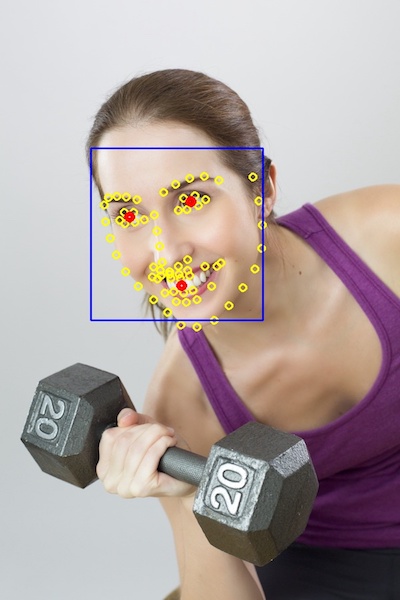
If you have installed dlib and want to use it instead of opencv detector, add option:
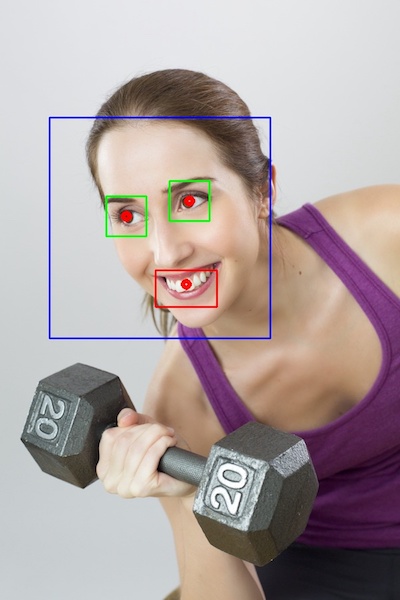
--detector dlibIf you want to see the results of the detection, add –debug option:
Opencv (–debug):
Dlib (–detector dlib –debug):
Almost everything is configurable. You can see the used configuration with:
--show-configThe default configuration is in src/thug/defaul.conf. You can override this by defining environment variable THUG_CONF and pointing it to a file which contains overrides. In addition, you can override any of the configuration variables from command line with –override or -o options. For example:
thug path/to/original/img.jpg 'WE HAVE HUGE CIGARS' 'BUT ALSO PINK TEXT' --detector dlib -o cigar_length 2 -o glasses_width 5 -o font_bgr '[180,105,255]'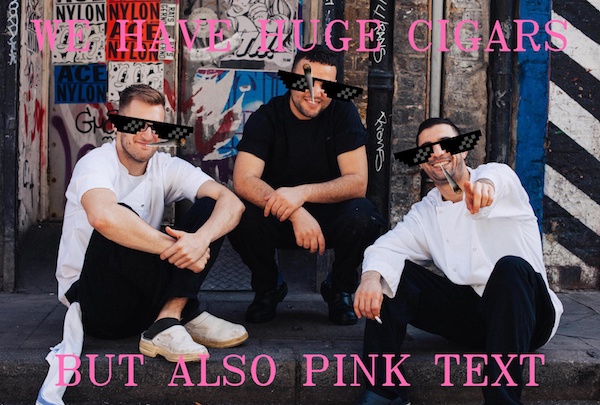
For all available options, see:
thug --helpIf you don’t want to have awesome Thug elements in your meme, there is also ‘a plain meme’ alternative:
meme path/to/the/original/image 'THIS IS A NORMAL MEME' 'WITHOUT THUG STUFF :(' -o font_bgr '[255,255,255]'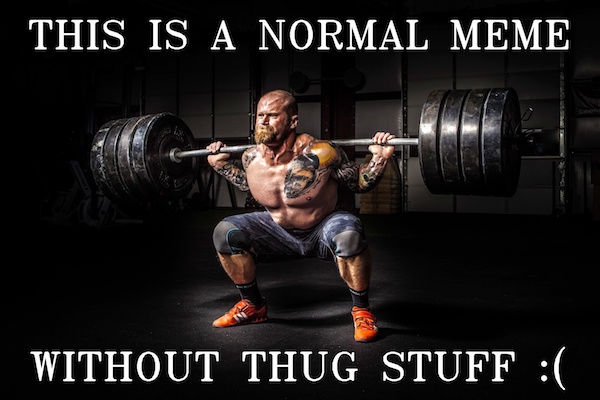
Example images are from pexels.
Contributing
See contributing guide.
1 maintainer

Metadata
1 maintainer
Release files for thug-memes 0.1.2
For a detailed explanation of source distributions (sdists) and built distributions (wheels), please see the package formats documentation.
Source distribution (sdist)
| File | Size | Uploaded | Provenance | |
|---|---|---|---|---|
| thug-memes-0.1.2.tar.gz | 1.2 MB | Without provenance | Details |
Release files / thug-memes-0.1.2.tar.gz
| Download URL | thug-memes-0.1.2.tar.gz |
|---|---|
| Size | 1.2 MB |
| Tags | Source |
|
SHA-256 checksum How to use checksums |
3e75ccedd0c882fd8e0c4753c6d405df97df7dfb3ed5ef88a759c88974704d2a
|
|
BLAKE2b-256 checksum How to use checksums |
d5ea040ab79aaeb175f83af225c7a6dc62cdda094577d18699ec73cc252781de
|
| Upload date | |
|
Uploaded using Trusted Publishing? What is trusted publishing? |
No |
| Uploaded via |
twine/1.11.0 pkginfo/1.4.2 requests/2.19.1 setuptools/40.2.0 requests-toolbelt/0.8.0 tqdm/4.25.0 CPython/3.6.3
|
Security for thug-memes 0.1.2
Provenance
Provenance describes where a file came from. On PyPI, provenance is shared via attestations, which provide a verifiable record of the build or publishing details. View details, limitations and caveats.
No provenance found
None of the files in this release were uploaded with provenance metadata.
A note on package security
PyPI is a repository for distributing packages, not a service for auditing them. While third-party security researchers and our staff do their best to detect and remove malicious packages, PyPI cannot guarantee the quality, security or suitability of any given package.
To learn more about protecting yourself from malicious actors, visit our package security documentation.














