
Tilion — a stealth browser for AI agents
mcp-name: io.github.tiliondev/fortress
pip install tilion— drive a real, undetected Chromium that gets past Cloudflare, DataDome, and bot detection. No server, no account, no API key.




Framework & MCP: Beta · runs local & free · Tilion Cloud (residential egress) coming soon
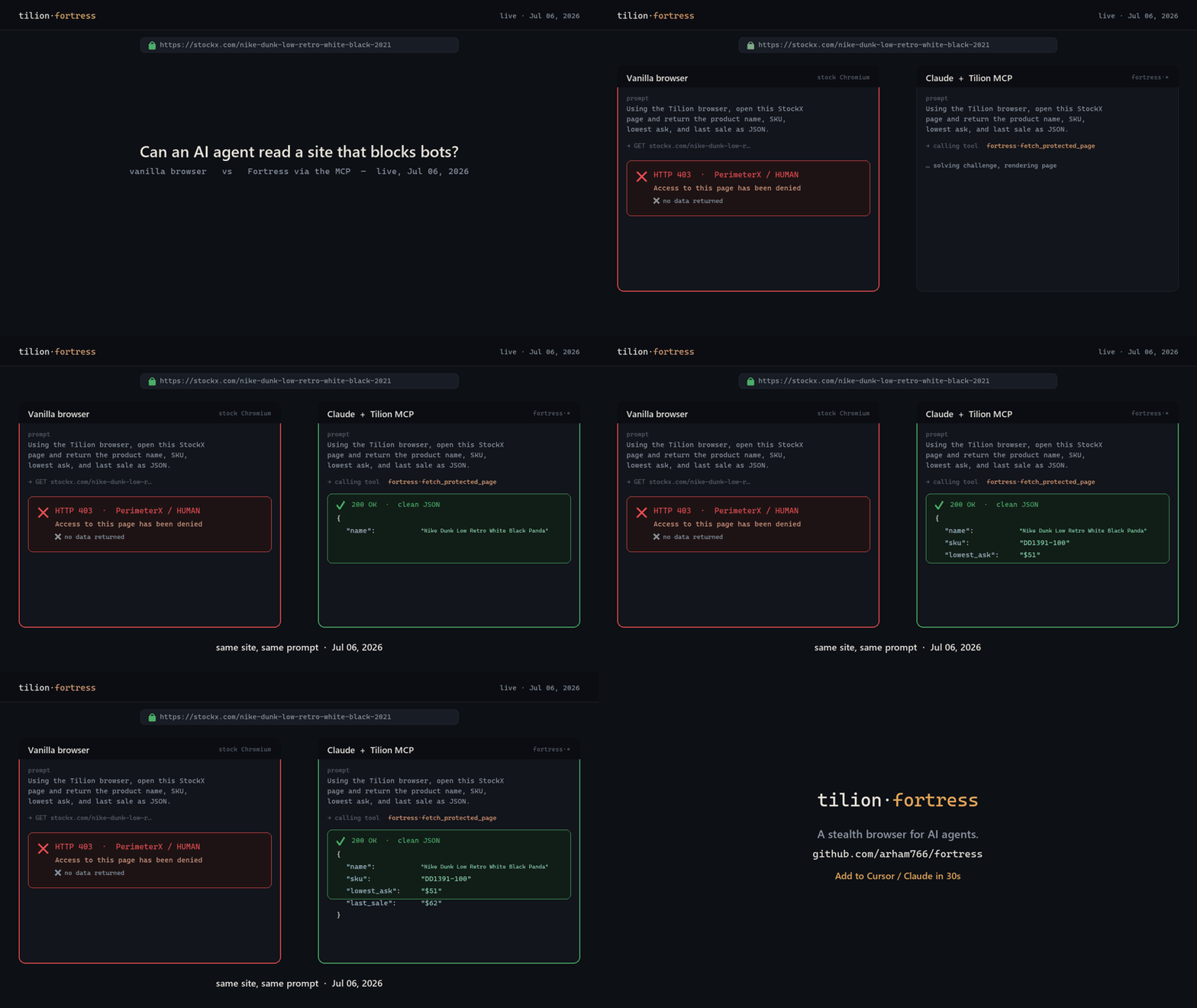
Real, dated run against stockx.com (PerimeterX). A stock browser gets HTTP 403 — "Access denied"; an agent with the Tilion MCP returns clean JSON — same site, same prompt.
Tilion runs a recompiled-Chromium stealth engine (Fortress) locally, in-process, and gives you one clean API for fetching protected pages, extracting content, crawling sites, reconnaissance, and multi-step automation — plus a Model Context Protocol (MCP) server so AI agents can reach for it the moment they get blocked.
pip install tilion
Quickstart
import asyncio
from tilion import Tilion

async def main():
    async with Tilion() as t:                                 # boots Fortress locally
        page = await t.fetch("https://protected.example")     # past Cloudflare/DataDome/403
        print(page["title"], page["text"][:200])

        data = await t.extract("https://site/pricing")        # clean markdown + tables
        docs = await t.crawl("https://site", depth=2)         # whole-site crawl (auto-SPA)
        apis = await t.recon("https://site")                  # discover the site's private API
        hits = await t.search("undetected playwright")        # real-browser web search

asyncio.run(main())
No uvicorn, no Redis, no auth — local mode holds one real browser and drives it directly.
Drop-in stealth for your existing stack
Already on browser-use, Playwright, Puppeteer, or Crawl4AI? They connect to a browser by CDP URL. Point that at Tilion and your code runs through the stealth engine — one line, no rewrite:
t = await Tilion().start()
cdp_url = t.cdp_url                       # hand this to any CDP-speaking stack

from browser_use import Agent, BrowserSession
agent = Agent(task="...", browser_session=BrowserSession(cdp_url=cdp_url))
MCP server — stealth browsing for any AI agent
pip install "tilion[mcp]"
tilion-mcp                                # or:  npx -y tilion-mcp
Claude Desktop / Cursor / Cline / Windsurf — add to the MCP config:
{ "mcpServers": { "fortress": { "command": "tilion-mcp" } } }
Claude Code (CLI): claude mcp add fortress -- tilion-mcp
26 tools: fetch_protected_page, extract_page, crawl_site, recon_site_apis,
search_web, run_browser_task, save_page, save_profile, get_stealth_cdp_endpoint, and
more — pre-warmed (~100 ms first call), concurrency-safe, timeout- and SSRF-guarded.
Full tool table →
What you get
fetch |
stealth GET past Cloudflare/DataDome/403 + auto challenge-resolve |
extract |
page → clean markdown + tables + metadata (or a schema-shaped record) |
crawl / spa_crawl |
whole-site crawl, auto-handles SPA/JS + lazy-load → sitemap |
recon |
reverse-engineer a site's private XHR/JSON API (secret-scrubbed) |
search |
real-browser web search (no SERP API) |
agent |
20 multi-step flows: login, paginate, infinite-scroll, checkout, downloads… |
screenshot / save |
PNG, or export as PDF / HTML / text |
cdp_url |
raw CDP endpoint for browser-use / Playwright / Puppeteer |
How stealth works
The engine is a recompiled Chromium C++ fork (shipped as the tilion-fortress dependency),
not a JS patch or a stealth plugin. Persona, User-Agent, WebGL, and canvas fingerprints are
applied natively with genuine binding returns (toString() === [native code]), so there are no
JavaScript injection tells. In independent suites it runs Sannysoft-clean, CreepJS 0%
headless, BrowserScan "Normal."
Honest note: a great fingerprint on a datacenter IP still gets blocked by the biggest sites — real anti-bot decisions weigh the egress IP heavily. For hostile targets, add a residential proxy or use hosted Tilion cloud egress (coming soon). Tilion does not claim to be "undetectable."
Install options
pip install tilion              # core: stealth browser + fetch/extract/crawl/recon/search
pip install "tilion[mcp]"       # + the MCP server
pip install "tilion[vision]"    # + LLM-driven agent (Claude/OpenAI/Gemini)
Links
- Engine + MCP repo: https://github.com/tiliondev/fortress
- MCP setup & tools: https://github.com/tiliondev/fortress/tree/main/mcp
- Engine package: https://pypi.org/project/tilion-fortress/
Open-core: the tilion facade + MCP are BSD-3; the engine (tilion.core driver + the Fortress
binary) is proprietary. Requires Python 3.10–3.13 on Linux, macOS, or Windows.
1 maintainer

Download files
Download the file for your platform. If you're not sure which to choose, learn more about installing packages.
Source Distributions
Built Distribution
Filter files by name, interpreter, ABI, and platform.
If you're not sure about the file name format, learn more about wheel file names.
Copy a direct link to the current filters
File details
Details for the file tilion-0.1.14-py3-none-any.whl.
File metadata
- Download URL: tilion-0.1.14-py3-none-any.whl
- Upload date:
- Size: 612.3 kB
- Tags: Python 3
- Uploaded using Trusted Publishing? No
- Uploaded via:
twine/6.2.0 CPython/3.12.10
File hashes
| Algorithm | Hash digest | |
|---|---|---|
| SHA256 |
dc750a9cd7322462fe5ffe42e37ee2a33deadcd3655a32198f2796fa5d525118
|
|
| MD5 |
d437c0d7783da5b04f3c9f8d72de8726
|
|
| BLAKE2b-256 |
921bd98d5ac2022eca115261543f961c6184950f642e14a5623b5a120d70bf4a
|














