
Orange3 TimeVariables
Timevariables add-on for Orange 3 data mining software for generating synthetic data using datasets with time series, generating graphs of relationships between the generated variables and includes another widget to save the data and configuration tables in a database.
Installation
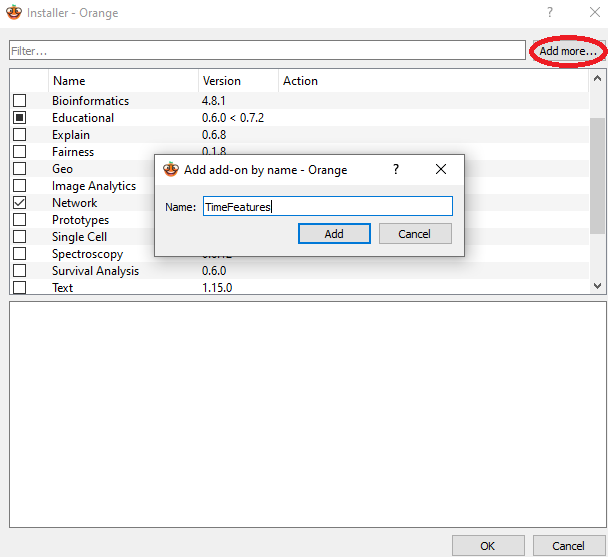
Orange add-on installer
Install from Orange add-on installer through Options -> Add-ons.
Using pip
To install the add-on with pip use
pip install TimeVariables
To install the add-on from source, run
python setup.py install
To register this add-on with Orange, but keep the code in the development directory (do not copy it to Python's site-packages directory), run
python setup.py develop
You can also run
pip install -e .
which is sometimes preferable as you can pip uninstall packages later.
Anaconda
If using Anaconda Python distribution, simply run
pip install TimeVariables
Required Dependencies:
- numpy>=1.22.4
- AnyQt>=0.2.0
- Orange3>=3.34.0
- PyQt5>=5.15.6
- scipy>=1.7.3
- Orange3-Network>=1.8.0
Usage
After the installation, the widgets from this add-on are registered with Orange. To run Orange from the terminal, use
orange-canvas
or
python3 -m Orange.canvas
New widgets are in the toolbox bar under Time-Features section.
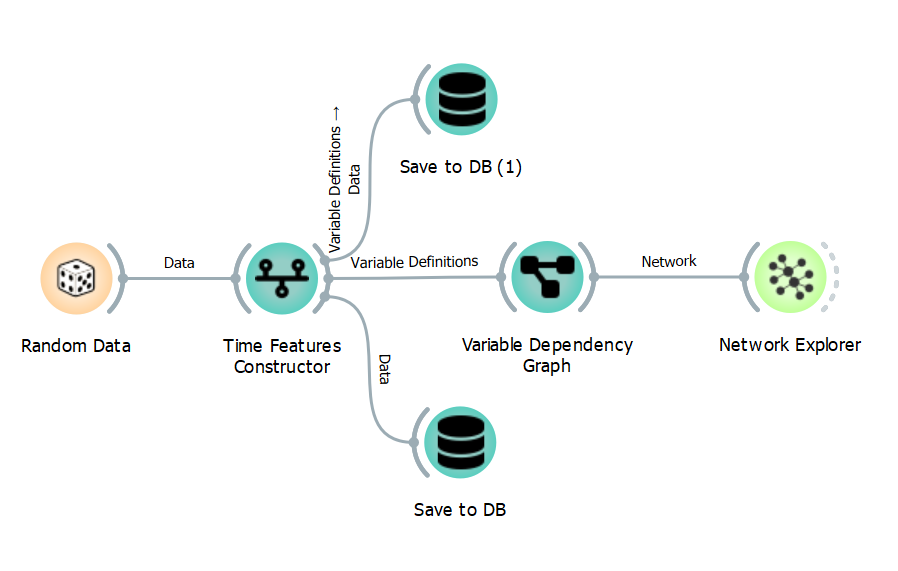
Workflow Example
This is an example of how you can use this add-on.
1 maintainer

Metadata
1 maintainer
Release files for TimeVariables 1.0.0
For a detailed explanation of source distributions (sdists) and built distributions (wheels), please see the package formats documentation.
Source distribution (sdist)
| File | Size | Uploaded | |
|---|---|---|---|
| TimeVariables-1.0.0.tar.gz | 96.3 kB | Details |
Built distribution (wheel)
| File | Interpreter | ABI | Platform | Reset |
|---|---|---|---|---|
| TimeVariables-1.0.0-py3-none-any.whl | Python 3 | none | any | Details |
Total release size: 170.4 kB
Release files / TimeVariables-1.0.0.tar.gz
| Download URL | TimeVariables-1.0.0.tar.gz |
|---|---|
| Size | 96.3 kB |
| Tags | Source |
|
SHA-256 checksum How to use checksums |
7c6c19866ebb32589f02abceebb6b655dbc80f4e341140fd6225866c802f3e0a
|
|
BLAKE2b-256 checksum How to use checksums |
a511a1d099e6077f29315b46f8ad9b5000061c6233a6e6ab69c41a1802a60a4f
|
| Upload date | |
|
Uploaded using Trusted Publishing? What is trusted publishing? |
No |
| Uploaded via |
twine/5.1.1 CPython/3.10.2
|
Release files / TimeVariables-1.0.0-py3-none-any.whl
| Download URL | TimeVariables-1.0.0-py3-none-any.whl |
|---|---|
| Size | 74.1 kB |
| Tags | Python 3 |
|
SHA-256 checksum How to use checksums |
ddcacd0cba3864ed1e24c8ffce8859d0150251417a1c59cac469aa4ce351a2b1
|
|
BLAKE2b-256 checksum How to use checksums |
377155fc71916bf577218b97fb1f24598afc69370a6992e047b1a79d9a56383b
|
| Upload date | |
|
Uploaded using Trusted Publishing? What is trusted publishing? |
No |
| Uploaded via |
twine/5.1.1 CPython/3.10.2
|













