
Calendar for your Tkinter application


Installation
pip3 install tk_datepicker
Quick start
The Datepicker class from the tk_datepicker module takes 2 arguments: an input class object for displaying the date and any object from the tkinter module that will open the calendar when clicked
from tkinter import Tk, Entry, Button
from tk_datepicker import Datepicker

root = Tk()
root.geometry("600x600")
entry = Entry()
entry.pack()
button = Button(text="Click me!")
button.pack()
dp = Datepicker(entry, button)
root.mainloop()
Output:
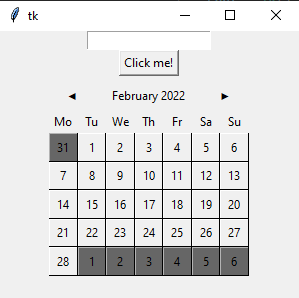
Calendar appearance settings
You can use the ui_settings method of the Datepicker class object to change the colors
dp = Datepicker(entry, button)
dp.ui_settings(days_bg="#888", days_fg="#FFF", t_days_bg="#FFF", t_days_fg="#FFF",
               back_month_text="<= Back", next_month_text="Next =>")
Output:
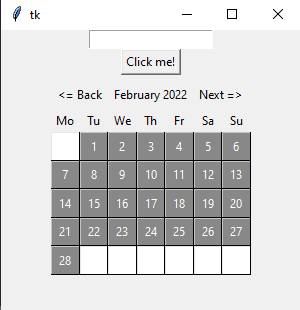 Full list of customizations:
• ctrl_btn_bg - Change month button background color
• ctrl_btn_fg - Change month button foreground color
• ctrl_lbl_bg - Name of the month background color
• ctrl_lbl_fg - Name of the month foreground color
• ctrl_border - Border size for items that are higher
• back_month_text - Last month button text
• next_month_text - Next month button text
• week_days_bg - Names of the days of the week background color
• week_days_fg - Names of the days of the week foreground color
• week_border - Names of the days of the week border size
• days_bg - Days of this month background color
• days_fg - Days of this month foreground color
• days_border - Days of this month border size
• t_days_bg - Days not of this month background color
• t_days_fg - Days not of this month foreground color
• t_days_border - Days not of this month border size
• output_format - Date output format (default "%Y.%m.%d")
Calendar rendering
The calendar is rendered relative to the object it is attached to. The calendar tries to find free space to render in this order:
1) TOP CENTER
2) TOP LEFT
3) TOP RIGHT
4) BOTTOM CENTER
5) BOTTOM LEFT
6) BOTTOM RIGHT
7) RIGHT CENTER
8) LEFT CENTER
In case the calendar cannot find a place to render, it will be rendered from x=0, y=0, keep that in mind
1 maintainer

Metadata
1 maintainer
Release files for tk-datepicker 0.0.2
For a detailed explanation of source distributions (sdists) and built distributions (wheels), please see the package formats documentation.
Source distribution (sdist)
| File | Size | Uploaded | Provenance | |
|---|---|---|---|---|
| tk_datepicker-0.0.2.tar.gz | 5.1 kB | Without provenance | Details |
Release files / tk_datepicker-0.0.2.tar.gz
| Download URL | tk_datepicker-0.0.2.tar.gz |
|---|---|
| Size | 5.1 kB |
| Tags | Source |
|
SHA-256 checksum How to use checksums |
fb746cd8ff2cd7f6e719fc2e1ec1a4d550bdbcee1115fef1d5d62230080573fe
|
|
BLAKE2b-256 checksum How to use checksums |
bf97c1c47740cf2c8a228ea64c174792acd8c96d6271571e30439753e2dba35e
|
| Upload date | |
|
Uploaded using Trusted Publishing? What is trusted publishing? |
No |
| Uploaded via |
twine/3.8.0 pkginfo/1.8.2 readme-renderer/32.0 requests/2.27.1 requests-toolbelt/0.9.1 urllib3/1.26.8 tqdm/4.62.3 importlib-metadata/4.10.1 keyring/23.5.0 rfc3986/2.0.0 colorama/0.4.4 CPython/3.10.2
|
Security for tk-datepicker 0.0.2
Provenance
Provenance describes where a file came from. On PyPI, provenance is shared via attestations, which provide a verifiable record of the build or publishing details. View details, limitations and caveats.
No provenance found
None of the files in this release were uploaded with provenance metadata.
A note on package security
PyPI is a repository for distributing packages, not a service for auditing them. While third-party security researchers and our staff do their best to detect and remove malicious packages, PyPI cannot guarantee the quality, security or suitability of any given package.














