
TkinterDnD2
Eliav2/tkinterdnd2 is a fork of the (unmaintained) pmgagne/tkinterdnd2 which is a python wrapper for tkdnd .
This repo was originally forked and edited for the purpose of publishing to pypi so one could simply install this package with pip install tkinterdnd2.
This repository is being maintained to ensure availability of tkinterdnd2 into the future, providing Tkinter native drag and drop support for windows, unix and Mac OSX.
What is TkDnD
tkDnD2 is a tcl/Tk extension adding native drag and drop support.
This repository contains the compiled binaries from https://github.com/petasis/tkdnd/releases/tag/tkdnd-release-test-v2.9.5 and my own compiled binaries for full Tcl 9 support: https://github.com/Squiblydoo/tkdnd. Tcl 9 binaries are not available for Intel Macs (osx-x64).
Install
python -m pip install tkinterdnd2
Usage
import tkinter as tk

from tkinterdnd2 import DND_FILES, TkinterDnD

root = TkinterDnD.Tk()  # notice - use this instead of tk.Tk()

lb = tk.Listbox(root)
lb.insert(1, "drag files to here")

def on_drop(event):
    # event.data is a raw Tcl list string, not a Python list - see note below
    for path in root.tk.splitlist(event.data):
        lb.insert(tk.END, path)

# register the listbox as a drop target
lb.drop_target_register(DND_FILES)
lb.dnd_bind('<<Drop>>', on_drop)

lb.pack()
root.mainloop()
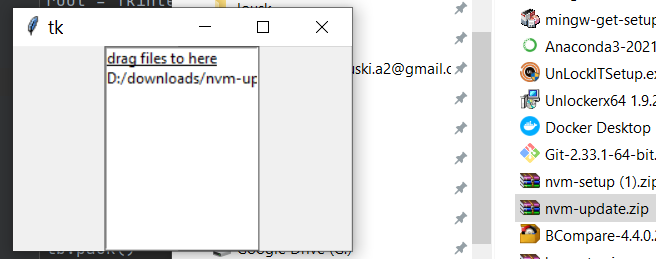
see any of the demos for usage examples.
Framework Integration
If you are using a GUI framework that manages its own Tk root window (such as PySimpleGUI or CustomTkinter), you cannot use TkinterDnD.Tk() as the root. Instead, call TkinterDnD.require() on the framework's existing root after it has been created. This loads tkdnd into the shared Tcl interpreter, making drag-and-drop available to all widgets in the process.
The following are some simple examples:
PySimpleGUI
import PySimpleGUI as sg
from tkinterdnd2 import TkinterDnD, DND_FILES

def on_drop(event):
    # event.data is a raw Tcl list; use splitlist to handle multiple/spaced paths, see note above
    files = window.TKroot.tk.splitlist(event.data)
    window["-FILE-"].update(files[0])

layout = [
    [sg.Text("Drag & Drop a File Here")],
    [sg.Input("", key="-FILE-")],
    [sg.Button("OK"), sg.Button("Cancel")],
]

window = sg.Window("File Drop", layout, finalize=True)

# Inject DnD into PySimpleGUI's own root — no dummy window needed
TkinterDnD.require(window.TKroot)

# Register any widget as a drop target
window["-FILE-"].widget.drop_target_register(DND_FILES)
window["-FILE-"].widget.dnd_bind("<<Drop>>", on_drop)

while True:
    event, values = window.read()
    if event in (sg.WIN_CLOSED, "Cancel"):
        break

window.close()
CustomTkinter
import customtkinter as ctk
from tkinterdnd2 import TkinterDnD, DND_FILES

def on_drop(event):
    # event.data is a raw Tcl list; use splitlist to handle multiple/spaced paths, see note above
    files = app.tk.splitlist(event.data)
    entry.delete(0, "end")
    entry.insert(0, files[0])

app = ctk.CTk()
app.title("File Drop")

# Inject DnD into CustomTkinter's root
TkinterDnD.require(app)

entry = ctk.CTkEntry(app, width=400, placeholder_text="Drag a file here...")
entry.pack(padx=20, pady=20)

entry.drop_target_register(DND_FILES)
entry.dnd_bind("<<Drop>>", on_drop)

app.mainloop()
pyinstaller
tkinterdnd2 includes a PyInstaller hook that collects the TkDnD binaries and builds them into the project. PyInstaller finds it automatically, so no extra options are needed:
pyinstaller -F -w myproject/myproject.py
The hook only bundles the TkDnD binaries for the OS, CPU and Tcl/Tk version of the Python doing the build. On macOS it bundles both the Intel and Apple Silicon binaries, so --target-arch universal2 builds work.
To use a modified copy of the hook instead, copy tkinterdnd2/__pyinstaller/hook-tkinterdnd2.py into the base directory of your project, then run pyinstaller as follows:
pyinstaller -F -w myproject/myproject.py --additional-hooks-dir=.
2 maintainers


Metadata
2 maintainers
Release files for tkinterdnd2 0.7.0
For a detailed explanation of source distributions (sdists) and built distributions (wheels), please see the package formats documentation.
Source distribution (sdist)
| File | Size | Uploaded | Provenance | Actions |
|---|---|---|---|---|
| tkinterdnd2-0.7.0.tar.gz | 738.0 kB | Without provenance | Details for tkinterdnd2-0.7.0.tar.gz |
Built distribution (wheel)
| File | Interpreter | ABI | Platform | Actions Reset |
|---|---|---|---|---|
| tkinterdnd2-0.7.0-py3-none-any.whl | Python 3 | none | any | Details for tkinterdnd2-0.7.0-py3-none-any.whl |
Total release size: 1.6 MB
Release files / tkinterdnd2-0.7.0.tar.gz
| Download URL | tkinterdnd2-0.7.0.tar.gz |
|---|---|
| Size | 738.0 kB |
| Tags | Source |
|
SHA-256 checksum How to use checksums |
bc5039c28092a702ee70fe15bd9b948cb579571e3b46ba4a092c9929966ca9f3
|
|
BLAKE2b-256 checksum How to use checksums |
e116a1b4d644cd0dd4b7949228e13e587dc8720362544a5b594a56ef90cedb89
|
| Upload date | |
|
Uploaded using Trusted Publishing? What is trusted publishing? |
No |
| Uploaded via |
twine/6.1.0 CPython/3.12.3
|
Release files / tkinterdnd2-0.7.0-py3-none-any.whl
| Download URL | tkinterdnd2-0.7.0-py3-none-any.whl |
|---|---|
| Size | 819.3 kB |
| Tags | Python 3 |
|
SHA-256 checksum How to use checksums |
f93d4f5ad439648ba1673f15db3e271cdd08f075c87f43553ffcdde4e634a717
|
|
BLAKE2b-256 checksum How to use checksums |
eb1373054a55222b55604846d78c2e5e0c84bbe9f35bc7d6d9697a289c905b3a
|
| Upload date | |
|
Uploaded using Trusted Publishing? What is trusted publishing? |
No |
| Uploaded via |
twine/6.1.0 CPython/3.12.3
|
Security for tkinterdnd2 0.7.0
Provenance
Provenance describes where a file came from. On PyPI, provenance is shared via attestations, which provide a verifiable record of the build or publishing details. View details, limitations and caveats.
No provenance found
None of the files in this release were uploaded with provenance metadata.
A note on package security
PyPI is a repository for distributing packages, not a service for auditing them. While third-party security researchers and our staff do their best to detect and remove malicious packages, PyPI cannot guarantee the quality, security or suitability of any given package.
To learn more about protecting yourself from malicious actors, visit our package security documentation.














