
Tkintertoy
Tkintertoy was designed to be a easy to use GUI library based on Tkinter. It was intended for novice programmers to develop GUIs with as little trouble as possible. However, more advanced programmers can reach the more complex features of Tkinter easily. Here is a short example:
from tkintertoy import Window
# create the window
gui = Window()
gui.setTitle('My First Tkintertoy GUI!')
# add the widgets
gui.addEntry('name', 'Type in your name')
gui.addLabel('welcome', 'Welcome message')
gui.addButton('commands')
# plot the widgets
gui.plotxy('name', 0, 0)
gui.plotxy('welcome', 0, 1)
gui.plotxy('commands', 0, 2, pady=10)
# start the event processing loop
while True:
    gui.waitforUser()
    if gui.content:
        gui.set('welcome', 'Welcome ' + gui.get('name'))
    else:
        break
This code will create a small window with an entry, label, and command button widgets. The application will wait for the user to type in their first name. After typing it in, and clicking on Ok, the application will display a welcome label. The user exits the code by clicking on Cancel.
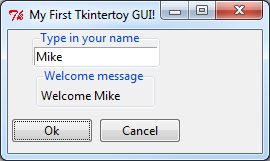
As you can see in order to create a simple GUI, you create a window, add widgets, plot the widgets in the desired location, and then call waitforUser.
While Tkintertoy was designed to be an GUI library for simple interfaces it has been used in more complex code as well.
Using Tkintertoy, it is hoped that Python instructors can quickly move students from boring command-line applications to useful standard GUIs. A tutorial with many useful examples in included with the documentation.
1 maintainer

Metadata
1 maintainer
Release files for tkintertoy 1.6.2
For a detailed explanation of source distributions (sdists) and built distributions (wheels), please see the package formats documentation.
Source distribution (sdist)
| File | Size | Uploaded | Provenance | Actions |
|---|---|---|---|---|
| tkintertoy-1.6.2.tar.gz | 1.6 MB | Without provenance | Details for tkintertoy-1.6.2.tar.gz |
Built distribution (wheel)
| File | Interpreter | ABI | Platform | Actions Reset |
|---|---|---|---|---|
| tkintertoy-1.6.2-py3-none-any.whl | Python 3 | none | any | Details for tkintertoy-1.6.2-py3-none-any.whl |
Total release size: 3.2 MB
Release files / tkintertoy-1.6.2.tar.gz
| Download URL | tkintertoy-1.6.2.tar.gz |
|---|---|
| Size | 1.6 MB |
| Tags | Source |
|
SHA-256 checksum How to use checksums |
161cc72350e76abc6e232824ebd3a7eed992ebcb631292affcbb5ee705b69f4a
|
|
BLAKE2b-256 checksum How to use checksums |
ca58c9691044a5c1edd27720b5ac287dc66c1abb4138a92dccd2031504b8fd4f
|
| Upload date | |
|
Uploaded using Trusted Publishing? What is trusted publishing? |
No |
| Uploaded via |
twine/4.0.2 CPython/3.12.0
|
Release files / tkintertoy-1.6.2-py3-none-any.whl
| Download URL | tkintertoy-1.6.2-py3-none-any.whl |
|---|---|
| Size | 1.6 MB |
| Tags | Python 3 |
|
SHA-256 checksum How to use checksums |
bad8306c909410501b49b592dcbc2d41fc5c7b5a90a64517d177ef61535a8ca0
|
|
BLAKE2b-256 checksum How to use checksums |
154acd6cf121f340b386059a1161486367d2f9516e7325a3a5128ed521d27d7f
|
| Upload date | |
|
Uploaded using Trusted Publishing? What is trusted publishing? |
No |
| Uploaded via |
twine/4.0.2 CPython/3.12.0
|
Security for tkintertoy 1.6.2
Provenance
Provenance describes where a file came from. On PyPI, provenance is shared via attestations, which provide a verifiable record of the build or publishing details. View details, limitations and caveats.
No provenance found
None of the files in this release were uploaded with provenance metadata.
A note on package security
PyPI is a repository for distributing packages, not a service for auditing them. While third-party security researchers and our staff do their best to detect and remove malicious packages, PyPI cannot guarantee the quality, security or suitability of any given package.
To learn more about protecting yourself from malicious actors, visit our package security documentation.














