
tk_sidebare
tkinter widgte to add a sidebare to your apps.
How to install
pip install tksidebar
Screenshot
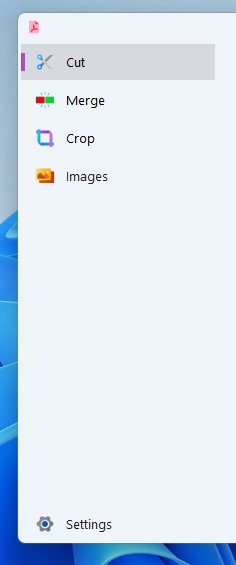
How to use
is simple
import tkinter as tk
from tksidebar import Sidebook


window =  tk.Tk()
window.geometry('1000x500')

sidebook = Sidebook(window) # you can add some options

frame_1 = tk.Frame(bg='#A75D5D', height=500, width=400)
frame_2 = tk.Frame(bg='#0081B4', height=500, width=400)
frame_3 = tk.Frame(bg='#C780FA', height=500, width=400)
frame_4 = tk.Frame(bg='#FF7B54', height=500, width=400)
frame_5 = tk.Frame(bg='#495579', height=500, width=400)


tabs = [
('split', frame_1, r'img\icons8-cut-24.png', False),
('crop margins', frame_2,r'img\icons8-crop-24.png', False),
('rotate pages', frame_3,r'img\icons8-rotate-24.png', False),
('to images', frame_4,r'img\icons8-picture-24.png', False),
('about', frame_5, r'img\icons8-settings-24.png', True), # this on bottom
]

for name, frame, icon, bottom in tabs:
  sidebook.add(frame, text=name, icon=icon, at_bottom=bottom) # add here any options for pack (fill, expand, padx...)
sidebook.select(0)

sidebook.pack(anchor='nw', fill='both', expand=True)

window.mainloop()
notice
you can change sidebare colors:
my_colors = {"accent": 'default', "bg":'#EFF4F8',"hover":'#E8EBF0',"press":'#D6D9DE'}
sidebook = Sidebook(window,colors=my_colors)
you can also specific sidebar width
sidebook = Sidebook(window,sidebar_width=260)
you can also add header to sidebar.
sidebook.add_header(widget, padx=10)
1 maintainer

Metadata
1 maintainer
Release files for tksidebar 0.3.0
For a detailed explanation of source distributions (sdists) and built distributions (wheels), please see the package formats documentation.
Source distribution (sdist)
| File | Size | Uploaded | |
|---|---|---|---|
| tksidebar-0.3.0.tar.gz | 5.0 kB | Details |














