
This release is a pre-release and may not be stable for production use.
TkTerm - Tkinter Terminal Emulator
A fully functional terminal emulator built on Tkinter library - perform all basic commands of a terminal
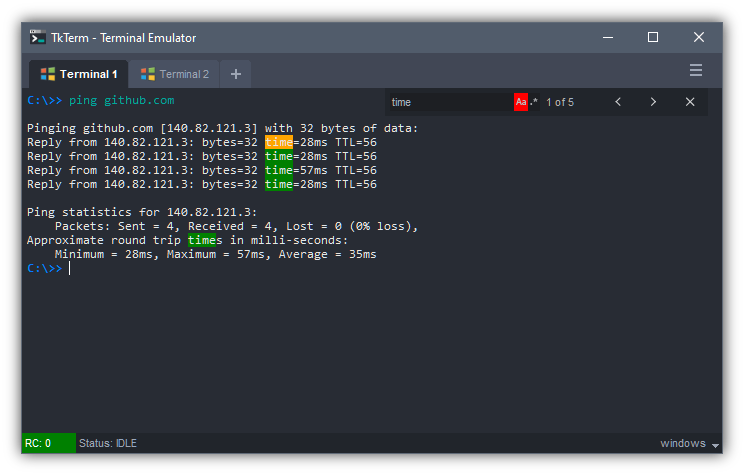
Under the hood it executes commands using Python's subprocess module and spawn as a thread. Pressing Ctrl-C will terminate current running command. Supports Unix shells (sh and bash) and Window's Command Prompt (cmd.exe) commands.
Features
- Compatible with Windows and Unix systems
- Tabbed Terminal -
click & dragto reorder,middle-clickto close tab,double-clickto rename - Return Code (RC) of previous run commands is shown at the bottom status bar
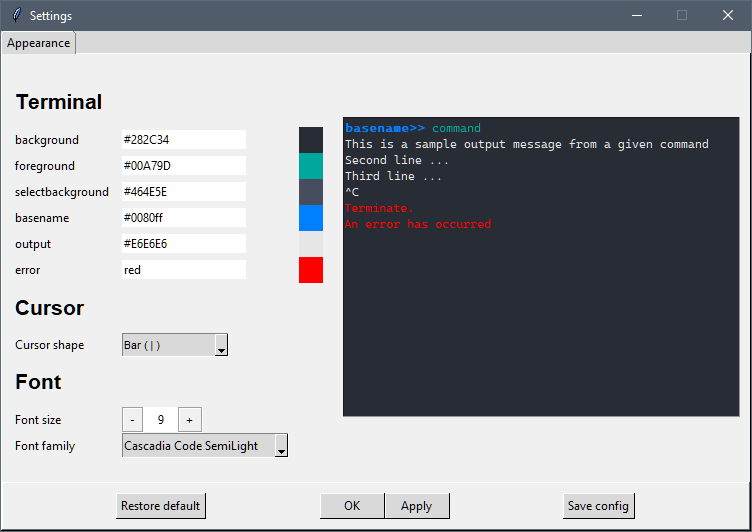
- Settings to customise colours, font and cursor shape
- Ctrl-C to kill current running process
- Ctrl-F to search; supports case sensitivity and regex searches
- UP and DOWN arrow keys to cycle between next and previous commands in history
- Unix-like tab completion on files and directories
- Handles multiline commands using caret character
^or\
Requirements
The Tkinter GUI library is built into Python, so no 3rd party library is required.
Requires at least Python version 3.x and above.
Standalone usage
Run standalone script simply with
$> python tkterm/tkterm.py
Integration with other Tkinter application
The Terminal is implemented as a Frame widget and can be easily be integrated to other Tkinter application by
import tkinter as tk
from tkinter import *
from tkterm import Terminal

root = tk.Tk()

terminal = Terminal(root)
terminal.pack(fill=BOTH, expand=True)

root.mainloop()
Customisation options
Customise Terminal interface by Right-click > Settings...
Note:
Clicking Save config saves setting configuration to a file.
Tkterm will automatically load this file the next time it starts up.
Multiline command
Long lines of command can be broken up using a caret. A caret at the line end appends the next line command with the current command.
In Windows the caret is ^, and UNIX is \.
For multiline command to be considered there must be no trailing space after the caret, for example:
$> ping ^is considered$> ping ^is not considered
$>> echo I ^
> have apple ^
> and banana
I have apple and banana
Links
Author
Developed by Dhanoo Surasarang
Github: @dhanoosu
1 maintainer

Metadata
1 maintainer
Release files for tkterm 0.0.0b1
For a detailed explanation of source distributions (sdists) and built distributions (wheels), please see the package formats documentation.
Source distribution (sdist)
| File | Size | Uploaded | Provenance | |
|---|---|---|---|---|
| tkterm-0.0.0b1.tar.gz | 137.2 kB | Without provenance | Details |
Built distribution (wheel)
| File | Interpreter | ABI | Platform | Reset |
|---|---|---|---|---|
| tkterm-0.0.0b1-py3-none-any.whl | Python 3 | none | any | Details |
Total release size: 282.3 kB
Release files / tkterm-0.0.0b1.tar.gz
| Download URL | tkterm-0.0.0b1.tar.gz |
|---|---|
| Size | 137.2 kB |
| Tags | Source |
|
SHA-256 checksum How to use checksums |
664b4f7633a7ae5bc23a67e5e04378ad4c59034ddb83d90695e31a52db66ec2b
|
|
BLAKE2b-256 checksum How to use checksums |
5409fd75bf64d031363068efc29cbf7cc94bd7a734abb8039e2e783421f9c986
|
| Upload date | |
|
Uploaded using Trusted Publishing? What is trusted publishing? |
No |
| Uploaded via |
twine/3.8.0 pkginfo/1.9.6 readme-renderer/34.0 requests/2.27.1 requests-toolbelt/0.10.1 urllib3/1.26.15 tqdm/4.64.1 importlib-metadata/4.8.3 keyring/23.4.1 rfc3986/1.5.0 colorama/0.4.5 CPython/3.6.8
|
Release files / tkterm-0.0.0b1-py3-none-any.whl
| Download URL | tkterm-0.0.0b1-py3-none-any.whl |
|---|---|
| Size | 145.2 kB |
| Tags | Python 3 |
|
SHA-256 checksum How to use checksums |
8197baf8ef514c49ed1e56d32fbcd64d7d9831de5e647328cc5fd75719e3ca40
|
|
BLAKE2b-256 checksum How to use checksums |
9918240274f55472b0d58f2a5858baf310ee88176c45fd5c64e06c94d4dfc3b1
|
| Upload date | |
|
Uploaded using Trusted Publishing? What is trusted publishing? |
No |
| Uploaded via |
twine/3.8.0 pkginfo/1.9.6 readme-renderer/34.0 requests/2.27.1 requests-toolbelt/0.10.1 urllib3/1.26.15 tqdm/4.64.1 importlib-metadata/4.8.3 keyring/23.4.1 rfc3986/1.5.0 colorama/0.4.5 CPython/3.6.8
|
Security for tkterm 0.0.0b1
Provenance
Provenance describes where a file came from. On PyPI, provenance is shared via attestations, which provide a verifiable record of the build or publishing details. View details, limitations and caveats.
No provenance found
None of the files in this release were uploaded with provenance metadata.
A note on package security
PyPI is a repository for distributing packages, not a service for auditing them. While third-party security researchers and our staff do their best to detect and remove malicious packages, PyPI cannot guarantee the quality, security or suitability of any given package.
To learn more about protecting yourself from malicious actors, visit our package security documentation.














