
torch-harmonics
Overview | Installation | More information | Getting started | Contributors | Cite us | References








Overview
torch-harmonics implements differentiable signal processing on the sphere. This includes differentiable implementations of the spherical harmonic transforms, vector spherical harmonic transforms and discrete-continuous convolutions on the sphere. The package was originally implemented to enable Spherical Fourier Neural Operators (SFNO) [1].
The SHT algorithm uses quadrature rules to compute the projection onto the associated Legendre polynomials and FFTs for the projection onto the harmonic basis. This algorithm tends to outperform others with better asymptotic scaling for most practical purposes [2].
torch-harmonics uses PyTorch primitives to implement these operations, making it fully differentiable. Moreover, the quadrature can be distributed onto multiple ranks making it spatially distributed.
torch-harmonics has been used to implement a variety of differentiable PDE solvers which generated the animations below. Moreover, it has enabled the development of Spherical Fourier Neural Operators [1].
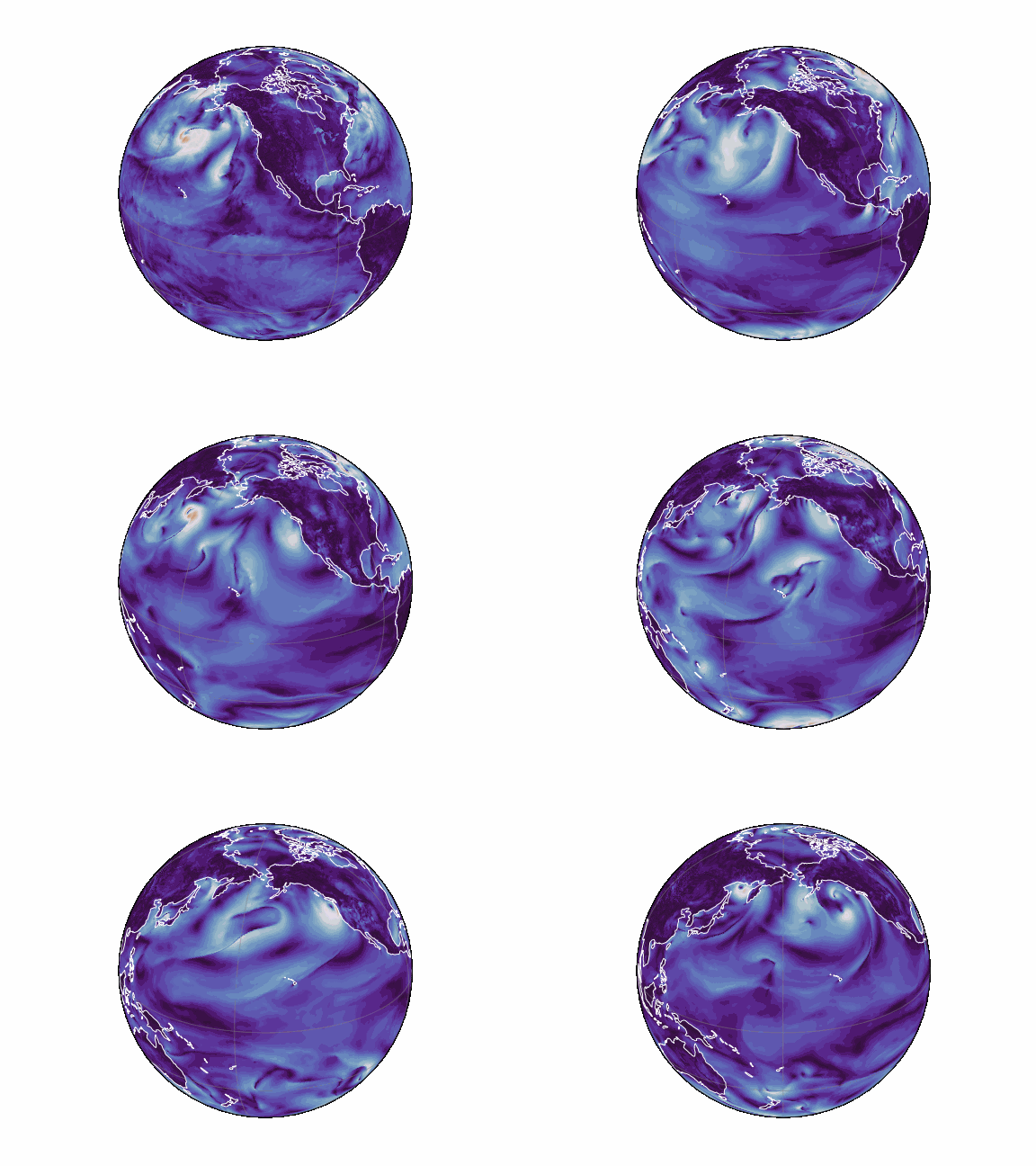 |
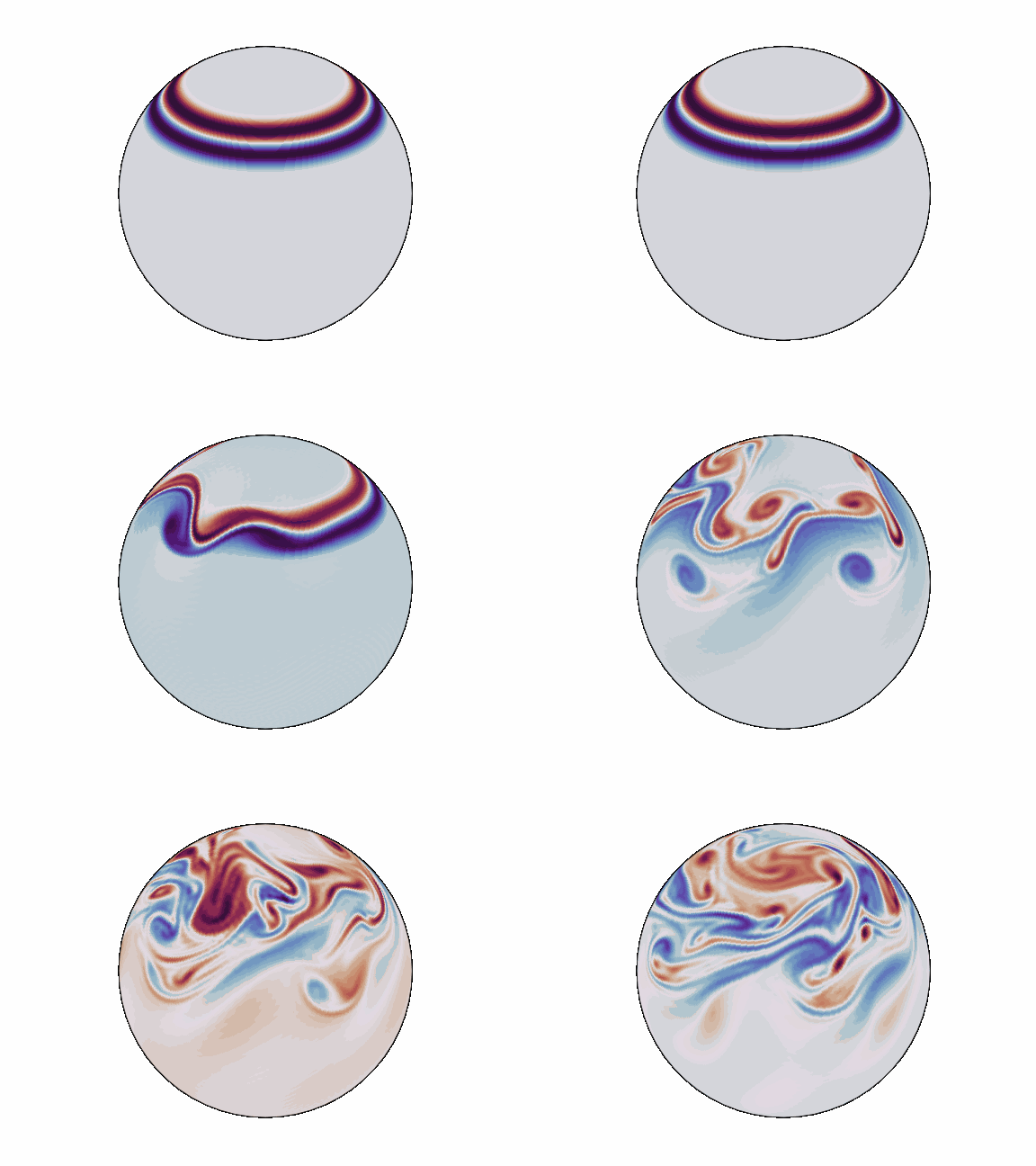 |
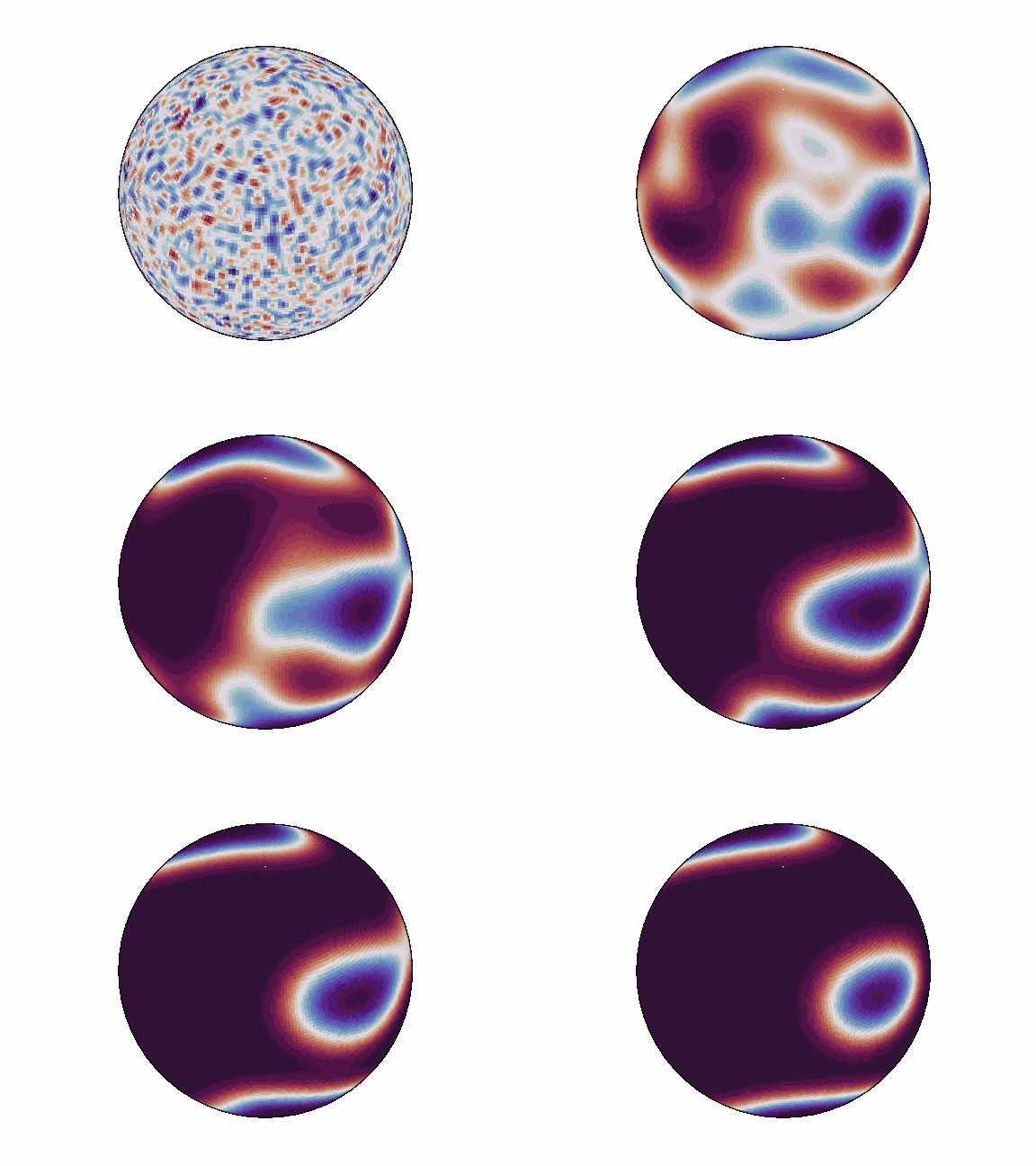 |
Installation
Prebuilt wheels
Prebuilt Linux wheels with compiled CUDA extensions are available on pypi.nvidia.com. Pick the package matching your CUDA toolkit version:
| CUDA | Package | Supported PyTorch | Install command |
|---|---|---|---|
| 12.6 | torch-harmonics-cu126 |
2.9.1 | pip install torch-harmonics-cu126 --extra-index-url https://pypi.nvidia.com |
| 12.8 | torch-harmonics-cu128 |
2.9.1 | pip install torch-harmonics-cu128 --extra-index-url https://pypi.nvidia.com |
| 12.9 | torch-harmonics-cu129 |
2.9.1 | pip install torch-harmonics-cu129 --extra-index-url https://pypi.nvidia.com |
| 13.0 | torch-harmonics-cu130 |
2.9.1 | pip install torch-harmonics-cu130 --extra-index-url https://pypi.nvidia.com |
| 13.2 | torch-harmonics-cu132 |
2.12.0 | pip install torch-harmonics-cu132 --extra-index-url https://pypi.nvidia.com |
If you don't need a specific CUDA version, use one of the rolling aliases:
# latest CUDA build
pip install torch-harmonics-cuda-latest --extra-index-url https://pypi.nvidia.com

# CPU only
pip install torch-harmonics-cpu-latest --extra-index-url https://pypi.nvidia.com
Tip: Run
nvidia-smito check your driver's CUDA version.
Older PyTorch or CUDA (PyTorch before 2.9, CUDA before 12.6) have no prebuilt wheels. Use the Docker container, which brings a matching PyTorch and CUDA, or build torch-harmonics from source against your installed PyTorch, adding --no-deps so that pip does not replace it with a newer one (pip install --no-build-isolation --no-deps .). These combinations are not tested.
PyPI
The vanilla torch-harmonics package on PyPI ships a CPU-only prebuilt wheel. This version is built for the newest PyTorch release. For GPU support, use the NVIDIA PyPI packages above.
pip install torch-harmonics
Building from source
If your OS, PyTorch or CUDA toolkit version is not covered by the available wheels, we recomment building torch-harmonics from the GitHub repository. Use --no-build-isolation so that custom CPU and CUDA kernels compile against your existing torch installation:
git clone git@github.com:NVIDIA/torch-harmonics.git
cd torch-harmonics
pip install --no-build-isolation -e .
If CUDA devices are not detected automatically (e.g. inside a container), set the TORCH_HARMONICS_BUILD_CUDA_EXTENSION flag. Set TORCH_CUDA_ARCH_LIST to only the architectures you need to reduce compilation time:
export TORCH_HARMONICS_BUILD_CUDA_EXTENSION=1
export TORCH_CUDA_ARCH_LIST="8.0 8.6 9.0a 10.0a+PTX"
pip install --no-build-isolation -e .
Tip: Use the
asuffix (e.g.9.0a,10.0a) instead of plain9.0or10.0to enable architecture-specific tensor core instructions (e.g.wgmmaon Hopper). Some layers such as DISCO benefit significantly from this. The trade-off is that the resulting binary is only compatible with the exact GPU generation it was compiled for.
⚠️ Custom CUDA extensions require architectures >= 7.0.
Alternatively, build a Docker container:
git clone git@github.com:NVIDIA/torch-harmonics.git
cd torch-harmonics
docker build . -t torch_harmonics
docker run --gpus all -it --rm --ipc=host --ulimit memlock=-1 --ulimit stack=67108864 torch_harmonics
More about torch-harmonics
Spherical harmonics
The spherical harmonics are special functions defined on the two-dimensional sphere $S^2$ (embedded in three dimensions). They form an orthonormal basis of the space of square-integrable functions defined on the sphere $L^2(S^2)$ and are comparable to the harmonic functions defined on a circle/torus. The spherical harmonics are defined as
$$ Y_l^m(\theta, \lambda) = \sqrt{\frac{(2l + 1)}{4 \pi} \frac{(l - m)!}{(l + m)!}} P_l^m(\cos \theta) \exp(im\lambda), $$
where $\theta$ and $\lambda$ are colatitude and longitude respectively, and $P_l^m$ the normalized, associated Legendre polynomials.
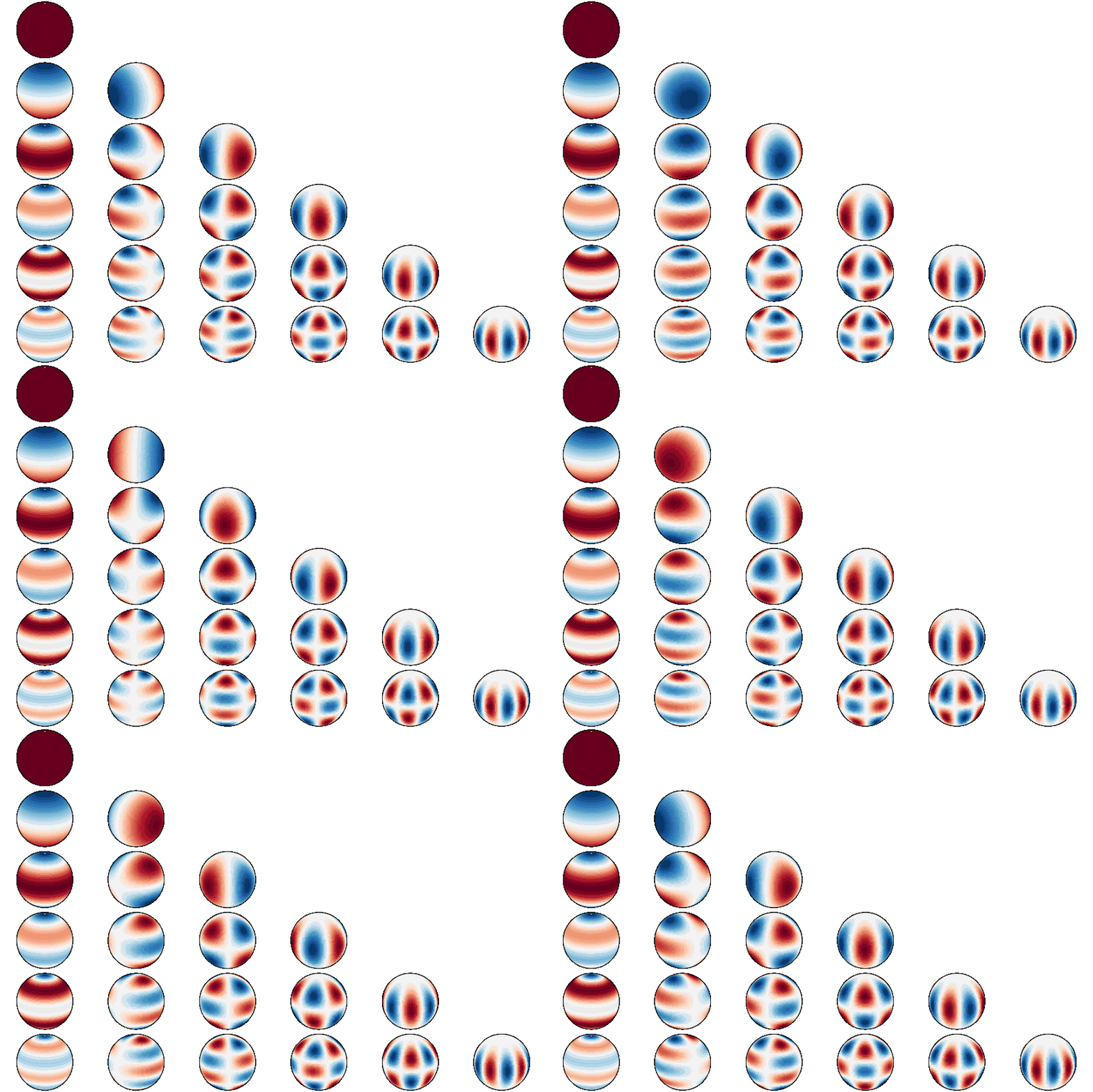
Spherical harmonics up to degree 5
Spherical harmonic transform
The spherical harmonic transform (SHT)
$$ f_l^m = \int_{S^2} \overline{Y_{l}^{m}}(\theta, \lambda) f(\theta, \lambda) \mathrm{d} \mu(\theta, \lambda) $$
realizes the projection of a signal $f(\theta, \lambda)$ on $S^2$ onto the spherical harmonics basis. The SHT generalizes the Fourier transform on the sphere. Conversely, a truncated series expansion of a function $f$ can be written in terms of spherical harmonics as
$$ f (\theta, \lambda) = \sum_{m=-M}^{M} \exp(im\lambda) \sum_{l=|m|}^{M} \hat f_l^m P_l^m (\cos \theta), $$
where $\hat{f}_l^m$, are the expansion coefficients associated to the mode $m$, $n$.
The implementation of the SHT follows the algorithm as presented in [2]. A direct spherical harmonic transform can be accomplished by a Fourier transform
$$ \hat f^m(\theta) = \frac{1}{2 \pi} \int_{0}^{2\pi} f(\theta, \lambda) \exp(-im\lambda) \mathrm{d} \lambda $$
in longitude and a Legendre transform
$$ \hat f_l^m = \frac{1}{2} \int^{\pi}_0 \hat f^{m} (\theta) P_l^m (\cos \theta) \sin \theta \mathrm{d} \theta $$
in latitude.
Discrete Legendre transform
The second integral, which computed the projection onto the Legendre polynomials is realized with quadrature. On the Gaussian grid, we use Gaussian quadrature in the $\cos \theta$ domain. The integral
$$ \hat f_l^m = \frac{1}{2} \int_{-1}^1 \hat{f}^m(\arccos x) P_l^m (x) \mathrm{d} x $$
is obtained with the substitution $x = \cos \theta$ and then approximated by the sum
$$ \hat f_l^m = \sum_{j=1}^{N_\theta} \hat{f}^m(\arccos x_j) P_l^m(x_j) w_j. $$
Here, $x_j \in [-1,1]$ are the quadrature nodes with the respective quadrature weights $w_j$.
Discrete-continuous convolutions on the sphere
torch-harmonics now provides local discrete-continuous (DISCO) convolutions as outlined in [5] on the sphere. These are use in local neural operators [2] to generalize convolutions to structured and unstructured meshes on the sphere.
Spherical (neighborhood) attention
torch-harmonics introduces spherical attention mechanisms which correctly generalize the attention mechanism to the sphere. The use of quadrature rules makes the resulting operations approximately equivariant and equivariant in the continuous limit. Moreover, neighborhood attention is correctly generalized onto the sphere by using the geodesic distance to determine the size of the neighborhood.
Getting started
The main functionality of torch_harmonics is provided in the form of torch.nn.Modules for composability. A minimum example is given by:
import torch
import torch_harmonics as th

device = torch.device('cuda' if torch.cuda.is_available() else 'cpu')

nlat = 512
nlon = 2*nlat
batch_size = 32
signal = torch.randn(batch_size, nlat, nlon, device=device)

# transform data on an equiangular grid
sht = th.RealSHT(nlat, nlon, grid="equiangular").to(device)

coeffs = sht(signal)
To enable scalable model-parallelism, torch-harmonics implements a distributed variant of the SHT located in torch_harmonics.distributed.
Detailed usage of torch-harmonics, alongside helpful analysis provided in a series of notebooks:
- Getting started
- Quadrature
- Visualizing the spherical harmonics
- Spectral fitting vs. SHT
- Conditioning of the Gramian
- Solving the Helmholtz equation
- Solving the shallow water equations
- Training Spherical Fourier Neural Operators (SFNO)
- Resampling signals on the sphere
- Computing partial derivatives with the SHT
Benchmarks
The benchmarks/ directory contains a performance benchmark suite covering SHT, DISCO
convolution, and spherical attention across resolutions, dtypes, and channel counts.
# run full suite on current GPU
python benchmarks/run.py

# filter by name or tag
python benchmarks/run.py --name disco
python benchmarks/run.py --tags attention neighborhood

# save a baseline, then compare after a change
python benchmarks/run.py --save-csv before.csv
python benchmarks/run.py --reference-csv before.csv
See CONTRIBUTING.md for the full workflow expected in performance-related PRs.
Examples and reproducibility
The examples folder contains training scripts for three distinct tasks:
- solution of the shallow water equations on the rotating sphere
- depth estimation on the sphere
- semantic segmentation on the sphere
Results from the papers can generally be reproduced by running python train.py. In the case of some older results the number of epochs and learning-rate may need to be adjusted by passing the corresponding command line argument.
Remarks on automatic mixed precision (AMP) support
Note that torch-harmonics uses Fourier transforms from torch.fft which in turn uses kernels from the optimized cuFFT library. This library supports fourier transforms of float32 and float64 (i.e. single and double precision) tensors for all input sizes. For float16 (i.e. half precision) and bfloat16 inputs however, the dimensions which are transformed are restricted to powers of two. Since data is converted to one of these reduced precision floating point formats when torch.autocast is used, torch-harmonics will issue an error when the input shapes are not powers of two. For these cases, we recommend disabling autocast for the harmonics transform specifically:
import torch
import torch_harmonics as th

sht = th.RealSHT(512, 1024, grid="equiangular").cuda()

with torch.autocast(device_type="cuda", enabled = True):
   # do some AMP converted math here
   x = some_math(x)
   # convert tensor to float32
   x = x.to(torch.float32)
   # now disable autocast specifically for the transform,
   # making sure that the tensors are not converted
   # back to reduced precision internally
   with torch.autocast(device_type="cuda", enabled = False):
      xt = sht(x)

   # continue operating on the transformed tensor
   xt = some_more_math(xt)
Depending on the problem, it might be beneficial to upcast data to float64 instead of float32 precision for numerical stability.
Contributors
Boris Bonev (bbonev@nvidia.com), Thorsten Kurth (tkurth@nvidia.com), Max Rietmann, Mauro Bisson, Andrea Paris, Alberto Carpentieri, Massimiliano Fatica, Nikola Kovachki, Jean Kossaifi, Christian Hundt
Cite us
If you use torch-harmonics in your work, please cite the paper describing the library [7]:
@misc{kurth2026library,
      title={A library for differentiable signal processing and machine learning on the sphere},
      author={Thorsten Kurth and Max Rietmann and Mauro Bisson and Andrea Paris and Alberto Carpentieri and Jean Kossaifi and Anima Anandkumar and Christian Hundt and Boris Bonev},
      year={2026},
      eprint={2609.39737},
      archivePrefix={arXiv},
      primaryClass={cs.LG},
      url={https://arxiv.org/abs/2609.39737}
}
If you use Spherical Fourier Neural Operators, please also cite [1]:
@misc{bonev2023spherical,
      title={Spherical Fourier Neural Operators: Learning Stable Dynamics on the Sphere},
      author={Boris Bonev and Thorsten Kurth and Christian Hundt and Jaideep Pathak and Maximilian Baust and Karthik Kashinath and Anima Anandkumar},
      year={2023},
      eprint={2306.03838},
      archivePrefix={arXiv},
      primaryClass={cs.LG}
}
References
[1] Bonev B., Kurth T., Hundt C., Pathak, J., Baust M., Kashinath K., Anandkumar A.; Spherical Fourier Neural Operators: Learning Stable Dynamics on the Sphere; International Conference on Machine Learning, 2023. arxiv link
[2] Liu-Schiaffini M., Berner J., Bonev B., Kurth T., Azizzadenesheli K., Anandkumar A.; Neural Operators with Localized Integral and Differential Kernels; International Conference on Machine Learning, 2024. arxiv link
[3] Schaeffer N.; Efficient spherical harmonic transforms aimed at pseudospectral numerical simulations; G3: Geochemistry, Geophysics, Geosystems, 2013.
[4] Wang B., Wang L., Xie Z.; Accurate calculation of spherical and vector spherical harmonic expansions via spectral element grids; Adv Comput Math, 2018.
[5] Ocampo, Price, McEwen, Scalable and equivariant spherical CNNs by discrete-continuous (DISCO) convolutions, ICLR (2023), arXiv:2209.13603
[6] Bonev B., Rietmann M., Paris A., Carpentieri A., Kurth T.; Attention on the Sphere; arxiv link
[7] Kurth T., Rietmann M., Bisson M., Paris A., Carpentieri A., Kossaifi J., Anandkumar A., Hundt C., Bonev B.; A library for differentiable signal processing and machine learning on the sphere; arXiv preprint, 2026. arxiv link


Release files for torch-harmonics 0.9.3
For a detailed explanation of source distributions (sdists) and built distributions (wheels), please see the package formats documentation.
Built distributions (wheels)
| File | Reset | |||
|---|---|---|---|---|
| torch_harmonics-0.9.3-cp314-cp314-manylinux_2_24_x86_64.manylinux_2_28_x86_64.whl | CPython 3.14 | CPython 3.14 | Linux glibc 2.28+ x86-64, Linux glibc 2.24+ x86-64 | Details |
| torch_harmonics-0.9.3-cp313-cp313-manylinux_2_24_x86_64.manylinux_2_28_x86_64.whl | CPython 3.13 | CPython 3.13 | Linux glibc 2.24+ x86-64, Linux glibc 2.28+ x86-64 | Details |
| torch_harmonics-0.9.3-cp312-cp312-manylinux_2_24_x86_64.manylinux_2_28_x86_64.whl | CPython 3.12 | CPython 3.12 | Linux glibc 2.28+ x86-64, Linux glibc 2.24+ x86-64 | Details |
| torch_harmonics-0.9.3-cp311-cp311-manylinux_2_24_x86_64.manylinux_2_28_x86_64.whl | CPython 3.11 | CPython 3.11 | Linux glibc 2.28+ x86-64, Linux glibc 2.24+ x86-64 | Details |
Total release size: 3.0 MB
Release files / torch_harmonics-0.9.3-cp314-cp314-manylinux_2_24_x86_64.manylinux_2_28_x86_64.whl
| Download URL | torch_harmonics-0.9.3-cp314-cp314-manylinux_2_24_x86_64.manylinux_2_28_x86_64.whl |
|---|---|
| Size | 751.1 kB |
| Tags | CPython 3.14 Linux glibc 2.24+ x86-64 Linux glibc 2.28+ x86-64 |
|
SHA-256 checksum How to use checksums |
75677833351fc856ebbfc326727424564f27ea9ae6cbbd7b0ae07d481ec5a9d8
|
|
BLAKE2b-256 checksum How to use checksums |
6c9d63e4ecfe16ab4ee633c9297bf5aff0f5c5d312b935f47823d83f91664272
|
| Upload date | |
|
Uploaded using Trusted Publishing? What is trusted publishing? |
No |
| Uploaded via |
twine/7.0.0 CPython/3.14.7
|
Release files / torch_harmonics-0.9.3-cp313-cp313-manylinux_2_24_x86_64.manylinux_2_28_x86_64.whl
| Download URL | torch_harmonics-0.9.3-cp313-cp313-manylinux_2_24_x86_64.manylinux_2_28_x86_64.whl |
|---|---|
| Size | 750.8 kB |
| Tags | CPython 3.13 Linux glibc 2.24+ x86-64 Linux glibc 2.28+ x86-64 |
|
SHA-256 checksum How to use checksums |
09b5a23ce3ec162189c9c355c0317b38df68bd7e119ea40b2bae8c067d5bffa9
|
|
BLAKE2b-256 checksum How to use checksums |
2b4f446c6cbf84d6b02ef2c8d5fb6cbc1cd89966d6e5b8cc41f1ef496c2453b7
|
| Upload date | |
|
Uploaded using Trusted Publishing? What is trusted publishing? |
No |
| Uploaded via |
twine/7.0.0 CPython/3.14.7
|
Release files / torch_harmonics-0.9.3-cp312-cp312-manylinux_2_24_x86_64.manylinux_2_28_x86_64.whl
| Download URL | torch_harmonics-0.9.3-cp312-cp312-manylinux_2_24_x86_64.manylinux_2_28_x86_64.whl |
|---|---|
| Size | 750.8 kB |
| Tags | CPython 3.12 Linux glibc 2.24+ x86-64 Linux glibc 2.28+ x86-64 |
|
SHA-256 checksum How to use checksums |
566f28a09cdb2ad470f4e2a943d37185a72eb078de4d82c28985f7e0f2c9b7c7
|
|
BLAKE2b-256 checksum How to use checksums |
3a907b740858c981cd92ebdec64b0a6bf567fa154e5a11b2015ae93ca3ac6aeb
|
| Upload date | |
|
Uploaded using Trusted Publishing? What is trusted publishing? |
No |
| Uploaded via |
twine/7.0.0 CPython/3.14.7
|
Release files / torch_harmonics-0.9.3-cp311-cp311-manylinux_2_24_x86_64.manylinux_2_28_x86_64.whl
| Download URL | torch_harmonics-0.9.3-cp311-cp311-manylinux_2_24_x86_64.manylinux_2_28_x86_64.whl |
|---|---|
| Size | 747.6 kB |
| Tags | CPython 3.11 Linux glibc 2.24+ x86-64 Linux glibc 2.28+ x86-64 |
|
SHA-256 checksum How to use checksums |
4c85df1c6aca1d8beb39879cf7adb34248d1bd1979dbe32155bc5d2abd0d3396
|
|
BLAKE2b-256 checksum How to use checksums |
21d0a71fa85ec1256997f83f416cb10c3a59be478c9a763b0af8f278f692b4b0
|
| Upload date | |
|
Uploaded using Trusted Publishing? What is trusted publishing? |
No |
| Uploaded via |
twine/7.0.0 CPython/3.14.7
|














