
Add OpenCV tracking, Hungarian detection-to-track matching and temporal
statistical smoothing on top of a model you already have — TensorFlow, PyTorch,
or anything else with a .predict().





Contents
- Why TrackEverything
- Installation
- Quickstart
- How It Works
- Breaking It Down to 5 Steps
- Configuration Reference
- More Options
- Examples
- Compatibility
- Migrating from 1.7.x
- Contributing
- License & Credits
Why TrackEverything
A per-frame detector has no memory. It cannot tell you that the person in frame 900 is the same person it saw in frame 1, and a single bad frame can flip a confident classification.
- Identity that persists. Detections are matched to tracks by solving the assignment problem over an IOU matrix, so each object keeps a stable id.
- Decisions that use every frame. Classification scores are smoothed with a moving average, so one ambiguous frame cannot overturn a hundred good ones.
- Your model, unchanged. Any object with a
.predict()works. No wrapper, no retraining, no framework lock-in. TensorFlow is never imported unless you ask for it.
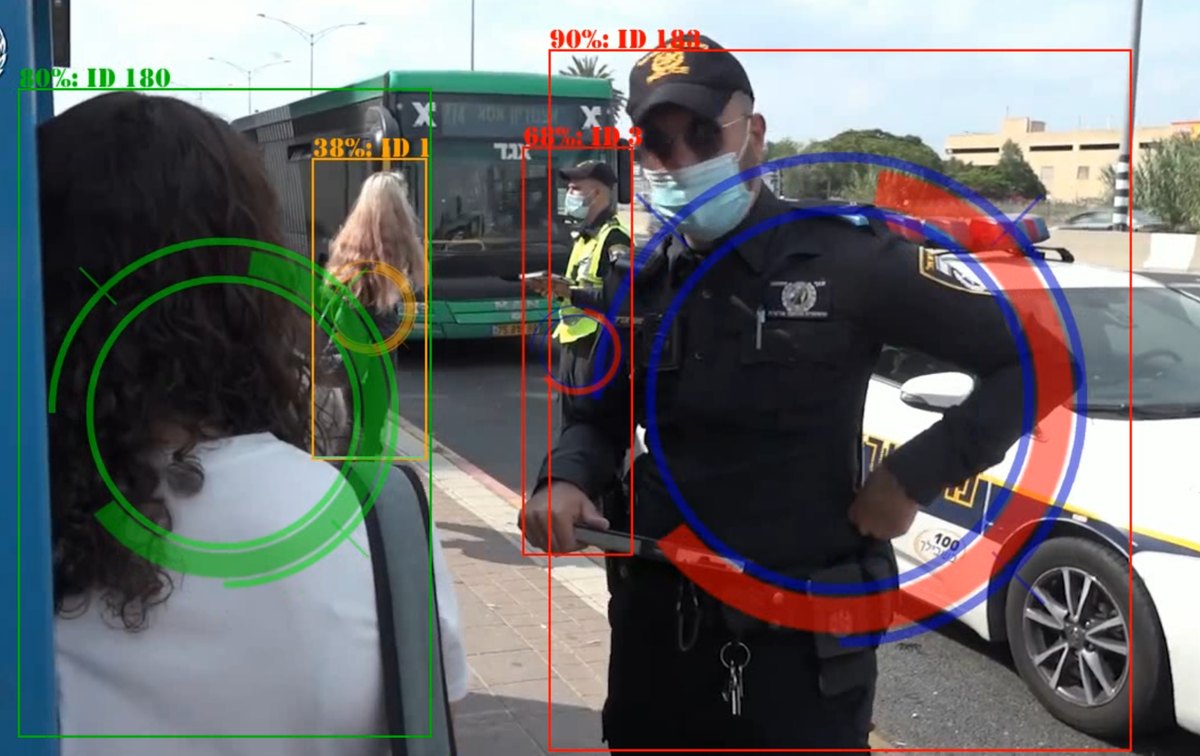
Real output. Each box carries an id that survives between frames, and a confidence score accumulated over all frames so far rather than measured from this one.
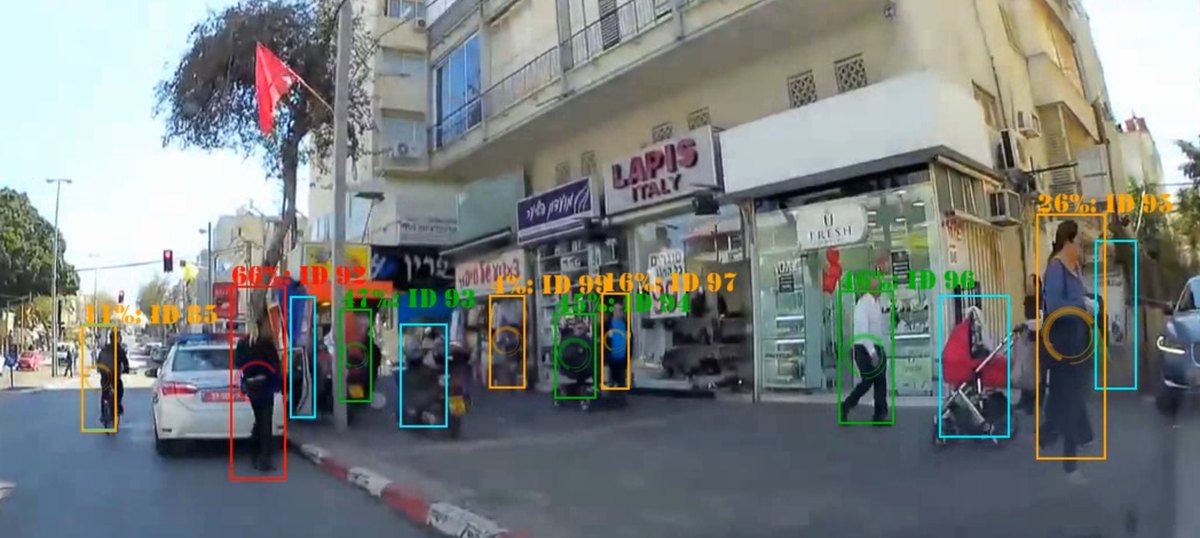
The same pipeline holding a dozen identities at once.
Installation
python -m pip install TrackEverything
Python 3.9+. NumPy, SciPy, Pillow and opencv-contrib-python are installed
automatically. TensorFlow is not a dependency — it is imported lazily, and
only if you call load_tf_model.
Quickstart
Minimal — add tracking to a detector you already have
from TrackEverything import Detector, DetectionVars

def my_detections(det_vars, frame):
    """Return [[confidence, (xmin, ymin, width, height)], ...] for one frame."""
    return [
        [score, (x, y, w, h)]
        for score, (x, y, w, h) in run_my_model(frame)
        if score > det_vars.detection_threshold
    ]

detector = Detector(
    det_vars=DetectionVars(
        detection_model=my_model,
        detection_proccessing=my_detections,
    )
)

detector.update(frame)              # detect -> match to tracks -> smooth
detector.draw_visualization(frame)  # boxes, persistent ids and scores, in place
Full — detection, classification and temporal smoothing
import cv2

from TrackEverything import (
    ClassificationVars,
    Detector,
    DetectionVars,
    InspectorVars,
    StatisticalCalculator,
    StatMethods,
    VisualizationVars,
)

detector = Detector(
    det_vars=DetectionVars(
        detection_model=my_detection_model,    # any object with .predict()
        detection_proccessing=my_detections,   # -> [[conf, (x, y, w, h)], ...]
        detection_threshold=0.5,
        non_max_sup_threshold=0.3,             # built-in NMS; < 0 disables it
    ),
    class_vars=ClassificationVars(
        class_model=my_classifier,             # omit entirely for detection only
    ),
    inspector_vars=InspectorVars(
        trck_type="CSRT",                      # or kcf / mosse / medianflow / ...
        max_trck_fails=10,                     # frames of tolerance before dropping
        stat_calc=StatisticalCalculator(method=StatMethods.EMA, class_num=2),
    ),
    visualization_vars=VisualizationVars(
        labels=["no_mask", "mask"],
        uncertainty_threshold=0.5,             # below this -> "Unknown", in orange
    ),
)

cap = cv2.VideoCapture("video.mp4")
while True:
    ok, frame = cap.read()
    if not ok:
        break

    detector.update(frame)
    detector.draw_visualization(frame)
    print(detector.get_current_class_summary())   # e.g. {1: 3, 0: 1}

    cv2.imshow("TrackEverything", frame)
    if cv2.waitKey(1) & 0xFF == ord("q"):
        break
How It Works
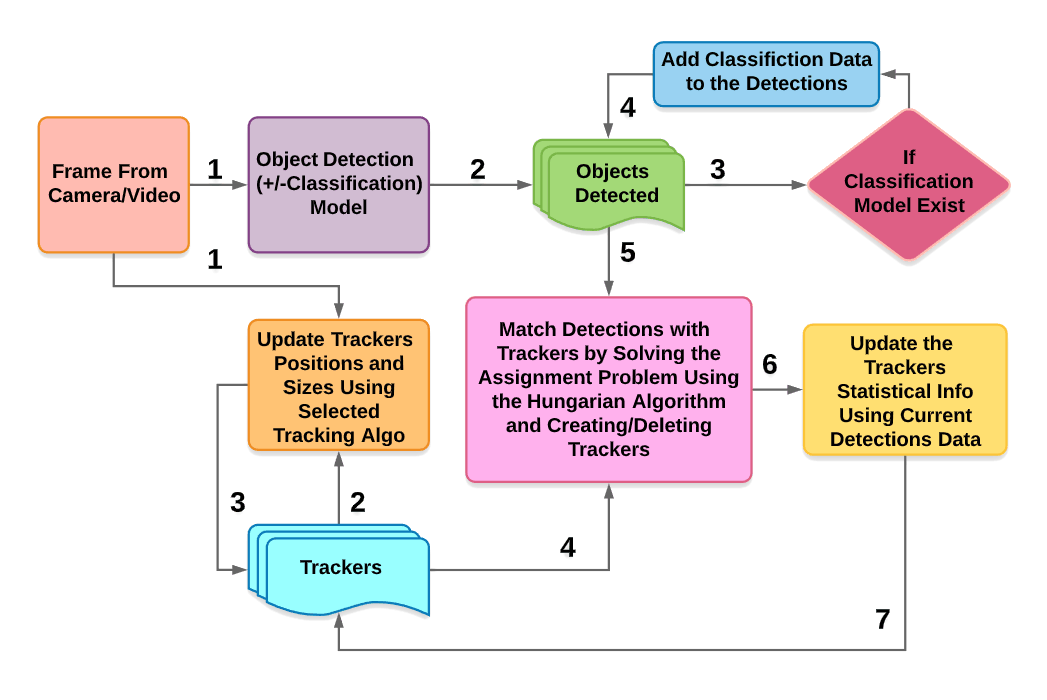
The pipeline receives a series of frames and outputs a list of tracker objects holding the detected objects and the probability of each belonging to a class.
Breaking It Down to 5 Steps
1st Step — Get all detections in the current frame
First we take the frame and pass it through an object detection model — any
Python model will do — then filter out redundant overlapping detections using
Non-Maximum Suppression (NMS) and add all of them to the detections list.
2nd Step — Get classification probabilities for the detected objects
After we have the detections from step 1, we put them through a classification
model to determine the probability of each belonging to a certain class. (If no
classification model is supplied, classification is applied during the previous
step.) We do this by cropping the frame to the object bounding box and passing
the crop through the classification model. This data is added as a vector of
probabilities to each detection in the detections list.
3rd Step — Update the tracker object list
We have a list of trackers, a class holding — among other things — an OpenCV
tracker object, a unique ID, previous statistics for that ID, and indicators for
the accuracy of that tracker. In the first frame this list is empty, and in step
4 it is filled with new trackers matching the detected objects. If the list is
not empty, in this step we update the trackers' positions using the current
frame and dispose of failed trackers.
4th Step — Match detections with trackers
Using intersection over union (IOU) of a tracker bounding box and a detection bounding box as a metric, we solve the linear sum assignment problem — also known as minimum weight matching in bipartite graphs — for the IOU matrix, using the Hungarian algorithm (also known as the Munkres algorithm). SciPy has a built-in utility that implements it:
matched_idx = linear_sum_assignment(-iou_matrix)
linear_sum_assignment minimizes cost by default, so we reverse the sign of the
IOU matrix to maximize instead. The result looks like this:
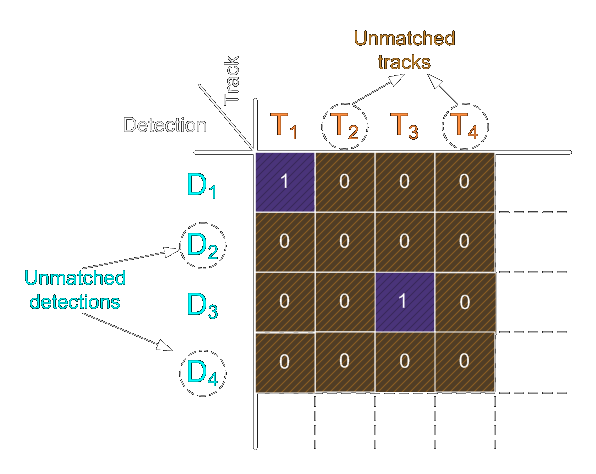
For each unmatched detection we create a new tracker with that detection's data.
For unmatched trackers we update the accuracy indicators and remove any that are
way off. For matched pairs we update the tracker position to the more accurate
detection box, take the classification data, and use the StatisticalCalculator
to adjust the results.
5th Step — Decide what to do
After step 4 the trackers list is up to date with all the statistical and
current data. The tracker class has a method returning the current
classifications and the confidence of those scores; we then update the
detections and iterate through them. A detection with a low confidence score
probably came from a tracker without enough data, or the detection itself is
poor — those can be marked using the uncertainty parameters in
VisualizationVars. We can then draw all the results, or read them directly
from the detections list.
Configuration Reference
A Detector is assembled from four configuration objects. Every one of them is
optional and has working defaults.
| Object | What it controls | Key parameters |
|---|---|---|
DetectionVars |
The detection model and how its output is read | detection_model, detection_model_path, detection_proccessing, detection_threshold, non_max_sup_threshold |
ClassificationVars |
The classification model, if any | class_model, class_model_path, class_proccessing |
InspectorVars |
Tracking and statistics | trck_type, max_trck_fails, trck_failure_pt, trck_reward_pt, trck_resizing, iou_paring_threshold, stat_calc |
VisualizationVars |
Drawing | labels, colors, show_ids, show_trackers, uncertainty_threshold, uncertainty_color, uncertainty_label |
Once the detector is set up, update(frame) refreshes all data from the new
frame, draw_visualization(frame) adds boxes and text to it, and
get_current_class_summary() returns a count of current detections per class.
More Options
Pick a different tracker type
TrackEverything uses OpenCV tracker objects. Set trck_type on InspectorVars
to any of csrt, kcf, mil, boosting, tld, medianflow, mosse or
goturn (case-insensitive). The default is
CSRT, a
Discriminative Correlation Filter Tracker with Channel and Spatial Reliability.
Names are resolved against both the cv2 and cv2.legacy namespaces, so
trackers that moved in OpenCV 4.5.1 keep working. available_trackers() lists
the ones your OpenCV build actually provides.
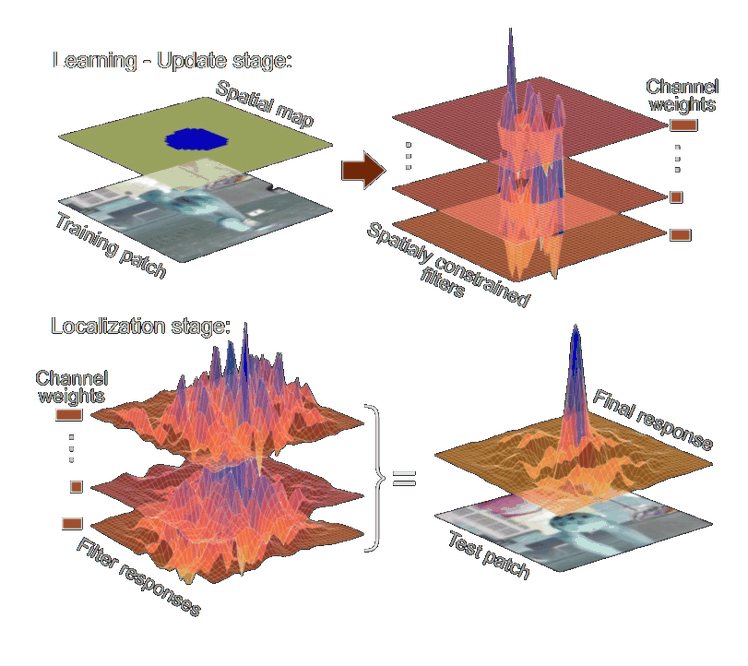
Overview of the CSR-DCF approach. An automatically estimated spatial reliability map restricts the correlation filter to the parts suitable for tracking (top), improving localization within a larger search region and performance for irregularly shaped objects. Channel reliability weights calculated in the constrained optimization step of the correlation filter learning reduce the noise of the weight-averaged filter response (bottom). Figure from Lukežič et al., arXiv:1611.08461.
A summary of the alternatives, by Adrian Rosebrock:
| Tracker | Notes | Min OpenCV |
|---|---|---|
| BOOSTING | Based on the AdaBoost algorithm behind Haar cascades. Slow and not very accurate; interesting mainly for comparison. | 3.0.0 |
| MIL | Better accuracy than BOOSTING, but does a poor job of reporting its own failures. | 3.0.0 |
| KCF | Kernelized Correlation Filters. Faster than BOOSTING and MIL. Does not handle full occlusion well. | 3.1.0 |
| CSRT | Tends to be more accurate than KCF, slightly slower. The default. | 3.4.2 |
| MedianFlow | Reports failures nicely, but fails on large jumps in motion or fast appearance changes. | 3.0.0 |
| TLD | Prone to false positives. Not recommended. | 3.0.0 |
| MOSSE | Very fast. Less accurate than CSRT or KCF, but a good choice when you need pure speed. | 3.4.1 |
| GOTURN | The only deep-learning-based tracker in OpenCV. Requires additional model files. | 3.2.0 |
Pick a different statistical method
InspectorVars takes a StatisticalCalculator, which currently offers four
methods:
| Method | Behaviour |
|---|---|
StatMethods.Non |
No statistical information is kept; only the current frame counts. |
StatMethods.CMA |
Cumulative Moving Average — the average of all data up to the current point. |
StatMethods.FMA |
Finite Moving Average — the unweighted mean of the previous n points. |
StatMethods.EMA |
Exponential Moving Average — a first-order IIR filter whose weights decay exponentially. |
These are just the basics; a method is any callable taking a StatParams, so
adding your own is a few lines.
Per-class weighting and NMS
You can run the built-in Non-Maximum Suppression over your model's output, and
give each classification category a different weight in the statistics via
StatParams.class_effect.
For example: use head detection plus a classifier that returns category 0 when it is not confident — say, when the person has their back to the camera. Set the effect of category 0 to a low value, and those frames barely disturb what is already known about that person, so the data survives until they turn back around.
import numpy as np

from TrackEverything import StatisticalCalculator, StatMethods, StatParams

stat_calc = StatisticalCalculator(
    parameters=StatParams(class_effect=np.array([0.05, 1.0, 1.0])),
    method=StatMethods.EMA,
    class_num=3,
)
Examples
Two companion repositories demonstrate the package end to end:
- Mask Detection — several examples using head detection, face detection and face detection plus classification models, to find and classify people with or without a mask.
- Cop Detection — a well-known object detection model plus a custom classification model, used to detect law-enforcement personnel with high accuracy.
Compatibility
| Dependency | Supported | Notes |
|---|---|---|
| Python | 3.9 – 3.13 | 3.7 and 3.8 are end-of-life |
| NumPy | ≥ 1.20 | |
| SciPy | ≥ 1.6 | linear_sum_assignment |
| Pillow | ≥ 8.0 | getsize was removed in Pillow 10; measurement is feature-detected |
| OpenCV | ≥ 4.5.1 | opencv-contrib-python; BOOSTING/TLD/MedianFlow/MOSSE live in cv2.legacy from this version |
Tested on Linux, Windows and macOS. See the CI matrix.
Migrating from 1.7.x
Version 2.0.0 repairs compatibility with every currently-supported Python, Pillow and OpenCV release — 1.7.2 cannot be imported at all on Python 3.11+. Full detail is in the CHANGELOG; the short version:
trck_typeis now a string, resolved whenInspectorVarsis built:InspectorVars(trck_type="CSRT"). Passing a callable still works, sotrck_type=get_tracker("kcf")is unchanged.- Configuration objects are no longer shared between instances. Two
Detectors previously shared one tracker-id counter and one set of statistics. If you relied on that, pass the sameInspectorVarsexplicitly. class_effectnow does something. It was documented but never read. Leaving it unset keeps the previous behaviour.- Python 3.7 and 3.8 are no longer supported.
Every import path from 1.7.x still resolves, so
from TrackEverything.detector import Detector keeps working.
Contributing
Contributions are welcome, and I would love to hear from you if you find this package useful.
git clone https://github.com/ami-a/TrackEverything.git
cd TrackEverything
python -m pip install -e ".[dev]"

pytest                 # the suite runs in about a second
ruff check .
The tests need neither TensorFlow, a GPU, nor a video file: the fakes in
tests/conftest.py stand in for the tracker and model contracts.
License & Credits
Released under the MIT License.
- The CSR-DCF diagram is reproduced from Lukežič et al., Discriminative Correlation Filter with Channel and Spatial Reliability, arXiv:1611.08461.
- The tracker comparison table summarises a write-up by Adrian Rosebrock.
- The demo footage is third-party broadcast material, used here to illustrate the library's output.
1 maintainer

Release files for TrackEverything 2.0.1
For a detailed explanation of source distributions (sdists) and built distributions (wheels), please see the package formats documentation.
Source distribution (sdist)
| File | Size | Uploaded | |
|---|---|---|---|
| trackeverything-2.0.1.tar.gz | 42.7 kB | Details |
Built distribution (wheel)
| File | Interpreter | ABI | Platform | Reset |
|---|---|---|---|---|
| trackeverything-2.0.1-py3-none-any.whl | Python 3 | none | any | Details |
Total release size: 71.6 kB
Release files / trackeverything-2.0.1.tar.gz
| Download URL | trackeverything-2.0.1.tar.gz |
|---|---|
| Size | 42.7 kB |
| Tags | Source |
|
SHA-256 checksum How to use checksums |
1b9909bf532f3ac729106fa543470e8d3d1cb2d2d60e16f6794b6dd73e52eb46
|
|
BLAKE2b-256 checksum How to use checksums |
a29437fc906f8a2c80f702062ea850b161f2b11b69d2bd0f5662ad7d0aa18496
|
| Upload date | |
|
Uploaded using Trusted Publishing? What is trusted publishing? |
Yes |
| Uploaded via |
twine/7.0.0 CPython/3.13.14
|
Provenance
Provenance describes where a file came from. On PyPI, provenance is shared via attestations, which provide a verifiable record of the build or publishing details. View details, limitations and caveats.


PyPI Publish Attestation
PyPI verified that this artifact, at this checksum, originated from the publisher listed below.
Signed by GitHub Actions, verified by PyPI on Sep 21, 2026.
Transparency logRelease files / trackeverything-2.0.1-py3-none-any.whl
| Download URL | trackeverything-2.0.1-py3-none-any.whl |
|---|---|
| Size | 28.9 kB |
| Tags | Python 3 |
|
SHA-256 checksum How to use checksums |
3cba2d736ff8b7a74a5002c70e218d36929fb57fa8cc21c1d96298342066a18b
|
|
BLAKE2b-256 checksum How to use checksums |
1e3aefccdc4176463e7e6077f0247c7a8069cbc0feea67d78bacda98740de68e
|
| Upload date | |
|
Uploaded using Trusted Publishing? What is trusted publishing? |
Yes |
| Uploaded via |
twine/7.0.0 CPython/3.13.14
|
Provenance
Provenance describes where a file came from. On PyPI, provenance is shared via attestations, which provide a verifiable record of the build or publishing details. View details, limitations and caveats.
PyPI Publish Attestation
PyPI verified that this artifact, at this checksum, originated from the publisher listed below.
Signed by GitHub Actions, verified by PyPI on Sep 21, 2026.
Transparency log













