
The trackintel Framework






trackintel is a library for the analysis of spatio-temporal tracking data with a focus on human mobility. The core of trackintel is the hierachical data model for movement data that is used in GIS, transport planning and related fields [1]. We provide functionalities for the full life-cycle of human mobility data analysis: import and export of tracking data of different types (e.g, trackpoints, check-ins, trajectories), preprocessing, data quality assessment, semantic enrichment, quantitative analysis and mining tasks, and visualization of data and results. Trackintel is based on Pandas and GeoPandas
You can find the documentation on the trackintel documentation page.
Try trackintel online in a MyBinder notebook:

Data model
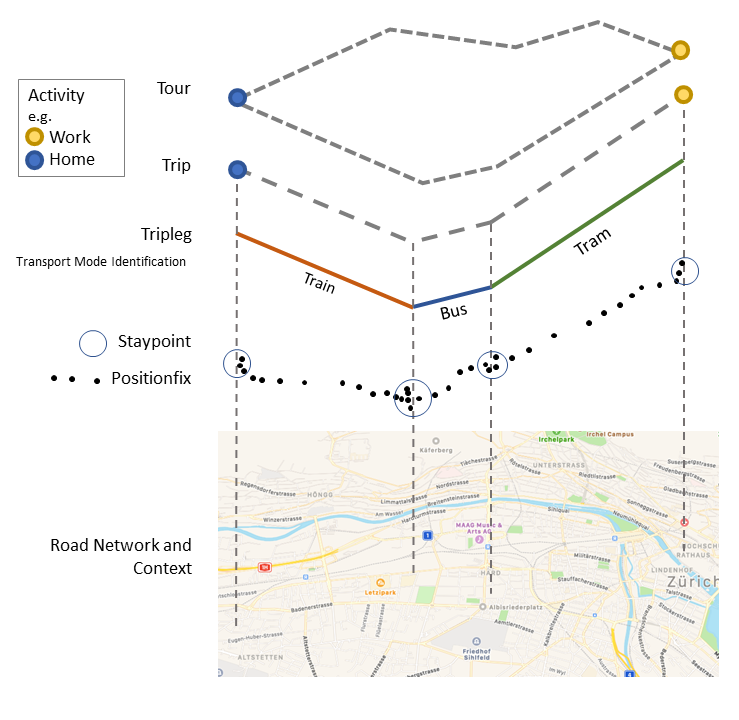
An overview of the data model of trackintel:
- positionfixes (Raw tracking points, e.g., GPS recordings or check-ins)
- staypoints (Locations where a user spent time without moving, e.g., aggregations of positionfixes or check-ins)
- activities (Staypoints with a purpose and a semantic label, e.g., meeting to drink a coffee as opposed to waiting for the bus)
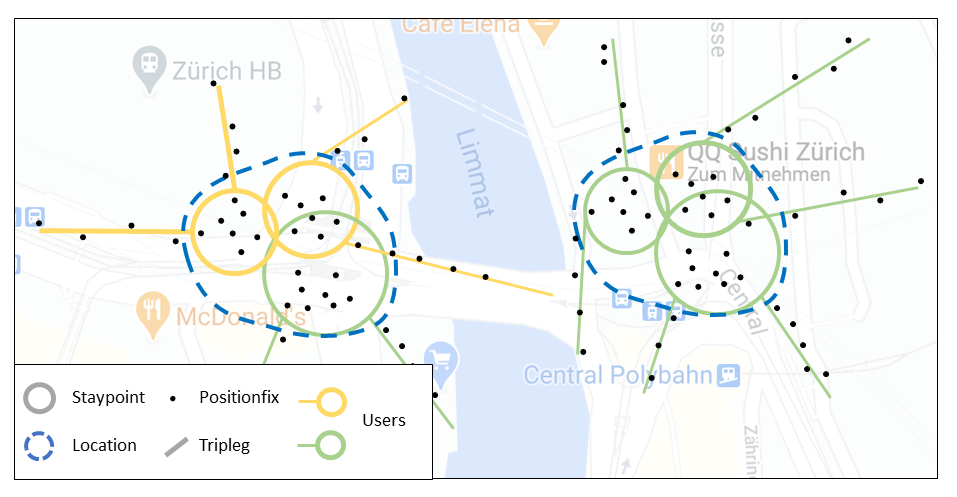
- locations (Important places that are visited more than once, e.g., home or work location)
- triplegs (or stages) (Continuous movement without changing mode, vehicle or stopping for too long, e.g., a taxi trip between pick-up and drop-off)
- trips (The sequence of all triplegs between two consecutive activities)
- tours (A collection of sequential trips that return to the same location)
An example plot showing the hierarchy of the trackintel data model can be found below:
The image below explicitly shows the definition of locations as clustered staypoints, generated by one or several users.
You can enter the trackintel framework if your data corresponds to any of the above mentioned movement data representation. Here are some of the functionalities that we provide:
- Import: Import from the following data formats is supported:
geopandas dataframes(recommended),csv filesin a specified format,postGISdatabases. We also provide specific dataset readers for popular public datasets (e.g, geolife). - Aggregation: We provide functionalities to aggregate into the next level of our data model. E.g., positionfixes->staypoints; positionfixes->triplegs; staypoints->locations; staypoints+triplegs->trips; trips->tours
- Enrichment: Activity semantics for staypoints; Mode of transport semantics for triplegs; High level semantics for locations
How it works
trackintel provides support for the full life-cycle of human mobility data analysis.
[1.] Import data.
import geopandas as gpd
import trackintel as ti

# read pfs from csv file
pfs = ti.io.file.read_positionfixes_csv(".\examples\data\pfs.csv", sep=";", index_col="id")
# or with predefined dataset readers (here geolife)
pfs, _ = ti.io.dataset_reader.read_geolife(".\tests\data\geolife_long")
[2.] Data model generation.
# generate staypoints and triplegs
pfs, sp = pfs.as_positionfixes.generate_staypoints(method='sliding')
pfs, tpls = pfs.as_positionfixes.generate_triplegs(sp, method='between_staypoints')
[3.] Visualization.
# plot the generated tripleg result
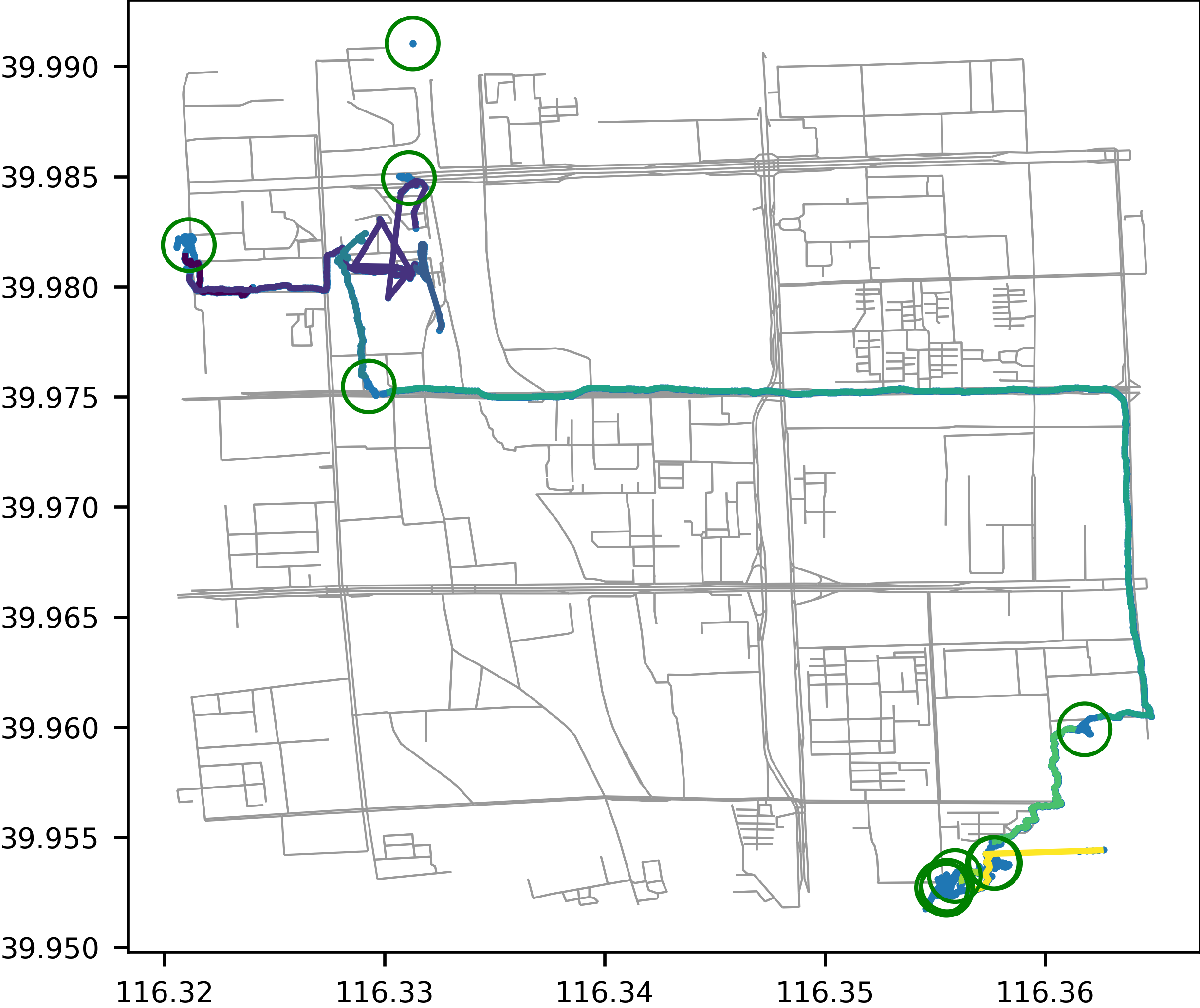
tpls.as_triplegs.plot(positionfixes=pfs, staypoints=sp, staypoints_radius=10)
[4.] Analysis.
# e.g., predict travel mode labels based on travel speed
tpls = tpls.as_triplegs.predict_transport_mode()
# or calculate the temporal tracking coverage of users
tracking_coverage = ti.temporal_tracking_quality(tpls, granularity='all')
[5.] Save results.
# save the generated results as csv file
sp.as_staypoints.to_csv('.\examples\data\sp.csv')
tpls.as_triplegs.to_csv('.\examples\data\tpls.csv')
For example, the plot below shows the generated staypoints and triplegs from the imported raw positionfix data.
Installation and Usage
trackintel is on pypi.org, you can install it in a GeoPandas available environment using:
pip install trackintel
You should then be able to run the examples in the examples folder or import trackintel using:
import trackintel as ti

ti.print_version()
Requirements and dependencies
- Numpy
- GeoPandas
- Matplotlib
- Pint
- NetworkX
- GeoAlchemy2
- scikit-learn
- tqdm
- OSMnx
- similaritymeasures
- pygeos
Development
You can find the development roadmap under ROADMAP.md and further development guidelines under CONTRIBUTING.md.
Contributors
trackintel is primarily maintained by the Mobility Information Engineering Lab at ETH Zurich (mie-lab.ethz.ch).
If you want to contribute, send a pull request and put yourself in the AUTHORS.md file.
References
[1] Axhausen, K. W. (2007). Definition Of Movement and Activity For Transport Modelling. In Handbook of Transport Modelling. Emerald Group Publishing Limited.
1 maintainer

Release files for trackintel 1.1.5
For a detailed explanation of source distributions (sdists) and built distributions (wheels), please see the package formats documentation.
Source distribution (sdist)
| File | Size | Uploaded | |
|---|---|---|---|
| trackintel-1.1.5.tar.gz | 107.0 kB | Details |
Built distribution (wheel)
| File | Interpreter | ABI | Platform | Reset |
|---|---|---|---|---|
| trackintel-1.1.5-py3-none-any.whl | Python 3 | none | any | Details |
Total release size: 246.6 kB
Release files / trackintel-1.1.5.tar.gz
| Download URL | trackintel-1.1.5.tar.gz |
|---|---|
| Size | 107.0 kB |
| Tags | Source |
|
SHA-256 checksum How to use checksums |
b1e74bd455ca73853dbf1f254b95bf595470854b78f2fe2eb031789d12a2cf0c
|
|
BLAKE2b-256 checksum How to use checksums |
99d2076f73794cfdf0bf7a2a4998a449a536dce125b8f322886e82d155c7eb24
|
| Upload date | |
|
Uploaded using Trusted Publishing? What is trusted publishing? |
No |
| Uploaded via |
twine/3.7.1 importlib_metadata/4.8.2 pkginfo/1.8.2 requests/2.26.0 requests-toolbelt/0.9.1 tqdm/4.62.3 CPython/3.9.9
|
Release files / trackintel-1.1.5-py3-none-any.whl
| Download URL | trackintel-1.1.5-py3-none-any.whl |
|---|---|
| Size | 139.6 kB |
| Tags | Python 3 |
|
SHA-256 checksum How to use checksums |
3efa91a7f486cfa4da41f33234f6da32b902c89206ada62ed0252c7f37f43014
|
|
BLAKE2b-256 checksum How to use checksums |
c553d0950e7604143368b59169ddae48df55329961570ba6d544f28179d2fe11
|
| Upload date | |
|
Uploaded using Trusted Publishing? What is trusted publishing? |
No |
| Uploaded via |
twine/3.7.1 importlib_metadata/4.8.2 pkginfo/1.8.2 requests/2.26.0 requests-toolbelt/0.9.1 tqdm/4.62.3 CPython/3.9.9
|














