
TrafficToll
NetLimiter-like traffic shaping for Linux
Description
TrafficToll allows you to limit download and upload bandwidth globally (per interface) and per process, even during the process' runtime.
The configuration can be easily adjusted and new limits applied at any point, as opposed to similar tools which either can only apply fixed global limits to the interface, certain ports, or require you to start the process through them (and thus restart the target process to change the limits).
Usage
# tt device config
Where device is the interface you want to limit (usually the one you
connect to the internet with). For example:
# tt enp3s0 night.yaml --delay 0.5(regular interface, check every half second for change in networked processes)# tt tun0 day.yaml --logging-level DEBUG(VPN interface, adjust logging level to DEBUG)
Currently TrafficToll works based on a YAML configuration file, but an additional GUI is planned. The configuration file is best explained by example:
# Global limits
download: 500kbps
upload: 100kbps

# Matched process limits
processes:
  Vivaldi:
    download: 100kbps
    match:
      - exe: /opt/vivaldi/vivaldi-bin

  Discord:
    download: 300kbps

    # This won't work, the specified upload exceeds the global upload, it will
    # be 100kb/s max
    upload: 200kbps
    match:
      - exe: /opt/discord/Discord

  JDownloader 2:
    # JDownloader 2 obviously has its own traffic shaping, this is just here as
    # an example to show that matching on something else than the executable's
    # path is possible
    download: 300kbps
    match:
      - cmdline: .* JDownloader.jar
Units can be specified in all formats that tc supports, namely: bit
(with and without suffix), kbit, mbit, gbit, tbit, bps, kbps, mbps,
gbps, tbps. To specify in IEC units, replace the SI prefix (k-, m-, g-,
t-) with IEC prefix (ki-, mi-, gi- and ti-) respectively.
All limits can be omitted, in which case obviously no limiting will be
applied. A process is selected when all predicates in the match section
match. Every attribute psutil.Process
provides on Linux can be matched on, using regular expressions.
When you terminate tt using Ctrl+C all changes to the traffic
scheduling will be reverted, allowing you to easily update the config
and apply new limits.
Installation
$ pip install traffictoll
tt has to be run as root.
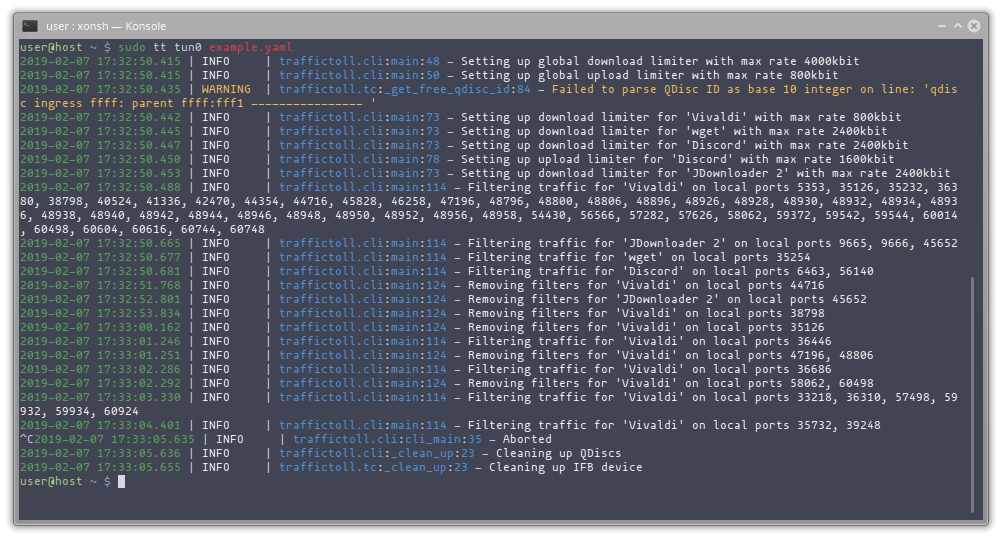
Screenshots
Because a picture is always nice, even for CLI applications:
1 maintainer

Metadata
1 maintainer
Release files for traffictoll 1.0.0
For a detailed explanation of source distributions (sdists) and built distributions (wheels), please see the package formats documentation.
Source distribution (sdist)
| File | Size | Uploaded | |
|---|---|---|---|
| TrafficToll-1.0.0.tar.gz | 31.4 kB | Details |
Built distribution (wheel)
| File | Interpreter | ABI | Platform | Reset |
|---|---|---|---|---|
| TrafficToll-1.0.0-py3-none-any.whl | Python 3 | none | any | Details |
Total release size: 63.7 kB
Release files / TrafficToll-1.0.0.tar.gz
| Download URL | TrafficToll-1.0.0.tar.gz |
|---|---|
| Size | 31.4 kB |
| Tags | Source |
|
SHA-256 checksum How to use checksums |
f6caf0c0730a72495f003b80f438f0baa350d24a576a4b51b5ea9487ec505464
|
|
BLAKE2b-256 checksum How to use checksums |
971c482c67f4c7de77c04f1d762cbbca63dc1e59301a1a9e283d3bf25d803c65
|
| Upload date | |
|
Uploaded using Trusted Publishing? What is trusted publishing? |
No |
| Uploaded via |
poetry/1.0.2 CPython/3.8.1 Linux/4.19.98-1-lts
|
Release files / TrafficToll-1.0.0-py3-none-any.whl
| Download URL | TrafficToll-1.0.0-py3-none-any.whl |
|---|---|
| Size | 32.2 kB |
| Tags | Python 3 |
|
SHA-256 checksum How to use checksums |
480fafef830cbb8efc6e5e47e3bb42245f42cbbd4048e24b67e5a1041ababc0d
|
|
BLAKE2b-256 checksum How to use checksums |
94212827809a0769024de8a1743f2b28914a239bf960587525763baf1caa99e7
|
| Upload date | |
|
Uploaded using Trusted Publishing? What is trusted publishing? |
No |
| Uploaded via |
poetry/1.0.2 CPython/3.8.1 Linux/4.19.98-1-lts
|














