
TraitsUI: Traits-capable windowing framework
The TraitsUI project provides a toolkit-independent GUI abstraction layer, which is used to support the “visualization” features of the Traits package. You can write a model using the Traits API and specify a GUI using the TraitsUI API (views, items, editors, etc.), and let TraitsUI and your selected toolkit back-end (Qt or Wx) take care of the details of displaying them.
Example
Given a Traits model like the following:
from traits.api import HasTraits, Str, Range, Enum

class Person(HasTraits):
    name = Str('Jane Doe')
    age = Range(low=0)
    gender = Enum('female', 'male')

person = Person(age=30)
And using TraitsUI to specify and display a GUI view:
from traitsui.api import Item, RangeEditor, View

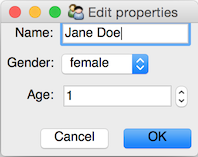
person_view = View(
    Item('name'),
    Item('gender'),
    Item('age', editor=RangeEditor(mode='spinner', low=0, high=150)),
    buttons=['OK', 'Cancel'],
    resizable=True,
)

person.configure_traits(view=person_view)
It creates a GUI which looks like this:
Important Links
Website and Documentation: http://docs.enthought.com/traitsui
User Manual http://docs.enthought.com/traitsui/traitsui_user_manual
API Documentation http://docs.enthought.com/traitsui/api
Source code repository: https://github.com/enthought/traitsui
Issue tracker: https://github.com/enthought/traitsui/issues
Download releases: https://pypi.python.org/pypi/traitsui
Mailing list: https://groups.google.com/forum/#!forum/ets-users
Installation
If you want to run traitsui, you must also install:
You will also need one of the following backends:
wxPython
PySide2
PyQt5
Backends have additional dependencies and there are optional dependencies on NumPy and Pandas for some editors.
TraitsUI along with all dependencies can be installed in a straightforward way using the Enthought Deployment Manager, pip or other package managers.
Running the Test Suite
To run the test suite, you will need to install Git and EDM as well as have a Python environment which has install Click available. You can then follow the instructions in etstool.py. In particular:
> python etstool.py test_all
will run tests in all supported environments automatically.
4 maintainers


Metadata
4 maintainers
Release files for traitsui 8.0.0
For a detailed explanation of source distributions (sdists) and built distributions (wheels), please see the package formats documentation.
Source distribution (sdist)
| File | Size | Uploaded | Provenance | Actions |
|---|---|---|---|---|
| traitsui-8.0.0.tar.gz | 6.8 MB | Without provenance | Details for traitsui-8.0.0.tar.gz |
Built distribution (wheel)
| File | Interpreter | ABI | Platform | Actions Reset |
|---|---|---|---|---|
| traitsui-8.0.0-py3-none-any.whl | Python 3 | none | any | Details for traitsui-8.0.0-py3-none-any.whl |
Total release size: 8.3 MB
Release files / traitsui-8.0.0.tar.gz
| Download URL | traitsui-8.0.0.tar.gz |
|---|---|
| Size | 6.8 MB |
| Tags | Source |
|
SHA-256 checksum How to use checksums |
901b9d1cbc45513e00a7397677b098441b28774b688f30a159bad4801bf40364
|
|
BLAKE2b-256 checksum How to use checksums |
5ecef8f3d97659822cac8ff6b80b4636161126d3a13a86a8c0d407498611d506
|
| Upload date | |
|
Uploaded using Trusted Publishing? What is trusted publishing? |
No |
| Uploaded via |
twine/4.0.2 CPython/3.8.16
|
Release files / traitsui-8.0.0-py3-none-any.whl
| Download URL | traitsui-8.0.0-py3-none-any.whl |
|---|---|
| Size | 1.5 MB |
| Tags | Python 3 |
|
SHA-256 checksum How to use checksums |
0e09c0965a8de12dd05e0b4bbdae31bdd576fa551fdaaf2f4e13ac4aa51980ee
|
|
BLAKE2b-256 checksum How to use checksums |
6ec7c96fcb966c1c61fbf2b58219cfa394d2c7160f31c9f4728402ead8f9a17c
|
| Upload date | |
|
Uploaded using Trusted Publishing? What is trusted publishing? |
No |
| Uploaded via |
twine/4.0.2 CPython/3.8.16
|
Security for traitsui 8.0.0
Provenance
Provenance describes where a file came from. On PyPI, provenance is shared via attestations, which provide a verifiable record of the build or publishing details. View details, limitations and caveats.
No provenance found
None of the files in this release were uploaded with provenance metadata.
A note on package security
PyPI is a repository for distributing packages, not a service for auditing them. While third-party security researchers and our staff do their best to detect and remove malicious packages, PyPI cannot guarantee the quality, security or suitability of any given package.
To learn more about protecting yourself from malicious actors, visit our package security documentation.














