
Directory Tree Script
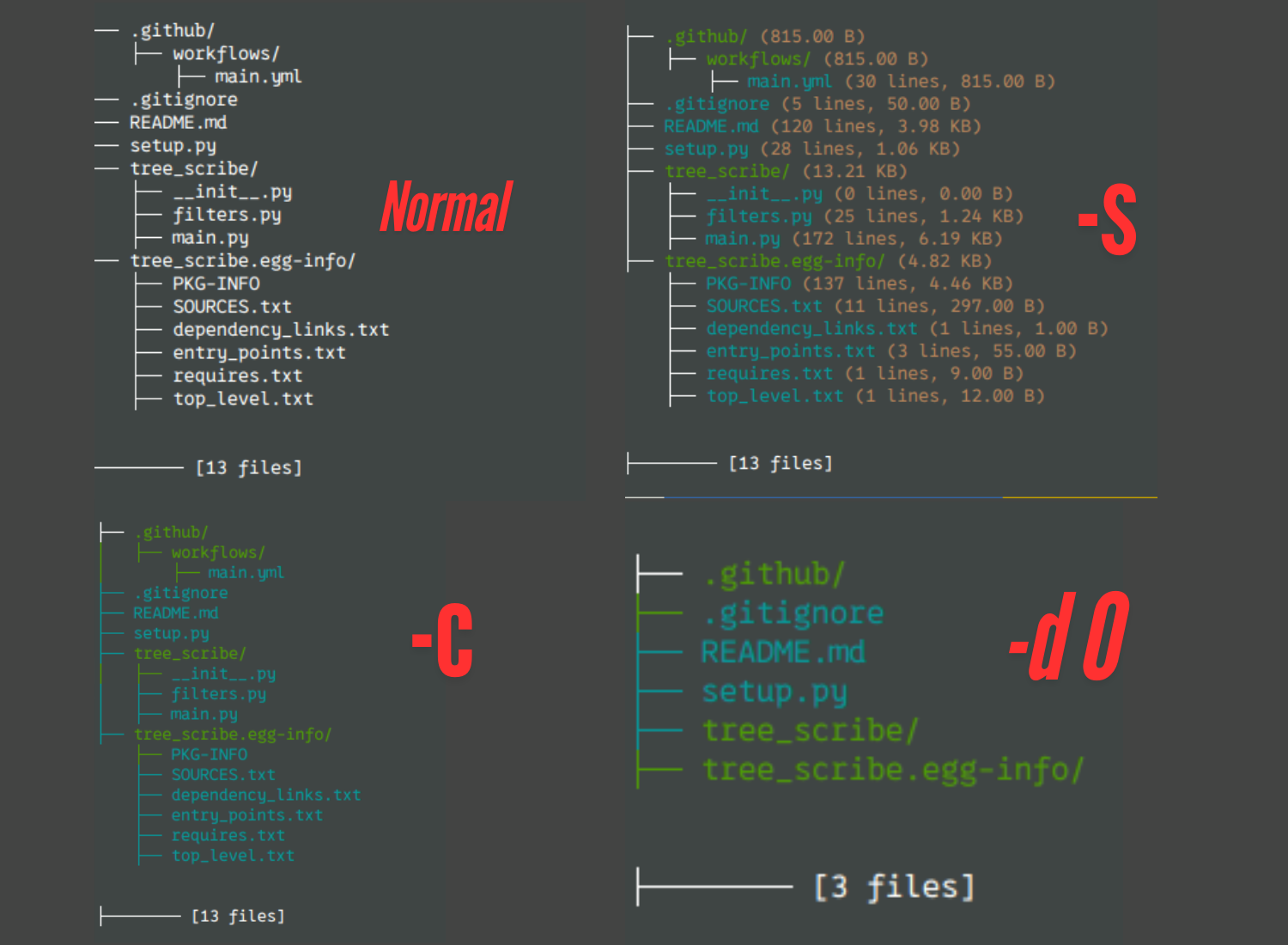
This script generates a visual representation of the directory structure of a specified root directory. It supports exporting the structure to a Markdown file and offers various options to customize the output.
Usage: tree-script [SWITCHES] directory

Generate a directory tree structure for a given path, with options for depth
limitation, colorful output, file sizes, and exporting to Markdown.

positional arguments:
  directory             Path to the root directory to analyze

optional arguments:
  -h, --help            Show this help message and exit
  -md, --export-md      Export the directory structure to a Markdown file
  -d DEPTH, --depth DEPTH
                        Limit the depth of directory traversal (e.g., -d 2)
  -v, --verbose         Enable verbose logging for debugging purposes
  -c, --color           Enable colorful output for better readability
  -s, --size            Show file sizes and line counts in the output

Examples:
  tree-script /path/to/directory
  tree-script /path/to/directory -d 2 -s
  tree-script /path/to/directory -md -c
Example Output
Installation
pip install tree-scribe
Or
pipx install tree-scribe
Command-Line Switches
| Switch/Option | Description | Example Usage |
|---|---|---|
<directory-path> |
Path to the root directory whose structure you want to display. | tree-scribe /home/project |
-md, --export-md |
Export the directory structure to a Markdown file. | tree-scribe /home/project -md |
-d, --depth <number> |
Limit the depth of directory traversal. | tree-scribe /home/project -d 2 |
-v, --verbose |
Enable verbose logging for detailed output. | tree-scribe /home/project -v |
-c, --color |
Enable colorful output in the terminal. | tree-scribe /home/project -c |
-s, --size |
Show line and size. | tree-scribe /home/project -s |
--exclude |
Exclude file and folder. | tree_scribe /path/to/directory --exclude dist build .git |
Examples
-
Display the Directory Structure
tree-scribe /home/project -
Export to Markdown
tree-scribe /home/project --export-md
-
Limit Depth to 2 Levels
tree-scribe /home/project --depth 2
-
Enable Verbose Logging
tree-scribe /home/project --verbose
-
Enable Colorful Output
tree-scribe /home/project -c
-
Show line and size
tree-scribe /home/project -s
-
Combine Options
tree-scribe /home/project --export-md --depth 3 -c -s
-
Exclude files or folder
tree_scribe /path/to/directory --exclude dist build .git
Troubleshooting
- Permission Errors: If you encounter permission errors, make sure you have the necessary permissions to access the directories and files.
- Invalid Directory Path: Ensure the specified directory path is correct and exists.
License
This script is provided under the MIT License. See the LICENSE file for more information.
Contributing
Feel free to submit issues, suggestions, or pull requests. Contributions are welcome!
1 maintainer

Release files for tree-scribe 0.0.7
For a detailed explanation of source distributions (sdists) and built distributions (wheels), please see the package formats documentation.
Source distribution (sdist)
| File | Size | Uploaded | |
|---|---|---|---|
| tree_scribe-0.0.7.tar.gz | 6.5 kB | Details |
Built distribution (wheel)
| File | Interpreter | ABI | Platform | Reset |
|---|---|---|---|---|
| tree_scribe-0.0.7-py3-none-any.whl | Python 3 | none | any | Details |
Total release size: 13.6 kB
Release files / tree_scribe-0.0.7.tar.gz
| Download URL | tree_scribe-0.0.7.tar.gz |
|---|---|
| Size | 6.5 kB |
| Tags | Source |
|
SHA-256 checksum How to use checksums |
c37034ca182c3f815c16aabe9d1301a942df660842ff32d919406f7247409c01
|
|
BLAKE2b-256 checksum How to use checksums |
739166e0737b91920044372f82626aca9380d29aa6470cb1cfc6a4dd4dc63979
|
| Upload date | |
|
Uploaded using Trusted Publishing? What is trusted publishing? |
Yes |
| Uploaded via |
twine/5.1.1 CPython/3.12.7
|
Provenance
Provenance describes where a file came from. On PyPI, provenance is shared via attestations, which provide a verifiable record of the build or publishing details. View details, limitations and caveats.


PyPI Publish Attestation
PyPI verified that this artifact, at this checksum, originated from the publisher listed below.
Signed by GitHub Actions, verified by PyPI on Dec 8, 2024.
Transparency logRelease files / tree_scribe-0.0.7-py3-none-any.whl
| Download URL | tree_scribe-0.0.7-py3-none-any.whl |
|---|---|
| Size | 7.0 kB |
| Tags | Python 3 |
|
SHA-256 checksum How to use checksums |
d0db1ac7d6b26deed0da4f9b1a6f94b45a5d9ba21aa82ffac2452845a5c5a218
|
|
BLAKE2b-256 checksum How to use checksums |
3251236d9269fafebc1f202dc36e0c32a04972b079ef6372ffd9f1a7e3119e27
|
| Upload date | |
|
Uploaded using Trusted Publishing? What is trusted publishing? |
Yes |
| Uploaded via |
twine/5.1.1 CPython/3.12.7
|
Provenance
Provenance describes where a file came from. On PyPI, provenance is shared via attestations, which provide a verifiable record of the build or publishing details. View details, limitations and caveats.
PyPI Publish Attestation
PyPI verified that this artifact, at this checksum, originated from the publisher listed below.
Signed by GitHub Actions, verified by PyPI on Dec 8, 2024.
Transparency log













