
A GUI application enabling the labelling and exploration of phylogenetic trees based on genogroup file information.

Project description
T-REX
Tree Explorer (T-REX) - A phylogenetic tree exploration and query tool
T-REX was created in response to requests to be able to easily link phylogenetic and phenotypic information together and yield insights from this. This package consists of a GUI-enabled phylogenetic tree viewer and manipulator into which users can link information on biological organisms and perform queries to find individuals of interest.

Features will be added over time to this open source project.
TABLE OF CONTENTS
INSTALLATION
The simplest way to install T-REX is to run the following:
pip install TreeExplorer-Python==1.2
Then simply:
trex
or
python -m TreeExplorer
Alternatively:
A pre-compiled binary for windows has been provided. Simply download to a location of your choosing and create a shortcut pointing to the executable. Alternatively you may run the code directly following the installation of PyQT5 (PyQt5==5.15.9), Pandas (pandas==1.5.3), ete3toolkit (ete3==3.1.2), and pillow (pillow==10.2.0).
USAGE
TREE EXPLORER 2024
Software package enabling the labelling of phylogenetic trees using information derived from genomap tables.
Usage:
Step 1: Upload phenotype file in csv format ensuring first column contains identifiers Step 2: Perform label selection BEFORE uploading tree file. Tree labels are modified following upload Step 3: Upload tree in Newick format. Step 4: Perform strain selection if you wish to limit tree size otherwise all are shown Step 5: You can select to crop the tree according to strains selected. Otherwise selections are not taken into account In addition you can collapse branches containing selected strains instead of cropping so you have a simpler tree but with the possibility to open the branches as you wish. Step 6: Click 'Show Tree' to display and explore the result
Click 'Reset' to start a new analysis and 'Exit' to quit the program
Colour Leaf Queries
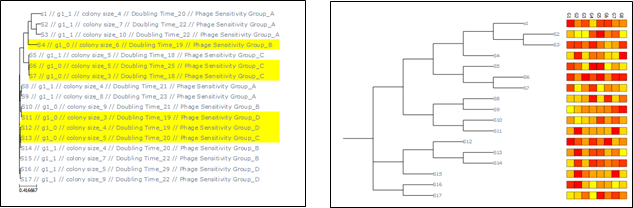
A basic tool has been added which allows the user to search for specific characteristics and colour those accordingly. In order to do this, you must enter queries in a specific form as follows:
LABEL=1 AND LABEL=2 AND COLOUR=X
for example to highlight strains in yellow that contain gene g1 (with 1/0 notation) you enter:
g1_1 AND yellow
The label entered reflects the structure of the genomap file so change this accordingly.
Multiple queries can also be performed along with more complex requests such as searching for ranges if columns contain numerical data. Searches are separated with the 'AND' keyword. The following notation allows you to perform searches for specific values:
pH=(G,5) search for pH greater than 5 pH=(L,5) search for pH less than 5 pH=(4,5) search for pH between 4 and 5
All these queries can be combined for example:
G1=1 AND pH=(L,5) AND DoublingTime=(20,25) AND colour=yellow
Will find g1 containing strains with pH less than 5, and a doubling time between 20 and 25 minutes.
This functionality is quite sensitive so whilst you will be informed of some mistakes it is possible that in some cases the absence of highlighting is due to an unusual error. So be careful. When the tree is displayed strains matching the search criteria will be coloured. This function is at an early stage and can be expanded depending on user feedback.
Adding Custom Labels
You are not limited to using preset options in the phenotype file. You are free to add as many as you want. Simply open the file and add the column header and relevant values that you want. There is no limit though if possible avoid unusual characters or symbols in label headers and values.
Heatmaps
An additional functionality allows for the addition of heatmaps to phylogenetic trees. To use this you need to upload a file with the genome identifiers and the various information you wish to display This can be presence/absence info of type +/- for example when dealing with genes. You may also upload raw numeric data which will be displayed accordingly. E.g. raw measures. After upload click to apply the heatmap and select the desired formatting options (e.g. grayscale or remove column names etc)
Below is an example visualisation for both the query and heatmap functionalities:
Explanations For Each Button
Upload Genomap: To upload your table containing strain names and characteristics of interest. Upload Tree File: To upload your phylogenetic tree in newick format. Show/Render Tree: Display tree. Reset: Remove all files and formatting to start a new analysis. Exit: Close the program. Prune Tree: Remove branches for all EXCEPT selected strains. Collapse: close branches containing selected strains. These can be expanded. Clear Prune: Remove both pruning and collapse options. Label Search: perform search of tree to colour branches of interest. Col Strain: Colour selected strains. Clear Colour: Remove all colour formatting. About: Opens this box. Label Options: Contains characteristics derived from genomap file. Select Strains: Select strains for further analysis. Upload HM: Upload you heatmap file if desired. Activate HM: apply formatting and show heatmap. Other Tools: Display menu containing other tools.
Other Tools Menu
Export labelled data: Output labelled data to csv file for colour coded strains. Tree Name Export: Extracts tree names into a text file. Useful if you have a tree only and want to construct a genomap type file Tree Name Exchange: Upload a file with old and new times to swap those in the tree. Change Tree Topology: Toggle rectangular and circular forms of tree. Export Tree File: Export raw tree file for other uses (labels also exported) Toggle Show/Render: Allow for direct image output instead of showing tree interactively (may be useful for excessively large trees) Close Window: Closes this tool box
Troubleshooting
Will be filled with resolutions as users report challenges in using program
If you are generally pleased with this software but have some things you would like to see included or changed, do not hesitate to get in contact!
Support/Requests/Questions: damian.magill@iff.com


Download files
Download the file for your platform. If you're not sure which to choose, learn more about installing packages.
Source Distribution
Built Distribution
Filter files by name, interpreter, ABI, and platform.
If you're not sure about the file name format, learn more about wheel file names.
Copy a direct link to the current filters
File details
Details for the file treeexplorer_python-1.3.tar.gz.
File metadata
- Download URL: treeexplorer_python-1.3.tar.gz
- Upload date:
- Size: 5.2 kB
- Tags: Source
- Uploaded using Trusted Publishing? No
- Uploaded via: twine/6.1.0 CPython/3.9.13
File hashes
| Algorithm | Hash digest | |
|---|---|---|
| SHA256 |
2bd3db614b5c0770f5fec614b71a9e69e0df6c394722be3c4ad19d02cae1972e
|
|
| MD5 |
28ea7fcb4ffa960e68df7c36b70d8392
|
|
| BLAKE2b-256 |
a85a6b84d8cb14747d660853fa93d11f3c830b414e12a5bcb7fbbda8b37be729
|
File details
Details for the file TreeExplorer_Python-1.3-py3-none-any.whl.
File metadata
- Download URL: TreeExplorer_Python-1.3-py3-none-any.whl
- Upload date:
- Size: 5.4 kB
- Tags: Python 3
- Uploaded using Trusted Publishing? No
- Uploaded via: twine/6.1.0 CPython/3.9.13
File hashes
| Algorithm | Hash digest | |
|---|---|---|
| SHA256 |
3f690003c7d5c4dfd3ad011578c4b6cd3dc6ff782c4e547de6f0bfe66780676e
|
|
| MD5 |
401d19a73eaa8496ec1166c3d8f027af
|
|
| BLAKE2b-256 |
cf6412a2091ed866626e18c36d5893878b17d64cdf7c1c18463273660d1b7bc2
|






