
tsrc: manage multiple repos / GitLab automation



Demo
Documentation
Screenshots
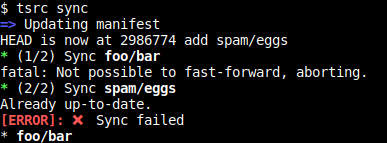
tsrc sync
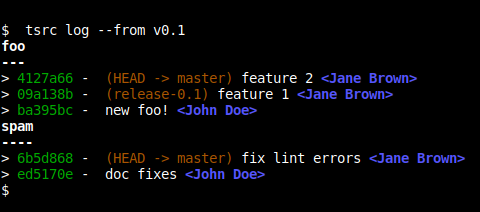
tsrc log
Tutorial
Getting started
Make sure you are using Python3.3 or higher.
Install tsrc with pip3 as usual.
Create a manifest repository. (git@example.org/manifest)
Push a file named manifest.yml looking like:
repos:
  - src: foo
    url: git@example.com/foo.git

  - src: bar
    url: git@example.com/bar.git
Clone the repositories with:
$ mkdir workspace
$ cd workspace
$ tsrc init git@example/manifest.git
In this example:
foo will be cloned in <workspace>/foo using git@example.com:foo.git origin url.
Similarly, bar will be cloned in <workspace>/bar using git@example.com/bar.git
Managing Merge Requests
Generate a token from GitLab
Add the http url to the manifest:
gitlab:
  url: http://gitlab.local
Create a ~/.config/tsrc.yml looking like:
auth:
  gitlab:
    token: <YOUR TOKEN>
Start working on your branch
Create the pull request:
$ tsrc push --assignee <an octive user>
When the review is done, tell GitLab to merge it once the CI passes:
$ tsrc push --accept
Why not Google repo?
See the FAQ
5 maintainers


Metadata
5 maintainers
Release files for tsrc 0.3.2
For a detailed explanation of source distributions (sdists) and built distributions (wheels), please see the package formats documentation.
Source distribution (sdist)
| File | Size | Uploaded | Provenance | Actions |
|---|---|---|---|---|
| tsrc-0.3.2.tar.gz | 24.8 kB | Without provenance | Details for tsrc-0.3.2.tar.gz |
Built distribution (wheel)
| File | Interpreter | ABI | Platform | Actions Reset |
|---|---|---|---|---|
| tsrc-0.3.2-py3-none-any.whl | Python 3 | none | any | Details for tsrc-0.3.2-py3-none-any.whl |
Total release size: 59.2 kB
Release files / tsrc-0.3.2.tar.gz
| Download URL | tsrc-0.3.2.tar.gz |
|---|---|
| Size | 24.8 kB |
| Tags | Source |
|
SHA-256 checksum How to use checksums |
29a85cb5454b5626065956f81d3442aac6219dd81953f4daa3a4e4de4cc2dc0b
|
|
BLAKE2b-256 checksum How to use checksums |
1ed8433a7b11c11b51862af96acce9ce147926bc8cb74f1de4c666b682a14d0d
|
| Upload date | |
|
Uploaded using Trusted Publishing? What is trusted publishing? |
No |
Release files / tsrc-0.3.2-py3-none-any.whl
| Download URL | tsrc-0.3.2-py3-none-any.whl |
|---|---|
| Size | 34.5 kB |
| Tags | Python 3 |
|
SHA-256 checksum How to use checksums |
169fd9066083cd0f67f889f84c100e28033887604d5e183b16e2c3d0def7b0a8
|
|
BLAKE2b-256 checksum How to use checksums |
0546687d7908304783f14ba164206b1232e7fa4422f2b77928f3ff39bf78ffc8
|
| Upload date | |
|
Uploaded using Trusted Publishing? What is trusted publishing? |
No |
Security for tsrc 0.3.2
Provenance
Provenance describes where a file came from. On PyPI, provenance is shared via attestations, which provide a verifiable record of the build or publishing details. View details, limitations and caveats.
No provenance found
None of the files in this release were uploaded with provenance metadata.
A note on package security
PyPI is a repository for distributing packages, not a service for auditing them. While third-party security researchers and our staff do their best to detect and remove malicious packages, PyPI cannot guarantee the quality, security or suitability of any given package.
To learn more about protecting yourself from malicious actors, visit our package security documentation.














