
ttwidgets
Package TTWidgets improves the Button, Label, and Listbox widgets of
the Tkinter library and provides a new ToolTip widget, all with support for
multiple fonts and visual schemes.
Although the standard Tkinter Button and Label widgets are limited to a
single set of widget options (e.g. background/bg, foreground/fg, bitmap,
cursor, relief) and a single font, a TTWidgets enhanced widget can be
passed tagged text instead of plain text to create a visually compound widget
(with multiple fonts and visual option sets) that behaves like a simple widget.
- The
ButtonandLabelimplementations are complete. - The
Listboximplementation is partial: there is no multi-font support, but the user can use the new 'text' option to pass in tagged text to define all the elements with visual schemes. The user can also pass tagged text to the insert() method, and thereby skip the secondary call to itemconfig() for the inserted element(s). A full multi-font implementation of a tagged textListboxmay come later. - As a bonus, a
ToolTipwidget is included, which also accepts tagged text as input, allowing the creation of colorful and multi-font ToolTips.
All TTWidgets support the 'text' keyword to accept and process tagged text
as input on creation.
All TTWidgets support modification of 'text' via the config() method and
retrieval via cget().
As a ttwidgets Button example:
button = ttwidgets.TTButton(text="Isn't a <t case=title relief=raised bd=1 bg=white padx=2>button</t> with <tag bold fg=red bg=yellow>bold red on yellow text</tag> and \na <tag fg=blue funderline>hyperlink</tag> <tag relief=groove bd=2>groovy</tag> <tag bitmap=warning/>", command=lambda e=None: print("Released!"), bg='lightgray')
gives a Button with text "Isn't a Button with bold red on yellow text and a hyperlink groovy!", where:
- "Button" appears inside a raised button (with "title" case),
- "bold red on yellow text" is bold red text on a yellow background,
- "hyperlink" is blue and underlined,
- "groovy" is in a box with 'groove' relief, and
- "!" is a warning bitmap.
Here are two versions of the same button. Which one would YOU rather use? :)

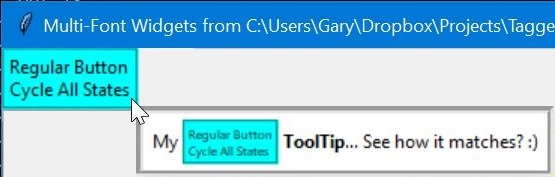
As a ttwidgets ToolTip example:
tooltip = ttwidgets.TTToolTip(reg_but, text='My <t bg=cyan px=2 py=2 bd=2 relief=groove size=6 wraplength=70>Regular Button Cycle All States</t><t b> ToolTip</t>... See how it matches? :)', bg='white', relief=tk.GROOVE, borderwidth=5)
gives a ToolTip for button "reg_but" which includes a smaller version of the button it is tipping, to make the ToolTip more visually appealing. The ToolTip also shows bold text and a white background.
In general, all the visual options and font attributes are supported in the
tagged text. For a tagged text overview, please see ttwidgets class TTWidget help.
Please note that, due to its implementation based on underlying Tkinter Labels, a TTButton will not have the foreground/background color failure-to-change issue on MacOS that a Tkinter.Button has.
1 maintainer

Metadata
1 maintainer
Release files for ttwidgets 1.1.3
For a detailed explanation of source distributions (sdists) and built distributions (wheels), please see the package formats documentation.
Source distribution (sdist)
| File | Size | Uploaded | Provenance | Actions |
|---|---|---|---|---|
| ttwidgets-1.1.3.tar.gz | 49.9 kB | Without provenance | Details for ttwidgets-1.1.3.tar.gz |
Built distribution (wheel)
| File | Interpreter | ABI | Platform | Actions Reset |
|---|---|---|---|---|
| ttwidgets-1.1.3-py3-none-any.whl | Python 3 | none | any | Details for ttwidgets-1.1.3-py3-none-any.whl |
Total release size: 101.1 kB
Release files / ttwidgets-1.1.3.tar.gz
| Download URL | ttwidgets-1.1.3.tar.gz |
|---|---|
| Size | 49.9 kB |
| Tags | Source |
|
SHA-256 checksum How to use checksums |
9d15cefb4668ea7fee356f4d7bf7728a978da1c2d2faed1d4b6ee31a0305f1e9
|
|
BLAKE2b-256 checksum How to use checksums |
17b5c89657676ea745c0f1514a7d5c38b09f5cc35917a2823f84ced97d9c9a47
|
| Upload date | |
|
Uploaded using Trusted Publishing? What is trusted publishing? |
No |
| Uploaded via |
twine/4.0.1 CPython/3.8.15
|
Release files / ttwidgets-1.1.3-py3-none-any.whl
| Download URL | ttwidgets-1.1.3-py3-none-any.whl |
|---|---|
| Size | 51.2 kB |
| Tags | Python 3 |
|
SHA-256 checksum How to use checksums |
d89d00d494bf6dbf218966a4ef97330f3df9d68add34977b87910333df9c046c
|
|
BLAKE2b-256 checksum How to use checksums |
784168325ee6ef36e3e305b11d553981c7498772f620c6855b4a185397f2d457
|
| Upload date | |
|
Uploaded using Trusted Publishing? What is trusted publishing? |
No |
| Uploaded via |
twine/4.0.1 CPython/3.8.15
|
Security for ttwidgets 1.1.3
Provenance
Provenance describes where a file came from. On PyPI, provenance is shared via attestations, which provide a verifiable record of the build or publishing details. View details, limitations and caveats.
No provenance found
None of the files in this release were uploaded with provenance metadata.
A note on package security
PyPI is a repository for distributing packages, not a service for auditing them. While third-party security researchers and our staff do their best to detect and remove malicious packages, PyPI cannot guarantee the quality, security or suitability of any given package.
To learn more about protecting yourself from malicious actors, visit our package security documentation.














