
Twitchy-Term
A simple terminal tool for browsing Twitch.tv and watching streams on VLC Player using Livestreamer.
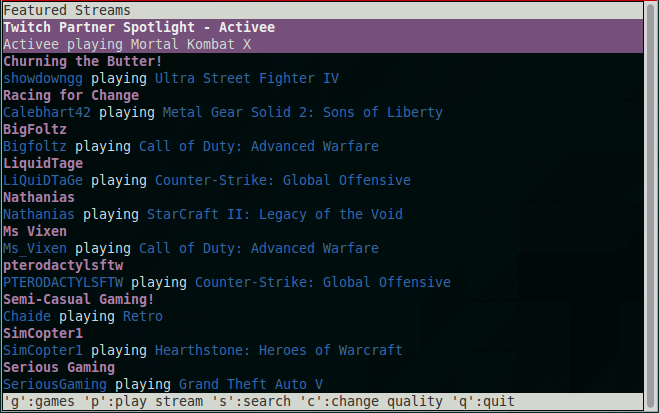
Dependencies
Python 3 (tested on version 3.4)
VLC Player (
sudo apt-get install vlc)
Installation
Using pip:
$ sudo pip3 install twitchy-termOR
Clone this repository:
$ git clone https://github.com/Andy-Au/twitchy-term.git
$ cd twitchy-term
$ sudo python3 setup.py install
Usage
Simply run:
$ twitchy-termIt also takes an optional argument for streaming quality (default is best):
$ twitchy-term -q [quality]Available qualities include:
best
high
medium
low
worst
Twitchy-Term offers the following pages of Twitch.tv:
Featured streams (from Twitch.tv’s home page)
Browse top games (and top streams of each)
Search
Commands
- ▲/▼:
Scroll up and down the current list of items
- f:
Featured streams
- g:
Top Games list
- s:
Search
- c:
Change stream quality
- q:
Quit
In Top Games list
- e:
View top streams of current selected game
In pages where streams are listed
- p:
Play the selected stream in VLC player with current quality
License
Please see LICENSE.
1 maintainer

Release files for twitchy-term 1.0.1
For a detailed explanation of source distributions (sdists) and built distributions (wheels), please see the package formats documentation.
Source distribution (sdist)
| File | Size | Uploaded | |
|---|---|---|---|
| twitchy-term-1.0.1.tar.gz | 7.8 kB | Details |
Release files / twitchy-term-1.0.1.tar.gz
| Download URL | twitchy-term-1.0.1.tar.gz |
|---|---|
| Size | 7.8 kB |
| Tags | Source |
|
SHA-256 checksum How to use checksums |
9e5079cdbe4692ea57c078eec60a3d8f724abe668ae6ebcad60d7a4dbd51d90c
|
|
BLAKE2b-256 checksum How to use checksums |
f4c5c21c76eb5bfbae02a98ae21f9210462373535e77623430e3241237a29ce2
|
| Upload date | |
|
Uploaded using Trusted Publishing? What is trusted publishing? |
No |














