
Typeform ETL
A python class and main function to extract and continuously sync data from a Typeform.com account.
Installation
Requirements
You should prefer Python 3 packages from your operating system.
So under Fedora Linux:
dnf install python3-requests python3-sqlalchemy python3-pandas python3-configobj python3-mysql
Under Red Hat Enterprise Linux 8:
dnf install python3-requests python3-sqlalchemy python3-configobj mariadb-connector-c-devel mariadb-connector-c gcc
pip3 install mysqlclient --user
This MariaDB connector is the one that works with SQLAlchemy (used by the module). Other connectors as PyMySQL failed our tests.
Installing mysqlclient with pip requires compilers and MariaDB development framework pre-installed in the system, as shown in the Red Hat Enterprise Linux section.
Install the module
pip3 install TypeformETL --user
All unsatisfied dependencies (such as Pandas on RHEL) will be installed along.
Or, to upgrade:
pip3 install -U TypeformETL --no-deps --user
Remove the --no-deps if you wish to upgrade also dependent modules as pandas and numpy.
Usage
Get a personal access token from Typeform's admin portal. We'll call it ___API_KEY___ from now on.
With plain command line
python3 -m TypeformETL --typeform "___API_KEY___" --database 'mysql://user:password@host/dbname'
Add --restart to get and sync all data from Typeform, not just last updates.
Add --updatedb to do everything except update database. Good for tests.
Add --debug to be more verbose.
Config file
If you want to not pass arguments through command line, you can also use a config file.
Use --config to pass a config file name. By default, the main module will look for a file name called syncFromTypeform.conf in the current directory.
Arguments from config file and command line will be combined giving priority to the ones passed in command line.
So if a database URL is passed both in command line and config file, the command line will be used.
With CRON
I have these 2 entries together on my crontab and then I don't need a config file:
@hourly    python3 -m TypeformETL --typeform "___API_KEY___" --database 'mysql://user:password@host/dbname' --tableprefix 'tf_'
30 3 * * 0 python3 -m TypeformETL --typeform "___API_KEY___" --database 'mysql://user:password@host/dbname' --tableprefix 'tf_' --restart
Which will run a sync every hour. And once a week will reset data tables and bring all data from scratch.
Into a Python program
from TypeformETL import TypeformETL

tf = TypeformETL(
	token='___API_KEY___',
	dburl='mysql://user:password@host/dbname',
	restart=False,     # True to reset data tables and bring all data from scratch
	dbupdate=True,     # Wether to simulate or actually write in database
	tableprefix='tf_'  # To better organize your tables
)


# Read Typeform updates and write to DB
tf.sync()
Database
A SQL database must exist. MySQL and MariaDB tested. Use the examples/datamodel.sql script to create the database.
Having “tf_” as a table prefix, these are the objects (tables and views) that will be created and updated:
| Table/View | Name | Contents |
|---|---|---|
| table | tf_forms |
Contains metadata about forms |
| table | tf_form_items |
Contains metadata about form items (text fields, checkboxes) related to their parent forms |
| table | tf_answers |
Contains all answers to all fields of all forms; each complete form response has an entry in the tf_responses table. |
| table | tf_responses |
Contains all responses and metadata to all forms; each form response has an entry here, each form field answer has an entry in the tf_answers table. |
| table | tf_options |
Operational table used by the syncer |
| table | tf_synclog |
Operational table that logs every sync with some simple statistics |
| view | tf_super_answers |
A convenient view that joins together table tf_answers, tf_responses, tf_form_items, tf_forms |
| view | tf_nps |
The calculated current NPS (Net Promoter Score) of all numerical fields (only a few fields might have a real NPS semantic) |
| view | tf_nps_daily |
The NPS of all numerical fields per day; can be used to see evolution of some NPS along time. |
| view | tf_nps_daily_mv |
A backwards compatible name for the tf_nps_daily view |
The module makes INSERT, UPDATE, CREATE TABLE, DROP TABLE, TRUNCATE operations. Make sure the database connection user has granted permission to all these operations.
SQL definition for all these tables and views can be found in examples/datamodel.sql.
Net Promoter Score
A common use of Typeform service is to measure user satisfaction through questions like “From 0 to 10, what is the chance of recommending this web site/app/service to a friend?”.
Once all answers are structured in a database its easy to calculate, from answers to a specific form field, both current NPS and NPS evolution as time series.
SQL views tf_nps and tf_nps_daily respectively will deliver this information. The tf_nps_daily is quite advanced and only possible (in one view) when using advanced SQL Window functions:
create view tf_nps_daily as
select
	a.form as form_id,
	fi.name as field_name,
	r.submitted as date,
	fi.type as type,
	f.title as form_title,
	fi.title as field_title,

 	((count(case when a.answer>=9 then 1 else NULL end) over day)-(count(case when a.answer<7 then 1 else NULL end) over day))/(count(a.answer) over day) as NPS_ofdate,
	count(case when a.answer<7 then 1 else NULL end) over day as detractors,
	count(case when a.answer between 7 and 8 then 1 else NULL end) over day as passives,
	count(case when a.answer>=9 then 1 else NULL end) over day as promoters,
	count(a.answer) over day as total,

	((count(case when a.answer>=9 then 1 else NULL end) over untilday)-(count(case when a.answer<7 then 1 else NULL end) over untilday))/(count(a.answer) over untilday) as NPS_cumulative,
	count(case when a.answer<7 then 1 else NULL end) over untilday as detr_cumulative,
	count(case when a.answer between 7 and 8 then 1 else NULL end) over untilday as pass_cumulative,
	count(case when a.answer>=9 then 1 else NULL end) over untilday as prom_cumulative,
	count(a.answer) over untilday as totl_cumulative
from
	tf_answers a,
	tf_responses r,
	tf_form_items fi,
	tf_forms f
where
	a.data_type_hint in ('number')
	and r.submitted is not NULL
	and r.id = a.response
	and fi.id = a.field
	and fi.form = a.form
	and f.id = a.form
window
	day as (partition by date(r.submitted), a.form, a.field),
	untilday as (partition by a.form, a.field order by r.submitted asc rows unbounded preceding)
order by
	a.form, a.field, r.submitted asc
The tf_nps view is simpler:
CREATE OR REPLACE VIEW tf_nps AS
select
	a.form as form_id,
	fi.name as field_name,
	min(r.submitted) as first,
	max(r.submitted) as last,
	fi.type as type,
	f.title as form_title,
	fi.title as field_title,
 	((count(case when a.answer>=9 then 1 else NULL end))-(count(case when a.answer<7 then 1 else NULL end)))/(count(a.answer)) as NPS,
	count(case when a.answer<7 then 1 else NULL end) as detractors,
	count(case when a.answer between 7 and 8 then 1 else NULL end) as passives,
	count(case when a.answer>=9 then 1 else NULL end) as promoters,
	count(a.answer) as total,
	avg(a.answer) as average,
	std(a.answer) as std_deviation
from
	tf_answers a,
	tf_responses r,
	tf_form_items fi,
	tf_forms f
where
	a.data_type_hint in ('number')
	and r.submitted is not NULL
	and r.id = a.response
	and fi.id = a.field
	and fi.form = a.form
	and f.id = a.form
group by
	form_id, field_name
order by
	a.form, a.field, r.submitted asc
Once set, you can query the NPS for a specific field as a time series (tf_nps_daily) or its last value (tf_nps) like this:
SELECT * FROM tf_nps_daily WHERE form_id='to6xfp' AND field_name='353eb07c-15bf-4669-9793-9c0ec33f818a'
Resulting data, when graphed, looks like this:
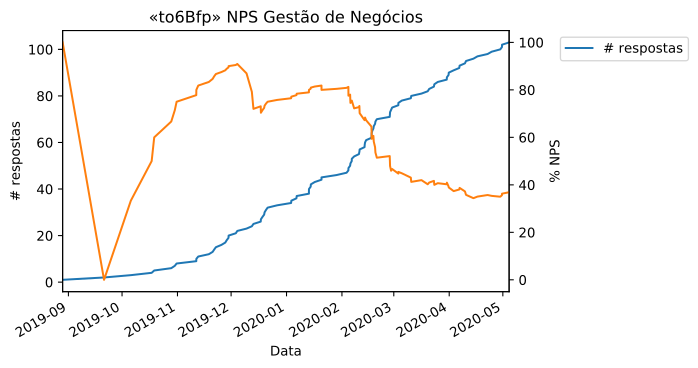
This graph was generated by the examples/NPS Analysis.ipynb notebook.
1 maintainer

Metadata
1 maintainer
Release files for TypeformETL 0.6.2
For a detailed explanation of source distributions (sdists) and built distributions (wheels), please see the package formats documentation.
Source distribution (sdist)
| File | Size | Uploaded | Provenance | |
|---|---|---|---|---|
| TypeformETL-0.6.2.tar.gz | 21.5 kB | Without provenance | Details |
Built distribution (wheel)
| File | Interpreter | ABI | Platform | Reset |
|---|---|---|---|---|
| TypeformETL-0.6.2-py3-none-any.whl | Python 3 | none | any | Details |
Total release size: 58.6 kB
Release files / TypeformETL-0.6.2.tar.gz
| Download URL | TypeformETL-0.6.2.tar.gz |
|---|---|
| Size | 21.5 kB |
| Tags | Source |
|
SHA-256 checksum How to use checksums |
ceab0a9ebce60cf31015e490fb815cbeb8269342958322d1283728a8d50e9376
|
|
BLAKE2b-256 checksum How to use checksums |
abd1e8dea9d2038ed9d853e67de39413e3d704abd463008dd060c364f183dc3a
|
| Upload date | |
|
Uploaded using Trusted Publishing? What is trusted publishing? |
No |
| Uploaded via |
twine/3.1.1 pkginfo/1.5.0.1 requests/2.22.0 setuptools/44.0.0 requests-toolbelt/0.9.1 tqdm/4.41.1 CPython/3.7.3
|
Release files / TypeformETL-0.6.2-py3-none-any.whl
| Download URL | TypeformETL-0.6.2-py3-none-any.whl |
|---|---|
| Size | 37.1 kB |
| Tags | Python 3 |
|
SHA-256 checksum How to use checksums |
43d916568ab11a1f6a924aab422bc72e489b71324e0ea71f8b10c124ba5093cf
|
|
BLAKE2b-256 checksum How to use checksums |
627739f02b04f6e83bfc43df84f8cbe4d160971281b3c4115e0b59e8f8cd8e23
|
| Upload date | |
|
Uploaded using Trusted Publishing? What is trusted publishing? |
No |
| Uploaded via |
twine/3.1.1 pkginfo/1.5.0.1 requests/2.22.0 setuptools/44.0.0 requests-toolbelt/0.9.1 tqdm/4.41.1 CPython/3.7.3
|
Security for TypeformETL 0.6.2
Provenance
Provenance describes where a file came from. On PyPI, provenance is shared via attestations, which provide a verifiable record of the build or publishing details. View details, limitations and caveats.
No provenance found
None of the files in this release were uploaded with provenance metadata.
A note on package security
PyPI is a repository for distributing packages, not a service for auditing them. While third-party security researchers and our staff do their best to detect and remove malicious packages, PyPI cannot guarantee the quality, security or suitability of any given package.














