
 typetree



Generate a type tree view of a Python object’s contents and attributes. The subtrees with the same type pattern are grouped together as a repeating structure, which forms a much more compact tree. This is very useful, for example, for quickly identifying the overall structure of a JSON object, which often contains many repeating type patterns.
Includes a GUI with mouse and keyboard navigation through the nodes.
Has Ctrl+C/double-click support for copying paths to the inner nodes.
No external dependency.
Installation
Install only typetree (no external dependency):
pip install typetree
Include pyperclip for better clipboard support (optional):
pip install typetree[clipboard]
Examples
Nested iterables:
import typetree

d = [{'a', 'b', 1, 2, (3, 4), (5, 6), 'c', .1}, {'a': 0, 'b': ...}]
typetree.print_tree(d)
<list>[2]
├── [0]: <set>[8]
│ ├── (×1) <float>
│ ├── (×2) <int>
│ ├── (×2) <tuple>[2]
│ │ └── [:2]: <int>
│ └── (×3) <str>
└── [1]: <dict>[2]
├── ['a']: <int>
└── ['b']: <ellipsis>
Attributes
Only the mutable attributes returned by vars() are shown by default.
If you wish to view the other attributes too, use include_dir=True.
This will search the dir() attributes, except the special
(__special__) and the protected (_protected) ones.
This can be changed by setting include_special=True and
include_protected=True. Beware that this will drastically increase
the tree size, so you should also limit the search depth max_depth
and/or number of branches max_branches, or the application will
likely freeze.
typetree.print_tree((0,), include_dir=True, max_depth=2, max_lines=15)<tuple>[1]
├── .count: <builtin_function_or_method>
├── .index: <builtin_function_or_method>
└── [0]: <int>
├── .as_integer_ratio: <builtin_function_or_method>
├── .bit_count: <builtin_function_or_method>
├── .bit_length: <builtin_function_or_method>
├── .conjugate: <builtin_function_or_method>
├── .denominator: <int>
│ └── ...
├── .from_bytes: <builtin_function_or_method>
├── .imag: <...> <int>
│ └── ...
├── .numerator: <...> <int>
...
Note that the last two items have a special tag <...> which means it
has identified an infinite recursion.
XML etree integration
Use type_name_lookup to specify how to retrieve the string to be
displayed as the type name. End nodes of XML etrees are empty tuples, so
the parameter value_lookup should also be given to specify how to
retrieve their values.
import urllib.request
import xml.etree.ElementTree

url = 'https://www.w3schools.com/xml/simple.xml'
with urllib.request.urlopen(url) as response:
    r = response.read()
text = str(r, encoding='utf-8')
tree = xml.etree.ElementTree.fromstring(text)

typetree.print_tree(
    tree,
    type_name_lookup=lambda x: x.tag,
    value_lookup=lambda x: x.text,
)
<breakfast_menu>[5]
└── [:5]: <food>[4]
├── [0]: <name>
├── [1]: <price>
├── [2]: <description>
└── [3]: <calories>
DOM integration
DOM objects are not directly iterable. Child nodes must be accessed through
attribute lookup, which can be specified by the parameter
items_lookup:
import xml.dom.minidom

dom = xml.dom.minidom.parseString(text)

typetree.print_tree(
    dom,
    items_lookup=lambda x: x.childNodes,
    type_name_lookup=lambda x: x.nodeName,
    value_lookup=lambda x: x.text,
    max_lines=10,
)
<#document>[1]
└── [0]: <breakfast_menu>[11]
├── [0]: <#text>
├── [1]: <food>[9]
│ ├── [0]: <#text>
│ ├── [1]: <name>[1]
│ │ └── [0]: <#text>
│ ├── [2]: <#text>
│ ├── [3]: <price>[1]
...
Alternatively, you can use configuration templates:
typetree.print_tree(dom, template=typetree.DOM, max_lines=10)Which gives the same output.
Interactive GUI
import json

url2 = 'https://archive.org/metadata/TheAdventuresOfTomSawyer_201303'

with urllib.request.urlopen(url2) as response2:
    r2 = response2.read()
text2 = str(r2, encoding='utf-8')
json2 = json.loads(text2)

typetree.view_tree(json2)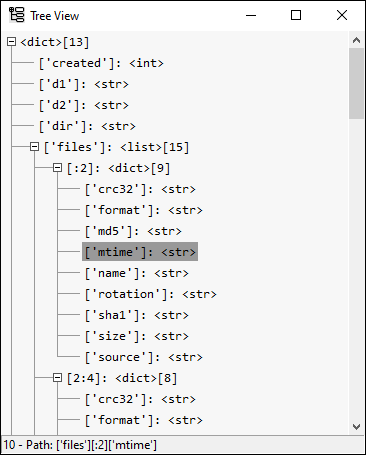
Double click or press Ctrl+C to copy the path to the selected node.
Use right-click on the plus/minus icons to expand/collapse each of the inner nodes without affecting the node you clicked on.
You can use the arrow keys to navigate and the space bar instead of the right-click.
Parameters
Configuration parameters
items_lookup: Callable[[Any], Any] = lambda var: var
type_name_lookup: Callable[[Any], str] = lambda var: type(var).__name__
value_lookup: Callable[[Any], Any] = lambda var: var
sort_keys: bool = True
show_lengths: bool = True
include_attributes: bool = True
include_dir: bool = False
include_protected: bool = False
include_special: bool = False
max_lines: float = 1000
max_search: float = 100_000
max_depth: float = 20
max_branches: float = float('inf')items_lookup: Function used to access the node’s content.type_name_lookup: Function used to get the type name.value_lookup: Function used to get the value when the node’s content is empty (tree leaves).sort_keys: Flag for sorting keys alphabetically.show_lengths: Flag for displaying lengths of iterables. This affects how subtrees are grouped together, since sequences with different sizes but same content types are considered equivalent.include_attributes: Flag for including the mutable attributes returned byvars.include_dir: Flag for including the attributes returned bydir, except the protected (_protected) and the special (__special__) ones.include_protected: Flag for including the protected (_protected) attributes.include_special: Flag for including the special (__special__) attributes.max_lines: Maximum number of lines to be printed. For the GUI, it is the maximum number of rows to be displayed, not including the extra ellipsis at the end. Can be disabled by setting it to infinity (float('inf')ormath.inf).max_search: Maximum number of nodes searched.max_depth: Maximum search depth.max_branches: Maximum number of branches displayed on each node. This only applies after grouping.
Additionally, there are also helper classes of configuration templates for common object types. Currently, the templates are:
Template(default)DOMHTMLXML
These templates can be passed to the parameter template.
GUI
For the GUI, both the Tree(...).view method and the
view_tree function accept two additional arguments to configure
whether the new window is created asynchronously and by which method
(threading or multiprocessing):
spawn_thread: bool = True
spawn_process: bool = False1 maintainer

Metadata
1 maintainer
Release files for typetree 0.1.7
For a detailed explanation of source distributions (sdists) and built distributions (wheels), please see the package formats documentation.
Source distribution (sdist)
| File | Size | Uploaded | |
|---|---|---|---|
| typetree-0.1.7.tar.gz | 27.3 kB | Details |
Built distribution (wheel)
| File | Interpreter | ABI | Platform | Reset |
|---|---|---|---|---|
| typetree-0.1.7-py3-none-any.whl | Python 3 | none | any | Details |
Total release size: 52.0 kB
Release files / typetree-0.1.7.tar.gz
| Download URL | typetree-0.1.7.tar.gz |
|---|---|
| Size | 27.3 kB |
| Tags | Source |
|
SHA-256 checksum How to use checksums |
d57ff42e66b6b0476dcec4d7e202c79793f798d3e0081b5093c583ef47bc8d80
|
|
BLAKE2b-256 checksum How to use checksums |
ba9487ec2fea2d3b1a1c3a438a8058d02c811a142bf1e5fdab21e8a1c4207feb
|
| Upload date | |
|
Uploaded using Trusted Publishing? What is trusted publishing? |
No |
| Uploaded via |
twine/4.0.1 CPython/3.10.8
|
Release files / typetree-0.1.7-py3-none-any.whl
| Download URL | typetree-0.1.7-py3-none-any.whl |
|---|---|
| Size | 24.7 kB |
| Tags | Python 3 |
|
SHA-256 checksum How to use checksums |
83afcb985cdfb5d0942fbd45c478c750e87457c8951c4908bdcb17f6d0269a01
|
|
BLAKE2b-256 checksum How to use checksums |
b4467be061f78888e08d6732f6ceae4d6ac7c71753d1dd930661c3f338eecd40
|
| Upload date | |
|
Uploaded using Trusted Publishing? What is trusted publishing? |
No |
| Uploaded via |
twine/4.0.1 CPython/3.10.8
|














