
tzBJC
TaggedZ's Binary JSON Converter
Turn a binary file into portable JSON, then restore the original bytes.





tzBJC packages one file into a JSON object containing its filename, a SHA-256 checksum, and its Zstandard-compressed contents encoded as URL-safe Base64. Use it from the command line, a desktop app, or your own Python code.
It is useful when a system accepts text or JSON but you need to carry binary content: an attachment in a JSON payload, a test fixture, or a file you want to copy through a text-only interface. The decoder verifies the checksum before writing the restored file.
The checksum detects corruption. It is not a digital signature, proof of authorship, or encryption. Anyone who can replace the contents can also replace the checksum.
Install · CLI · Desktop app · Python API · Development · Releasing
How it works
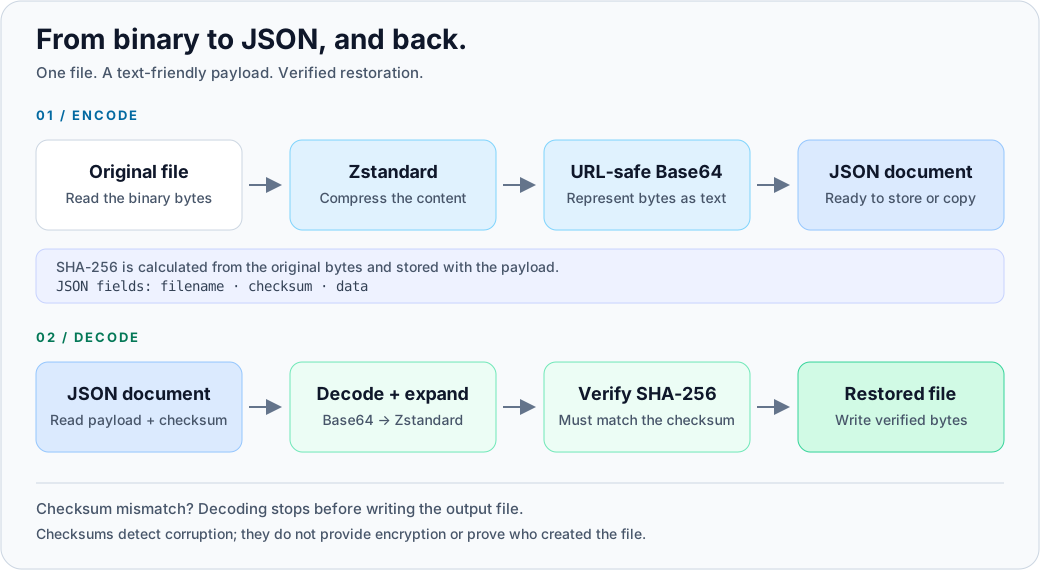
Each JSON document represents one file, with these fields:
| Field | Contents |
|---|---|
filename |
Original file's basename, without its directory |
checksum |
SHA-256 of the original, uncompressed bytes, as hexadecimal text |
data |
URL-safe Base64 text containing the Zstandard-compressed bytes |
Compression can reduce the file size, but JSON output is not guaranteed to be smaller. Base64 adds roughly one-third to the compressed size, and already compressed formats such as ZIP or JPEG may not shrink much.
Installation
Use Python 3.9–3.13 on a platform supported by PySide6 6.9.0. Python 3.10–3.13 is required for development and tests. The package installs Qt/PySide6 even when you only use the CLI or library.
Create a virtual environment:
python -m venv .venv
Activate it using the command for your shell:
| Shell | Command |
|---|---|
| Windows PowerShell | .venv\Scripts\Activate.ps1 |
| Windows Command Prompt | .venv\Scripts\activate.bat |
| macOS / Linux (bash or zsh) | source .venv/bin/activate |
Then install the latest published release:
python -m pip install --upgrade pip
python -m pip install tzBJC
To install the code from a checkout instead, run python -m pip install . in
the repository root. The PyPI badge above shows the published version;
the checkout may contain changes that have not been released yet.
Command-line usage
Encode a file and restore it to a new path:
tzBJC-cli encode -i input.bin -o encoded.json
tzBJC-cli decode -i encoded.json -o restored.bin
The restored file contains the same bytes as input.bin. Both commands refuse
to overwrite an existing output file unless you add --force (or -f).
Quote paths containing spaces.
| Task | Command |
|---|---|
| Show help | tzBJC-cli --help |
| Show encode options | tzBJC-cli encode --help |
| Write JSON to standard output | tzBJC-cli encode -i input.bin |
| Restore using the embedded filename | tzBJC-cli decode -i encoded.json |
| Replace an existing output | tzBJC-cli decode -i encoded.json -o restored.bin --force |
When -o is omitted during decoding, the embedded filename determines the
output path; normally this writes to the current directory. For JSON received
from someone else, specify your own output path with -o: the decoder does
not sanitize the embedded filename. Input JSON must be a file; stdin is not
currently supported.
See the CLI reference for all options and exit codes.
Desktop app
tzBJC-gui
- Choose Convert Binary to JSON or Convert JSON to Binary, then browse for an input file and check the output path. You can also drop a file onto the main window to open a converter automatically.
- Click Convert. When encoding, clear Output to file to display the JSON as text, then use Copy to Clipboard.
Existing files are protected unless you select Force overwrite if file already exists. Drag-and-drop treats parseable JSON as decode input; use the explicit encode button to package an ordinary JSON file. Decoding requires a tzBJC document, not arbitrary JSON. The GUI needs a graphical desktop session.
Python API
The library takes an input path and a writable text stream for encoding, or a readable JSON text stream and an output path for decoding:
from tzBJC.core import encode_to_json_stream, decode_from_json_stream

with open("encoded.json", "w", encoding="utf-8") as output:
    encode_to_json_stream("input.bin", output)

with open("encoded.json", "r", encoding="utf-8") as source:
    decode_from_json_stream(source, "restored.bin")
Use io.StringIO instead of a file to work with JSON in memory. A checksum
mismatch raises ValueError and prevents the decoded output from being written.
Unlike the CLI and GUI, the library overwrites an existing output path;
check for an existing file yourself when that matters.
Current limits
- Encoding reads the input twice: once to hash it, then to compress it. Keep the input unchanged during conversion. Zstandard uses compression level 22, which favors compression over speed and can use substantial memory.
- Decoding loads the JSON, compressed payload, and restored bytes into memory. The stream-based function names do not imply bounded-memory decoding. Choose input sizes that fit your available RAM; there is no decompressed-size limit.
- There is no password protection, encryption, multi-file archive support, or authenticity check. Process JSON from trusted sources.
- Releases before 0.2.18 can produce invalid Base64 across compression chunks. If an older document fails verification, re-encode the original with 0.2.18 or newer. Updating the decoder alone does not repair an old document.
Development
Clone the repository:
git clone https://github.com/taggedzi/tzBJC.git
cd tzBJC
Create and activate a virtual environment as above, then install the development packages and run the tests:
python -m pip install -e ".[dev]"
python -m pytest --cov=tzBJC --cov-report=term-missing
GUI tests use pytest-qt. For headless runs, set QT_QPA_PLATFORM=offscreen before
running pytest ($env:QT_QPA_PLATFORM="offscreen" in PowerShell or
export QT_QPA_PLATFORM=offscreen in bash). Linux also needs the Qt system
libraries; see the CI workflow
for the Ubuntu setup used by this project. CI currently runs on Python 3.10
and Ubuntu, rather than testing every supported Python/platform combination.
To build a wheel and source distribution:
python -m pip install build
python -m build
Artifacts are written to dist/.
Releasing
Version 0.2.18 is a patch release for maintenance and the Base64 chunk fix. See the changelog for details.
Use Invoke to prepare both version files and validate the release:
python -m invoke prepare-release --version=0.2.18
python -m invoke release --version=0.2.18
After reviewing, committing, and merging the changes to main, add --publish
to validate again and push the production release tag. Add --test --publish
for a TestPyPI-only trial. GitHub Actions handles uploads; the local task does
not upload packages. Follow the release guide
for checks and exact commands before publishing.
License and links
tzBJC is licensed under the MIT License.
PyPI · Source code · Issues · Generated API docs
The checked-in API documentation is generated separately and may lag behind the source code.
1 maintainer

Metadata
1 maintainer
Release files for tzBJC 0.2.18
For a detailed explanation of source distributions (sdists) and built distributions (wheels), please see the package formats documentation.
Source distribution (sdist)
| File | Size | Uploaded | |
|---|---|---|---|
| tzbjc-0.2.18.tar.gz | 25.8 kB | Details |
Built distribution (wheel)
| File | Interpreter | ABI | Platform | Reset |
|---|---|---|---|---|
| tzbjc-0.2.18-py3-none-any.whl | Python 3 | none | any | Details |
Total release size: 37.7 kB
Release files / tzbjc-0.2.18.tar.gz
| Download URL | tzbjc-0.2.18.tar.gz |
|---|---|
| Size | 25.8 kB |
| Tags | Source |
|
SHA-256 checksum How to use checksums |
df29bffceebff676d3f71706a387110903a0232dc67ee4b5f93ab1f45f86bb16
|
|
BLAKE2b-256 checksum How to use checksums |
e2274b64792e7bf06e36acf5bd6e4e8cdec5d6a5cf4b72cdfcd27afb629705b2
|
| Upload date | |
|
Uploaded using Trusted Publishing? What is trusted publishing? |
No |
| Uploaded via |
twine/7.0.0 CPython/3.10.22
|
Release files / tzbjc-0.2.18-py3-none-any.whl
| Download URL | tzbjc-0.2.18-py3-none-any.whl |
|---|---|
| Size | 11.9 kB |
| Tags | Python 3 |
|
SHA-256 checksum How to use checksums |
c3d9e0f71e64af9fac09f4f918b5067eb051cb8cba4b2c0bdc18dadea483415e
|
|
BLAKE2b-256 checksum How to use checksums |
c61173f1b2931e7ab60fbb8d7ec657494ee7b95d05847051ccafacf26cfcbc7f
|
| Upload date | |
|
Uploaded using Trusted Publishing? What is trusted publishing? |
No |
| Uploaded via |
twine/7.0.0 CPython/3.10.22
|















