
UELer
Unified Exploratory Linked Viewer: a Jupyter-based framework for interactive exploration of multiplexed imaging datasets.
Try it on Binder
You can try UELer without installation by launching it on Binder:

Installation
Option A — install with pip (recommended)
The install name is ueler-viewer; the import name is ueler.
The stable release is on PyPI:
pip install ueler-viewer
This pulls in every runtime dependency. Two optional extras are available:
pip install "ueler-viewer[ark]"     # adds ark-analysis (pinned) for ark-based workflows
pip install "ueler-viewer[docs]"    # adds the mkdocs toolchain for building the docs
Requires Python 3.10, 3.11, or 3.12. Then, in Python:
import ueler
Pre-releases (TestPyPI)
Every release also goes to TestPyPI, and pre-releases (alpha, beta, rc) go there only — so use this if you want a preview of a version that is not out yet. Keep the command on one line: --extra-index-url is required, because TestPyPI does not mirror UELer's runtime dependencies, and --pre is what lets pip pick a pre-release at all.
pip install --pre --index-url https://test.pypi.org/simple/ --extra-index-url https://pypi.org/simple/ ueler-viewer
Extras work the same way — "ueler-viewer[ark]", "ueler-viewer[docs]" — and appending ==0.6.0rc1 pins one specific preview. Full details, including how to get back to the stable channel: the installation page.
If the install fails
-
No matching distribution found for scikit-image>=0.19(or for any other dependency) — specific to the TestPyPI command: the resolver is only seeing TestPyPI, which hosts an emptyscikit-imageproject. Keep the command on one line: the--extra-index-url https://pypi.org/simple/part is what lets the dependencies come from real PyPI, and it is easy to lose when a multi-line command is pasted. -
Installing with
uv— uv's default--index-strategy first-indexstops at the first index that lists a package at all, so it never falls back to PyPI for the dependencies. It needs an extra flag:uv pip install --prerelease=allow --index-url https://test.pypi.org/simple/ --extra-index-url https://pypi.org/simple/ --index-strategy unsafe-best-match ueler-viewer
-
You installed an earlier release under the old
uelerdistribution name — runpip uninstall uelerfirst. Both distributions install the sameueler/package, and pip does not know they are the same project, so having both leaves two installs fighting over the same files.
Option B — install from source (for development)
Use this if you want to modify UELer or track the develop branch.
-
Create a compatible environment from the
env/environment.ymlfile in this repository:micromamba env create --name ark-analysis-ueler --file environment.yml
-
Clone the repository and activate the environment:
git clone https://github.com/HartmannLab/UELer.git
micromamba activate ark-analysis-ueler
-
Install in editable mode from the cloned directory:
cd UELer
pip install -e .
Upgrade UELer
If you installed the stable release from PyPI:
pip install --upgrade ueler-viewer
If you installed a pre-release from TestPyPI:
pip install --upgrade --pre --index-url https://test.pypi.org/simple/ --extra-index-url https://pypi.org/simple/ ueler-viewer
Coming from a release installed as ueler rather than ueler-viewer? Run pip uninstall ueler first — see If the install fails.
If you installed from source, pull the latest commits in your UELer directory. Re-run the install only when the dependencies changed — an editable install picks up code changes on its own:
git pull
pip install -e .   # only needed if env/environment.yml or pyproject.toml changed
Getting started
- Open your favorite editor that supports Jupyter notebook.
- Open the starter notebook
script/run_ueler.ipynb. If you installed with pip rather than cloning, download it from the repository. - Select the kernel for an ark-analysis compatible conda/micromamba env.
- Change the lines according to the instructions in the notebook: when configuring the
/script/run_ueler.ipynb, ensure that you specify the following directory paths:
base_folder: The directory containing the FOV (Field of View) folders with image data (e.g.,.../image_data).masks_folder(optional): The directory containing the segmentation.tiffiles for cell segmentation (e.g.,.../segmentation/cellpose_output).annotations_folder(optional): The directory containing annotation files for marking regions of interest (e.g.,.../annotations).cell_table_path(optional): The path to the file containing the cell table data (e.g.,.../segmentation/cell_table/cell_table_size_normalized.csv). Make sure these paths are correctly set in the notebook for the viewer to access the data correctly.
- Run the code and you will see the viewer displayed.
Streaming from the BioImage Archive (BIA)
You can explore a public BioImage Archive study (an S-BIAD* accession) without downloading the
whole dataset first:
from ueler.runner import run_viewer_bia

viewer = run_viewer_bia(
    "S-BIAD2557",                      # accession id (or a direct HTTPS base URL)
    descriptor={                        # optional; auto-detection is attempted if omitted
        "mode": "folder",
        "base": "Files/spatial_murine_iCCAvsHCC/image_data",
        "mask_dir": "Files/spatial_murine_iCCAvsHCC/segmentation/cleaned_mask",
        "mask_glob": "{fov}_*.tiff",
    },
)
Because BIA studies have no standard folder layout, a small JSON descriptor (a dict or a path
to a .json file) maps the study files onto FOVs / channels / masks; when omitted, UELer attempts
to auto-detect the folder-per-FOV, OME-TIFF-per-FOV, or zip-container layouts. The descriptor is
flexible enough for the variation seen across real studies:
- Masks accept either a single
mask_dir/mask_glob, or amaskslist of sources — each with an optionalname(renames masks named<fov>.tiffto a clean label) orper_fov: true(masks stored in a per-FOV subfolder<dir>/<fov>/*.tiff).annotationsuses the same shape. - Zipped FOVs: set
"fov_container": "zip"when each FOV is a<FOV>.zipof channel TIFFs — UELer reads a single channel straight out of the remote zip via an HTTP byte-range request rather than downloading the whole archive.
Pyramidal OME-TIFFs and single zip members are streamed via HTTP byte-range requests; other files
(e.g. single-resolution MIBI TIFFs) are downloaded once into a local cache. A per-study
workspace at ~/.ueler/bia/<accession>/ (override with local_dir=) holds your persistent
.UELer work (ROIs, checkpoints, palettes) plus a disposable cache/ of downloaded images.
Examples for three real studies — S-BIAD2557 (single-dir masks), S-BIAD2864 (two named mask
folders), and S-BIAD2708 (zipped FOVs + per-FOV masks) — are in script/run_ueler_BIA.ipynb.
User interface
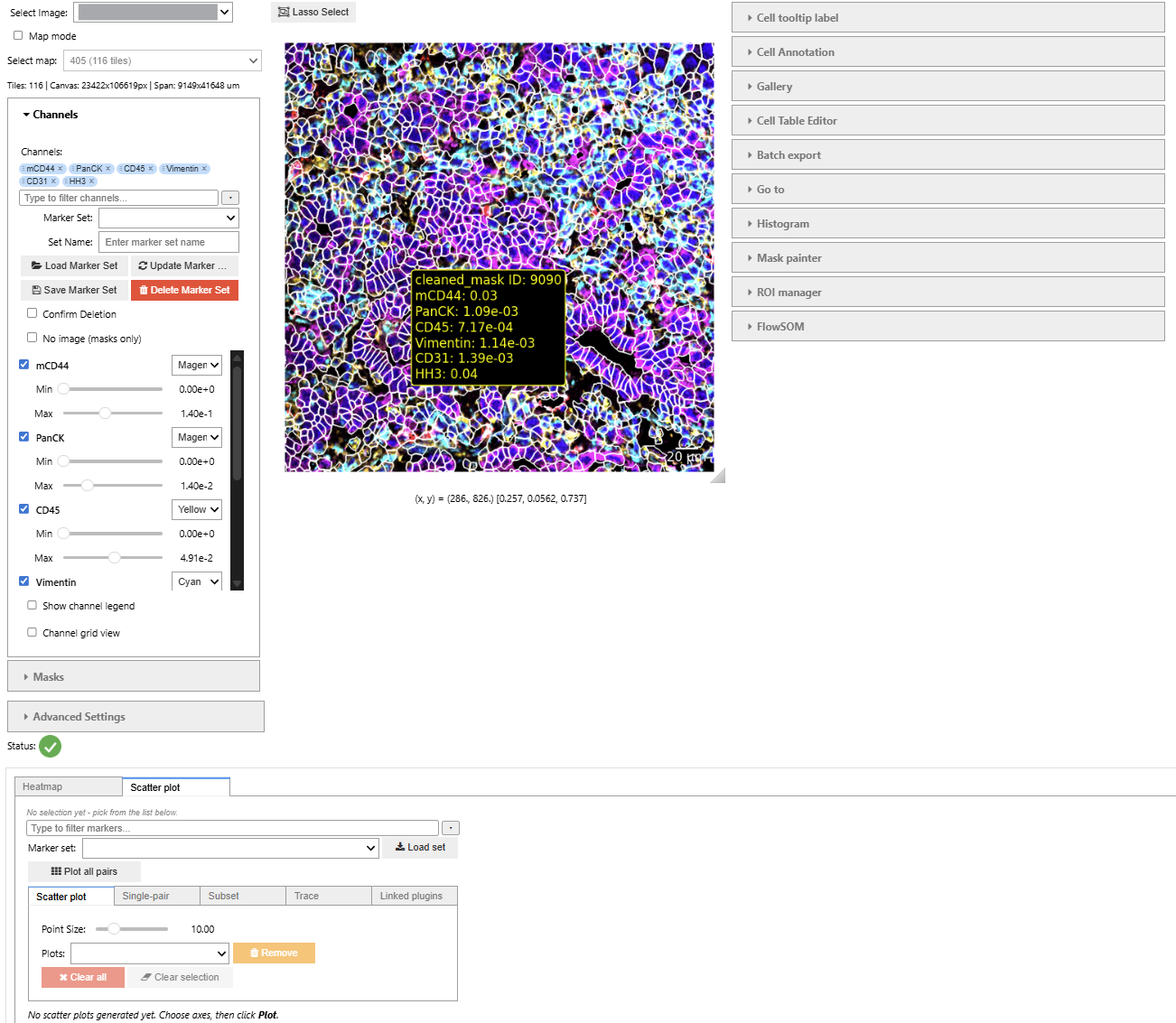
- left: overall settings (channel, annotation, and mask accordions)
- middle: main viewer with overlay controls and image navigation
- right: plugin tools (Mask Painter, ROI Manager, palette editors, statistics panels)
- bottom (optional): wide plugin tabs (e.g., horizontal heatmap or gallery extensions)
For more details, see the user guide.
New Update
UELer v0.5.0 Summary
The 0.5.0 line turns UELer from a repository you clone into a package you install. This is the first release published to PyPI.
Installation and licensing
pip install ueler-viewer— you stillimport ueler. PyPI prohibits the nameueler, so the distribution isueler-viewer, likescikit-image/skimageoropencv-python/cv2. Nothing in your code changes. Stable releases come from PyPI; alphas, betas and release candidates are only on TestPyPI — see the installation guide. If you hold an editable install of the olduelerdistribution,pip uninstall uelerfirst: pip treats the two as unrelated projects even though both own theueler/package.- Relicensed from GPL-3.0-only to BSD 3-Clause. UELer is imported into other people's pipelines, which is where copyleft bites hardest — under the GPL, distributing a pipeline that imported
uelerpulled that pipeline into the GPL too. BSD-3 matches the surrounding stack (scikit-image, dask, bokeh, anndata, napari). Existing users only gain permissions. - Supported Python: 3.10, 3.11 and 3.12, and
pandas>=2.0is now a declared dependency rather than arriving through seaborn and anndata. - Breaking:
import uelerno longer claims the top-level namesviewer,constants,data_loaderandimage_utils. The pre-0.2 compatibility hook is removed, along with theensure_aliases=argument ofrun_viewer()/run_viewer_bia(). The canonical paths (ueler.constants,ueler.viewer.*, …) are unchanged.
New in the viewer
- Line and polygon ROIs, in the ROI manager. Click a chain of points onto the canvas — left-click adds a vertex, left-drag moves one, right-click deletes the nearest,
ctrl+z/ctrl+yundo and redo,enterfinishes — with a live length or perimeter readout in px and µm. Shapes are ordinary ROI rows, so tags, thumbnails, filtering, CSV import/export and batch export all apply; exporting a shape exports its bounding box. Older ROI CSVs load unchanged. - Cells selected in the image now reach the plots. A Follow main viewer checkbox (Linked plugins tab, off by default) in the Scatter plot, Histogram and Heatmap mirrors the image's live selection into the plot, across several FOVs in map mode. It is the counterpart of the Main viewer checkbox, which pushes the other way.
- A handful of selected cells is now visible in the histogram. Five cells out of 80 000 drew a bar 0.006 % of the plot height. When the selection's peak falls below 5 % of the tallest bar, the bins holding selected cells are tinted over their full height, with the proportional overlay still drawn on top. Mark faint selections turns it off.
- The interactive scatter is the default everywhere, VS Code included. The static-Matplotlib fallback for VS Code worked around a webview bug that no longer happens, and cost every VS Code user their linked brushing.
UELER_SCATTER_BACKEND=staticremains as an opt-out.
Fixed
- Locating a single cell works in the channel grid view. Go-To, a gallery tile, a scatter or heatmap point, and centring on a saved ROI all did nothing at all in grid mode — no error, no movement.
- Painting a cell table no longer crashes on pandas extension dtypes. The Mask Painter raised
TypeError: Cannot interpret '<StringDtype…>' as a data typewhenever the identifier column was categorical or nullable — which AnnDataobscolumns routinely are. - The scatter matrix follows the standard SPLOM convention: a row shares its y-axis, a column shares its x-axis. The previous layout was the transpose.
- A finished shape stays on screen, instead of vanishing until the ROI was saved and loaded back, and
Save shapenow finishes the drawing for you.
Removed
- The
Chart (heatmap)plugin. A near-duplicate of the Scatter plot reading its axes from the cluster × marker matrix, offering nothing Scatter plot or Heatmap does not. The real Heatmap, Scatter plot and Histogram are untouched — the plugin once labelled Chart is today's Scatter plot, not the removed one.
Worth knowing
ENABLE_MAP_MODEmust be set beforeimport ueler. The flag is read at module import time, so setting it later has no effect — even beforerun_viewer().- The pixel size defaults to 390 nm — the MIBI pixel pitch — for every dataset, and it drives the scale bar in the viewer and in every batch-exported image. Set it from your acquisition metadata (1000 nm for IMC), or to
0to omit the scale bar entirely. The new display settings page covers this and the 99.9th-percentile contrast default. - The documentation site was audited against the code, and a checker now runs on every docs deploy so install commands, the Python range, extras, repo paths, environment variables and UI labels cannot drift from the software again. Two new developer pages cover plugin development and mask rendering & coloring.
- Behind the scenes: CI runs the suite on Python 3.10–3.12 and installs the built wheel outside the repository, a skipped test counts as a failure, and a pushed tag routes itself — pre-releases to TestPyPI, stable only after a matching release candidate is confirmed to ship identical code. Publishing uses PyPI Trusted Publishing; no API token exists in the repository.
Earlier changes (v0.4.4 and before) are in the update log.
License
UELer is released under the BSD 3-Clause License — see LICENSE.txt.
You are free to use, modify and redistribute UELer, including in commercial and closed-source
work, provided you keep the copyright notice and do not use the authors' names to endorse a
derived product. This is the same license as scikit-image, dask, bokeh, anndata and
napari, so UELer imposes no constraints your existing scientific Python stack does not.
If you use UELer in published work, a citation is appreciated but not required.
Issues and contact
Bug reports and feature requests: GitHub Issues. Maintained by Yu-Le Wu, Hartmann Lab, DKFZ Heidelberg.
1 maintainer

Download files
Download the file for your platform. If you're not sure which to choose, learn more about installing packages.
Source Distribution
Built Distribution
Filter files by name, interpreter, ABI, and platform.
If you're not sure about the file name format, learn more about wheel file names.
Copy a direct link to the current filters
File details
Details for the file ueler_viewer-0.5.0.tar.gz.
File metadata
- Download URL: ueler_viewer-0.5.0.tar.gz
- Upload date:
- Size: 328.4 kB
- Tags: Source
- Uploaded using Trusted Publishing? Yes
- Uploaded via:
twine/7.0.0 CPython/3.13.14
File hashes
| Algorithm | Hash digest | |
|---|---|---|
| SHA256 |
7b7294fd60a6636c28836c967a2994c0595e45dcd9a3ed519fbaccb4302c597e
|
|
| MD5 |
8d051770ba8bea46888d3d4da20bc2ed
|
|
| BLAKE2b-256 |
6e6a264b759b765d3742978501a04a8a5a42dd60531f967adcb51bc0306bf861
|
Provenance
The following attestation bundles were made for ueler_viewer-0.5.0.tar.gz:
Publisher:
release.yml on HartmannLab/UELer
-
Statement:
-
Statement type:
https://in-toto.io/Statement/v1 -
Predicate type:
https://docs.pypi.org/attestations/publish/v1 -
Subject name:
ueler_viewer-0.5.0.tar.gz -
Subject digest:
7b7294fd60a6636c28836c967a2994c0595e45dcd9a3ed519fbaccb4302c597e - Sigstore transparency entry: 2535535386
- Sigstore integration time:
-
Permalink:
HartmannLab/UELer@5606dfaaceeecaed9a44cb6934b6ef61aed5b5b3 -
Branch / Tag:
refs/tags/v0.5.0 - Owner: https://github.com/HartmannLab
-
Access:
public
-
Token Issuer:
https://token.actions.githubusercontent.com -
Runner Environment:
github-hosted -
Publication workflow:
release.yml@5606dfaaceeecaed9a44cb6934b6ef61aed5b5b3 -
Trigger Event:
push
-
Statement type:
File details
Details for the file ueler_viewer-0.5.0-py3-none-any.whl.
File metadata
- Download URL: ueler_viewer-0.5.0-py3-none-any.whl
- Upload date:
- Size: 343.7 kB
- Tags: Python 3
- Uploaded using Trusted Publishing? Yes
- Uploaded via:
twine/7.0.0 CPython/3.13.14
File hashes
| Algorithm | Hash digest | |
|---|---|---|
| SHA256 |
6f2949f2a9c90316867f055f4c2231e14b6bc8f8399c569cac4ac86bc708c7e5
|
|
| MD5 |
bec139871dbb88e21b7bce3cd7c71903
|
|
| BLAKE2b-256 |
5278642f8f87e759743220561087915fa156cb2bc174bf7386d2488e785f19e9
|
Provenance
The following attestation bundles were made for ueler_viewer-0.5.0-py3-none-any.whl:
Publisher:
release.yml on HartmannLab/UELer
-
Statement:
-
Statement type:
https://in-toto.io/Statement/v1 -
Predicate type:
https://docs.pypi.org/attestations/publish/v1 -
Subject name:
ueler_viewer-0.5.0-py3-none-any.whl -
Subject digest:
6f2949f2a9c90316867f055f4c2231e14b6bc8f8399c569cac4ac86bc708c7e5 - Sigstore transparency entry: 2535535612
- Sigstore integration time:
-
Permalink:
HartmannLab/UELer@5606dfaaceeecaed9a44cb6934b6ef61aed5b5b3 -
Branch / Tag:
refs/tags/v0.5.0 - Owner: https://github.com/HartmannLab
-
Access:
public
-
Token Issuer:
https://token.actions.githubusercontent.com -
Runner Environment:
github-hosted -
Publication workflow:
release.yml@5606dfaaceeecaed9a44cb6934b6ef61aed5b5b3 -
Trigger Event:
push
-
Statement type:













