
说明
python版本uiadmin实现, API接口自动生成管理后台,无需前端参与。
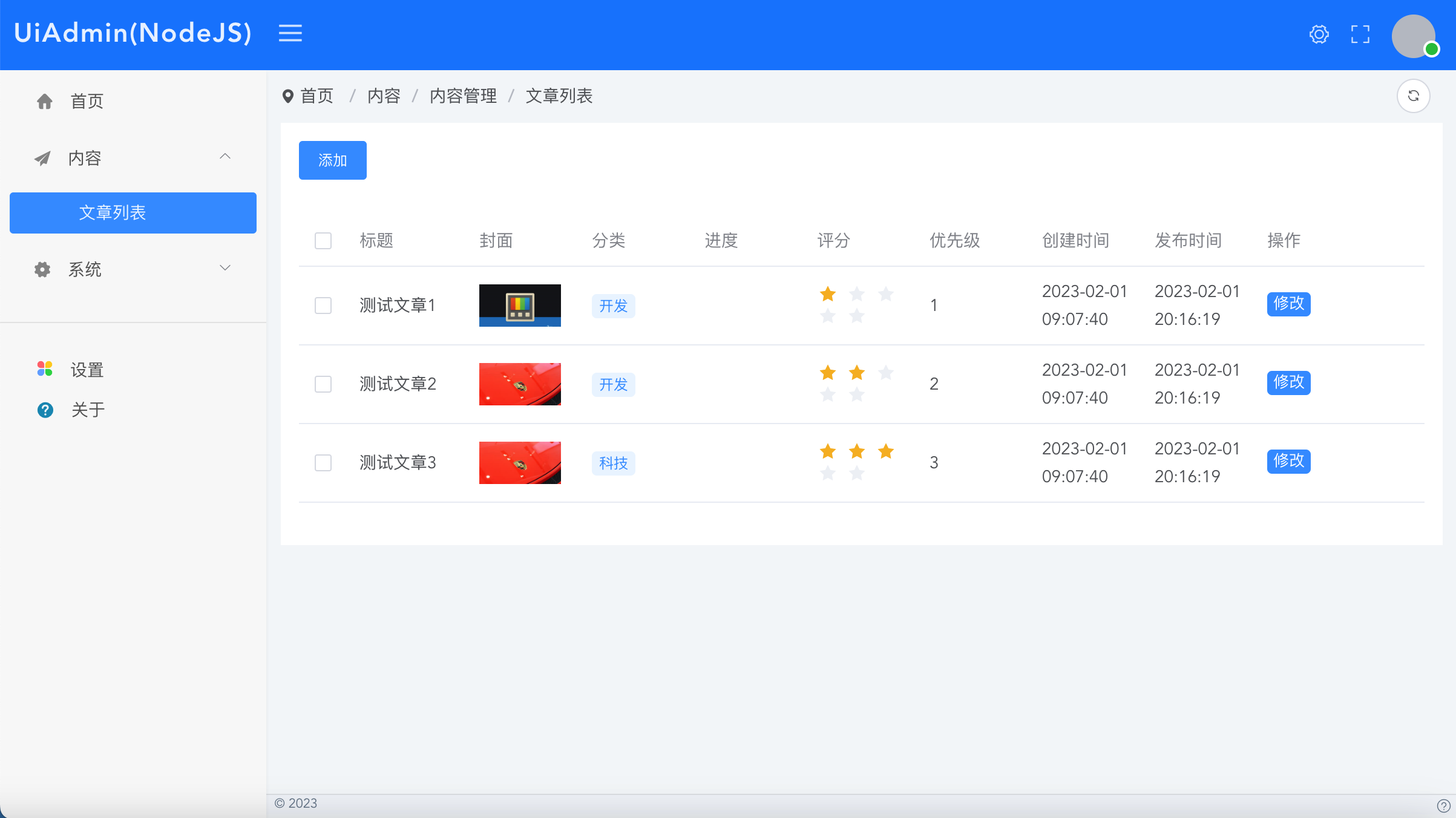
https://pypi.org/project/Uiadmin-Flask/
Builder文档
https://uiadmin.net/docs/builder
教程
官方脚手架
下载脚手架工程
如果您不想自己搭建项目工程,可以直接使用官方的脚手架。
https://gitee.com/uiadmin/uiadmin/tree/master/back-end-python/
下载后执行
pip install
export FLASK_APP=app
flask run
访问:localhost:5000/xyadmin/ 输入账号admin密码uiadmin登录即可进入管理后台页面
开发
仿照示例接口进行业务开发
自建工程使用步骤
安装依赖
pip install Flask
pip install uiadmin-flask
pip freeze >requirements.txt
pip install -r requirements.txt
增加配置文件
在config/default.y
   uiadmin:
   site:
     # 网站名称
     title: "UiAdm
     #正方形logo
     logo: ""
     #带有标题的横
     logoTitle: ""
     logoBadge: ""
   system:
     api-version:
     menu-from: "a
   user:
     user-role:
       - id: 1
         name: sup
         title: 超
         menus: ""
         status: 1
       - id: 2
         name: adm
         title: 管
         menus: [
           "/v1/ad
         ]
         status: 1
     user-list:
       - id: 1
         nickname:
         username:
         password:
         avatar: "
         roles: "s
         status: 1
app.py使用
from flask import Flask
from flask_cors import CORS
from uiadmin_flask.Uiadmin import Uiadmin
from uiadmin_flask.util import jsonres
from uiadmin_flask.util.xybuilder.XyBuilderList import XyBuilderList
from uiadmin_flask.util.xybuilder.XyBuilderForm import XyBuilderForm

app = Flask(__name__)

# 调用Uiadmin
uiadmin = Uiadmin(app)
app.config.update(
    UIADMIN_SITE_TITLE='UiAdmin', // 后台名称
    UIADMIN_SITE_LOGO='', // logo
    UIADMIN_SITE_LOGO_BADGE='Beta' // 角标
)

cors = CORS(app, resources={r"/*": {
    "origins": "*",
    "allow_headers": "Authorization, Content-Type, CloudId, Eid",
    "methods": "GET, POST, PUT, DELETE, OPTIONS"
}}, supports_credentials=True)

@app.route("/")
def index():
    return "<a href='/xyadmin/'>点击打开后台</a>"

# 示例
@uiadmin.menu_item({"title": "文章列表", "path": "/demo/lists", "pmenu": "/content", "menuType": 1,
  "routeType": "list", "apiSuffix": "", "apiParams": "", "apiMethod": "GET", "sortnum": 0})
@app.route("/api/v1/admin/demo/lists")
def demo_lists():
    dataList = [
      {
        "id": 1,
        "title": "测试文章1",
        "cate": "开发",
        "cover": "https://ts2.cn.mm.bing.net/th?id=ORMS.11d30098d0f4a79a42c6352014e0f066&pid=Wdp&w=300&h=156&qlt=90&c=1&rs=1&dpr=2&p=0",
        "level": 1,
        "progress": 50,
        "updateTime": "2023-02-01 20:16:19",
        "createTime": "2023-02-01 09:07:40",
        "status": 1
      },
      {
        "id": 2,
        "title": "测试文章2",
        "cate": "开发",
        "cover": "https://ts2.cn.mm.bing.net/th?id=ORMS.ed34ae135a326a834ca9d3379be134d3&pid=Wdp&w=300&h=156&qlt=90&c=1&rs=1&dpr=2&p=0",
        "level": 2,
        "progress": 80,
        "updateTime": "2023-02-01 20:16:19",
        "createTime": "2023-02-01 09:07:40",
        "status": 1
      },
      {
        "id": 3,
        "title": "测试文章3",
        "cate": "科技",
        "cover": "https://ts2.cn.mm.bing.net/th?id=ORMS.ed34ae135a326a834ca9d3379be134d3&pid=Wdp&w=300&h=156&qlt=90&c=1&rs=1&dpr=2&p=0",
        "level": 3,
        "progress": 90,
        "updateTime": "2023-02-01 20:16:19",
        "createTime": "2023-02-01 09:07:40",
        "status": 1
      },
    ]
    xyBuilderlist = XyBuilderList();
    (xyBuilderlist
      .init()
      .addColumn("title", "标题", {
        "type": "text"
      })
      .addColumn("cover", "封面", {
        "type": "image",
      })
      .addColumn("cate", "分类", {
        "type": "tag",
        "prefixType": "dot",
        "options": []
      })
      .addColumn("progress", "进度", {
        "type": "progress"
      })
      .addColumn("level", "评分", {
        "type": "rate"
      })
      .addColumn("level", "优先级", {
        "prefixType": "dot",
        "useOptions": True,
        "options": [
          {"title": "低", "value": 1, "color": "#c6cdd4"},
          {"title": "中", "value": 2, "color": "#0488de"},
          {"title": "高", "value": 3, "color": "#ff9d28"}
        ]
      })
      .addColumn("createTime", "创建时间", {
        "type": "time",
      })
      .addColumn("updateTime", "发布时间", {
        "type": "time",
      })
      .addTopButton("add", "添加", {
        "title": "新增",
        "pageType": "modal",
        "modalType": "form",
        "api": "/v1/admin/demo/add",
        "width": "1000px"
      })
      .addColumn("rightButtonList",  "操作", {
        "type": "rightButtonList",
        "minWidth": "120px"
      })
      .addRightButton("edit", "修改", {
        "title": "修改",
        "pageType": "modal",
        "modalType": "form",
        "api": "/v1/admin/demo/edit",
        "width": "1000px"
      })
      .setDataList(dataList)
      )

    return jsonres({
        "code": 200,
        "msg": "登录成功",
        "data": {
            "listData": xyBuilderlist.getData()
        }
      }
    )

@uiadmin.menu_item({"title": "文章增加", "path": "/demo/add", "pmenu": "/demo/lists", "menuType": 1,
  "routeType": "form", "apiSuffix": "", "apiParams": "", "apiMethod": "POST", "sortnum": 0})
@app.route("/api/v1/admin/demo/add")
def demo_add():
    xyBuilderForm = XyBuilderForm()
    (xyBuilderForm
      .init()
      .addFormItem("name", "文章标题", "text", "", {})
      .addFormItem("content", "文章内容", "html", "", {})
      .addFormItem("level", "登记", "select", "", {
        "options":[
          {"title": "低", "value": 1},
          {"title": "中", "value": 2},
          {"title": "高", "value": 3},
        ]
      })
      )

    return jsonres({
        "code": 200,
        "msg": "成功",
        "data": {
            "formData": xyBuilderForm.getData()
        }
      }
    )

@uiadmin.menu_item({"title": "文章修改", "path": "/demo/edit", "pmenu": "/demo/lists", "menuType": 1,
  "routeType": "form", "apiSuffix": "", "apiParams": "", "apiMethod": "POST", "sortnum": 0})
@app.route("/api/v1/admin/demo/edit/<string:id>")
def demo_edit(id):
    xyBuilderForm = XyBuilderForm()
    (xyBuilderForm
      .init()
      .addFormItem("id", "ID", "text", "", {
        "disabled": True
      })
      .addFormItem("name", "文章标题", "text", "", {})
      .addFormItem("content", "文章内容", "html", "", {})
      .addFormItem("level", "登记", "select", "", {
        "options":[
          {"title": "低", "value": 1},
          {"title": "中", "value": 2},
          {"title": "高", "value": 3},
        ]
      })
      .setFormValues({
        "id": id,
        "name": "text",
        "content": "测试",
        "level": 2
      })
      )

    return jsonres({
        "code": 200,
        "msg": "成功",
        "data": {
            "formData": xyBuilderForm.getData()
        }
      }
    )

if __name__ == '__main__':
    app.run(host='0.0.0.0', debug=True)
运行
export FLASK_APP=app
flask run
访问:localhost:5000/xyadmin/ 输入账号admin密码uiadmin登录即可进入管理后台页面
开发
仿照示例接口进行业务开发
1 maintainer

Download files
Download the file for your platform. If you're not sure which to choose, learn more about installing packages.
Source Distribution
Built Distribution
Filter files by name, interpreter, ABI, and platform.
If you're not sure about the file name format, learn more about wheel file names.
Copy a direct link to the current filters
File details
Details for the file Uiadmin-Flask-1.0.7.tar.gz.
File metadata
- Download URL: Uiadmin-Flask-1.0.7.tar.gz
- Upload date:
- Size: 10.3 kB
- Tags: Source
- Uploaded using Trusted Publishing? No
- Uploaded via:
twine/4.0.2 CPython/3.9.16
File hashes
| Algorithm | Hash digest | |
|---|---|---|
| SHA256 |
71ec0c71dab370d8b26a7c308b254162e5337a58d8226c4352990065554db786
|
|
| MD5 |
5456f198024059c923ece3679a193bcf
|
|
| BLAKE2b-256 |
3e3f444b8cf7b6304c0aeb7134e04f24015adb12c3ae6fef3e7cdd2096262d0a
|
File details
Details for the file Uiadmin_Flask-1.0.7-py3-none-any.whl.
File metadata
- Download URL: Uiadmin_Flask-1.0.7-py3-none-any.whl
- Upload date:
- Size: 12.3 kB
- Tags: Python 3
- Uploaded using Trusted Publishing? No
- Uploaded via:
twine/4.0.2 CPython/3.9.16
File hashes
| Algorithm | Hash digest | |
|---|---|---|
| SHA256 |
eaae07e5549967e7e2fe99265a55a50ae888a0e0b7fd01a7e7a78554666daf54
|
|
| MD5 |
1626bfffbb61bd198d24f2bdb8c6090f
|
|
| BLAKE2b-256 |
02b72534c31b683ad002265b78b8751bff7d1ec76e30a6bdf3025fef415ed4cc
|













