
Umlaut
A simpler way to work with MLflow. Umlaut simplifies model deployment and operational analytics for data teams. Centralize critical business logic and track all uses in a single location. Umlaut is built on top of MLflow and offers a simple Python class to assist with tracking and running models. Umlaut is designed to be used by data teams of all sizes and is a great tool for small teams without dedicated data scientists.
Umlaut provides a simple Python class to assist with saving and running models in MLflow. The class has two methods:
track_model: Converts a data science model or block of business logic into an MLflow compatiblemodelrun_model: Runs a previously trainedmodeland saves audit metadata
Umlaut offers
- simple commands to track and run models
- history of all inputs and results for model runs
- model lifecycle management
- access to multiple versions of the same model
- a user interface with
MLflow - model audit history tracking (roadmap)
- auto-deployed models that can be queried through an API (roadmap)
Installing Umlaut
pip install umlaut
MLflow Setup
MLflow is a powerful machine learning library created by Databricks for data science teams. It offers an extensive API for tracking and running models, but the learning curve can be a deterrent for small teams without dedicated data scientists. Umlaut strips away much of the complexity of MLflow while maintaining the immense value of tracking and running your models in a single location.
MLflow has two requirements:
- A model artifact storage location
- This can be a local directory or a cloud storage URI. More info in the MLflow docs.
- A model registry
- The model registry is where model changes and run data are stored. More info in the MLflow docs.
An mlflow server must be running in order to work with Umlaut. The command to start an MLflow server with local artifact storage and a Postgres model registry is as follows:
mlflow server --backend-store-uri postgresql+psycopg2://admin:password@localhost:5432/database --default-artifact-root "mlruns/"
Once the server is running you can navigate to the MLflow UI and begin interacting with models.
Core Functionality
Umlaut offers a simple Python class to assist with saving and running business logic in MLflow. The class has two methods:
track_model: Converts a data science model or block of business logic into an MLflow compatiblemodelrun_model: Runs a previously trainedmodeland saves audit metadata
Deploying models with Umlaut
Custom models can be deployed simply by running track_model(). Ensure that the model code block is in a Python Class and follow the example below.
class ExampleModel():
    """Example business logic that can be wrapped into a model.
       The class must contain a 'run' method with the input config
       mapped to the corresponding model parameters."""

    def business_logic(self, revenue: int) -> bool:
        return revenue > 5

    def run(self, model_input: dict) -> bool:
        return self.business_logic(revenue=model_input.get("revenue"))


if __name__ == "__main__":
    """Saves the model to MLflow in an experiment run"""
    from umlaut import Umlaut

    Umlaut().track_model(
        model=ExampleModel(),
        model_name="Revenue Forecast",
    )
This will push the latest changes of ExampleModel() to MLflow as a new model version. Navigate to the MLflow server where you can find details for the example "Quarterly Revenue" model.
Running models with Umlaut
Once a model is deployed in MLflow with track_model(), it can be run by calling run_model().
from umlaut import Umlaut

result = Umlaut().run_model(
    model_name="Revenue Forecast",
    input_config={"revenue": 3},
    stage="Staging",
)
print(f"Revenue will{'' if result else ' not'} exceed target")
Running the simple Revenue Forecast model with revenue = 3 will return False as the revenue does not exceed the target of 5. The call to the model will be tracked in MLflow with model inputs and results.
User Interface
MLflow provides a useful interface for interacting with models and visualizing their performance.
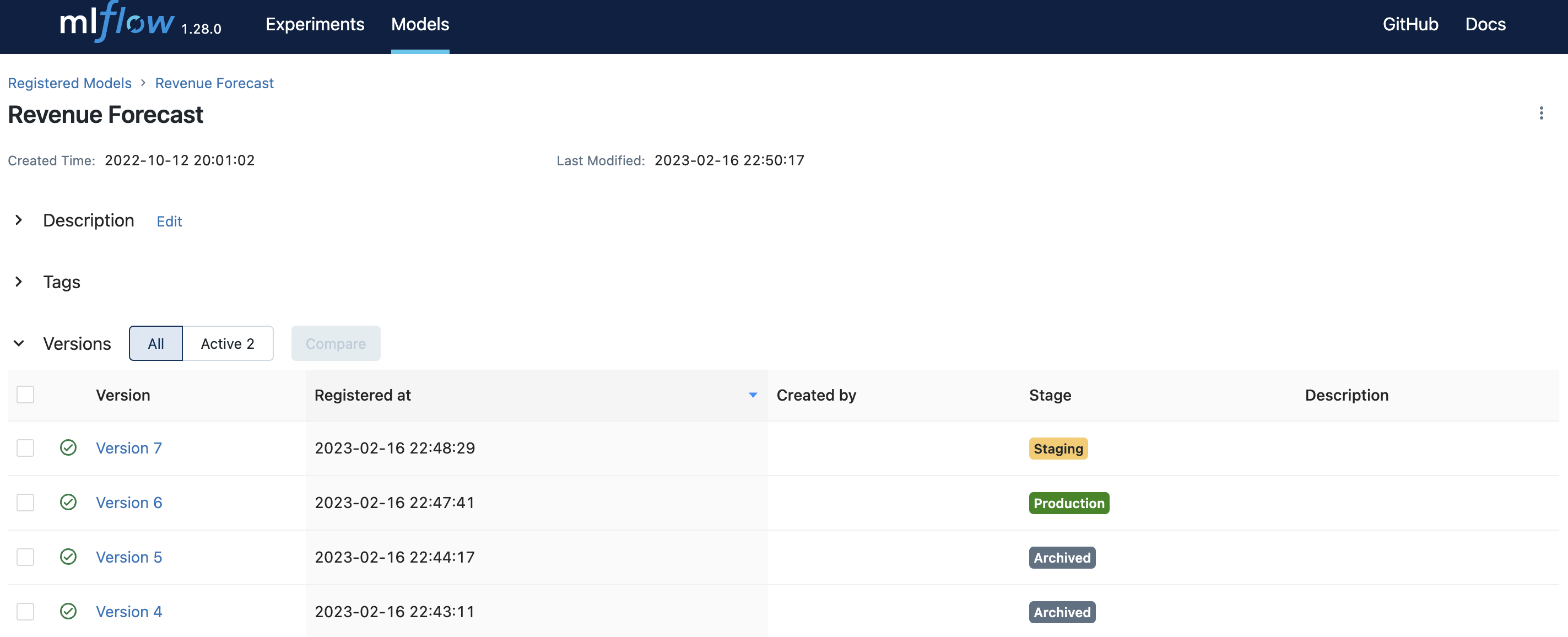
Deploy a staging and production version of the same model for testing changes before promoting.
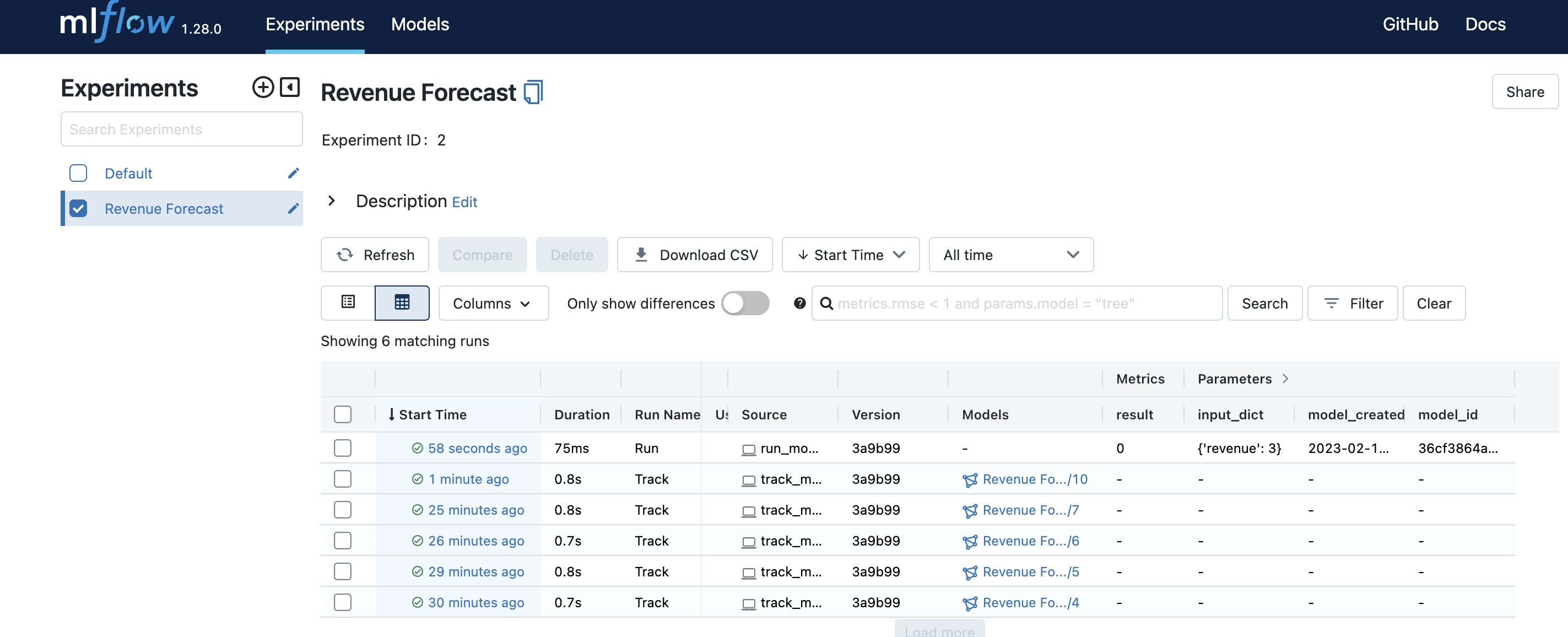
Track all model run inputs and outputs.
1 maintainer

Metadata
1 maintainer
Release files for umlaut 0.3.4
For a detailed explanation of source distributions (sdists) and built distributions (wheels), please see the package formats documentation.
Source distribution (sdist)
| File | Size | Uploaded | Provenance | Actions |
|---|---|---|---|---|
| umlaut-0.3.4.tar.gz | 17.8 kB | Without provenance | Details for umlaut-0.3.4.tar.gz |
Built distribution (wheel)
| File | Interpreter | ABI | Platform | Actions Reset |
|---|---|---|---|---|
| umlaut-0.3.4-py3-none-any.whl | Python 3 | none | any | Details for umlaut-0.3.4-py3-none-any.whl |
Total release size: 36.4 kB
Release files / umlaut-0.3.4.tar.gz
| Download URL | umlaut-0.3.4.tar.gz |
|---|---|
| Size | 17.8 kB |
| Tags | Source |
|
SHA-256 checksum How to use checksums |
b918e50932f398b03c8b64d0d631f4eb6e3ef7190b837c5b2b6b1cf4a0903ddf
|
|
BLAKE2b-256 checksum How to use checksums |
1146a30b0dd78284c0c4b7fecce4a9e69814aafe069537294de6e20b5559f316
|
| Upload date | |
|
Uploaded using Trusted Publishing? What is trusted publishing? |
No |
| Uploaded via |
poetry/1.2.1 CPython/3.10.4 Darwin/20.4.0
|
Release files / umlaut-0.3.4-py3-none-any.whl
| Download URL | umlaut-0.3.4-py3-none-any.whl |
|---|---|
| Size | 18.6 kB |
| Tags | Python 3 |
|
SHA-256 checksum How to use checksums |
9dce64c646468760ef8a141aa538929a908fe695f245f00f68bf9f1ac089c4ff
|
|
BLAKE2b-256 checksum How to use checksums |
1d92adf7e764efa593248262ce50fdf6d3954f2138a86310d3329680e8c3ce21
|
| Upload date | |
|
Uploaded using Trusted Publishing? What is trusted publishing? |
No |
| Uploaded via |
poetry/1.2.1 CPython/3.10.4 Darwin/20.4.0
|
Security for umlaut 0.3.4
Provenance
Provenance describes where a file came from. On PyPI, provenance is shared via attestations, which provide a verifiable record of the build or publishing details. View details, limitations and caveats.
No provenance found
None of the files in this release were uploaded with provenance metadata.
A note on package security
PyPI is a repository for distributing packages, not a service for auditing them. While third-party security researchers and our staff do their best to detect and remove malicious packages, PyPI cannot guarantee the quality, security or suitability of any given package.
To learn more about protecting yourself from malicious actors, visit our package security documentation.














