
UP Tree (Utility Pattern Tree)
This is a simple module which takes input of transactions and provides it's UP-Tree, HeaderTable, and transactions along with their item-utilities. Each node N of a UP-Tree has six entries: N.item is the item name of N; N. count is the node utility of N; N.num is the support count of N; N.parent indicates the parent node of N; N.nextNode is a node link which may point to a node having the same item name as N.item; N.children which is a dictionary, it contains item name as key and Node as value of all nodes whoes parent is N. The Header table is a structure employed to facilitate the traversal of the UP-Tree. A header table entry contains an item name, an estimated utility value, and a link. The link points to the first node in the UP-Tree having the same item name as the entry. The nodes whose item names are the same can be traversed efficiently by following the links in header table and the node links in the UP-Tree.
Github: https://github.com/miths/UPTree
How to use
-
copy contents of src folder to your project folder.
-
runinit.py file
UPTree.py contains all functions used andinit.py contains main function which can execute the code.
usage and functions
upTree, headerTable, transanctions= UPTree(transaction File path, profit file path)
upTree.disp() # prints UP-Tree
eg:
upTree, headerTable, transactions = UPTree('D:\user\data_proj_1.txt', 'D:\user\profit1.txt')
input format:
Two text files required. One for transactions(items and quantity) and the other for profit(for each item).
eg:
format:
item1 item2 item3 item4 : quantity(item1) quantity(item2) quantity(item3) quantity(item4)
..
..
..
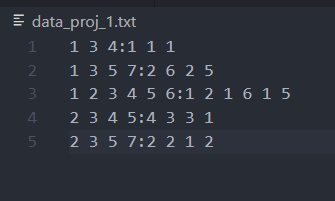
format:
profit(item1)
profit(item2)
profit(item3)
profit(item4)
..
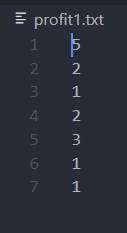
Note: all item names should be numericals. Profit can be float or int. Profit value should be positive for all items. All quantity values should be greater than 0. All items must have a valid quantity in every transaction. All items must have profit value.
Output:
function returns
- upTree
- headertable
- transactions
upTree
can be printed by: upTree.disp()
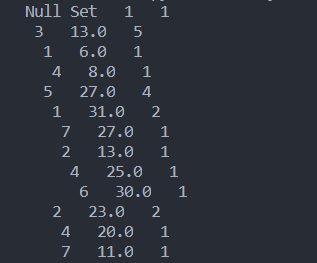
Each Node of UP-Tree displays following information:
headerTable
can be printed by: print(headerTable)

headerTable is a dictionary. key: item, value: [transaction weighted utility, head Node of item(Node.nextNode points to other node of same item)]
transactions
can be printed by: print(transactions)

transactions is a dictionary in decending order according to each item's transaction weighted utility
key: transaction number, value: dictionary(item : item utility)
Some useful definitions
Transaction Weighted Utility
definition
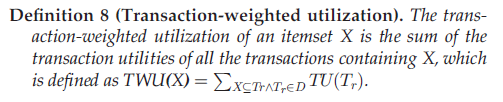
eg for this case

Item Utility
definition
The absolute utility of an item I in a transaction T is denoted as IU(I)= Quantity(I) * Profit(I)
1 maintainer

Metadata
1 maintainer
Release files for UP-Tree 0.0.3
For a detailed explanation of source distributions (sdists) and built distributions (wheels), please see the package formats documentation.
Source distribution (sdist)
| File | Size | Uploaded | Provenance | Actions |
|---|---|---|---|---|
| UP-Tree-0.0.3.tar.gz | 4.5 kB | Without provenance | Details for UP-Tree-0.0.3.tar.gz |
Release files / UP-Tree-0.0.3.tar.gz
| Download URL | UP-Tree-0.0.3.tar.gz |
|---|---|
| Size | 4.5 kB |
| Tags | Source |
|
SHA-256 checksum How to use checksums |
408b191e30d03e1b5dfe9ff345e6c5bc48fa5f265dc6ca1df6a3cbc76d950d4e
|
|
BLAKE2b-256 checksum How to use checksums |
b8b8ba168459fb61b92452b2515d7958b201621d9bc3840bdc70b38f84437a5a
|
| Upload date | |
|
Uploaded using Trusted Publishing? What is trusted publishing? |
No |
| Uploaded via |
twine/3.2.0 pkginfo/1.5.0.1 requests/2.22.0 setuptools/44.0.0 requests-toolbelt/0.9.1 tqdm/4.44.1 CPython/3.7.4
|
Security for UP-Tree 0.0.3
Provenance
Provenance describes where a file came from. On PyPI, provenance is shared via attestations, which provide a verifiable record of the build or publishing details. View details, limitations and caveats.
No provenance found
None of the files in this release were uploaded with provenance metadata.
A note on package security
PyPI is a repository for distributing packages, not a service for auditing them. While third-party security researchers and our staff do their best to detect and remove malicious packages, PyPI cannot guarantee the quality, security or suitability of any given package.
To learn more about protecting yourself from malicious actors, visit our package security documentation.














