
UQLM (Uncertainty Quantification for Language Models) is a Python package for UQ-based LLM hallucination detection.

Project description
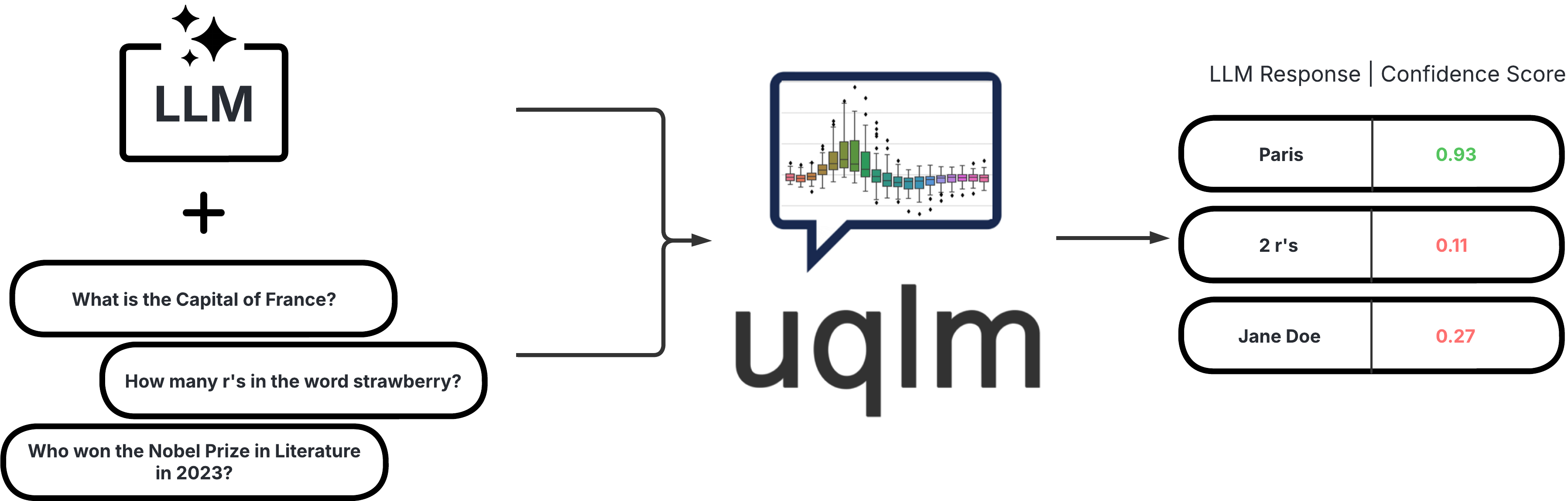
uqlm: Uncertainty Quantification for Language Models





UQLM is a Python library for Large Language Model (LLM) hallucination detection using state-of-the-art uncertainty quantification techniques.
Installation
The latest version can be installed from PyPI:
pip install uqlm
Hallucination Detection
UQLM provides a suite of response-level scorers for quantifying the uncertainty of Large Language Model (LLM) outputs. Each scorer returns a confidence score between 0 and 1, where higher scores indicate a lower likelihood of errors or hallucinations. We categorize these scorers into four main types:
| Scorer Type | Added Latency | Added Cost | Compatibility | Off-the-Shelf / Effort |
|---|---|---|---|---|
| Black-Box Scorers | ⏱️ Medium-High (multiple generations & comparisons) | 💸 High (multiple LLM calls) | 🌍 Universal (works with any LLM) | ✅ Off-the-shelf |
| White-Box Scorers | ⚡ Minimal (token probabilities already returned) | ✔️ None (no extra LLM calls) | 🔒 Limited (requires access to token probabilities) | ✅ Off-the-shelf |
| LLM-as-a-Judge Scorers | ⏳ Low-Medium (additional judge calls add latency) | 💵 Low-High (depends on number of judges) | 🌍 Universal (any LLM can serve as judge) | ✅ Off-the-shelf |
| Ensemble Scorers | 🔀 Flexible (combines various scorers) | 🔀 Flexible (combines various scorers) | 🔀 Flexible (combines various scorers) | ✅ Off-the-shelf (beginner-friendly); 🛠️ Can be tuned (best for advanced users) |
Below we provide illustrative code snippets and details about available scorers for each type.
Black-Box Scorers (Consistency-Based)
These scorers assess uncertainty by measuring the consistency of multiple responses generated from the same prompt. They are compatible with any LLM, intuitive to use, and don't require access to internal model states or token probabilities.
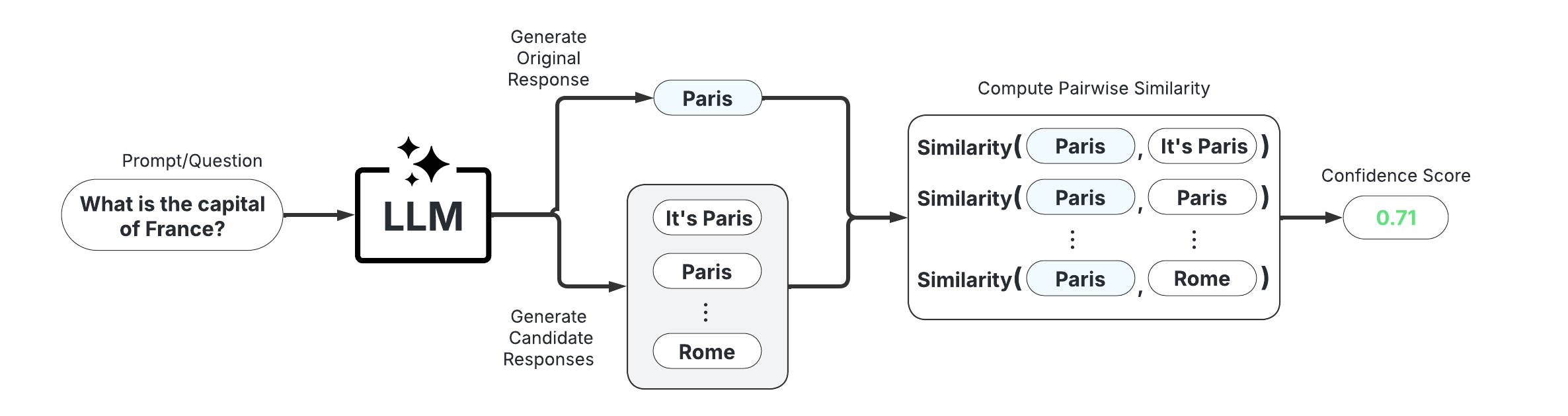
Example Usage:
Below is a sample of code illustrating how to use the BlackBoxUQ class to conduct hallucination detection.
from langchain_google_vertexai import ChatVertexAI
llm = ChatVertexAI(model='gemini-pro')

from uqlm import BlackBoxUQ
bbuq = BlackBoxUQ(llm=llm, scorers=["semantic_negentropy"], use_best=True)

results = await bbuq.generate_and_score(prompts=prompts, num_responses=5)
results.to_df()
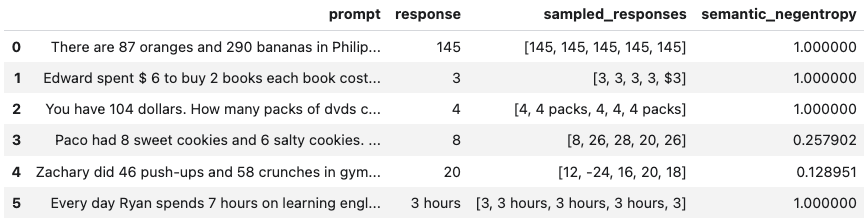
Above, use_best=True implements mitigation so that the uncertainty-minimized responses is selected. Note that although we use ChatVertexAI in this example, any LangChain Chat Model may be used. For a more detailed demo, refer to our Black-Box UQ Demo.
Available Scorers:
- Non-Contradiction Probability (Chen & Mueller, 2023; Lin et al., 2024; Manakul et al., 2023)
- Semantic Entropy (Farquhar et al., 2024; Kuhn et al., 2023)
- Exact Match (Cole et al., 2023; Chen & Mueller, 2023)
- BERT-score (Manakul et al., 2023; Zheng et al., 2020)
- BLUERT-score (Sellam et al., 2020)
- Cosine Similarity (Shorinwa et al., 2024; HuggingFace)
White-Box Scorers (Token-Probability-Based)
These scorers leverage token probabilities to estimate uncertainty. They are significantly faster and cheaper than black-box methods, but require access to the LLM's internal probabilities, meaning they are not necessarily compatible with all LLMs/APIs.

Example Usage:
Below is a sample of code illustrating how to use the WhiteBoxUQ class to conduct hallucination detection.
from langchain_google_vertexai import ChatVertexAI
llm = ChatVertexAI(model='gemini-pro')

from uqlm import WhiteBoxUQ
wbuq = WhiteBoxUQ(llm=llm, scorers=["min_probability"])

results = await wbuq.generate_and_score(prompts=prompts)
results.to_df()

Again, any LangChain Chat Model may be used in place of ChatVertexAI. For a more detailed demo, refer to our White-Box UQ Demo.
Available Scorers:
- Minimum token probability (Manakul et al., 2023)
- Length-Normalized Joint Token Probability (Malinin & Gales, 2021)
LLM-as-a-Judge Scorers
These scorers use one or more LLMs to evaluate the reliability of the original LLM's response. They offer high customizability through prompt engineering and the choice of judge LLM(s).
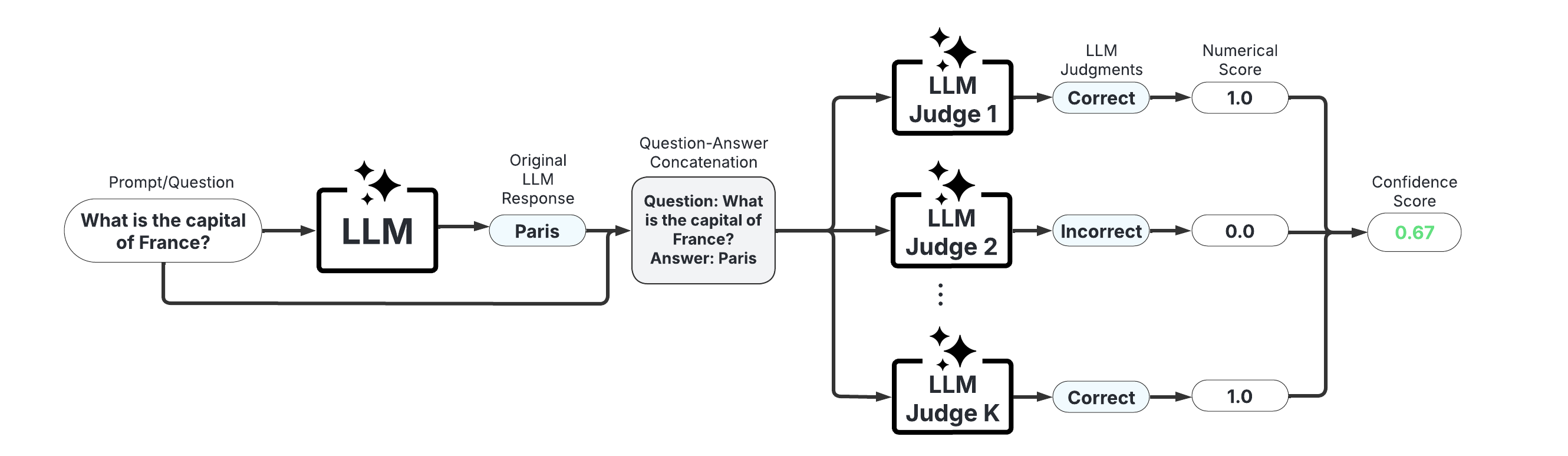
Example Usage:
Below is a sample of code illustrating how to use the LLMPanel class to conduct hallucination detection using a panel of LLM judges.
from langchain_google_vertexai import ChatVertexAI
llm1 = ChatVertexAI(model='gemini-1.0-pro')
llm2 = ChatVertexAI(model='gemini-1.5-flash-001')
llm3 = ChatVertexAI(model='gemini-1.5-pro-001')

from uqlm import LLMPanel
panel = LLMPanel(llm=llm1, judges=[llm1, llm2, llm3])

results = await panel.generate_and_score(prompts=prompts)
results.to_df()

Note that although we use ChatVertexAI in this example, we can use any LangChain Chat Model as judges. For a more detailed demo illustrating how to customize a panel of LLM judges, refer to our LLM-as-a-Judge Demo.
Available Scorers:
- Categorical LLM-as-a-Judge (Manakul et al., 2023; Chen & Mueller, 2023; Luo et al., 2023)
- Continuous LLM-as-a-Judge (Xiong et al., 2024)
- Panel of LLM Judges (Verga et al., 2024)
- Likert Scale Scoring (Bai et al., 2023)
Ensemble Scorers
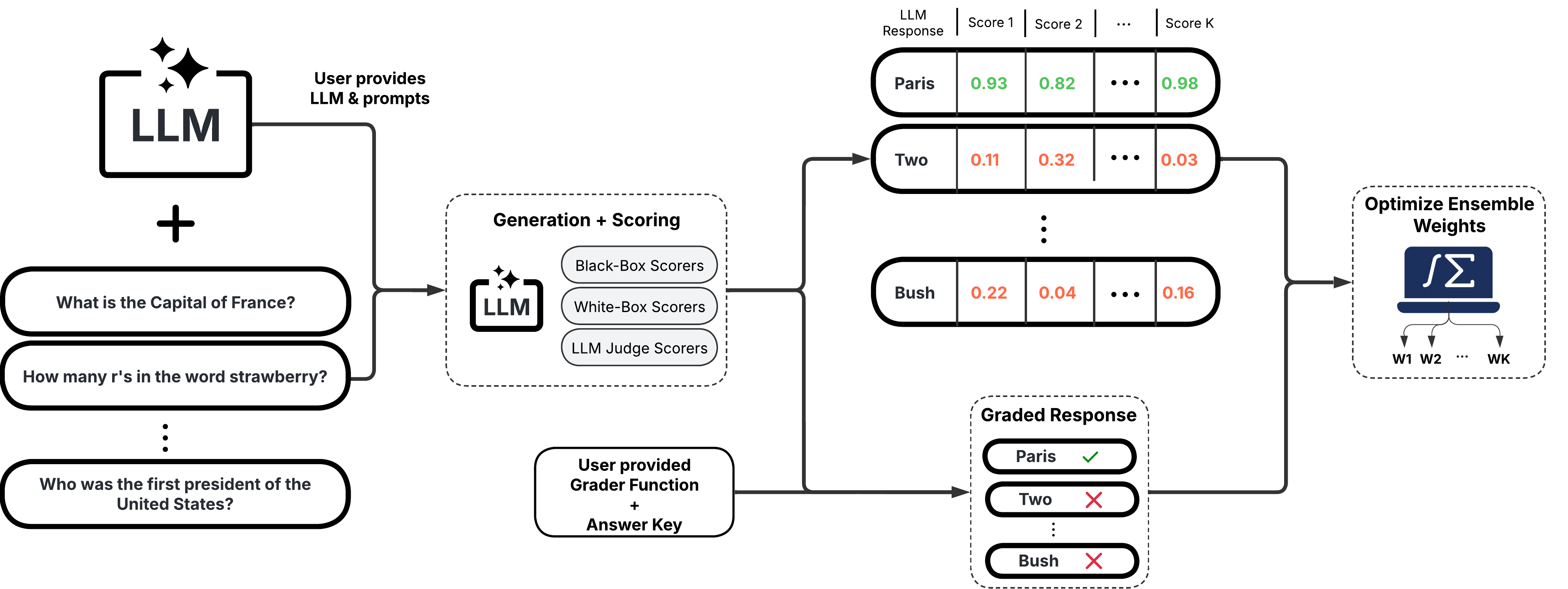
These scorers leverage a weighted average of multiple individual scorers to provide a more robust uncertainty/confidence estimate. They offer high flexibility and customizability, allowing you to tailor the ensemble to specific use cases.
Example Usage:
Below is a sample of code illustrating how to use the UQEnsemble class to conduct hallucination detection.
from langchain_google_vertexai import ChatVertexAI
llm = ChatVertexAI(model='gemini-pro')

from uqlm import UQEnsemble
## ---Option 1: Off-the-Shelf Ensemble---
# uqe = UQEnsemble(llm=llm)
# results = await uqe.generate_and_score(prompts=prompts, num_responses=5)

## ---Option 2: Tuned Ensemble---
scorers = [ # specify which scorers to include
    "exact_match", "noncontradiction", # black-box scorers
    "min_probability", # white-box scorer
    llm # use same LLM as a judge
]
uqe = UQEnsemble(llm=llm, scorers=scorers)

# Tune on tuning prompts with provided ground truth answers
tune_results = await uqe.tune(
    prompts=tuning_prompts, ground_truth_answers=ground_truth_answers
)
# ensemble is now tuned - generate responses on new prompts
results = await uqe.generate_and_score(prompts=prompts)
results.to_df()

As with the other examples, any LangChain Chat Model may be used in place of ChatVertexAI. For more detailed demos, refer to our Off-the-Shelf Ensemble Demo (quick start) or our Ensemble Tuning Demo (advanced).
Available Scorers:
- BS Detector (Chen & Mueller, 2023)
- Generalized UQ Ensemble (Bouchard & Chauhan, 2025)
Documentation
Check out our documentation site for detailed instructions on using this package, including API reference and more.
Example notebooks
Explore the following demo notebooks to see how to use UQLM for various hallucination detection methods:
- Black-Box Uncertainty Quantification: A notebook demonstrating hallucination detection with black-box (consistency) scorers.
- White-Box Uncertainty Quantification: A notebook demonstrating hallucination detection with white-box (token probability-based) scorers.
- LLM-as-a-Judge: A notebook demonstrating hallucination detection with LLM-as-a-Judge.
- Tunable UQ Ensemble: A notebook demonstrating hallucination detection with a tunable ensemble of UQ scorers (Bouchard & Chauhan, 2023).
- Off-the-Shelf UQ Ensemble: A notebook demonstrating hallucination detection using BS Detector (Chen & Mueller, 2023) off-the-shelf ensemble.
Associated Research
A technical description of the uqlm scorers and extensive experiment results are contained in this this paper. If you use our framework or toolkit, we would appreciate citations to the following paper:
@misc{bouchard2025uncertaintyquantificationlanguagemodels,
      title={Uncertainty Quantification for Language Models: A Suite of Black-Box, White-Box, LLM Judge, and Ensemble Scorers},
      author={Dylan Bouchard and Mohit Singh Chauhan},
      year={2025},
      eprint={2504.19254},
      archivePrefix={arXiv},
      primaryClass={cs.CL},
      url={https://arxiv.org/abs/2504.19254},
}
Release history Release notifications | RSS feed


Download files
Download the file for your platform. If you're not sure which to choose, learn more about installing packages.
Source Distribution
Built Distribution
Filter files by name, interpreter, ABI, and platform.
If you're not sure about the file name format, learn more about wheel file names.
Copy a direct link to the current filters
File details
Details for the file uqlm-0.1.9.tar.gz.
File metadata
- Download URL: uqlm-0.1.9.tar.gz
- Upload date:
- Size: 40.1 kB
- Tags: Source
- Uploaded using Trusted Publishing? No
- Uploaded via: poetry/1.8.4 CPython/3.10.15 Linux/5.10.0-35-cloud-amd64
File hashes
| Algorithm | Hash digest | |
|---|---|---|
| SHA256 |
fbc18367ae6ff6081274e524c1faa13bb06ea551f3174e4667f256ce9973f3e3
|
|
| MD5 |
58fd3b18ed6386e23407a15778c552a9
|
|
| BLAKE2b-256 |
317cd206e14b71649576c7000b2004cf0795ddf7a601bc8b64d4f9ea3049b0b4
|
File details
Details for the file uqlm-0.1.9-py3-none-any.whl.
File metadata
- Download URL: uqlm-0.1.9-py3-none-any.whl
- Upload date:
- Size: 58.5 kB
- Tags: Python 3
- Uploaded using Trusted Publishing? No
- Uploaded via: poetry/1.8.4 CPython/3.10.15 Linux/5.10.0-35-cloud-amd64
File hashes
| Algorithm | Hash digest | |
|---|---|---|
| SHA256 |
1b94929faf226189a1ff628bacfe1c0a57cb2baf2fa838f543c696dc0ddbb907
|
|
| MD5 |
c18509e38ba2de9f20606a34b54574d2
|
|
| BLAKE2b-256 |
9755cd86cd4b880ee8d6605cb8f85c21cca30e88a642670cf1a53c9358303b2c
|






