
dumb_menu

simple_term_menu don't support windows, so I made dumb_menu.
dumb_menu is not as powerful as simple_term_menu , but this a GOOD OLD MENU .
dumb_menu is a light weight command line menu that supports Windows, MacOS, and Linux.
Installation
pip install dumb-menu
https://pypi.org/project/dumb-menu/
https://github.com/cornradio/dumb_menu (I want stars ⭐ uwu)
Usage
example:
import dumb_menu
options = ["[1]Option 1", "[2]Option 2", "[3]Option 3","[q]quit"]
index = dumb_menu.get_menu_choice(options)
print(f"You selected option {index + 1}: {options[index]}")
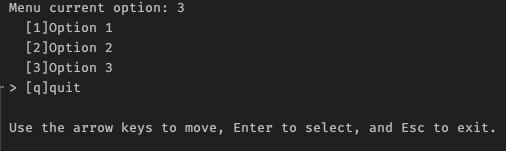
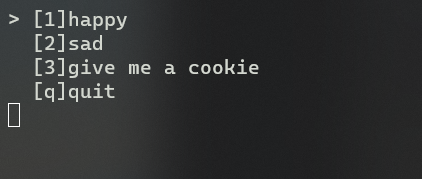
another example:
import os
import dumb_menu

def loopmenu():
    options = ["[1]happy",
            "[2]sad",
            "[3]give me a cookie",
            "[q]quit"]
    index = dumb_menu.get_menu_choice(options,isclean = True)
    # clear screen, cls for windows, clear for linux
    os.system('cls')
    # Python 3.10+ only,old version could use if-else
    match index:
        case 0:
            print(":)")
        case 1:
            print(":(")
        case 2:
            print("🍪ヾ(•ω•`)o")
        case 3:
            exit()
    input('Press ENTER to continue...')

if __name__ == "__main__":
    while True:
        loopmenu()
Get help
Get help ➡️ Github issue
Update log
1.0.8 add "return key string" option , add demo.py As a straightforward example
dumb_menu.get_menu_choice(options,give_key_str = True)
1.0.7 fix "flickering on mac zsh"
1.0.6 forget write log in 1.0.5
1.0.5 fix bug in 1.0.4
1.0.4 support "clean mode"
1.0.3 show selected index also when using hotkey
1.0.2 first useable version
1.0.1 fix bug
1.0.0 first release
how to upload a new version (for me)
en: https://packaging.python.org/tutorials/packaging-projects/
zh: https://python-packaging-zh.readthedocs.io/zh_CN/latest/minimal.html#id2
make sure have twine installed first
- change
setup.py - testing
python3 setup.py develop python3 setup.py sdisttwine upload dist/*
test code :
python3

import dumb_menu
dumb_menu.demo()
1 maintainer

Metadata
1 maintainer
Release files for utils-knime 1.0.0
For a detailed explanation of source distributions (sdists) and built distributions (wheels), please see the package formats documentation.
Source distribution (sdist)
| File | Size | Uploaded | Provenance | |
|---|---|---|---|---|
| utils_knime-1.0.0.tar.gz | 4.7 kB | Without provenance | Details |
Release files / utils_knime-1.0.0.tar.gz
| Download URL | utils_knime-1.0.0.tar.gz |
|---|---|
| Size | 4.7 kB |
| Tags | Source |
|
SHA-256 checksum How to use checksums |
f90b06795bc709b4116066ddfa13e9e11d06bca62a85cd86851b793c90a2e937
|
|
BLAKE2b-256 checksum How to use checksums |
93b8603608c5d403f733b0556044ce367500bf02e9bab1a7a64f44f6f12131b8
|
| Upload date | |
|
Uploaded using Trusted Publishing? What is trusted publishing? |
No |
| Uploaded via |
twine/6.1.0 CPython/3.10.16
|
Security for utils-knime 1.0.0
Provenance
Provenance describes where a file came from. On PyPI, provenance is shared via attestations, which provide a verifiable record of the build or publishing details. View details, limitations and caveats.
No provenance found
None of the files in this release were uploaded with provenance metadata.
A note on package security
PyPI is a repository for distributing packages, not a service for auditing them. While third-party security researchers and our staff do their best to detect and remove malicious packages, PyPI cannot guarantee the quality, security or suitability of any given package.
To learn more about protecting yourself from malicious actors, visit our package security documentation.













