
vCard module






This program can be used for strict validation and parsing of vCards. It currently supports vCard 3.0 (RFC 2426).
Installation
To install or upgrade in a virtualenv:
pip install --upgrade vcard
To use without installing:
nix-shell
See the nixpkgs index for instructions to install the command-line tool or the Python package.
Usage
See vcard --help.
Utilities
format-TEL.bash- Format phone numbers according to national standardssplit.bash- Split a multiple vCards file into individual filessort-lines.bash- Sort vCard property lines according to a custom keyjoin-lines.sh- Join previously split vCard linessplit-lines.sh- Split long vCard lines
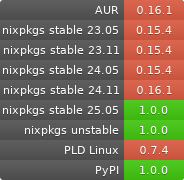
Packaging status
Development
Setup
git clone git@gitlab.com:engmark/vcard.git
Release
- Bump the version in vcard/version.txt
- Commit & push everything
- Create a new merge request
- Wait for the MR to be merged
- Update to latest
master nix-shell --pure --run './clean.bash && ./distribute.bash && ./release.bash'
Requirements:
- Nix
Contributing code
You can contribute either by submitting a merge requests or by email.
Security fixes should only be submitted via email, encrypted with the PGP key F1C5F63013E5DE2FB574D42ACE5EB38344D85DB6.
Email is also appropriate in some other cases:
- If you don't want to create a GitLab account.
- If you want to be anonymous. Make sure to be explicit about this! Contributing anonymously
means the following:
- You transfer copyright to me. Otherwise your contribution would make it impossible for future maintainers to ever change the license - they wouldn't know who to contact to ask for permission.
- The commit message will make it clear that it was contributed anonymously, with an "Authored-by: Anonymous <>" line.
- Email submissions must be in patch format, including a detailed commit message, so that it can be added to the repository without any changes, and without breaking the pipeline.
🚫 Other channels are not supported.
How open is this project?
- GitLab features:
- All features enabled for this repository are publicly available
- Project settings are private for security reasons
- Commit history:
- All commits on all branches are publicly visible
- Issues:
- Publicly visible
- You need to be logged into GitLab to submit an issue or comment
- Questions from non-users interested in the project are welcome
- Expect answers within a few days
- Pipelines:
- The configuration is publicly visible
- Runs are publicly visible
- Logs are publicly visible, and logs should be kept indefinitely.
- Releases:
- Hosted publicly
- Old releases should be available indefinitely, but this is under PyPI's control, not mine
- Work (past, current, and planned) is documented publicly within the project
1 maintainer

Metadata
1 maintainer
Release files for vcard 1.0.0
For a detailed explanation of source distributions (sdists) and built distributions (wheels), please see the package formats documentation.
Built distribution (wheel)
| File | Interpreter | ABI | Platform | Actions Reset |
|---|---|---|---|---|
| vcard-1.0.0-py2.py3-none-any.whl | Python 3, Python 2 | none | any | Details for vcard-1.0.0-py2.py3-none-any.whl |
Release files / vcard-1.0.0-py2.py3-none-any.whl
| Download URL | vcard-1.0.0-py2.py3-none-any.whl |
|---|---|
| Size | 29.4 kB |
| Tags | Python 2 Python 3 |
|
SHA-256 checksum How to use checksums |
17d63d632060d0fc181a8f8a98171b7c1ec071b30764f64c6dc8039aa1b32a7f
|
|
BLAKE2b-256 checksum How to use checksums |
5c662cab5fc52ae01d07d8bb08c4ae55bb66fcb1718708a2afb3c4621f051f22
|
| Upload date | |
|
Uploaded using Trusted Publishing? What is trusted publishing? |
No |
| Uploaded via |
twine/5.0.0 CPython/3.11.9
|
Security for vcard 1.0.0
Provenance
Provenance describes where a file came from. On PyPI, provenance is shared via attestations, which provide a verifiable record of the build or publishing details. View details, limitations and caveats.
No provenance found
None of the files in this release were uploaded with provenance metadata.
A note on package security
PyPI is a repository for distributing packages, not a service for auditing them. While third-party security researchers and our staff do their best to detect and remove malicious packages, PyPI cannot guarantee the quality, security or suitability of any given package.
To learn more about protecting yourself from malicious actors, visit our package security documentation.














