
Flight and hotel search for your terminal, Python, and AI assistants. Runs on your machine, no API keys.




Website · Usage guide · Architecture · Changelog
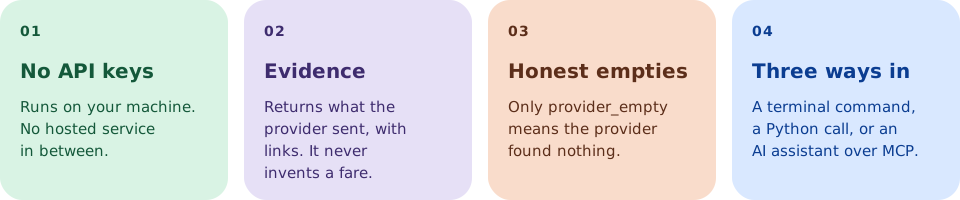
It reads Google Flights, Google Hotels, and Booking.com directly, and Skiplagged when you opt in. It returns prices, itinerary details, and links. It reports what the provider returned and says so when something is unknown; it never invents a fare.
Quick start
Requires Python 3.10+.
pip install viajante

viajante flights JFK-LHR:2026-11-15 --fetch sweep
viajante hotels London 2026-11-15 2026-11-20 --currency GBP --source google
Use future dates. Not sure of a code? viajante airports london.
Prefer not to install? uvx --from viajante viajante airports JFK, or
npx -y -p @viajante/mcp viajante airports JFK (both need uv).
These searches use plain HTTP. Booking.com and --fetch detail need the
browser extra.
Connect an AI assistant
Add this to your assistant's MCP configuration (needs
uv and Python 3.10+):
{
  "mcpServers": {
    "viajante": {
      "command": "npx",
      "args": ["-y", "@viajante/mcp"]
    }
  }
}
Without Node, use "command": "uvx" with
"args": ["--from", "viajante[mcp]", "viajante-mcp"]. That covers Google
Flights and Hotels with no Chromium. The npm entry also includes the browser
extra, which search_explore needs.
Then ask in plain language:
Find a seven-night round trip from BOS to LHR, departing any day in November 2026. Compare the dates.
Hotels in Tokyo, November 12 to 16, two adults, free cancellation, in JPY.
Every tool result (except lookup_airports) carries one envelope: status,
completeness, empty_reason, retry_after, observed_at. Only
empty_reason: provider_empty means the provider found nothing. A client that
only takes a URL can use viajante-mcp --transport streamable-http; it has no
auth, so keep it on loopback (details).
All 22 MCP tools
| Tool | What it does |
|---|---|
search_flights |
One-way, round-trip, or multi-city flights |
search_dates |
Cheapest fare per departure date in a window |
search_flex |
Dates around a target, then flights for the cheapest day |
search_explore |
Destinations from an origin, with a priced shortlist |
search_hotels |
Stays with total-stay prices and cancellation terms |
search_hotel_rooms |
Skiplagged room rates for one named hotel |
get_hotel_details |
A hotel offer from this session, plus an optional room quote |
search_trip |
Flights and hotel together, summed when compatible |
search_split_tickets |
Opt-in separately ticketed itineraries (connections not protected) |
search_hidden_city |
Opt-in Skiplagged hidden-city fares |
recheck_offer |
One fresh search to re-check an earlier offer |
validate_itinerary |
Check a proposed itinerary against search evidence |
compare_awards |
Cents-per-point math for a named award offer |
lookup_transfers |
Points transfer-partner table |
lookup_airports |
Airport and metro codes, offline |
plan_stay_blocks |
Group consecutive nights with the same people |
split_stay_costs |
Split stay totals among who slept there |
verify_answer |
Flag amounts, codes, dates, or links no search returned |
price_history |
Prices this machine recorded for a query (opt-in) |
watch_price |
Re-run a saved search and report the change |
get_runtime_info |
Installed version, offline |
get_guide |
Long operational guide |
Command line
Run viajante <command> --help for options. Add --save FILE to write a JSON report.
| Command | Purpose |
|---|---|
flights |
Specific routes and dates (--nearby-days compares ±N days when N is set; --split-tickets is opt-in) |
dates |
Cheapest departure day across a window of up to 31 days |
flex |
A few days either side of a target date |
explore |
Destinations from an origin airport |
hotels, hotel-rooms |
Google Hotels, Booking.com, or Skiplagged |
trip |
Flights and a hotel stay in one request |
recheck-offer |
Re-check a saved offer against a fresh search |
airports |
Find airport codes |
hidden-city, awards, points |
Skiplagged fares, award value, transfer partners |
history, watch |
Recorded prices and saved re-runs (opt-in) |
feedback |
Open a prefilled GitHub issue (viajante sends nothing itself) |
viajante dates BOS-LHR --from 2026-11-01 --to 2026-11-30 --nights 7
Python
from viajante import get_flights

report = get_flights("JFK-LHR:2026-11-15", fetch="sweep", top=5)

for result in report.queries:
    if result.status == "ok":
        for offer in result.offers:
            print(offer.price, report.currency, offer.airline, offer.duration)
    else:
        print(result.error)
FlightQuery, HotelQuery, and the search_* functions are exported too;
see the Python examples.
Optional browser support
pip install 'viajante[browser]'
playwright install chromium
For uvx, use viajante[mcp,browser] in --from and install Chromium from
that same environment.
Good to know
- Currency. Taken from
--currency, or from a named origin airport's country. Hotels always need one. Viajante never converts between currencies. - Baggage.
--carry-onasks Google to price one carry-on. Checked bags (--bags) are refused, because no transport can verify them.--baggage-bufferonly affects ranking; it is not a quoted fee. - Hotels. Prices are for the whole stay. Free cancellation is required unless you opt out. Google rates 0–5, Booking.com 0–10.
- Recommendation. Flight results may include a short
recommendationblock. It adds to the offer list and never replaces it. - Price level. Flight results may include Google's own price level
(
low,typical, orhigh) from the results page already fetched. It is Google's label for that price against its typical range.--price-historyadds the page's price history. No extra request. - Unknown stays unknown. Missing fields are left out or marked unknown.
Travel sites change their pages, block requests, and update prices at any time. Confirm the final fare, baggage, hotel total, and cancellation terms with the provider before you book.
Contributing
Bug reports and focused pull requests are welcome; see CONTRIBUTING.md.
License
MIT. Independent project, not affiliated with Google, Booking.com, or any airline. Use of those services is subject to their terms: Google, Booking.com.
1 maintainer

Metadata
1 maintainer
Release files for viajante 1.5.2
For a detailed explanation of source distributions (sdists) and built distributions (wheels), please see the package formats documentation.
Source distribution (sdist)
| File | Size | Uploaded | Provenance | |
|---|---|---|---|---|
| viajante-1.5.2.tar.gz | 683.0 kB | Without provenance | Details |
Built distribution (wheel)
| File | Interpreter | ABI | Platform | Reset |
|---|---|---|---|---|
| viajante-1.5.2-py3-none-any.whl | Python 3 | none | any | Details |
Total release size: 1.1 MB
Release files / viajante-1.5.2.tar.gz
| Download URL | viajante-1.5.2.tar.gz |
|---|---|
| Size | 683.0 kB |
| Tags | Source |
|
SHA-256 checksum How to use checksums |
e84fb543df9a7174ff703717490168765208babcc0df94bde7249aa77cce4254
|
|
BLAKE2b-256 checksum How to use checksums |
b4721e9f1883dcd0af3b4087def1ffbdae0749a7079845f68b3354675702ef8a
|
| Upload date | |
|
Uploaded using Trusted Publishing? What is trusted publishing? |
Yes |
| Uploaded via |
uv/0.13.1 {"installer":{"name":"uv","version":"0.13.1","subcommand":["publish"]},"python":null,"implementation":{"name":null,"version":null},"distro":{"name":"Ubuntu","version":"24.04","id":"noble","libc":null},"system":{"name":null,"release":null},"cpu":null,"openssl_version":null,"setuptools_version":null,"rustc_version":null,"ci":true}
|
Release files / viajante-1.5.2-py3-none-any.whl
| Download URL | viajante-1.5.2-py3-none-any.whl |
|---|---|
| Size | 438.3 kB |
| Tags | Python 3 |
|
SHA-256 checksum How to use checksums |
58ac942d8a445f798acdec701786d46594e91e86d2b8c80851744fffe115e0b8
|
|
BLAKE2b-256 checksum How to use checksums |
d90083735cf4dbe52f00e0be16fc0e3bf2bdff5ce1651b08bca352d443347d5b
|
| Upload date | |
|
Uploaded using Trusted Publishing? What is trusted publishing? |
Yes |
| Uploaded via |
uv/0.13.1 {"installer":{"name":"uv","version":"0.13.1","subcommand":["publish"]},"python":null,"implementation":{"name":null,"version":null},"distro":{"name":"Ubuntu","version":"24.04","id":"noble","libc":null},"system":{"name":null,"release":null},"cpu":null,"openssl_version":null,"setuptools_version":null,"rustc_version":null,"ci":true}
|
Security for viajante 1.5.2
Provenance
Provenance describes where a file came from. On PyPI, provenance is shared via attestations, which provide a verifiable record of the build or publishing details. View details, limitations and caveats.
No provenance found
None of the files in this release were uploaded with provenance metadata.
A note on package security
PyPI is a repository for distributing packages, not a service for auditing them. While third-party security researchers and our staff do their best to detect and remove malicious packages, PyPI cannot guarantee the quality, security or suitability of any given package.
To learn more about protecting yourself from malicious actors, visit our package security documentation.














