




ViennaPS is a header-only C++ library for topography simulation in microelectronic fabrication processes. It models the evolution of 2D and 3D surfaces during etching, deposition, and related steps, combining advanced level-set methods for surface evolution with Monte Carlo ray tracing for flux calculation. This allows accurate, feature-scale simulation of complex fabrication geometries.
ViennaPS supports both physical process models and fast emulation approaches, enabling flexible and efficient development of semiconductor processes. It can be easily integrated into existing C++ projects and also provides Python bindings for use in Python-based workflows. The library is actively developed and continuously improved to address the needs of process and topography simulation in microelectronics.
Quick Start
To install ViennaPS for Python, simply run:
pip install ViennaPS
To use ViennaPS in C++ follow the CMake instructions below. A ready-to-use CMake template is also available for a quick start: ViennaPS CMake Template.
For full documentation, visit ViennaPS Documentation.
Releases
Releases are tagged on the master branch and available in the releases section.
ViennaPS is also available on the Python Package Index (PyPI) for most platforms.
Building
Supported Operating Systems
-
Linux (g++ / clang)
-
macOS (clang)
-
Windows (MSVC)
System Requirements
- C++20 Compiler with OpenMP support
ViennaTools Dependencies (installed automatically)
ViennaPS is part of the ViennaTools ecosystem and depends on several lightweight, header-only ViennaTools libraries. During configuration, CMake will fetch them automatically as part of the ViennaPS build. No separate installation step is required for these dependencies:
External Dependencies
The following external dependencies are required to build ViennaPS. On most systems, installing them via a package manager (e.g. apt, brew, or vcpkg) is the fastest option:
CMake automatically checks for these dependencies during configuration. If they are not found, they can be built from source as part of the build.
To prefer a specific local installation, point CMake to it via VIENNAPS_LOOKUP_DIRS (a semicolon-separated list of prefixes):
cmake -B build -DVIENNAPS_LOOKUP_DIRS="/path/to/vtk;/path/to/embree"
Alternatively (or additionally), you can use CMAKE_PREFIX_PATH if that better matches your local setup.
Installing
ViennaPS is a header-only library, so no formal installation is required. To use ViennaPS in your C++ project, refer to the Integration in CMake projects section below.
Building the Python package locally
The Python package can be built and installed using the pip command:
git clone https://github.com/ViennaTools/ViennaPS.git
cd ViennaPS

pip install .
To build the Python package with GPU support, use the install script in python/scripts folder. On Linux, e.g., run:
python3 -m venv .venv # create virtual environment (optional, but recommended)
source .venv/bin/activate # activate virtual environment
python python/scripts/install_ViennaPS.py
A CUDA toolkit and driver compatible with your GPU must be installed on your system to use the GPU functionality.
Some features of the ViennaPS Python module depend on the ViennaLS Python module. The ViennaLS is installed automatically as a dependency. Note: A locally built ViennaPS Python module is typically not compatible with the ViennaLS package from PyPI. For details and troubleshooting, see this guide.
Using the Python package
The ViennaPS Python package can be used by importing it in your Python scripts:
import viennaps as vps
By default, ViennaPS operates in two dimensions. You can set the dimension using:
vps.setDimension(2)  # For 2D simulations
vps.setDimension(3)  # For 3D simulations
For more details and examples, refer to the official documentation.
Integration in CMake projects
We recommend using CPM.cmake to consume this library.
-
Installation with CPM
CPMAddPackage("gh:viennatools/viennaps@4.2.2")
-
With a local installation
In case you have ViennaPS installed in a custom directory, make sure to properly specify the
CMAKE_PREFIX_PATH.list(APPEND CMAKE_PREFIX_PATH "/your/local/installation") find_package(ViennaPS) target_link_libraries(${PROJECT_NAME} PUBLIC ViennaTools::ViennaPS)
Note: If you installed ViennaPS to a custom location, GPU kernels can not be built, since the CMake configuration does not support this setup. If you need GPU support, please use CPM.cmake.
Shared Library
In order to save build time during development, dynamically linked shared libraries can be used if ViennaPS was built with them. This is done by precompiling the most common template specialisations. In order to use shared libraries, use
cmake -B build -DVIENNALS_PRECOMPILE_HEADERS=ON
If ViennaPS was built with shared libraries and you use ViennaPS in your project (see above), CMake will automatically link them to your project.
GPU Acceleration (Experimental)
As of version 3.4.0, ViennaPS supports GPU acceleration for the ray tracing part of the library. This feature is still experimental. Details on how to enable GPU functionality can be found in the documentation.
Basic Examples
Building
The examples can be built using CMake:
git clone https://github.com/ViennaTools/ViennaPS.git
cd ViennaPS

cmake -B build -DVIENNAPS_BUILD_EXAMPLES=ON
cmake --build build
The examples can then be executed in their respective build folders with the config files, e.g.:
cd build/examples/exampleName
./exampleName.bat config.txt # (Windows)
./exampleName config.txt # (Other)
Individual examples can also be build by calling make in their respective build folder. An equivalent Python script, using the ViennaPS Python bindings, is also given for each example.
Trench Deposition
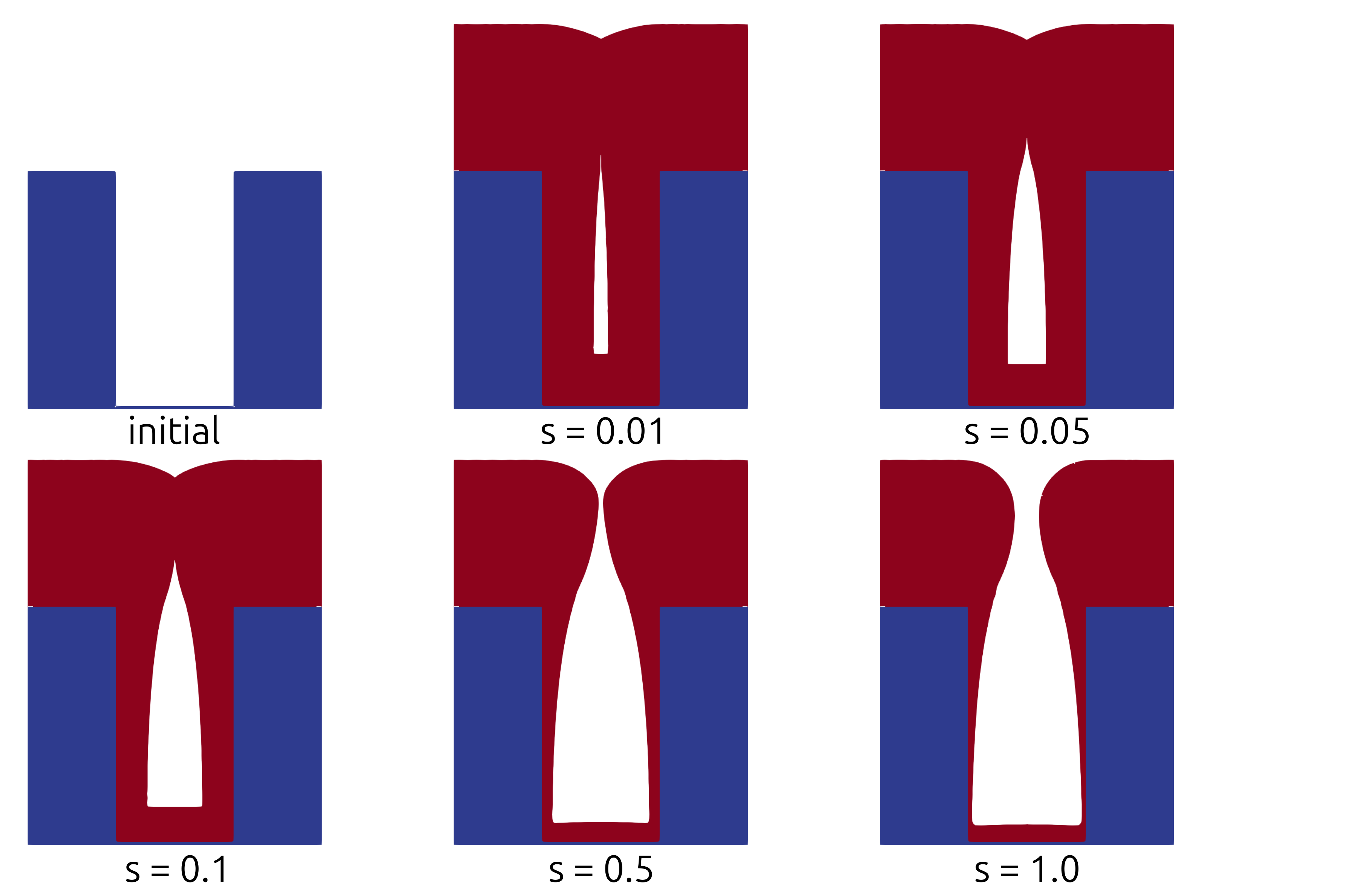
This example focuses on a particle deposition process within a trench geometry. By default, the simulation presents a 2D representation of the trench. Nevertheless, users have the flexibility to conduct 3D simulations by adjusting the value of the constant D in trenchDeposition.cpp to 3. Customization of process and geometry parameters is achieved through the config.txt file. The accompanying image illustrates instances of the trench deposition process, showcasing variations in the particle sticking probability s.
SF6/O2 Hole Etching
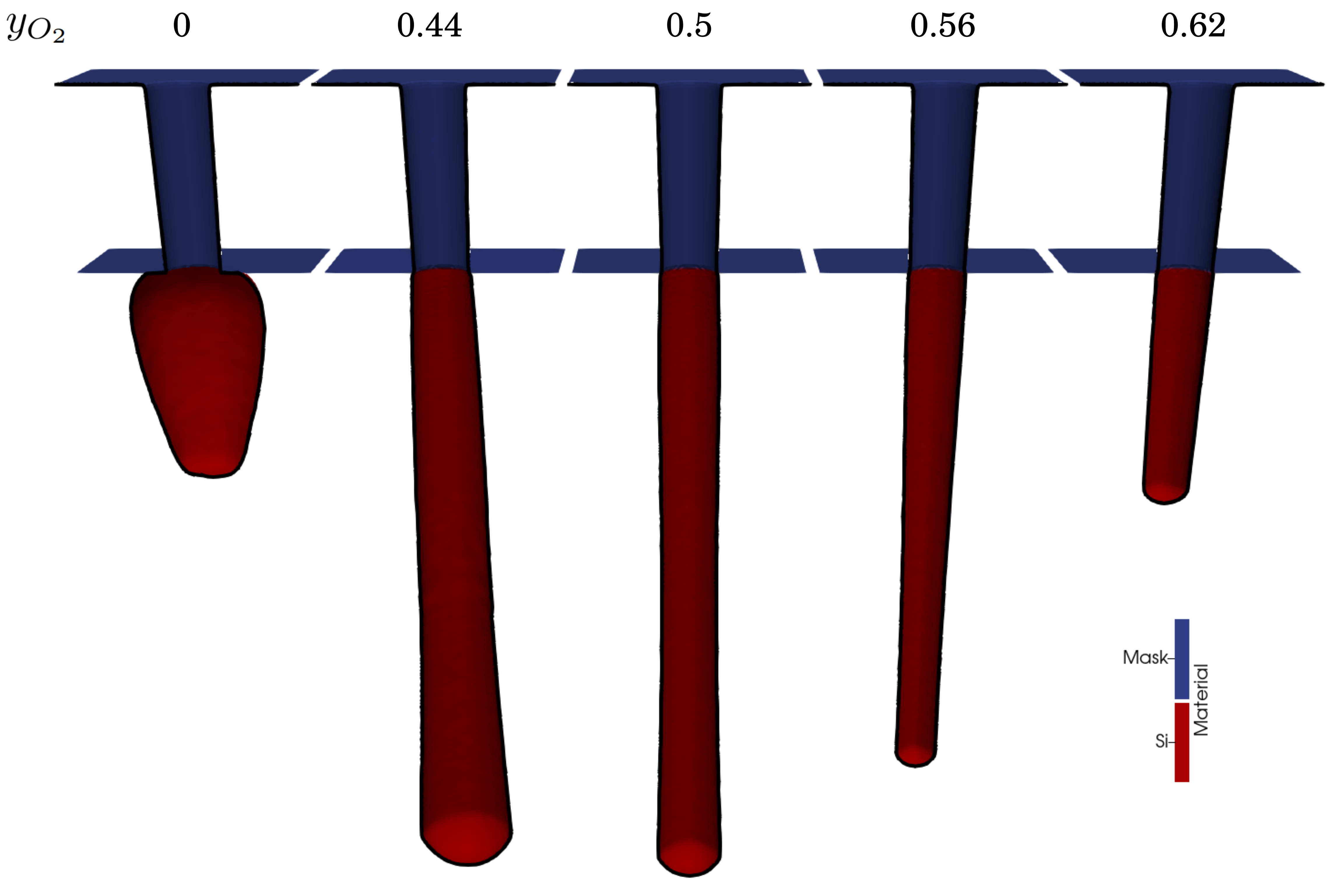
This example demonstrates a hole etching process with a SF6/O2 plasma etching chemistry with ion bombardment. The process is controlled by various parameters, including geometry and plasma conditions, which can be adjusted in the config.txt file.
The image presents the results of different flux configurations, as tested in testFluxes.py. Each structure represents a variation in flux conditions, leading to differences in hole shape, depth, and profile characteristics. The variations highlight the influence of ion and neutral fluxes on the etching process.
Bosch Process
This example compares different approaches to simulating the Bosch process, a deep reactive ion etching (DRIE) technique. The three structures illustrate how different modeling methods influence the predicted etch profile.
- Left: The structure generated through process emulation, which captures the characteristic scalloping effect of the Bosch process in a simplified yet effective way.
- Middle: The result of a simple simulation model, which approximates the etching dynamics but may lack finer physical details.
- Right: The outcome of a more physical simulation model, leading to a more realistic etch profile.
This comparison highlights the trade-offs between computational efficiency and physical accuracy in DRIE simulations.

Wet Etching
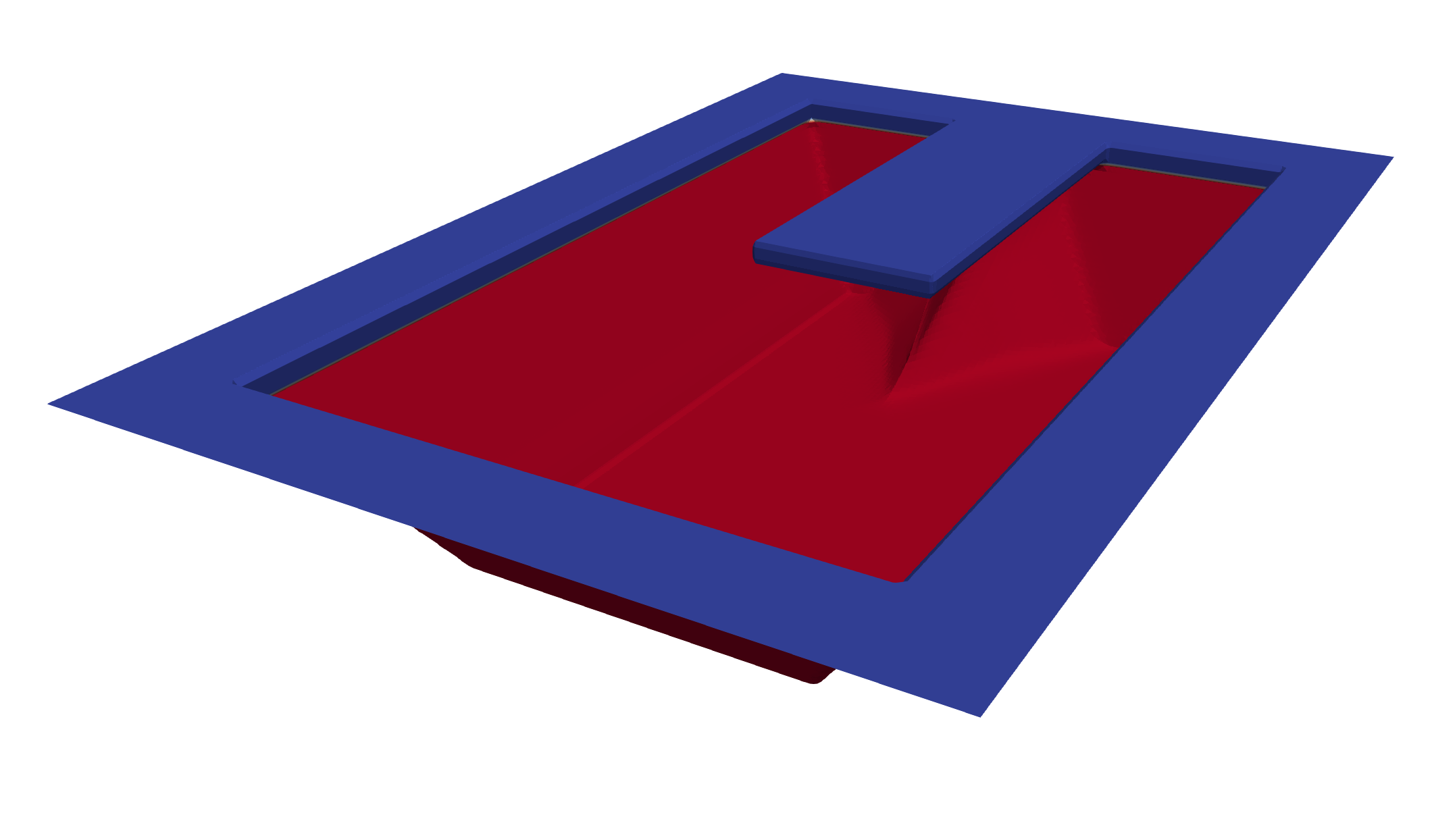
This example demonstrates the wet etching process, specifically focusing on the cantilever structure. The simulation captures the etching dynamics and the influence of crystallographic directions on the etch profile.
Selective Epitaxy
This example demonstrates the selective epitaxy process, focusing on the growth of SiGe on a Si substrate. Similar to wet etching, the process is influenced by crystallographic directions, which can be adjusted in the config.txt file. The simulation captures the growth dynamics and the resulting SiGe structure.

Redeposition During Selective Etching
This example demonstrates capturing etching byproducts and the subsequent redeposition during a selective etching process in a Si3N4/SiO2 stack. The etching byproducts are captured in a cell set description of the etching plasma. To model the dynamics of these etching byproducts, a convection-diffusion equation is solved on the cell set using finite differences. The redeposition is then captured by adding up the byproducts in every step and using this information to generate a velocity field on the etched surface.

GDS Mask Import Example
This example tests the full GDS mask import, blurring, rotation, scaling, and flipping as well as the level set conversion pipeline. Shown below is the result after applying proximity correction and extrusion on a simple test.

Tests
ViennaPS uses CTest to run its tests. In order to check whether ViennaPS runs without issues on your system, you can run:
git clone https://github.com/ViennaTools/ViennaPS.git
cd ViennaPS

cmake -B build -DVIENNAPS_BUILD_TESTS=ON
cmake --build build
ctest -E "Benchmark|Performance" --test-dir build
Contributing
If you want to contribute to ViennaPS, make sure to follow the LLVM Coding guidelines.
Make sure to format all files before creating a pull request:
cmake -B build
cmake --build build --target format
Authors
Current contributors: Tobias Reiter, Lado Filipovic, Roman Kostal, Noah Karnel
Contact us via: viennatools@iue.tuwien.ac.at
ViennaPS was developed under the aegis of the 'Institute for Microelectronics' at the 'TU Wien'. http://www.iue.tuwien.ac.at/
License
ViennaPS is licensed under the MIT License.
Some third-party libraries used by ViennaPS are under their own permissive licenses (MIT, BSD, Apache-2.0).
See THIRD_PARTY_LICENSES.md for details.
1 maintainer

Metadata
1 maintainer
Release files for ViennaPS 4.2.2
For a detailed explanation of source distributions (sdists) and built distributions (wheels), please see the package formats documentation.
Built distributions (wheels)
Total release size: 775.3 MB
Release files / viennaps-4.2.2-cp312-cp312-win_amd64.whl
| Download URL | viennaps-4.2.2-cp312-cp312-win_amd64.whl |
|---|---|
| Size | 39.9 MB |
| Tags | CPython 3.12 Windows x86-64 |
|
SHA-256 checksum How to use checksums |
b9494c919142bea408526a418e3b72469e5898b506302d1b78a13d945f2549b5
|
|
BLAKE2b-256 checksum How to use checksums |
000187923831591178eeb092519ea984378f8a295357ac25b59e97228bfad768
|
| Upload date | |
|
Uploaded using Trusted Publishing? What is trusted publishing? |
Yes |
| Uploaded via |
twine/6.1.0 CPython/3.13.7
|
Provenance
Provenance describes where a file came from. On PyPI, provenance is shared via attestations, which provide a verifiable record of the build or publishing details. View details, limitations and caveats.


PyPI Publish Attestation
PyPI verified that this artifact, at this checksum, originated from the publisher listed below.
Signed by GitHub Actions, verified by PyPI on Feb 23, 2026.
Transparency logRelease files / viennaps-4.2.2-cp312-cp312-musllinux_1_1_x86_64.whl
| Download URL | viennaps-4.2.2-cp312-cp312-musllinux_1_1_x86_64.whl |
|---|---|
| Size | 88.7 MB |
| Tags | CPython 3.12 Linux musl 1.1+ x86-64 |
|
SHA-256 checksum How to use checksums |
552f6fa010eae3cb003fbe1ef373c612217322a14fc5a35a854e31d4128f34f2
|
|
BLAKE2b-256 checksum How to use checksums |
65d11547f875cd4d04ba29eef153a14e93b0513c5ea23bcb5e92a6aaec259883
|
| Upload date | |
|
Uploaded using Trusted Publishing? What is trusted publishing? |
Yes |
| Uploaded via |
twine/6.1.0 CPython/3.13.7
|
Provenance
Provenance describes where a file came from. On PyPI, provenance is shared via attestations, which provide a verifiable record of the build or publishing details. View details, limitations and caveats.
PyPI Publish Attestation
PyPI verified that this artifact, at this checksum, originated from the publisher listed below.
Signed by GitHub Actions, verified by PyPI on Feb 23, 2026.
Transparency logRelease files / viennaps-4.2.2-cp312-cp312-manylinux_2_17_x86_64.manylinux2014_x86_64.whl
| Download URL | viennaps-4.2.2-cp312-cp312-manylinux_2_17_x86_64.manylinux2014_x86_64.whl |
|---|---|
| Size | 90.2 MB |
| Tags | CPython 3.12 Linux glibc 2.17+ x86-64 |
|
SHA-256 checksum How to use checksums |
c4d6ab3dccb405fbd48e137f5b2e9aa436b3fb5d21a7c089181a6c9dc05ba80f
|
|
BLAKE2b-256 checksum How to use checksums |
5035305ec5d202c57a6cc1e695cb08ac075669e1b2a3d32b0a3785ebe374ca09
|
| Upload date | |
|
Uploaded using Trusted Publishing? What is trusted publishing? |
Yes |
| Uploaded via |
twine/6.1.0 CPython/3.13.7
|
Provenance
Provenance describes where a file came from. On PyPI, provenance is shared via attestations, which provide a verifiable record of the build or publishing details. View details, limitations and caveats.
PyPI Publish Attestation
PyPI verified that this artifact, at this checksum, originated from the publisher listed below.
Signed by GitHub Actions, verified by PyPI on Feb 23, 2026.
Transparency logRelease files / viennaps-4.2.2-cp312-cp312-macosx_11_0_arm64.whl
| Download URL | viennaps-4.2.2-cp312-cp312-macosx_11_0_arm64.whl |
|---|---|
| Size | 59.5 MB |
| Tags | CPython 3.12 macOS 11.0+ ARM64 |
|
SHA-256 checksum How to use checksums |
9e95c10239ceec64aae80416b6802184ca15b1e51dc9a6a5d0de143416f4fa1f
|
|
BLAKE2b-256 checksum How to use checksums |
da6e6fe4cc0b678ee0f214809e8b8a619692db368253ab94ab328f068246d7a9
|
| Upload date | |
|
Uploaded using Trusted Publishing? What is trusted publishing? |
Yes |
| Uploaded via |
twine/6.1.0 CPython/3.13.7
|
Provenance
Provenance describes where a file came from. On PyPI, provenance is shared via attestations, which provide a verifiable record of the build or publishing details. View details, limitations and caveats.
PyPI Publish Attestation
PyPI verified that this artifact, at this checksum, originated from the publisher listed below.
Signed by GitHub Actions, verified by PyPI on Feb 23, 2026.
Transparency logRelease files / viennaps-4.2.2-cp311-cp311-win_amd64.whl
| Download URL | viennaps-4.2.2-cp311-cp311-win_amd64.whl |
|---|---|
| Size | 39.9 MB |
| Tags | CPython 3.11 Windows x86-64 |
|
SHA-256 checksum How to use checksums |
74242def6530380997ba6974dbb9ae846137853e433f0bd0244de7eab384d511
|
|
BLAKE2b-256 checksum How to use checksums |
43909dbcd8e767f7e247046159cbb648585f3180a519b2e41ec435c8a59149f1
|
| Upload date | |
|
Uploaded using Trusted Publishing? What is trusted publishing? |
Yes |
| Uploaded via |
twine/6.1.0 CPython/3.13.7
|
Provenance
Provenance describes where a file came from. On PyPI, provenance is shared via attestations, which provide a verifiable record of the build or publishing details. View details, limitations and caveats.
PyPI Publish Attestation
PyPI verified that this artifact, at this checksum, originated from the publisher listed below.
Signed by GitHub Actions, verified by PyPI on Feb 23, 2026.
Transparency logRelease files / viennaps-4.2.2-cp311-cp311-musllinux_1_1_x86_64.whl
| Download URL | viennaps-4.2.2-cp311-cp311-musllinux_1_1_x86_64.whl |
|---|---|
| Size | 88.7 MB |
| Tags | CPython 3.11 Linux musl 1.1+ x86-64 |
|
SHA-256 checksum How to use checksums |
22791b3a7d216940b8673a153d0f98d3fc9b03d08141da06734313baf437fdc7
|
|
BLAKE2b-256 checksum How to use checksums |
ffeb29f977e154f7af4efde4c8cf3c8c7248979d1aaa0b9ecd6f0906003f4704
|
| Upload date | |
|
Uploaded using Trusted Publishing? What is trusted publishing? |
Yes |
| Uploaded via |
twine/6.1.0 CPython/3.13.7
|
Provenance
Provenance describes where a file came from. On PyPI, provenance is shared via attestations, which provide a verifiable record of the build or publishing details. View details, limitations and caveats.
PyPI Publish Attestation
PyPI verified that this artifact, at this checksum, originated from the publisher listed below.
Signed by GitHub Actions, verified by PyPI on Feb 23, 2026.
Transparency logRelease files / viennaps-4.2.2-cp311-cp311-manylinux_2_17_x86_64.manylinux2014_x86_64.whl
| Download URL | viennaps-4.2.2-cp311-cp311-manylinux_2_17_x86_64.manylinux2014_x86_64.whl |
|---|---|
| Size | 90.2 MB |
| Tags | CPython 3.11 Linux glibc 2.17+ x86-64 |
|
SHA-256 checksum How to use checksums |
2360d1383ae17308a002089ab6a196a007ef890f3552237fd8f50df4e0fc4720
|
|
BLAKE2b-256 checksum How to use checksums |
36784a2972363961218b615824cd9ae35d43bb97a66e6e3572317f17d0886544
|
| Upload date | |
|
Uploaded using Trusted Publishing? What is trusted publishing? |
Yes |
| Uploaded via |
twine/6.1.0 CPython/3.13.7
|
Provenance
Provenance describes where a file came from. On PyPI, provenance is shared via attestations, which provide a verifiable record of the build or publishing details. View details, limitations and caveats.
PyPI Publish Attestation
PyPI verified that this artifact, at this checksum, originated from the publisher listed below.
Signed by GitHub Actions, verified by PyPI on Feb 23, 2026.
Transparency logRelease files / viennaps-4.2.2-cp311-cp311-macosx_11_0_arm64.whl
| Download URL | viennaps-4.2.2-cp311-cp311-macosx_11_0_arm64.whl |
|---|---|
| Size | 59.5 MB |
| Tags | CPython 3.11 macOS 11.0+ ARM64 |
|
SHA-256 checksum How to use checksums |
79b100a032e97ade706ffb4d7a550700c723dfb51b2935825537e1a9c33df9cf
|
|
BLAKE2b-256 checksum How to use checksums |
867fc51682c90704eb0c8845a325aa0a78e9798abfa6526d195d6cf945c81726
|
| Upload date | |
|
Uploaded using Trusted Publishing? What is trusted publishing? |
Yes |
| Uploaded via |
twine/6.1.0 CPython/3.13.7
|
Provenance
Provenance describes where a file came from. On PyPI, provenance is shared via attestations, which provide a verifiable record of the build or publishing details. View details, limitations and caveats.
PyPI Publish Attestation
PyPI verified that this artifact, at this checksum, originated from the publisher listed below.
Signed by GitHub Actions, verified by PyPI on Feb 23, 2026.
Transparency logRelease files / viennaps-4.2.2-cp310-cp310-win_amd64.whl
| Download URL | viennaps-4.2.2-cp310-cp310-win_amd64.whl |
|---|---|
| Size | 39.9 MB |
| Tags | CPython 3.10 Windows x86-64 |
|
SHA-256 checksum How to use checksums |
13cc064fe9509c0df25cdfc490e23588cd0d6b05889af242d693450c1ae6641d
|
|
BLAKE2b-256 checksum How to use checksums |
9a88ad64a4833617789b3665546462843fb18b106552972cc452e04d7491498b
|
| Upload date | |
|
Uploaded using Trusted Publishing? What is trusted publishing? |
Yes |
| Uploaded via |
twine/6.1.0 CPython/3.13.7
|
Provenance
Provenance describes where a file came from. On PyPI, provenance is shared via attestations, which provide a verifiable record of the build or publishing details. View details, limitations and caveats.
PyPI Publish Attestation
PyPI verified that this artifact, at this checksum, originated from the publisher listed below.
Signed by GitHub Actions, verified by PyPI on Feb 23, 2026.
Transparency logRelease files / viennaps-4.2.2-cp310-cp310-musllinux_1_1_x86_64.whl
| Download URL | viennaps-4.2.2-cp310-cp310-musllinux_1_1_x86_64.whl |
|---|---|
| Size | 88.7 MB |
| Tags | CPython 3.10 Linux musl 1.1+ x86-64 |
|
SHA-256 checksum How to use checksums |
4cab9c666deb005fbb69aefa8af03c5644e94697a70101913797aa73e924762f
|
|
BLAKE2b-256 checksum How to use checksums |
e2ae44aff11ef2a4b55b326c9e3cda08fc7d655731755b69eed1da2e42eaf592
|
| Upload date | |
|
Uploaded using Trusted Publishing? What is trusted publishing? |
Yes |
| Uploaded via |
twine/6.1.0 CPython/3.13.7
|
Provenance
Provenance describes where a file came from. On PyPI, provenance is shared via attestations, which provide a verifiable record of the build or publishing details. View details, limitations and caveats.
PyPI Publish Attestation
PyPI verified that this artifact, at this checksum, originated from the publisher listed below.
Signed by GitHub Actions, verified by PyPI on Feb 23, 2026.
Transparency logRelease files / viennaps-4.2.2-cp310-cp310-manylinux_2_17_x86_64.manylinux2014_x86_64.whl
| Download URL | viennaps-4.2.2-cp310-cp310-manylinux_2_17_x86_64.manylinux2014_x86_64.whl |
|---|---|
| Size | 90.2 MB |
| Tags | CPython 3.10 Linux glibc 2.17+ x86-64 |
|
SHA-256 checksum How to use checksums |
60d830b9a212974835860b763d08d4184646da2a5dda4400874a0241f8160669
|
|
BLAKE2b-256 checksum How to use checksums |
562fb7969f8e69af3dcf25815d18c3a78d02972c871bede44196cabc076f1e9d
|
| Upload date | |
|
Uploaded using Trusted Publishing? What is trusted publishing? |
Yes |
| Uploaded via |
twine/6.1.0 CPython/3.13.7
|
Provenance
Provenance describes where a file came from. On PyPI, provenance is shared via attestations, which provide a verifiable record of the build or publishing details. View details, limitations and caveats.
PyPI Publish Attestation
PyPI verified that this artifact, at this checksum, originated from the publisher listed below.
Signed by GitHub Actions, verified by PyPI on Feb 23, 2026.
Transparency logSecurity for ViennaPS 4.2.2
Provenance
Provenance describes where a file came from. On PyPI, provenance is shared via attestations, which provide a verifiable record of the build or publishing details. View details, limitations and caveats.
Full provenance
All 11 files in this release have been uploaded with provenance metadata.
Attestation for viennaps-4.2.2-cp312-cp312-win_amd64.whl
PyPI Publish Attestation
PyPI verified that this artifact, at this checksum, originated from the publisher listed below.
Signed by GitHub Actions, verified by PyPI on Feb 23, 2026.
Transparency logA note on package security
PyPI is a repository for distributing packages, not a service for auditing them. While third-party security researchers and our staff do their best to detect and remove malicious packages, PyPI cannot guarantee the quality, security or suitability of any given package.
To learn more about protecting yourself from malicious actors, visit our package security documentation.














